
1. تعارف
Welcome to the Hot Wheels Velocity X PC game. This manual provides essential information to help you install, play, and troubleshoot the game. Prepare to navigate Monument City, engage in high-speed races, and complete challenging missions.

Image 1: The official cover art for Hot Wheels Velocity X, featuring a green racing car against a backdrop of a futuristic city skyline.
2. سسٽم گهرجون
Before installing, ensure your computer meets the minimum system requirements for optimal performance.
- آپريٽنگ سسٽم: Windows 95, Windows 98, Windows Me (Later Windows versions may require compatibility mode).
- پروسيسر: Pentium II 300 MHz or equivalent.
- رام: 64 ايم بي
- هارڊ ڊرائيو خلا: 500 MB free.
- وڊيو ڪارڊ: 8 MB DirectX compatible 3D accelerator card.
- سائونڊ ڪارڊ: DirectX مطابقت رکندڙ سائونڊ ڪارڊ.
- سي ڊي روم ڊرائيو: 8x speed.
- ان پٽ: Keyboard, Mouse.
3. تنصيب
Follow these steps to install Hot Wheels Velocity X on your PC:
- Insert the Hot Wheels Velocity X game CD into your computer's CD-ROM drive.
- If the installer does not launch automatically, navigate to "My Computer," right-click on your CD-ROM drive icon, and select "Open." Then, locate and double-click "Setup.exe" or "Install.exe."
- Follow the on-screen prompts to complete the installation process. This typically involves accepting the license agreement, choosing an installation directory, and selecting components.
- Once installation is complete, you may be prompted to restart your computer. It is recommended to do so.
- A shortcut to the game will be placed on your desktop or in your Start Menu.
4. راند هلائڻ
4.1 راند شروع ڪرڻ
Double-click the Hot Wheels Velocity X shortcut on your desktop or select it from the Start Menu to launch the game.
4.2 مين مينيو
From the main menu, you can access various game options:
- نئين راند: هڪ نئون سي شروع ڪريوampنشاني
- راند لوڊ ڪريو: اڳ ۾ محفوظ ڪيل راند جاري رکو.
- اختيارن: Adjust graphics, sound, and control settings.
- ملٽي پليئر: Engage in local multiplayer modes.
- نڪرڻ: راند کي ڇڏي ڏيو.
4.3 راند جا طريقا
Hot Wheels Velocity X offers several modes of play:
- ڪهاڻي موڊ: Embark on 30 missions across six distinct levels in Monument City to defeat a criminal gang.
- ريس موڊ: Compete in various races against AI opponents.
- جنگ جو طريقو: Engage in vehicular combat using power-ups.
- Stunt Challenge: Perform daring stunts and earn points.
- ملٽي پليئر: Challenge a friend in head-to-head racing, battle mode, or stunt challenges.

Image 2: A dynamic in-game screenshot showing a yellow Hot Wheels car defying gravity on a looped track, highlighting the game's stunt capabilities.
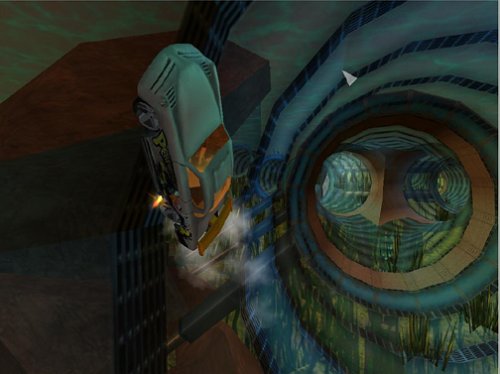
Image 3: An in-game view of a white Hot Wheels car navigating a vibrant, patterned tunnel, showcasing the diverse track designs.
4.4 ڪنٽرول
Default keyboard controls are as follows. These can be customized in the Options menu.
- تيز ڪريو: مٿي تي ڪلڪ ڪريو
- Brake/Reverse: ھيٺ واري تير واري بٽڻ
- Steer Left: کاٻي تير جي چاٻي
- Steer Right: ساڄي تير جي چاٻي
- Use Power-up: اسپيس بار
- هٿ بريڪ: کاٻي شفٽ ڪي
- Look Back: سي ڪي
- Pause Game: Esc چيڪ

Image 4: An action shot from the game featuring a white Hot Wheels car with custom decals, racing on an elevated track against a vibrant sunset.

Image 5: A high-resolution gameplay image showing a Hot Wheels car executing a wall ride on a complex track structure, with the city visible below.
4.5 Saving and Loading
The game typically features an auto-save function at key points. You can also manually save your progress through the in-game pause menu. To load a game, select "Load Game" from the main menu and choose your desired save file.
5. سار سنڀال
پنهنجي راند جي ڊگهي عمر ۽ بهترين ڪارڪردگي کي يقيني بڻائڻ لاءِ، هيٺ ڏنل سار سنڀال جي صلاحن تي غور ڪريو:
- ڊسڪ جي سنڀال: Keep the game CD clean and free of scratches. Store it in its original case when not in use.
- سسٽم تازه ڪاريون: Ensure your operating system and graphics drivers are up to date. This can improve game compatibility and performance.
- ڊسڪ اسپيس: Periodically check that you have sufficient free hard drive space for game saves and temporary files.
- اينٽي وائرس سافٽ ويئر: Keep your antivirus software updated and perform regular scans to prevent malware interference.
6. مسئلا حل ڪرڻ
If you encounter issues while playing Hot Wheels Velocity X, refer to the following common solutions:
- Game Not Starting:
- پڪ ڪريو ته توهان جو سسٽم گهٽ ۾ گهٽ گهرجن کي پورو ڪري ٿو.
- Ensure the game CD is clean and properly inserted.
- Try running the game in compatibility mode for Windows 95/98/Me. Right-click the game shortcut, select "Properties," then "Compatibility."
- پنھنجي گرافڪس ڪارڊ ڊرائيورز کي اپڊيٽ ڪريو.
- Performance Issues (Lag, Low FPS):
- پس منظر ۾ هلندڙ ٻيون ايپليڪيشنون بند ڪريو.
- Lower the game's graphical settings in the Options menu.
- Ensure your graphics drivers are updated.
- آواز جا مسئلا:
- Check your computer's volume settings and in-game sound options.
- Ensure your sound card drivers are up to date.
- Verify your sound card is DirectX compatible.
- ڪنٽرول جواب نه ڏيڻ:
- Ensure your keyboard and mouse are properly connected.
- Check the in-game control settings for any reconfigurations.
- Restart the game and your computer.
وڌيڪ مدد لاءِ، مھرباني ڪري سپورٽ سيڪشن جو حوالو ڏيو.
7. وضاحتون
| خاصيت | تفصيل |
|---|---|
| عنوان | Hot Wheels Velocity X - PC |
| برانڊ | THQ |
| ماڊل | رفتار X |
| پليٽ فارم | PC (Windows 95, Windows 98, Windows Me) |
| ڇڏڻ جي تاريخ | آڪٽوبر 21، 2002 |
| ٺاهيندڙ | THQ |
| شيءِ جو وزن | 4.8 اونس |
| پيداوار جي ماپ | 7.76 x 5.24 x 1.26 انچ |
| يو پي سي | 752919490976 |
| ASIN | B00006C7EP |
| ESRB ريٽنگ | هرڪو |
8. وارنٽي ڄاڻ
This product is subject to the standard warranty terms provided by the manufacturer, THQ, at the time of purchase. Please refer to the documentation included with your game disc or visit the official THQ website (if available) for detailed warranty information, including coverage period and conditions. Keep your proof of purchase for any warranty claims.
9. سپورٽ
For technical support or further inquiries regarding Hot Wheels Velocity X, please consider the following resources:
- ٺاهيندڙ Webسائيٽ: Visit the official THQ website for potential FAQs, patches, or contact information. (Note: THQ has undergone significant changes since the game's release; current support may be limited).
- آن لائن فورم: Community forums dedicated to classic PC games or Hot Wheels games may offer solutions from other players.
- پرچون ڪندڙ سپورٽ: If purchased recently, your retailer may offer limited support or return options.