
SmallRig RF20C
SmallRig RF20C RGB Portable LED Photo Torch User Manual
Model: RF20C (5335)
Бренд: SmallRig
1. Введение
The SmallRig RF20C RGB Portable LED Photo Torch is a versatile and powerful lighting tool designed for photographers, videographers, and content creators. It features 5-color LED beads, adjustable beam angle, and supports creative lighting effects with included gobos. This manual provides essential information for the safe and effective use of your device.
2. Информация по технике безопасности
- Не подвергайте устройство воздействию воды или чрезмерной влажности.
- Избегайте прямого попадания светодиодного света в глаза.
- Не разбирайте и не модифицируйте устройство. Ремонт должен производиться только уполномоченным персоналом.
- Хранить в недоступном для детей месте.
- Ensure proper ventilation during extended use, as the device may become warm.
- Используйте только указанный зарядный кабель и адаптер питания.
3. Содержимое упаковки
Проверьте наличие всех предметов в посылке:
- RF20C Portable Focusable LED Video Light x 1
- Gobos x 20
- Silicone Gobo Holder x 1
- Сумка для хранения x 1
- Руководство пользователя (1 шт.)
- Зарядный кабель х 1
4. Настройка
4.1 Первоначальная зарядка
Before first use, fully charge the RF20C. Connect the provided USB-C charging cable to the device's charging port and to a compatible USB power adapter (PD 36W recommended). The device can be used while charging.

Figure 4.1: Internal battery illustration and runtime information.

Figure 4.2: Portable design, mounting options, cooling fan, and charging capability.
4.2 Attaching Gobos
To use the creative pattern gobos, first remove the plano-convex lens from the front of the light. Then, attach the silicone gobo holder and insert the desired gobo. This ensures optimal projection effects.

Figure 4.3: Gobo projection examples and installation tip.
5. Инструкция по эксплуатации
5.1 Включение/выключение и основные элементы управления
The RF20C features a single multi-function button for control. To prevent accidental activation during transport, the device requires a specific action to turn on.
- Включение питания: Rotate the control button to turn on the device.
- Выключение: Press and hold the control button for 3 seconds.
- Изменить цвет: Short press the control button to cycle through the available colors (Red, 5600K White, Purple, Orange, Cyan).
- Отрегулируйте яркость: Rotate the control button to increase or decrease the light brightness.
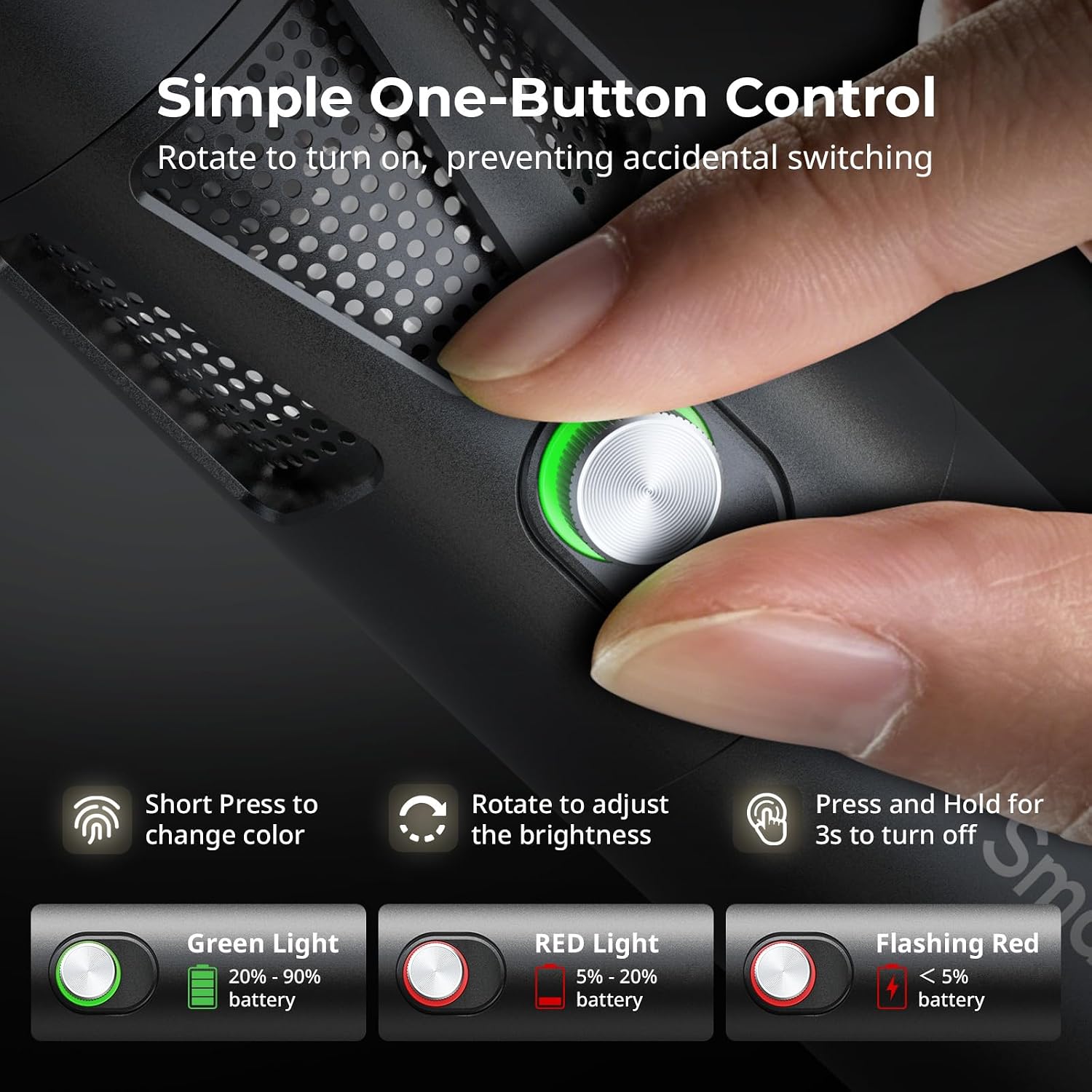
Figure 5.1: One-button control and battery indicator.

Figure 5.2: Available LED colors.
5.2 Регулировка угла луча
The front plano-convex lens allows for adjustment of the beam angle. Push or pull the lens to change the focus of the light from a narrow 24° beam to a wider 60° diffusion.
- Extend the lens: Narrows the beam (e.g., 24°).
- Retract the lens: Diffuses the beam (e.g., 60°).

Figure 5.3: Beam angle adjustment mechanism.
5.3 Индикатор заряда батареи
The control button's LED indicates the battery status:
- Зеленый свет: Осталось 20% - 90% заряда батареи.
- Красный свет: Осталось 5% - 20% заряда батареи.
- Мигающий красный свет: Оставшийся заряд батареи менее 5%.

Figure 5.4: Brightness comparison of RF20C.
6. Техническое обслуживание
- Clean the device regularly with a soft, dry cloth. Do not use harsh chemicals or abrasive materials.
- Храните устройство в прохладном, сухом месте, вдали от прямых солнечных лучей и экстремальных температур.
- When not in use for extended periods, charge the battery to approximately 50% every three months to prolong battery life.
- Keep the lens and LED surface free from dust and fingerprints for optimal light output.
7. Поиск Неисправностей
| Проблема | Возможная причина | Решение |
|---|---|---|
| Устройство не включается. | Низкий заряд батареи; неправильная процедура включения. | Charge the device. Ensure you rotate the control button to power on. |
| Световой поток тусклый. | Low battery; brightness set too low; dirty lens. | Charge the device. Rotate the control button to increase brightness. Clean the lens. |
| Gobo projection is blurry. | Plano-convex lens not removed; gobo not seated correctly. | Remove the plano-convex lens before attaching the silicone gobo holder. Ensure gobo is properly inserted. |
| Устройство нагревается во время использования. | Normal operation, especially at high power; fan obstruction. | This is normal. Ensure the fan vents are not obstructed for proper heat dissipation. If excessively hot, reduce brightness or allow to cool. |
| Шум вентилятора заметен. | Normal operation for cooling. | The device uses a high-speed fan for efficient heat dissipation. This noise is part of normal operation. Consider distance from audio recording equipment. |
8. Технические характеристики
| Особенность | Деталь |
|---|---|
| Модель | RF20C (5335) |
| Власть | 20 Вт |
| Вход | 20 V / 1.8 A (max. 36 W) |
| Цвета светодиодов | Red, 5600K White, Purple, Orange, Cyan |
| Индекс цветопередачи (CRI) | ≥ 97 |
| Индекс согласованности телевизионного освещения (TLCI) | ≥ 99 (at 5600 K) |
| Яркость | 5400 Lux @ 1m / 5600K |
| Емкость аккумулятора | 10000mAh (2 x 5000mAh / 7.4V / 37Wh) |
| Время работы (полная мощность) | До 1.5 часов |
| Зарядка | USB-C PD 36W Fast Charging, supports charging while operating |
| Регулировка угла луча | от 24° до 60° |
| Материал | Алюминиевый сплав, АБС |
| Размеры продукта | φ49.0 x 200.0 mm / φ1.9 x 7.9 inches |
| Вес продукта | 520.0 ± 20.0 г / 18.3 ± 0.7 унции |
| Технология связи | USB |
| Страна происхождения | Китай |
9. Гарантия и поддержка
SmallRig products are designed and manufactured to the highest quality standards. This product is covered by a limited warranty from the date of purchase. For detailed warranty terms, technical support, or service inquiries, please refer to the official SmallRig webсайт или свяжитесь с вашим местным дистрибьютором.
Пожалуйста, сохраните документ, подтверждающий покупку, для претензий по гарантии.
10 Сценарии использования
The SmallRig RF20C is suitable for various applications, including:
- Фотография
- Видеозапись
- Прямая трансляция
- Creative Accent Lighting
- Macro Work and Close-ups

Рисунок 10.1: Examples of RF20C usage scenarios.
Ask a question about this manual
Ask about setup, troubleshooting, compatibility, parts, safety, or missing instructions. Manuals+ will review the question and use this page’s manual context to help answer it.