
1. Введение
The GameSir Pocket Taco is a vertical mobile gaming controller designed to transform your Android smartphone into a retro handheld gaming device. It offers a compact, lightweight design with Bluetooth connectivity and a built-in rechargeable battery, providing an authentic arcade experience for mobile gaming.
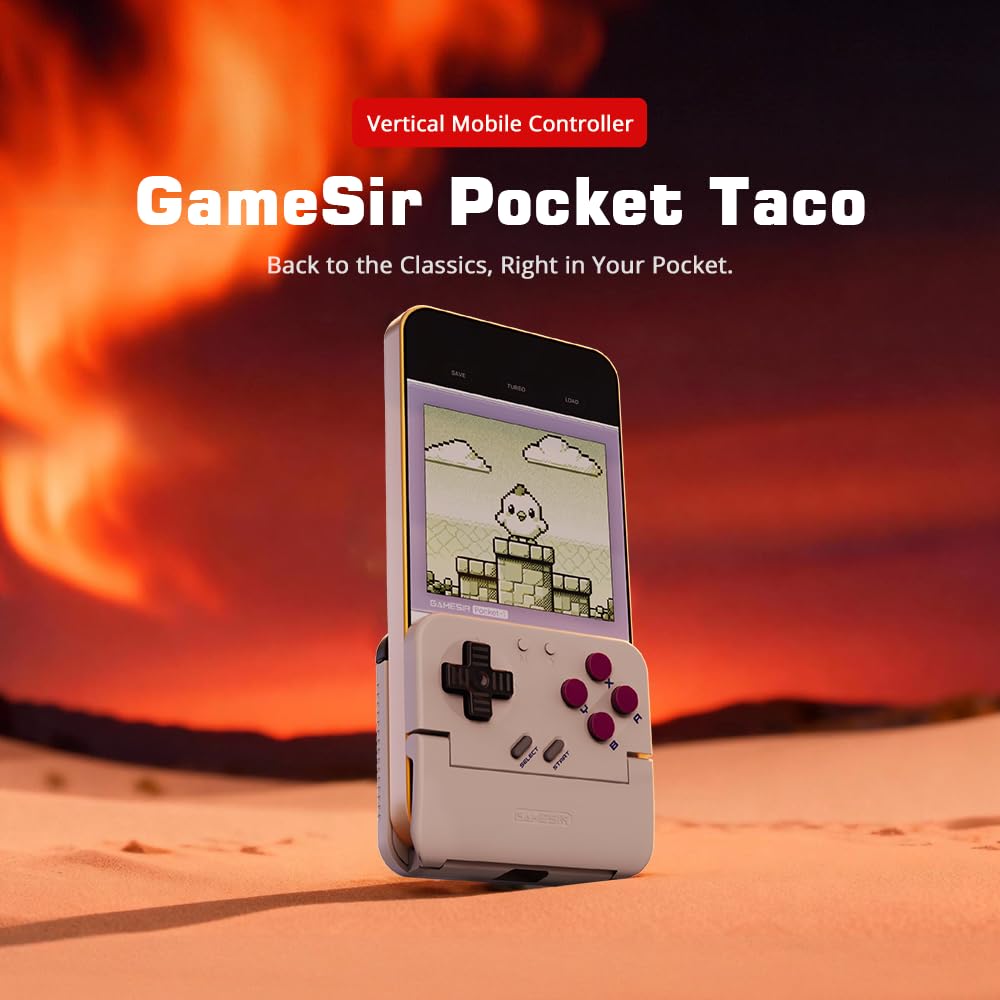
Figure 1: GameSir Pocket Taco attached to a smartphone, ready for vertical gaming.
Видео 1: Оверview of the GameSir Pocket Taco Vertical Mobile Gaming Controller, showcasinг его дизайн и особенности.
2.Основные характеристики
- Vertical Retro Arcade Design: Transforms your phone into a classic vertical handheld gaming device, ideal for retro titles and vertical shoot 'em ups.
- Ультрапортативный и легкий: Weighing only 62.2g, this compact Bluetooth controller is easy to carry and includes a durable PP storage box for protection.
- Smart Power & Seamless Bluetooth Connectivity: Automatically powers on when unfolded and off when closed. Offers low-latency wireless gaming on Android and other compatible devices.
- Long-Lasting 600 mAh Battery & Pass-Through Charging: Provides hours of gameplay on a single charge. The hollow-bottom design allows simultaneous phone charging while gaming.
- Customizable Controls via GameSir App: Remap buttons, enable D-pad diagonal lock, switch to keyboard mode, and access G-Touch/V-Touch support for precise inputs.
- Phone-Friendly Silicone Protection: Soft silicone pads in the clamp area protect your phone from scratches and ensure a secure fit during intense gaming sessions.

Figure 2: Experience vertical handheld gaming by attaching your smartphone to the GameSir Pocket Taco.
3. Настройка и подключение
3.1 Начальная настройка
- Распаковать: Carefully remove the GameSir Pocket Taco from its packaging.
- Осмотреть: Check for any visible damage or missing components.
- Заряжать: Ensure the controller is sufficiently charged before first use. Connect the USB-C cable to the charging port on the controller.
- Вставьте телефон: Gently open the controller's clamp and insert your smartphone. The silicone pads will secure your device and prevent scratches.
3.2 Bluetooth-соединение
The GameSir Pocket Taco supports multiple connection modes for various platforms. Follow the steps below for your specific device:

Figure 3: The GameSir Pocket Taco offers seamless Bluetooth connectivity across various compatible devices.
3.2.1 iOS Connection (DS4 Mode)
- Нажмите и удерживайте Кнопка «Домой» и по умолчанию Кнопка simultaneously for 2 seconds until the indicator light turns solid and flashes rapidly.
- On your iOS device, open Настройки Bluetooth.
- Select "DUALSHOCK 4 Wireless Controller" from the available devices to connect.
- A solid indicator light on the controller confirms a successful connection.
3.2.2 Android Connection (Android Mode)
- Нажмите и удерживайте Кнопка «Домой» и по умолчанию Кнопка B simultaneously for 2 seconds until the indicator light turns solid and flashes rapidly.
- On your Android device, open Настройки Bluetooth.
- Select "GameSir-Pocket 1" or "GameSir-Pocket 1_G" from the available devices to connect.
- A solid indicator light on the controller confirms a successful connection.
3.2.3 Switch Connection (Switch Mode)
- Нажмите и удерживайте Кнопка «Домой» и по умолчанию Кнопка Х simultaneously for 2 seconds until the indicator light flashes up and down rapidly.
- On your Nintendo Switch, go to the Главное меню, затем выберите «Контроллеры», а потом "Сменить хват/порядок" для входа в режим сопряжения.
- Wait for the connection to be established. A solid indicator light on the controller confirms a successful connection.
3.2.4 G-Touch Mode Connection
- Нажмите и удерживайте Кнопка «Домой» и по умолчанию Кнопка Y simultaneously for 2 seconds until the indicator light turns solid and flashes rapidly.
- On your Android device, open Настройки Bluetooth.
- Select "GameSir-Pocket 1_G" from the available devices to connect.
- A solid indicator light on the controller confirms a successful connection.
4. Инструкция по эксплуатации
4.1 Включение/выключение питания
- Включение питания: Unfold the controller to automatically power it on.
- Выключение: Close the controller to automatically power it off.
4.2 Зарядка
The GameSir Pocket Taco features a 600mAh battery. To charge, connect a USB-C cable to the charging port located on the top of the controller. The hollow-bottom design allows you to charge your phone simultaneously while playing.

Figure 4: Key features of the GameSir Pocket Taco, including pass-through charging and protective silicone pads.
4.3 Customizable Controls (GameSir App)
Download the official GameSir App to unlock advanced customization options:
- Переназначение кнопок: Assign functions to different buttons for personalized gameplay.
- D-pad Diagonal Lock: Enable or disable diagonal input for the D-pad.
- Режим клавиатуры: Switch to keyboard mode for a more flexible control experience.
- G-Touch/V-Touch Support: Utilize advanced touch mapping features for specific games.
- Обновления прошивки: Keep your controller up-to-date with the latest software enhancements.

Figure 5: Customize your GameSir Pocket Taco settings and update firmware using the dedicated GameSir App.
5. Уход и обслуживание
- Уборка: Для очистки контроллера используйте мягкую сухую ткань. Избегайте абразивных чистящих средств или растворителей.
- Хранилище: When not in use, store the GameSir Pocket Taco in its durable PP storage box to protect it from dust, scratches, and impacts.
- Умение обращаться: Do not apply excessive force when opening or closing the controller to prevent damage to the hinge mechanism.
- Температура: Избегайте длительного воздействия на контроллер экстремальных температур или прямых солнечных лучей.
6. Поиск Неисправностей
6.1 Проблемы с подключением
- Контроллер не подключается: If the connection fails, press and hold the 'M' button and the 'Home' button on the controller for 2 seconds to re-enter pairing mode. Ensure Bluetooth is enabled on your device and the correct mode (iOS, Android, Switch, G-Touch) is selected.
- Прерывистое соединение: Ensure the controller is within range of your device and there are no significant obstructions. Fully charge the controller and your device.
6.2. Отклик кнопок
- Кнопки не отвечают: Ensure the controller is properly connected. Check for firmware updates via the GameSir App.
- D-pad issues: Some users have reported issues with D-pad responsiveness. Ensure firmware is up-to-date. If issues persist, contact GameSir support.
6.3 Проблемы с зарядкой
- Контроллер не заряжается: Use the provided USB-C cable or a compatible cable. Ensure the cable and power adapter are functioning correctly.
7. Технические характеристики
| Особенность | Деталь |
|---|---|
| Название модели | GameSir Pocket Taco |
| Бренд | GameSir |
| Совместимые устройства | Android (also supports iOS, Switch, PC via specific modes) |
| Тип контроллера | Геймпад |
| Связность | Беспроводная связь (Bluetooth) |
| Емкость аккумулятора | 600 мАч |
| Порт зарядки | USB-C (Pass-Through Charging for phone) |
| Вес товара | 0.2 килограмма (приблизительно 62.2 г) |
| Цвет | Белый |
| Аппаратная платформа | Смартфон |
8. Гарантия и поддержка
For warranty information, technical support, or service inquiries, please refer to the documentation included with your product or visit the official GameSir webСохраните чек о покупке в качестве подтверждения покупки для предъявления гарантийных претензий.