
Введение
This manual provides essential information for setting up, operating, maintaining, and troubleshooting your HP 15.6-inch FHD IPS Touchscreen Laptop. Please read this guide thoroughly to ensure optimal performance and longevity of your device. This laptop features an AMD Ryzen 7 7730U processor, 64GB DDR4 RAM, 2.28TB storage (2TB SSD + 288GB Docking Station Set), AMD Radeon Graphics, and runs on Windows 11 Pro.
Настраивать
Unpacking and Initial Power-On
Carefully remove all components from the packaging. Connect the power adapter to the laptop and a power outlet. Press the power button to turn on the laptop. Follow the on-screen instructions to complete the initial Windows 11 Pro setup.
Включенные аксессуары
Your laptop package includes the following accessories:
- 1x 7-in-1 Docking Station with 256GB Storage
- 1 карта MicroSD на 32 ГБ с адаптером
- 1x кабель передачи данных Type-C
- 1x Зарядный кабель 3-в-1
- 1 замшевая салфетка для чистки
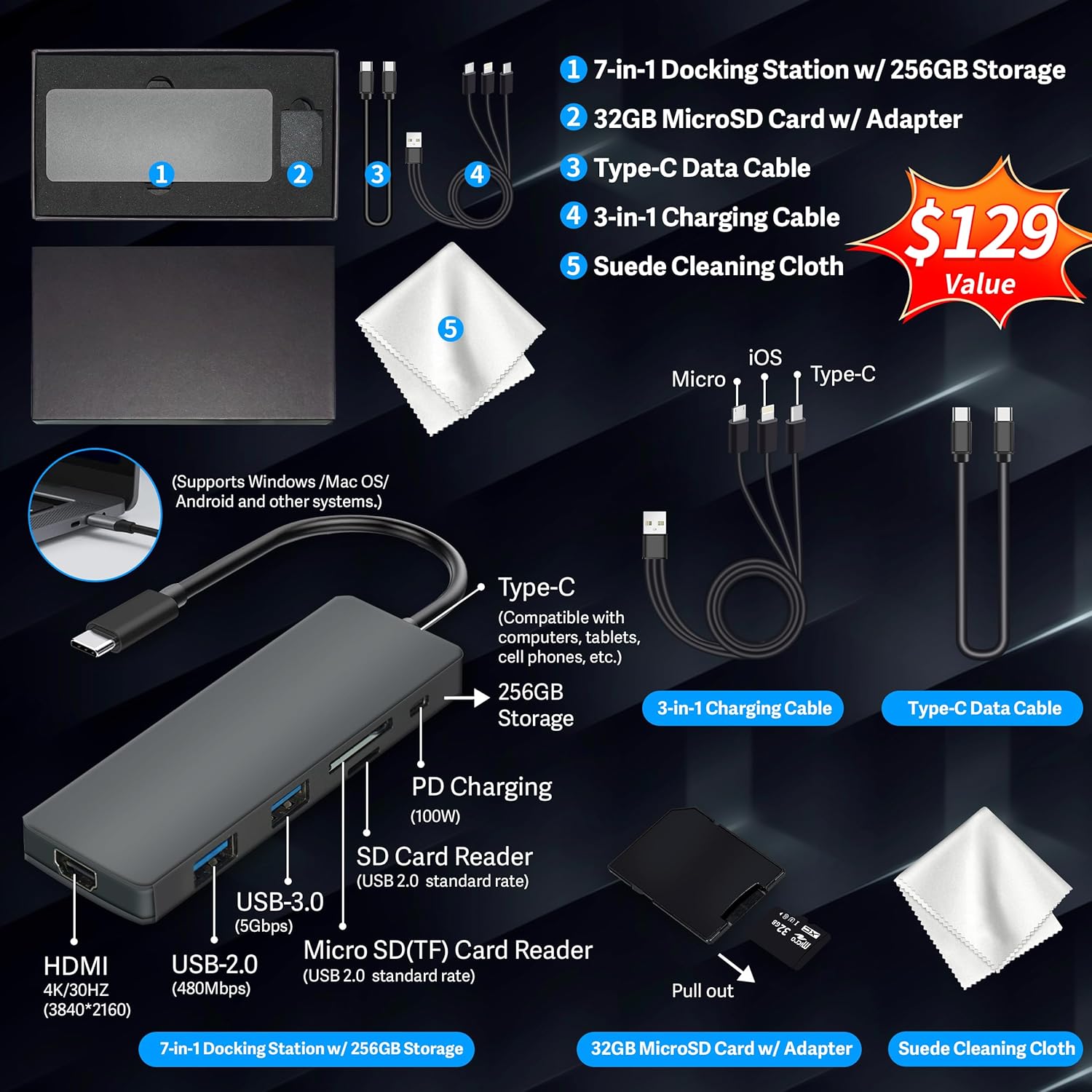
Figure 1: Included accessories, including the 7-in-1 docking station, various cables, and a cleaning cloth.
Работа с ноутбуком
Характеристики дисплея
The HP 15.6-inch laptop features an FHD IPS touchscreen display with a resolution of 1920 x 1080 pixels and an anti-glare coating. This display provides clear and vibrant visuals from various viewуглы.

Figure 2: The 15.6-inch FHD IPS display offers crisp and vivid details.
Связь и периферийные устройства
Your laptop is equipped with various connectivity options and integrated features to enhance your user experience.
- HD-камера 720p: For video calls and online meetings.
- Wi-Fi 6: Для высокоскоростного беспроводного подключения к Интернету.
- Bluetooth: Для подключения беспроводных периферийных устройств, таких как мыши, клавиатуры и наушники.
- Цифровая клавиатура: A full numeric keypad is integrated for efficient data entry and calculations.

Figure 3: Key features for staying connected and productive, including the numeric keypad.
The laptop includes multiple ports for connecting external devices:
- 2x USB Type-A ports
- 1 порт USB Type-C
- 1x HDMI-порт
- 1 комбинированный разъем для наушников/микрофона

Figure 4: Multi-port configuration on the laptop for various connections.
Производительность и многозадачность
Equipped with an AMD Ryzen 7 7730U processor, 64GB DDR4 RAM, and AMD Radeon Graphics, this laptop is designed for efficient multitasking and demanding applications. The 2.28TB storage (2TB SSD + 288GB Docking Station Set) provides ample space and fast access to your files.

Figure 5: Core specifications for performance and storage.

Figure 6: Laptop demonstrating effortless multitasking with several applications running simultaneously.
The laptop is designed for extended use, offering reliable battery life to support your daily tasks.

Figure 7: The laptop supports continuous work throughout the day with its battery performance.
Обслуживание
To ensure the longevity and optimal performance of your HP laptop, follow these maintenance guidelines:
- Уборка: Use the provided suede cleaning cloth or a soft, lint-free cloth to clean the screen and exterior. Avoid harsh chemicals.
- Обновления программного обеспечения: Regularly update your Windows 11 Pro operating system and drivers to ensure security and performance.
- Уход батареи: Избегайте частой полной разрядки аккумулятора. При длительном хранении зарядите аккумулятор примерно на 50–70%.
- Вентиляция: Убедитесь, что вентиляционные отверстия ноутбука не заблокированы, чтобы предотвратить перегрев. Используйте ноутбук на твердой плоской поверхности.
- Хранилище: Храните ноутбук в прохладном, сухом месте, вдали от прямых солнечных лучей и экстремальных температур.
Поиск неисправностей
В этом разделе рассматриваются распространенные проблемы, с которыми вы можете столкнуться при использовании ноутбука.
Ноутбук не включается
- Убедитесь, что адаптер питания надежно подключен к ноутбуку и рабочей розетке.
- Проверьте работоспособность розетки, подключив к ней другое устройство.
- Если аккумулятор полностью разряжен, дайте ему зарядиться в течение как минимум 15–30 минут, прежде чем пытаться включить устройство.
Screen Remains Blank
- Проверьте, включен ли ноутбук (горит ли индикатор питания).
- Try connecting an external monitor to see if display output is available.
- Отрегулируйте яркость экрана с помощью функциональных клавиш.
Проблемы с подключением Wi-Fi
- Убедитесь, что Wi-Fi включен в настройках Windows.
- Перезагрузите маршрутизатор и модем.
- Update your Wi-Fi drivers through Device Manager.
- Проверьте наличие каких-либо физических препятствий или помех.
Низкая производительность
- Закройте ненужные приложения, работающие в фоновом режиме.
- Проверьте диспетчер задач на наличие процессов, потребляющих много ресурсов ЦП или ОЗУ.
- Убедитесь, что ваша операционная система и драйверы обновлены.
- Выполните очистку и дефрагментацию диска (для жестких дисков, для SSD не требуется).
- Сканирование на наличие вредоносных программ и вирусов.
Технические характеристики
Below are the detailed technical specifications for your HP 15.6-inch FHD IPS Touchscreen Laptop.

Figure 8: Laptop dimensions and weight for portability.
| Особенность | Деталь |
|---|---|
| Бренд | HP |
| Название модели | HP 15.6" FHD IPS Touchscreen Laptop |
| Размер экрана | 15.6 дюйма |
| Разрешение дисплея | 1920 x 1080 пикселей (FHD) |
| Тип дисплея | LED IPS сенсорный экран |
| Процессор | AMD Ryzen 7 7730U (8 Cores, 2 GHz base) |
| Графический сопроцессор | AMD Radeon Graphics (интегрированная) |
| Оперативная память | 64 ГБ DDR4 (3200 МГц) |
| Хранилище | 2 TB SSD + 288 GB Docking Station Set (Total 2.28 TB) |
| Операционная система | Windows 11 Профессиональная |
| Связность | Wi-Fi 6 (802.11ax), Bluetooth, HDMI, USB |
| Порты | 2x USB Type-A, 1x USB Type-C, 1x HDMI, 1x Headphone/Microphone Combo |
| Webкулачок | HD-камера 720p |
| Клавиатура | Полноразмерный с цифровой клавиатурой |
| Размеры (Д x Ш x Т) | 14.17" x 9.29" x 0.73" |
| Вес товара | 3.52 фунта (приблизительно 1.6 кг) |
| Цвет | Серебро |
| СКП | 196188514924 |
| ASIN | B0FX2NR2WN |
Информация о гарантии
Your HP laptop comes with a manufacturer's warranty. For upgraded components (RAM/SSD), a 1-year warranty is provided by SnowBell. The original 1-year manufacturer warranty applies to all other components of the laptop. Please retain your proof of purchase for warranty claims. For detailed terms and conditions, refer to the warranty documentation included with your product or visit the official HP support webсайт.
Поддерживать
Для получения дополнительной помощи, технической поддержки или по вопросам обслуживания, пожалуйста, обратитесь к следующим ресурсам:
- Официальная поддержка HP Webсайт: Посещать support.hp.com для драйверов, руководств и руководств по устранению неисправностей.
- Онлайн-помощь: Utilize the built-in Windows 11 Pro help features for software-related questions.
- Связаться с продавцом: For issues related to upgraded components or purchase, contact SnowBell or your point of purchase.