
Введение
This manual provides detailed instructions for the setup, operation, and maintenance of your LIGE EF19-A Smartwatch. This device features a 1.85-inch HD display, Bluetooth calling capabilities, extensive health monitoring, and over 100 sports modes. It is designed for durability with IP68 waterproofing and a robust build. Please read this manual thoroughly to ensure proper use and to maximize the functionality of your smartwatch.
1. Настройка
1.1 Содержимое упаковки
- 1 x LIGE EF19-A Smartwatch
- 2 x Watch Straps (1 steel, 1 silicone)
- 1 х USB-кабель для зарядки
- 1 x зарядный кабель Type-C
- 1 x Strap Adjuster (Regulator)
- 1 х Руководство пользователя
1.2 Зарядка умных часов
Before initial use, fully charge your smartwatch.
- Подключите магнитный зарядный кабель к зарядным контактам на задней панели умных часов.
- Connect the other end of the charging cable (USB or Type-C) to a compatible power source (e.g., USB wall adapter, computer USB port, power bank, car charger).
- На дисплее часов будет отображаться статус зарядки. Полная зарядка обычно занимает около 2 часов.

Image: The smartwatch connected to a charging cable, illustrating its 1000 mAh battery capacity and charging process.
A fully charged battery provides up to 7-15 days of normal use and up to 50 days in standby mode.
1.3 Установка и сопряжение приложения
To access all features, download the companion app on your smartphone. The smartwatch is compatible with Android 5.1 and higher, and iOS 9.0 and higher.
- Scan the QR code provided in the manual or on the watch packaging, or search for the app name (usually specified in the quick start guide) in your phone's app store (Google Play Store for Android, Apple App Store for iOS).
- Установите приложение и создайте учетную запись, если потребуется.
- Убедитесь, что Bluetooth включен на вашем смартфоне.
- Open the app and follow the on-screen instructions to add your device. The app will search for your smartwatch.
- Select your smartwatch (e.g., "EF19-A" or similar Bluetooth name) from the list of available devices to pair.
- Confirm the pairing request on both your smartphone and smartwatch if a prompt appears.
1.4 Strap Installation/Adjustment
The smartwatch comes with two interchangeable straps: a steel strap and a silicone strap.
- Чтобы прикрепить ремень: Align the spring bar with the lug holes on the watch body and slide the pin into place.
- Чтобы снять ремень: Locate the small lever on the spring bar, pull it inwards, and gently detach the strap from the watch body.
- For the steel strap: Use the provided strap adjuster (regulator) to remove or add links for a comfortable fit. Refer to the specific instructions for the strap adjuster if needed.
2. Инструкция по эксплуатации
2.1 Базовая навигация
- Сенсорный экран: Проведите пальцем влево/вправо, вверх/вниз для навигации по меню и функциям. Коснитесь, чтобы выбрать.
- Боковая(ые) кнопка(и): Typically, one button serves as a power on/off, back, or home button. Long press for power options, short press to return to the watch face or previous screen.
2.2 Звонки и уведомления по Bluetooth
Once paired with your smartphone, the smartwatch allows you to manage calls and receive notifications.
- Совершение/прием звонков: When a call comes in, the watch will display the caller ID. You can answer or reject calls directly from the watch. You can also dial numbers or select contacts from the watch interface.
- Уведомления о сообщениях: Receive notifications for SMS, Facebook, WhatsApp, Twitter, TikTok, and other apps directly on your watch. Swipe down from the watch face to view последние уведомления.

Image: The smartwatch showing an incoming call, message notifications, and the voice assistant interface.
2.3 Мониторинг здоровья
Умные часы постоянно отслеживают различные показатели здоровья.
- Частота сердечных сокращений: Access the heart rate monitoring function to view Ваш текущий пульс и исторические данные.
- Кислород в крови (SpO2): Измерьте уровень кислорода в крови.
- Качество сна: The watch automatically tracks your sleep patterns, including deep sleep, light sleep, and wake times. View Подробные отчеты о сне в сопутствующем приложении.
- Уровень стресса: Контролируйте уровень стресса в течение дня.
- Дыхательная тренировка: Engage in guided breathing exercises to help manage stress.

Image: A user wearing the smartwatch, with the display showing real-time heart rate, blood oxygen saturation, and breathing exercise prompts.
Примечание: This device is not a medical device. Health monitoring data is for reference only and should not be used for medical diagnosis or treatment.
2.4 спортивных режима
The smartwatch supports over 100 sports modes for tracking your physical activity.
- Navigate to the "Workout" or "Sports" menu on your watch.
- Select your desired activity (e.g., running, cycling, swimming, hiking, yoga, badminton, basketball, golf).
- The watch will begin tracking metrics such as steps, distance, calories burned, and heart rate.
- End the workout by following the on-screen prompts. Detailed summaries are available on the watch and in the companion app.

Image: A person cycling while wearing the smartwatch, with the display showing steps, distance, calories, and heart rate for different sports activities.
2.5 Функция фонарика
The smartwatch includes a built-in torch function for instant illumination.
- Access the torch function from the quick settings menu or app list.
- It offers different modes such as constant light, warning mode, and SOS mode.
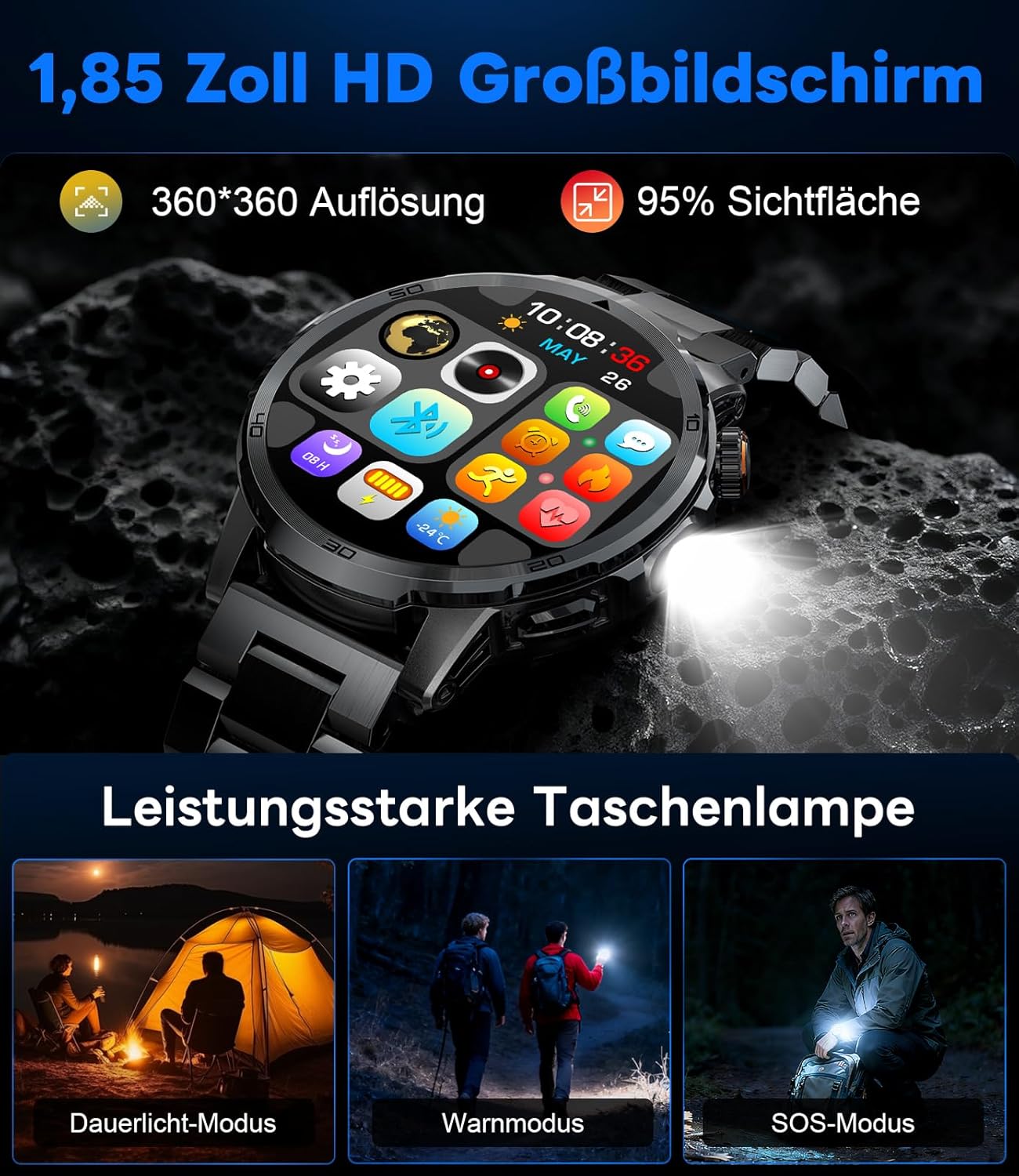
Image: The smartwatch displaying its 1.85-inch HD screen and demonstrating its powerful flashlight feature with different modes.
2.6 Другие функции
- Голосовой помощник: Activate the voice assistant to control your phone or get information (e.g., "What's the weather?").
- Управление музыкой: Control music playback on your smartphone (play, pause, skip tracks, adjust volume) directly from your watch.
- Управление камерой: Используйте часы в качестве пульта дистанционного спуска затвора камеры вашего смартфона.
- Прогноз погоды: View текущие погодные условия и прогнозы.
- Будильники и таймеры: Установите будильники и используйте функции секундомера/таймера.
- Напоминание о питье: Установите напоминания, чтобы выпить воды.
- Циферблаты: Customize your watch face from over 100 options or upload your own photos via the app.

Image: The smartwatch interface displaying icons for music control, flashlight, camera control, weather, alarm, and drink reminders.

Image: A selection of diverse watch faces available for customization on the LIGE EF19-A Smartwatch.
3. Техническое обслуживание
3.1 Очистка
- Regularly clean your smartwatch and straps with a soft, dry, lint-free cloth.
- При необходимости используйте слегка damp Смажьте тканью с мягким мылом, затем вытрите насухо.
- Избегайте использования агрессивных химикатов, абразивных чистящих средств или растворителей, так как они могут повредить покрытие и уплотнения часов.
- Перед зарядкой убедитесь, что зарядные контакты чистые и сухие.
3.2 Водонепроницаемость (IP68)
The LIGE EF19-A Smartwatch is IP68 waterproof, meaning it is resistant to dust and can withstand immersion in water up to 1.5 meters for up to 30 minutes.
- It is suitable for daily use, such as hand washing, rain, and shallow water swimming.
- Avoid using the watch in hot water, saunas, or steam rooms, as steam can penetrate the seals and cause damage.
- Не нажимайте кнопки под водой.
- After exposure to water, wipe the watch dry before charging or using.

Image: The smartwatch highlighting its robust military-grade design, including resistance to temperature extremes, shock, dust, and IP68 water resistance.
4. Поиск Неисправностей
4.1 Часы не включаются
- Убедитесь, что часы полностью заряжены. Подключите их к зарядному устройству как минимум на 30 минут.
- Try long-pressing the side button for 10-15 seconds to force a restart.
4.2 Невозможно подключиться к смартфону
- Убедитесь, что на вашем смартфоне включен Bluetooth.
- Убедитесь, что умные часы находятся в зоне действия Bluetooth (обычно 10 метров).
- Перезагрузите смартфон и умные часы.
- Check if the app has the necessary permissions (location, Bluetooth, etc.).
- If previously paired, try "forgetting" the device in your phone's Bluetooth settings and re-pairing through the app.
4.3 Неточные данные о состоянии здоровья
- Убедитесь, что часы плотно прилегают к запястью, примерно на ширину одного пальца выше косточки запястья.
- Избегайте чрезмерных движений во время измерений.
- Очистите датчик на задней панели часов.
- Факторы окружающей среды и индивидуальная физиология могут влиять на показания.
4.4 Уведомления не появляются
- Убедитесь, что часы успешно сопряжены со смартфоном.
- Check notification settings within the companion app to ensure desired apps are enabled for notifications.
- Убедитесь, что в настройках уведомлений вашего телефона разрешено отображение уведомлений сопутствующим приложением.
- Make sure your phone is not in "Do Not Disturb" mode.
5. Технические характеристики
| Особенность | Спецификация |
|---|---|
| Номер модели | EF19-A |
| Отображать | 1.85-inch IPS HD Touch Screen, 360x360 pixels |
| Емкость аккумулятора | 1000 мАч литий-полимерн. |
| Срок службы батареи (нормальное использование) | 7-15 дней |
| Срок службы батареи (в режиме ожидания) | До 50 дней |
| Время зарядки | Приблизительно 2 часов |
| Связность | Блютус 5.2 |
| Водостойкость | IP68 (водонепроницаемый) |
| Емкость памяти | 128 МБ |
| Совместимые устройства | Смартфоны Android 5.1+ / iOS 9.0+ |
| Мониторинг здоровья | Heart Rate, Blood Oxygen, Sleep Quality, Stress Level |
| Спортивные режимы | 100+ (e.g., Running, Cycling, Swimming, Hiking, Yoga) |
| Дополнительные возможности | Bluetooth Calls, Message Notifications, Torch, Voice Assistant, Music Control, Camera Control, Weather, Alarms, Timers, Drink Reminder, Customizable Watch Faces |
| GPS | Через смартфон |
| Целевая аудитория | Мужчины |
6. Информация о гарантии
The LIGE EF19-A Smartwatch comes with a Гарантия 2 год с даты покупки. Данная гарантия распространяется на производственные дефекты и неисправности при нормальном использовании.
Гарантия не распространяется на:
- Damage caused by improper use, accident, abuse, neglect, or unauthorized modification.
- Normal wear and tear, including scratches, dents, or cosmetic damage.
- Damage caused by exposure to extreme temperatures, liquids (beyond IP68 rating), or corrosive environments.
- Damage to accessories (straps, charging cables) unless defective upon receipt.
To claim warranty service, please retain your proof of purchase and contact customer support.
7. Поддержка клиентов
If you encounter any issues or have questions regarding your LIGE EF19-A Smartwatch that are not covered in this manual, please contact our customer support team.
- Refer to the contact information provided on the product packaging or the official LIGE webсайт.
- When contacting support, please provide your product model number (EF19-A) and a detailed description of the issue.