
1. Продукт закончилсяview
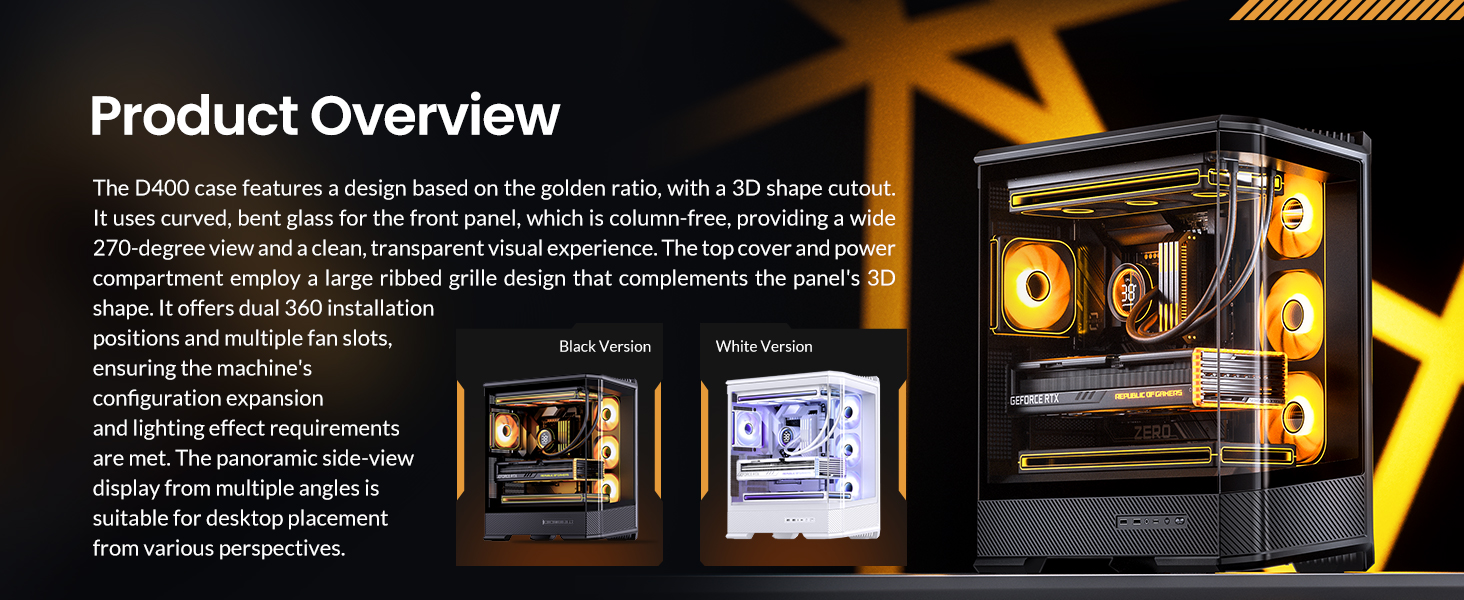
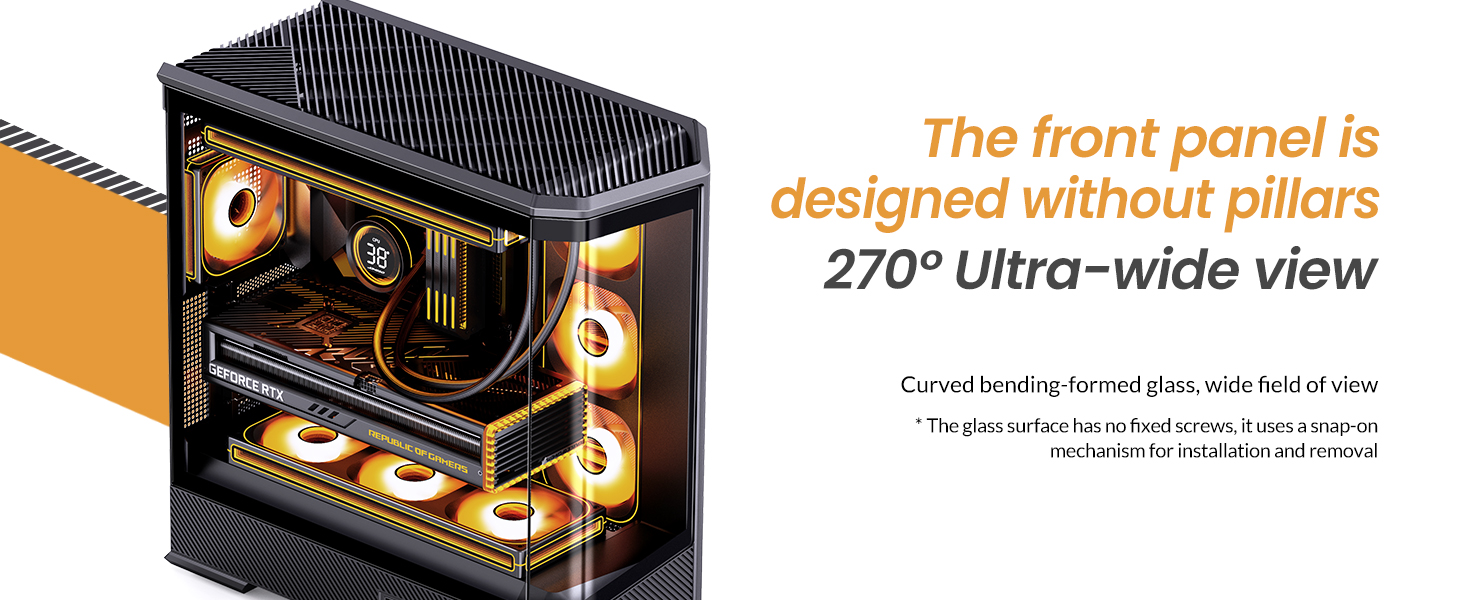
The JONSBO D400 is a white ATX Mid-Tower PC case featuring a three-dimensional beveled curved glass design, allowing for clear visibility of internal hardware. It supports BTF motherboards, ATX power supplies, and dual 360mm AIO liquid coolers, offering extensive cooling and component compatibility.
Основные характеристики:
- Размеры: 488mm (L) x 239mm (W) x 514mm (H) (including feet).
- Дизайн: Three-dimensional beveled curved glass for enhanced aesthetics and hardware visibility.
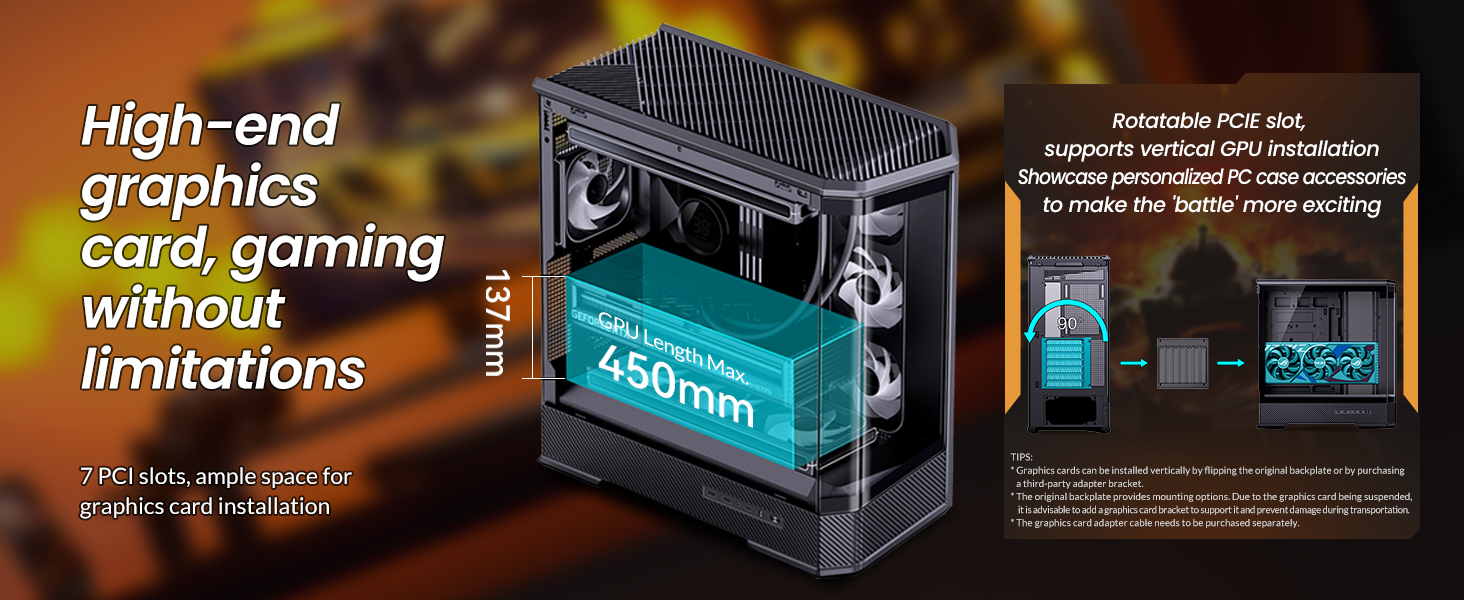
- Поддержка графического процессора: Graphics cards up to 450mm in length.
- Поддержка блока питания: ATX PS2 power supplies.
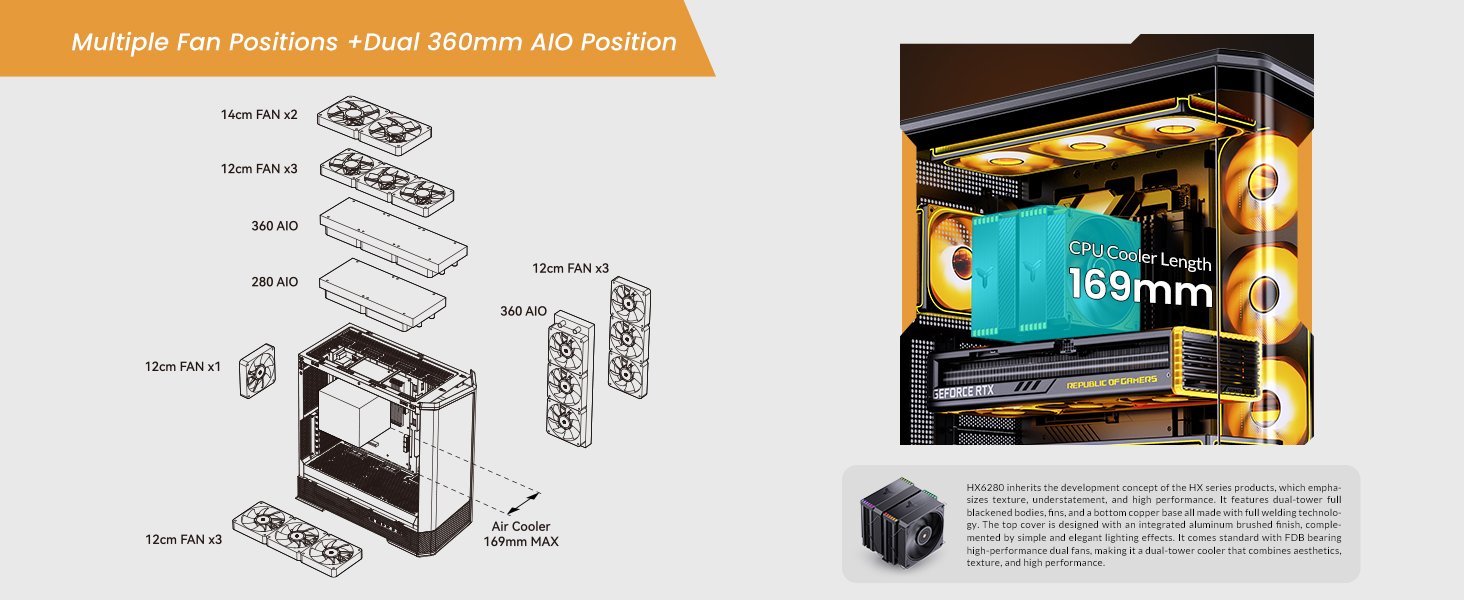
- Воздушное охлаждение: CPU coolers up to 169mm in height.
- Liquid Cooling (AIO): Supports top-mounted 240mm, 280mm, or 360mm AIOs, and side-mounted 360mm AIOs.
- Fan Positions: Up to 10 fan positions for optimal airflow (Top: 3x120mm/2x140mm; Side: 3x120mm; Rear: 1x120mm; Power Compartment: 3x120mm).
- Отсеки для дисков: Flexible storage options including 2x 2.5" SSDs, or 1x 3.5" HDD + 1x 2.5" SSD (back side), and 1x 2.5" SSD or 1x 3.5" HDD (PSU compartment).
- Фронтальный ввод / вывод: 1x USB3.2 Gen2 Type-C, 2x USB3.0, 1x AUDIO + 1x MIC (2-in-1).
- Слоты расширения: 7.

2. Технические характеристики
| Особенность | Деталь |
|---|---|
| Бренд | Йонсбо |
| Название модели | Д400 |
| Тип корпуса | Средняя башня |
| Цвет | Белый |
| Материал | Металл |
| Размеры продукта (ДxШxВ) | 19.21 x 9.21 x 20.43 дюймов (488x239x514 мм) |
| Вес товара | 23.6 фунта |
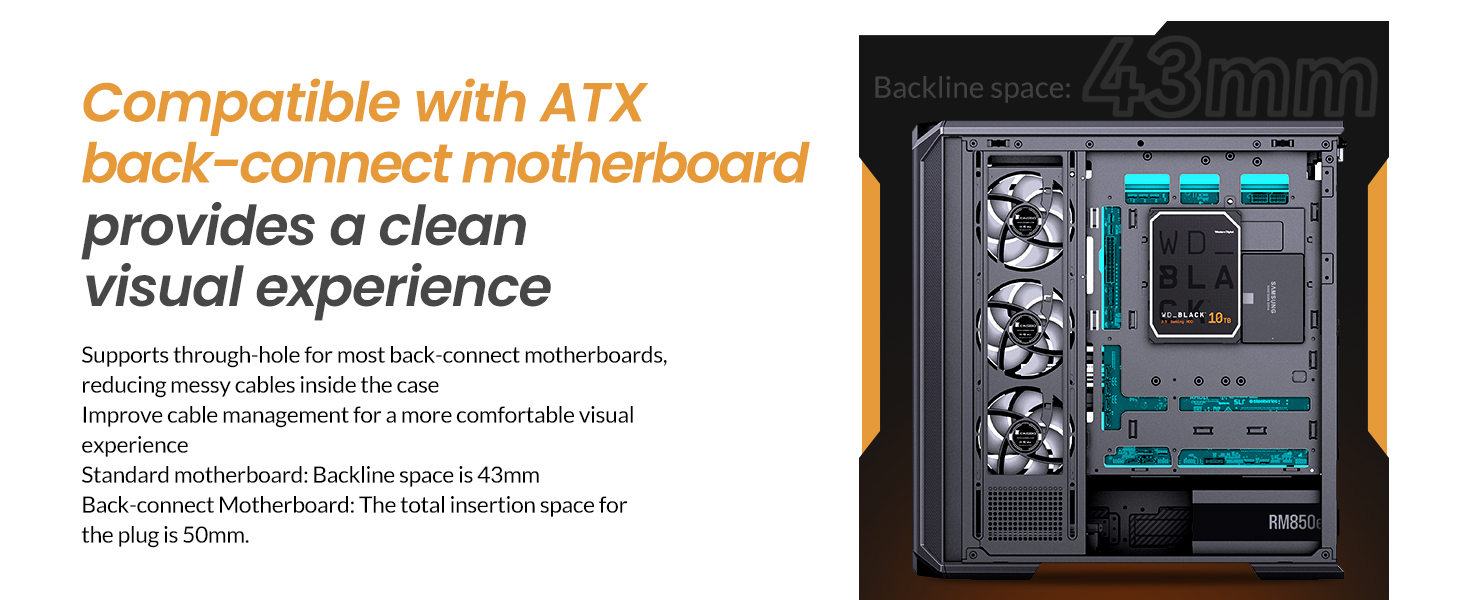
| Совместимость с материнской платой | ATX, Micro ATX, Mini ITX, BTF Motherboard |
| Максимальная длина графического процессора | ≤450мм |
| Максимальная высота кулера для процессора | 169 мм |
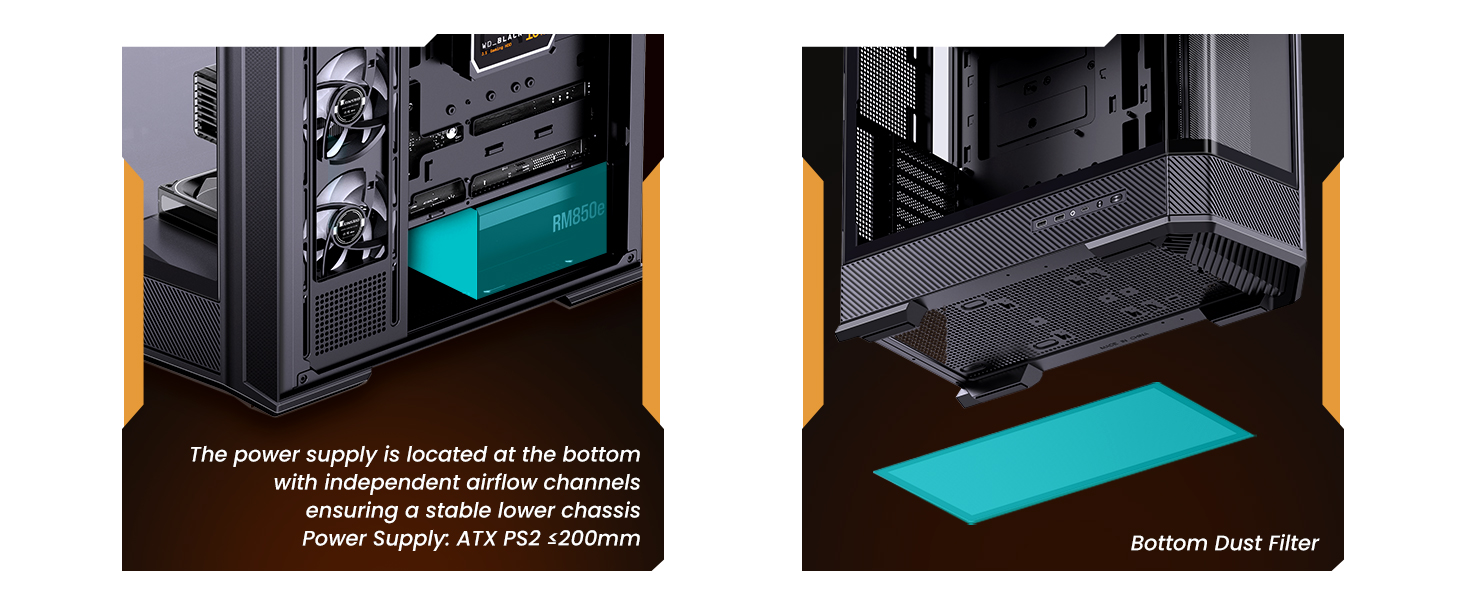
| Поддержка блока питания | ATX PS2 (≤200mm), Bottom Mount |
| Поддержка моноблоков | Top: 240mm/280mm/360mm (optional); Side: 360mm (optional) |
| Fan Positions | Top: 3x120mm/2x140mm; Side: 3x120mm; Rear: 1x120mm; Power Compartment: 3x120mm |
| Отсеки для дисков | Back Side: 2x 2.5" SSD or 1x 3.5" HDD + 1x 2.5" SSD; PSU Compartment: 1x 2.5" SSD or 1x 3.5" HDD |
| Передние порты ввода / вывода | 1x USB3.2 Gen2 Type-C, 2x USB3.0, 1x AUDIO + 1x MIC (2-in-1) |
| Слоты расширения | 7 |
3. Настройка и установка
This section provides general guidelines for installing components into your JONSBO D400 PC case. Always refer to the specific manuals for your individual components (motherboard, GPU, PSU, etc.) for detailed instructions.
3.1 Подготовка дела
- Carefully remove the side glass panels. The beveled curved glass design allows for easy access.
- Identify the motherboard standoffs. Ensure they match your motherboard's form factor (ATX, Micro ATX, Mini ITX, or BTF).

3.2 Установка материнской платы
- Align your motherboard with the standoffs in the case.
- Закрепите материнскую плату с помощью прилагаемых винтов.
- Connect the front I/O cables (USB 3.0, USB Type-C, Audio, Power/Reset switches, LED indicators) to the appropriate headers on your motherboard.
3.3 Установка блока питания (БП)
- The JONSBO D400 supports ATX PS2 power supplies and features a bottom-mount design.
- Install the PSU into its designated compartment at the bottom rear of the case.
- Закрепите блок питания винтами.
- Проложите необходимые кабели питания через вырезы для укладки кабелей.
3.4 Установка видеокарты (GPU)
- Корпус поддерживает видеокарты длиной до 450 мм.
- Снимите необходимые заглушки слотов расширения на задней панели корпуса.
- Insert your GPU into the primary PCIe slot on your motherboard and secure it with screws.
- Connect the required PCIe power cables from your PSU to the GPU.
3.5 Cooling System Installation (Fans & AIO)
- The D400 offers 10 fan positions: Top (3x120mm/2x140mm), Side (3x120mm), Rear (1x120mm), and Power Compartment (3x120mm).
- For AIO liquid coolers, the case supports up to 360mm radiators on the top and side.
- Install fans or radiators into your desired positions, ensuring proper airflow direction (intake/exhaust).
- Connect fan and AIO pump cables to your motherboard headers or a fan controller.
3.6 Установка накопителя
- The case provides mounting options for 2.5" SSDs and 3.5" HDDs.
- Install your drives into the designated drive bays (back side of motherboard tray or PSU compartment).
- Secure the drives with screws and connect SATA data and power cables.

4. Инструкция по эксплуатации
Once all components are installed and secured, and the side panels are reattached, your JONSBO D400 PC is ready for operation.
4.1 Включение
- Ensure all external cables (power, monitor, peripherals) are securely connected.
- Flip the power switch on your PSU to the 'On' position.
- Press the power button on the front I/O panel of your case to start your system.
4.2 Использование передних портов ввода/вывода
Передняя панель ввода/вывода обеспечивает удобный доступ к различным портам:
- USB3.2 Gen2 Type-C: Для высокоскоростной передачи данных с использованием совместимых устройств.
- USB3.0: Для подключения USB-устройств, таких как внешние накопители, клавиатуры и мыши.
- AUDIO (2-in-1): For connecting headphones or headsets with a combined audio/microphone jack.
5. Техническое обслуживание
Регулярное обслуживание помогает обеспечить оптимальную производительность и долговечность компонентов вашего ПК.
5.1 Очистка пылевых фильтров
- The JONSBO D400 features a removable bottom dust filter.
- Periodically remove and clean the dust filter to prevent dust buildup and maintain good airflow.
- Use compressed air or a soft brush to remove dust.
5.2 Очистка наружных поверхностей
- Wipe the exterior surfaces, including the glass panels, with a soft, lint-free cloth.
- For stubborn smudges on glass, use a mild glass cleaner applied to the cloth (not directly to the glass).
6. Поиск Неисправностей
If you encounter issues with your JONSBO D400 PC case or its installed components, consider the following common troubleshooting steps:
6.1 Нет питания
- Убедитесь, что блок питания включен, а кабель питания надежно подключен как к блоку питания, так и к розетке.
- Убедитесь, что кабель кнопки питания передней панели правильно подключен к материнской плате.
6.2 Проблемы с перегревом
- Check that all installed fans are spinning and oriented correctly for optimal airflow (e.g., front/side intake, rear/top exhaust).
- Ensure CPU cooler and AIO radiators are properly seated and fans are functioning.
- Clean any dust filters and internal components to improve heat dissipation.
6.3 Проблемы с подгонкой компонентов
- If a component does not fit, double-check its dimensions against the case specifications (GPU length ≤450mm, CPU cooler height ≤169mm, PSU length ≤200mm).
- Ensure proper alignment and removal of any necessary modular parts of the case during installation.
6.4 Передний ввод/вывод не работает
- Verify that all front I/O cables (USB, Audio) are correctly connected to their respective headers on the motherboard.
- Check your motherboard's manual for correct pin assignments.
7. Гарантия и поддержка
7.1 Политика возврата
This product is subject to a 30-day return/replacement policy from the date of purchase. Please refer to your retailer's specific return terms and conditions.
7.2 Техническая поддержка
For technical assistance or further inquiries, please visit the official JONSBO website or contact their customer support. Keep your proof of purchase handy when seeking support.
8. Видеодемонстрации
JONSBO D400 ATX PC Case Overview
Это видео дает исчерпывающую информациюview of the JONSBO D400 ATX PC case, showcasing its design, features, and internal layout. It highlights the aesthetic appeal and functional aspects of the case.