
1. Заview
The Element 32-inch 720p HD Xumo Smart TV offers reliable performance and smart functionality in a compact design. Ideal for smaller spaces such as kitchens, dorm rooms, guest rooms, or offices, this television combines a clear HD display with a versatile smart platform and modern connectivity options.
Key features include a 720p resolution display, a 120Hz effective refresh rate for smooth motion, and the integrated Xumo OS for access to numerous streaming applications and free live channels. Connectivity is robust with multiple HDMI ports, USB, LAN, Bluetooth, and Apple AirPlay support. The TV also comes with a voice remote for convenient navigation.
2. Что в коробке
Upon unboxing your Element 32-inch Xumo Smart TV, please ensure all the following components are present:
- 32-inch Element Xumo TV
- Voice Remote + 2 AAA batteries
- TV Stand & Screws
- Краткое руководство пользователя

Image: The contents of the TV box, showing the 32-inch television, its remote control, two stand feet, and a bag of screws for assembly. Dimensions of the TV are also displayed.
3. Настройка
3.1 Крепление подставки под телевизор
- Осторожно положите телевизор экраном вниз на мягкую чистую поверхность, чтобы не поцарапать его.
- Совместите каждую ножку подставки с соответствующими отверстиями для винтов на нижней части телевизора.
- Secure each stand foot using the provided screws. Ensure they are tightened firmly but do not overtighten.
- Осторожно поднимите телевизор и поставьте его на устойчивую ровную поверхность.
Alternatively, the TV supports VESA mounting for wall installation (wall mount hardware sold separately).
3.2 Подключение питания
Connect the power cord to the TV's power input and then plug it into a standard electrical outlet. A pilot light on the TV will indicate that it is receiving power.
3.3 Initial Setup (Xumo OS)
При первом включении телевизор проведет вас через процесс первоначальной настройки. Он включает в себя:
- Выбор языка: Выберите желаемый язык.
- Подключение к сети: Connect the TV to your home Wi-Fi network or via an Ethernet cable.
- Xumo OS Account Setup: Follow on-screen prompts to set up or log in to your Xumo OS account. This is necessary to access smart features and apps.
- Сканирование каналов: При подключении антенны телевизор выполнит поиск доступных каналов.

Image: The Element 32-inch Xumo Smart TV is shown on a wooden TV stand, displaying its smart interface with various streaming app icons.
4. Связи
The Element Xumo Smart TV provides a variety of ports for connecting external devices:
- Порты HDMI (3): Connect high-definition devices such as Blu-ray players, gaming consoles, or cable/satellite boxes. One HDMI port supports eARC (enhanced Audio Return Channel) for simplified audio connections to compatible soundbars or AV receivers.
- USB-порт (1): Подключите USB-накопители к view фотографии, слушайте музыку или смотрите видео.
- Порт LAN (Ethernet): Для проводного подключения к Интернету.
- Audio Out (Optical) / Headphone Jack: Для подключения внешних аудиосистем или наушников.
- Composite Input / Analog Tuner: For connecting older devices or an antenna.
5. Управление телевизором
Пульт дистанционного управления 5.1
The included voice remote allows for intuitive control of your TV. It features dedicated buttons for popular streaming services and a microphone for voice commands.
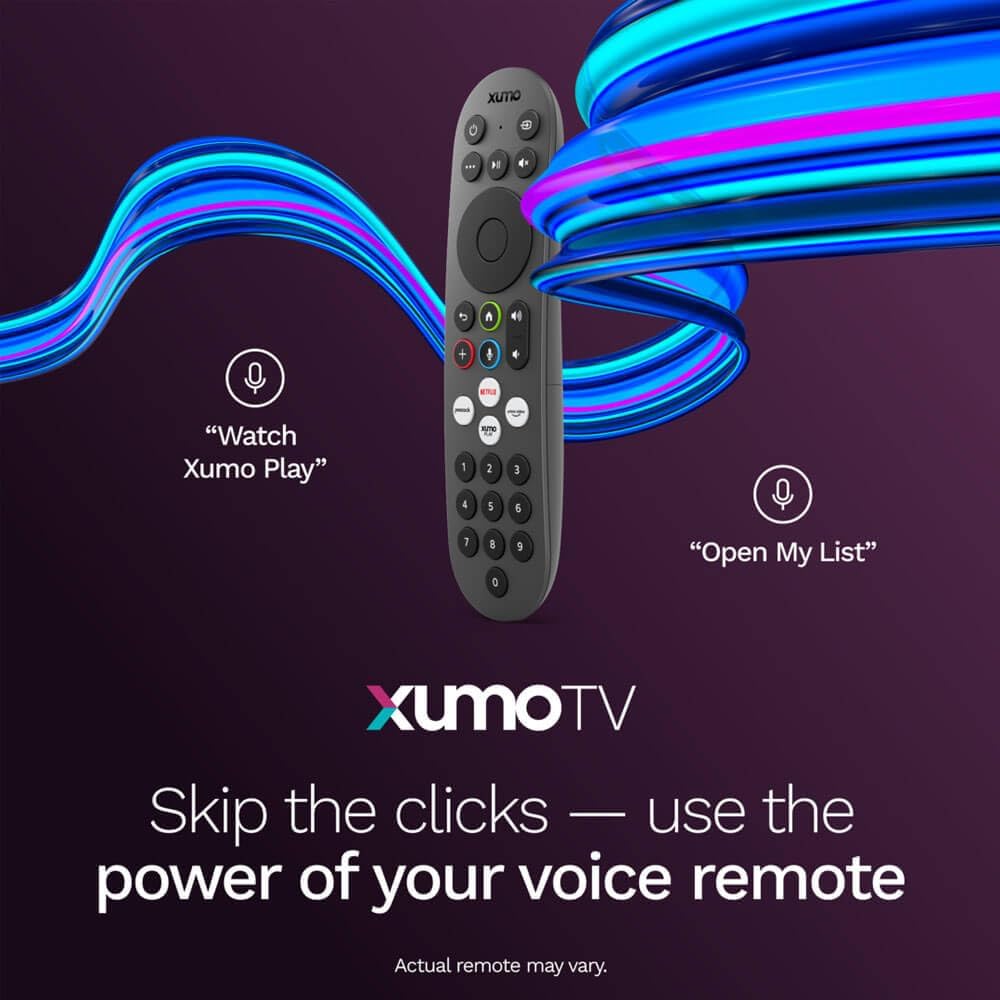
Image: A close-up of the Element Xumo Smart TV voice remote, highlighting its various buttons including a microphone for voice commands and quick access buttons for streaming services.
5.2 Smart Features & Streaming (Xumo OS)
The Xumo OS provides access to over 250 preloaded apps and more than 750 free live channels. You can:
- Search Content: Use the unified search function to find content across all your installed apps.
- My List: Curate your personal watchlist for easy access to your favorite shows and movies.
- Free On-Demand Libraries: Explore a wide selection of free on-demand content.
- Голосовое управление: Use the voice remote to navigate, search, and control your TV hands-free.

Image: The Xumo TV interface showing a selection of popular streaming applications and content recommendations.
5.3 Настройки изображения и звука
Your TV delivers a crisp 720p HD display with a 120Hz effective refresh rate, minimizing motion blur for clear visuals. Dolby Audio processing enhances the sound experience. You can adjust picture and sound settings via the TV's menu to suit your preferences.
- Режимы изображения: Select from various preset picture modes (e.g., Standard, Vivid, Movie, Sports) or customize settings like brightness, contrast, and color.
- Звуковые режимы: Choose from different sound modes (e.g., Standard, Music, Movie, Speech) or adjust bass and treble levels.
5.4 Apple AirPlay & Home Support
Seamlessly stream content or mirror your screen from your iPhone, iPad, or Mac directly to your Element TV using Apple AirPlay. With Apple Home support, you can integrate your TV into your Apple smart home ecosystem for convenient control.
6. Техническое обслуживание
To ensure the longevity and optimal performance of your Element Xumo Smart TV, follow these maintenance guidelines:
- Очистка экрана: Аккуратно протрите экран мягкой, сухой тканью без ворса. Для удаления стойких загрязнений слегка потрите.ampСмочите ткань водой или специальным чистящим средством для экранов (никогда не распыляйте средство непосредственно на экран).
- Чистка шкафа: Для чистки корпуса телевизора используйте мягкую сухую ткань. Избегайте использования абразивных чистящих средств и растворителей.
- Вентиляция: Во избежание перегрева убедитесь, что вентиляционные отверстия на задней панели телевизора не заблокированы.
- Выключение питания, когда он не используется: Выключайте телевизор, когда он не используется, чтобы экономить электроэнергию и продлить срок его службы.
7. Поиск Неисправностей
If you encounter any issues with your Element Xumo Smart TV, refer to the following common troubleshooting tips:
- Нет питания: Проверьте, надежно ли вставлен шнур питания в телевизор и в розетку. Убедитесь, что розетка исправна.
- Нет изображения/звука: Verify that the correct input source is selected. Check all cable connections (HDMI, antenna, etc.) for secure fit.
- Пульт дистанционного управления не работает: Замените батарейки типа ААА в пульте дистанционного управления. Убедитесь, что между пультом и ИК-датчиком телевизора нет никаких препятствий.
- Проблемы с сетевым подключением: Restart your Wi-Fi router. Check the TV's network settings to ensure it's connected to the correct network and the password is entered correctly.
- Smart App Problems: Try restarting the app. If the issue persists, clear the app's cache or reinstall it. Ensure your TV's software is up to date.
For persistent issues, please contact Element customer support.
8. Технические характеристики
| Особенность | Спецификация |
|---|---|
| Номер модели | E300AE32C |
| Размер экрана | 32 дюйма |
| Разрешение дисплея | 720p (1366x768) |
| Частота обновления | 60 Hz (120Hz Effective) |
| Соотношение сторон | 1.78:1 |
| Операционная система | Xumo OS |
| Связность | 3x HDMI (1x eARC), 1x USB, LAN (Ethernet), Optical Audio Out, Headphone Jack, Composite Input, Wi-Fi, Bluetooth |
| Особые возможности | Bezel-Less Design, Built-In Speaker, Voice Remote, Apple AirPlay & Home Support |
| TV with Stand Dimensions (W x H x D) | 28.8" x 19.2" x 7.0" |
| TV without Stand Dimensions (W x H x D) | 28.8" x 17.0" x 2.7" |
| Вес товара | 8.8 фунта |
9. Гарантия и поддержка
The Element 32-inch 720p HD Xumo Smart TV comes standard with a Гарантия производителя на 2 годДанная гарантия распространяется на дефекты материалов и изготовления при условии нормального использования. Сохраните чек о покупке для предъявления гарантийных претензий.
For technical support, warranty inquiries, or further assistance, please refer to the contact information provided in your Quick Start Guide or visit the official Element Electronics webсайт.