
Введение
This manual provides detailed instructions for the installation, operation, and maintenance of the EasQjK F722-BT V3 Flight Controller. This flight controller is designed for use in RC FPV drones, supporting 3-6S LiPo power systems. Please read this manual thoroughly before use to ensure proper functionality and safety.
Информация по безопасности
- Always disconnect power before performing any installation, maintenance, or repair.
- Ensure correct polarity when connecting power to avoid damage to the flight controller and other components.
- Handle the flight controller with care to prevent electrostatic discharge (ESD) damage.
- Перед подачей питания убедитесь, что все соединения надежны и правильны.
- Operate FPV drones responsibly and in accordance with local regulations.
Продукт болееview
The EasQjK F722-BT V3 Flight Controller is a high-performance unit featuring an STM32F722 MCU and ICM42688-P IMU. It includes an integrated OSD with AT7456E chip, dual BECs (5V@3A, 9V@2.5A), and supports 3-6S LiPo input. A 512M onboard black box is included for flight data logging. The board also features a Type-C USB interface for configuration and an integrated LC power filter.

Рисунок 1: Вершина view of the F722-BT V3 Flight Controller. This image displays the layout of the main components, including the STM32F722 microcontroller, USB Type-C port, and various solder pads for connections such as BT, MCU, 5V, LED, RCS, CUR, M1-M4, BAT, G, CAM, VTX, and T1.

Рисунок 2: Нижний view of the F722-BT V3 Flight Controller. This perspective highlights the AT7456E OSD chip, additional capacitors, and solder pads for connections like VTX, 9V, 5V, LED, DM, DP, BOOT, and motor outputs M1-M4.
Технические характеристики

Рисунок 3: Detailed specifications of the F722-BT V3 Flight Controller.
| Особенность | Деталь |
|---|---|
| МК | STM32F722 |
| ИДУ | ICM42688-P (SPI) |
| Черный ящик | 512М на борту |
| Bluetooth | Поддерживается |
| Барометр | Поддерживается |
| USB-интерфейс | Тип-С |
| экранное меню | Экранное меню BetaFlight с чипом AT7456E |
| БЭК | 5 В при 3 А, 9 В при 2.5 А, двойной BEC |
| Цель прошивки | F722_BT_V3 |
| Размер | 36.9мм х 36.9мм |
| Монтажное отверстие | 30.5mm x 30.5mm (M4, convertible to M3 with grommets) |
| Vol входtage | 3-6S LiPo |
| УАПП | 5 групп (UART4 фиксирован для Bluetooth) |
| Фильтр мощности | Интегрированный LC-фильтр |
| Масса | 8.2 г |
| Размеры изделия (приблизительные) | 0.39 x 0.39 x 0.39 дюйма |
| Номер модели товара | EasQjK77521 |
Настраивать
1. Физическая установка
- Mount the flight controller onto your drone frame using the provided grommets and nylon nuts. Ensure the arrow on the FC points towards the front of the drone.
- Use the shock-absorbing rings if converting M4 mounting holes to M3.
2. Проводные соединения
Refer to the pinout diagrams (not provided in this manual, consult product page or manufacturer's website) for specific connections. General connections include:
- Потребляемая мощность: Connect your 3-6S LiPo battery directly to the BAT and G pads.
- ЭСК: Connect motor signal wires (M1-M4) to the corresponding pads.
- Приемник (RX): Connect your receiver to an available UART (e.g., SBUS, CRSF, PPM). UART4 is fixed for Bluetooth.
- Видеопередатчик (VTX): Connect VTX power (9V or 5V) and video signal to the VTX pads.
- Камера (CAM): Connect camera power (5V) and video signal to the CAM pads.
- GPS (опционально): Connect GPS module to an available UART.
- Air Unit (e.g., DJI Air Unit): Direct plugging into DJI Air Unit is supported. Use the provided Air Unit Cable.
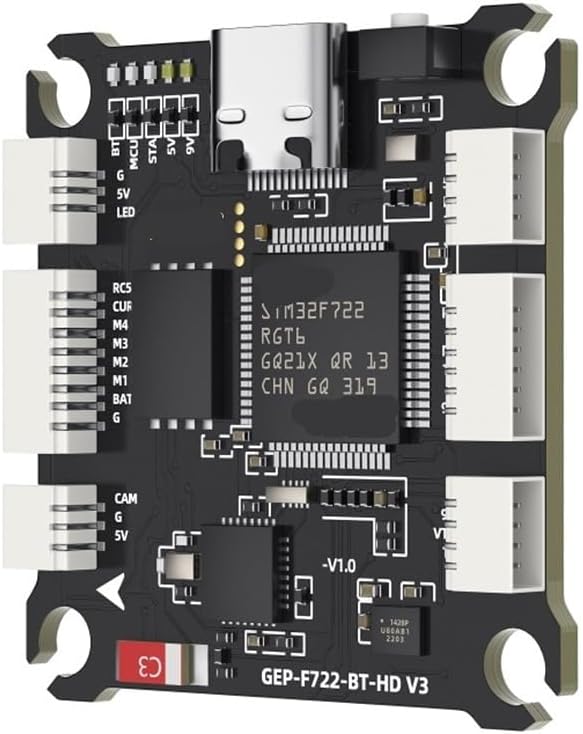
Рисунок 4: F722-BT V3 Flight Controller with connectors. This image illustrates the various white connector ports and solder pads, indicating where external components like motors, receivers, and video systems can be connected.
Инструкция по эксплуатации
1. Прошивка микропрограммы
- Download the latest BetaFlight Configurator software from the official BetaFlight webсайт.
- Подключите полетный контроллер к компьютеру с помощью кабеля USB Type-C.
- В BetaFlight Configurator перейдите на вкладку "Прошивка".
- Select the target "F722_BT_V3" and choose the desired firmware version.
- Нажмите «Загрузить прошивку [онлайн]», а затем «Прошить прошивку».
2. Initial Configuration (BetaFlight)
After flashing, connect to the flight controller in BetaFlight Configurator.
- Вкладка «Порты»: Configure UARTs for your receiver, VTX, GPS, etc. Remember UART4 is for Bluetooth.
- Вкладка «Конфигурация»: Set up ESC protocol (DShot, OneShot), accelerometer calibration, board alignment, and other basic settings.
- Вкладка «Приёмник»: Проверьте входной сигнал приемника и сопоставление каналов.
- Вкладка «Режимы»: Configure arming, flight modes, and other switches.
- Вкладка OSD: Customize the on-screen display elements.
- Вкладка «Черный ящик»: Configure logging rates and parameters for the 512M onboard black box.
3. Функциональность Bluetooth
The integrated Bluetooth allows for wireless configuration via a mobile app (e.g., SpeedyBee App or similar BetaFlight mobile configurators). Ensure Bluetooth is enabled on your mobile device and connect to the flight controller.
Обслуживание
- Регулярный осмотр: Периодически проверяйте все паяные соединения и проволочные контакты на предмет ослабления или повреждений.
- Уборка: Keep the flight controller free from dust, dirt, and moisture. Use a soft brush or compressed air for cleaning.
- Обновления прошивки: Regularly check for new firmware releases for performance improvements and bug fixes.
- Охрана окружающей среды: Avoid exposing the flight controller to extreme temperatures, humidity, or direct sunlight.
Поиск неисправностей
- FC Not Powering On:
- Проверьте подключение и полярность аккумулятора.
- Проверьте уровень входного напряжения.tage is within 3-6S LiPo range.
- Нет подключения к BetaFlight Configurator:
- Ensure USB Type-C cable is functional and properly connected.
- Установите необходимые драйверы VCP (виртуального COM-порта).
- Попробуйте использовать другой порт USB на вашем компьютере.
- Экранное меню не отображается:
- Check OSD settings in BetaFlight Configurator.
- Verify video signal connections from camera to FC and FC to VTX.
- Двигатели не вращаются:
- Ensure the drone is armed (check arming conditions in BetaFlight).
- Verify ESC connections and protocol settings.
- При необходимости откалибруйте регуляторы скорости.
- Неустойчивый полет:
- Check IMU calibration and board alignment in BetaFlight.
- Inspect for vibrations affecting the flight controller.
- Review Настройки ПИД-регулятора.
Информация о гарантии
This product is covered by a standard manufacturer's warranty against defects in materials and workmanship. The warranty period typically begins from the date of purchase. Please retain your proof of purchase for warranty claims. Damage resulting from improper installation, misuse, unauthorized modification, or accidents is not covered under warranty. For specific warranty terms and conditions, please refer to the manufacturer's official webсайте или обратитесь к продавцу.
Поддерживать
For technical assistance, troubleshooting, or further inquiries regarding the EasQjK F722-BT V3 Flight Controller, please visit the official EasQjK support website or contact their customer service. Online resources, community forums, and video tutorials may also provide valuable information for setup and configuration.
Производитель: EasQjK77521
Номер модели: EasQjK77521
ASIN: B0FP26SCG5