
Lian Li SP1000P
Lian Li SP1000P Platinum 1000W SFX Power Supply User Manual
Model: SP1000P | Brand: Lian Li
1. Информация по технике безопасности
Please read these safety instructions carefully before installing or using your power supply unit (PSU). Failure to follow these instructions may result in electric shock, fire, or damage to the product and connected devices.
- Не открыть блок питанияasinг. Высокий объемtagВнутри находятся детали, которые пользователь может обслуживать самостоятельно. Открытие корпусаasing аннулирует гарантию.
- Не Вставляйте любые предметы в решетку вентилятора или вентиляционные отверстия.
- Не block the ventilation openings of the PSU. Ensure adequate airflow for proper cooling.
- Не operate the PSU in high humidity, extreme temperatures, or in environments with excessive dust.
- Ensure the PSU is connected to a properly grounded power outlet.
- Always disconnect the power cable from the wall outlet before installing, removing, or servicing the PSU or any other computer components.
- Use only the modular cables provided with this PSU. Using incompatible cables may cause damage.
- Ensure all connectors are fully seated and secured before powering on the system. Pay special attention to the 12V-2x6 connector for graphics cards.
2. Содержимое упаковки
Проверьте наличие всех предметов в посылке:
- Lian Li SP1000P Platinum 1000W SFX Power Supply Unit
- Modular Cable Set (including 12V-2x6 connector)
- SFX-to-ATX Mounting Bracket
- Шнур питания переменного тока
- Internal Power Switch Cable (for hidden PSU installations)
- Крепежные винты
- Хомуты для кабеля
- Руководство пользователя
Video: Unboxing the Lian Li SP Platinum PSU. This video demonstrates the contents of the package, including the power supply unit, modular cables, and accessories.
3. Продукт закончилсяview
The Lian Li SP1000P is a high-performance SFX form factor power supply designed for compact and standard PC builds. It features Platinum efficiency, fully modular cables, and advanced cooling for stable and quiet operation.
3.1 Основные характеристики
- SFX Form Factor: Compact dimensions (125mm W x 63.5mm H x 100mm D) ideal for small-form-factor cases.
- Платиновый сертификат 80 Plus: Up to 92% efficiency for reduced heat, lower noise, and energy savings.
- ATX 3.1 & PCIe 5.1 Compliant: Equipped with 12V-2x6 connectors for next-generation graphics cards.
- Полностью модульные кабели: Flexible, braided DC cables for easy routing and improved airflow.
- Умное охлаждение: Fanless mode under 40% load for silent operation, with fan engagement only when needed.
- Премиум компоненты: Built with 100% Japanese 105°C-rated capacitors for superior durability and stable performance.
- SFX-to-ATX Bracket: Included for versatile installation in both SFX and standard ATX cases.
3.2 Размеры и совместимость

Image: The Lian Li SP1000P SFX Power Supply showing its compact dimensions (125mm W x 63.5mm H x 100mm D). This compact size makes it suitable for small-form-factor cases.
The compact SFX footprint (125 x 63.5 x 100 mm) ensures compatibility with small-form-factor cases. The included SFX-to-ATX bracket extends its compatibility to mid-tower and full-tower builds, offering flexible installation options.

Image: Illustration of the included SFX-to-ATX bracket and how the SFX PSU can be installed in both compact SFX and standard ATX cases.
4. Настройка и установка
Follow these steps to properly install your Lian Li SP1000P Power Supply Unit.
4.1 PSU Installation
- Prepare your case: If installing in an ATX case, attach the provided SFX-to-ATX bracket to the PSU using the included screws.
- Установите блок питания: Secure the PSU (with or without the bracket) into the designated power supply bay in your computer case using the appropriate mounting screws.
- Подключите шнур питания переменного тока: Plug the internal power switch cable into the PSU's AC inlet. If your PSU is hidden, use the provided internal power switch cable to extend the power switch functionality.
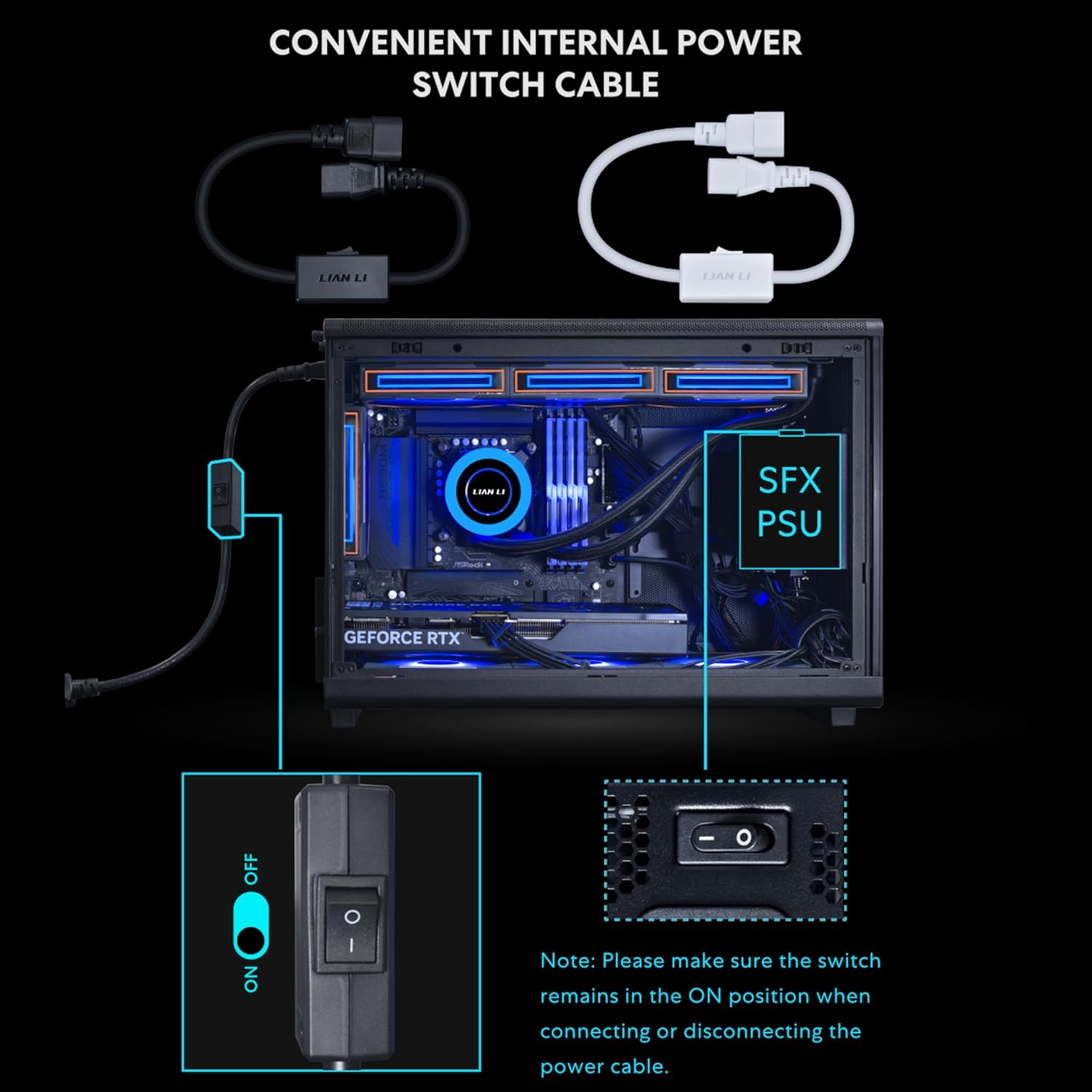
Image: The convenient internal power switch cable, which allows you to easily cut power even when the PSU is hidden inside the chassis. Ensure the switch is in the ON position when connecting or disconnecting the power cable.
Video: Demonstration of the SFX ATX Bracket Installation for the SP Platinum Power Supply. This video guides you through the process of mounting the PSU using the bracket.
4.2 Кабельные соединения
The SP1000P features fully modular, braided cables for optimal cable management and airflow.
- Мощность материнской платы: Подключите 24-контактный кабель ATX к материнской плате.
- Мощность процессора: Connect the 4+4 pin EPS/CPU cables to your motherboard's CPU power connectors. High-end motherboards may require two such connectors.
- Graphics Card Power (PCIe): Use the 12V-2x6 connector for compatible graphics cards. Ensure the blue-marked connector is fully inserted until it disappears into the socket for a secure connection. For other graphics cards, use the 6+2 pin PCIe cables.
- Периферийные устройства: Connect SATA cables for storage drives and other peripherals.

Image: Close-up of the braided modular cables, highlighting their flexibility for easy routing and clean builds.
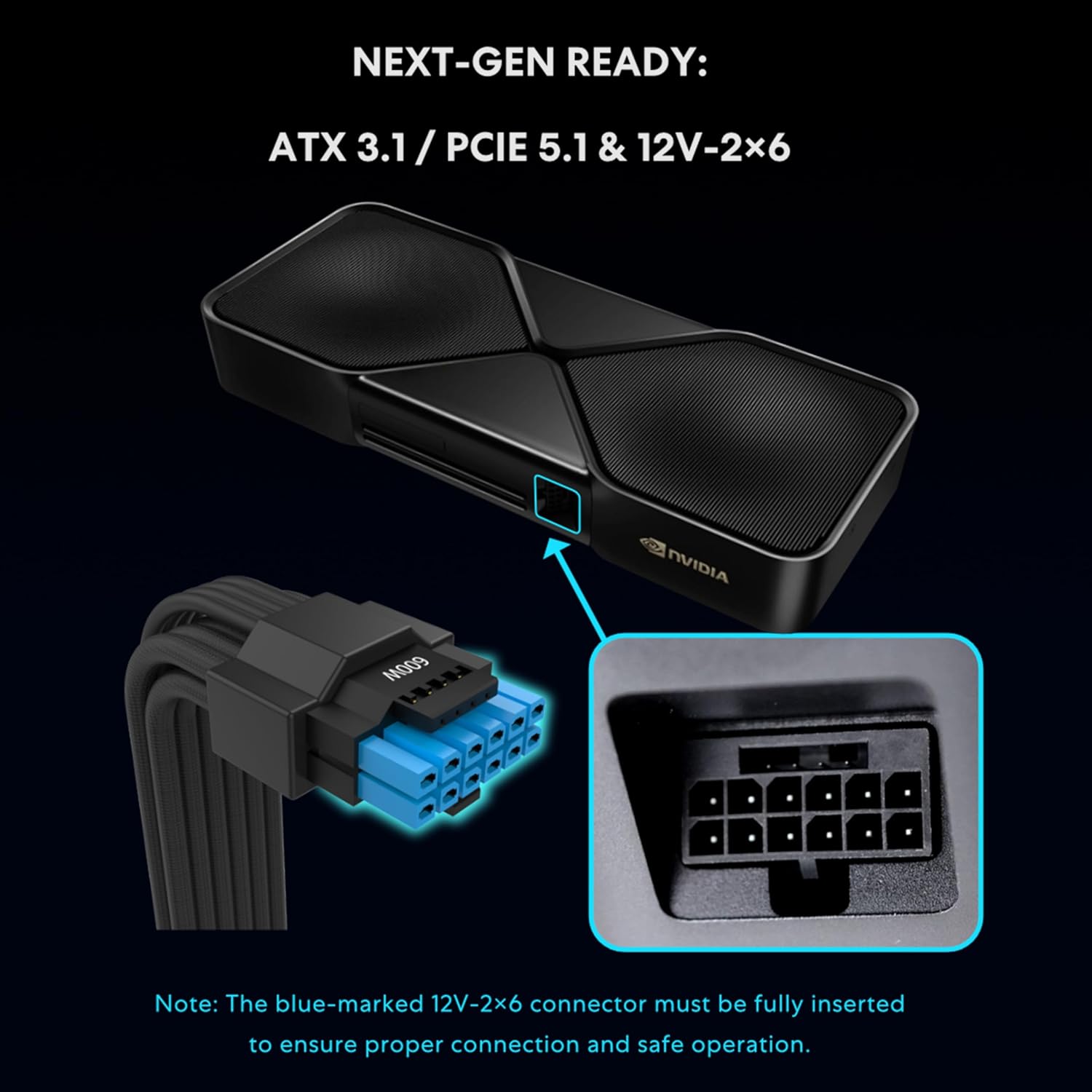
Image: Detail of the 12V-2x6 connector, emphasizing the importance of full insertion for proper connection and safe operation.

Image: A table detailing the comprehensive cable connectivity options for the SP Platinum series, including motherboard, CPU, PCIe, 12V-2x6, SATA, and SATA-PATA connectors.
5. Инструкция по эксплуатации
5.1 Smart Cooling Feature
The SP1000P features a smart cooling system with a zero-RPM mode. The fan remains off for silent operation when the system load is at or below 40%. As performance demands increase and the load exceeds 40%, the fan will automatically ramp up to maintain optimal temperatures and ensure long-term reliability.

Image: The Lian Li SP1000P power supply highlighting its smart cooling feature, which allows for silent operation at low loads.

Image: Graph illustrating the acoustic noise levels and fan speed relative to power output for both SP1000P and SP850P models, demonstrating the zero-RPM mode at lower loads.
5.2 Включение/выключение питания
After all components are securely connected, connect the main AC power cord to the PSU and a wall outlet. Use the external power switch on the PSU (or the internal power switch cable if used) to turn the unit on or off. Always ensure the system is properly shut down before disconnecting power.
6. Технические характеристики
| Особенность | Деталь |
|---|---|
| Название модели | SP1000P.B |
| Бренд | Лиан Ли |
| Форм-фактор | SFX |
| Выход Втtage | 1000 Вт |
| Сертификация эффективности | 80 Plus уровня Platinum |
| Версия АТХ | АТХ 3.1 |
| Версия PCIe | PCIe 5.1 (with 12V-2x6 connector) |
| Конденсаторы | 100% японский, 105°C |
| Метод охлаждения | Air (Smart Cooling with Zero-RPM mode) |
| Количество вентиляторов | 1 |
| Размеры (Д x Ш x В) | 4.92 x 2.5 x 3.94 дюйма (125 мм x 63.5 мм x 100 мм) |
| Vol входtage | 120 вольт (переменный ток) |
| Функции защиты | OPP/NLP/OVP/OCP/UCP/OTP/LVP/SIP (Over Power, No Load, Over Voltage, Over Current, Under Current, Over Temperature, Low Voltage, Short Circuit Protection) |

Image: A comprehensive specifications table for the Lian Li SP Platinum series, including details on models, dimensions, output, efficiency, and protection features.
7. Техническое обслуживание
Правильное техническое обслуживание обеспечивает долговечность и оптимальную производительность вашего блока питания.
- Очистка от пыли: Periodically clean dust from the PSU's fan grille and ventilation openings using compressed air. Ensure the system is powered off and unplugged before cleaning.
- Управление кабелями: Регулярно проверяйте кабельные соединения, чтобы убедиться в их надежности и отсутствии препятствий для циркуляции воздуха.
- Условия окружающей среды: Operate the PSU in a well-ventilated area, away from direct sunlight, heat sources, and excessive moisture.
8. Поиск Неисправностей
If you encounter issues with your PSU, refer to the following common troubleshooting steps:
- Нет питания:
- Убедитесь, что шнур питания переменного тока надежно подключен как к блоку питания, так и к розетке.
- Check if the power switch on the PSU (or the internal power switch cable) is in the "ON" position.
- Проверьте работоспособность розетки, подключив к ней другое устройство.
- Confirm all modular cables are correctly and fully seated into the PSU and corresponding components.
- Нестабильность системы/сбои:
- Убедитесь, что ваш блок питания работаетtage is sufficient for all your components, especially the graphics card.
- Check for loose cable connections, particularly the 12V-2x6 connector for high-power GPUs.
- Для обеспечения надлежащего охлаждения необходимо контролировать температуру системы.
- Необычный шум:
- The PSU fan operates in a zero-RPM mode at low loads. If the system load is high, fan noise is normal.
- If you hear unusual grinding or rattling, ensure no cables are obstructing the fan.
- Coil whine can occur in some PSUs under certain loads. While generally harmless, if excessive, contact support.
If problems persist after following these steps, please contact Lian Li customer support.
9. Гарантия и поддержка
The Lian Li SP1000P Platinum Power Supply comes with a Гарантия 10 год Гарантия действует с даты покупки и распространяется на дефекты материалов и изготовления при нормальной эксплуатации. Эта гарантия обеспечивает долгосрочную надежность и спокойствие.
Для получения технической поддержки, оформления гарантийных претензий или получения дополнительной помощи, пожалуйста, посетите официальный сайт Lian Li. webили обратитесь в службу поддержки клиентов. Сохраните чек о покупке для подтверждения гарантии.
Лянь Ли Чиновник Webсайт: www.lian-li.com
Ask a question about this manual
Ask about setup, troubleshooting, compatibility, parts, safety, or missing instructions. Manuals+ will review the question and use this page’s manual context to help answer it.