
1. Знакомство с продуктом
The Adoric Digital Caliper KC24 is a versatile measuring tool designed for precise measurements in household, DIY, and jewelry applications. It features a large LCD screen for easy reading, automatic power-off, and quick conversion between inch and millimeter units. Constructed from durable plastic carbon fiber composites, it provides accurate measurements without scratching delicate surfaces.
Компоненты болееview

Изображение 1.1: оконченоview of the Adoric Digital Caliper components.
- Outside Diameter Jaws: Используется для измерения внешних размеров.
- Inside Diameter Jaws: Используется для измерения внутренних размеров.
- Большой ЖК-дисплей: Shows instant digital readings.
- mm/inch Switch: Button to toggle between millimeter and inch units.
- Переключатель ВКЛ / ВЫКЛ: Button to manually turn the caliper on or off.
- Переключатель ZERO: Button to set the display to zero at any position.
- Глубинное лезвие: Used for measuring depths.
- Отсек для батареи: Houses the LR44 1.5V battery.
2. Настройка
Установка аккумулятора
The Adoric Digital Caliper requires one LR44 1.5V battery (included). Follow these steps to install or replace the battery:
- Locate the battery compartment on the back of the digital caliper.
- Use a small screwdriver to unscrew the fastener securing the battery compartment cover.
- Remove the cover and insert the LR44 battery with the positive (+) side facing up.
- Установите на место крышку батарейного отсека и закрепите ее винтом.

Image 2.1: Steps for replacing the battery in the digital caliper.
3. Инструкция по эксплуатации
Включение/выключение питания
- Автоматический режим включен: The caliper will automatically turn on when you slide the measuring rail.
- Ручной режим: Press the 'ON' button to turn the caliper on.
- Автоматическое выключение: The caliper will automatically shut off after 5 minutes of no operation to conserve battery life.
- Ручное выключение: Press the 'OFF' button to manually turn the caliper off.
Нулевая калибровка
To ensure accurate measurements, it is recommended to zero the caliper before use or when starting a new measurement from a specific point:
- Close the measuring jaws completely, ensuring they are clean and free of debris.
- Press the 'ZERO' button. The display will show '0.00' (or '0.0' in mm mode).
- You can also set zero at any position to perform differential measurements.
Unit Conversion (Inch/Millimeter)
Easily switch between measurement units:
- Press the 'mm/inch' button (blue button) to toggle the display between millimeters (mm) and inches (in).

Image 3.1: Unit conversion between millimeters and inches.
4 Режимы измерения
The Adoric Digital Caliper supports four distinct measurement types:
- External Measuring: Use the long jaws to measure the outer diameter or length of objects.
- Internal Measuring: Use the top jaws to measure the inner diameter of objects.
- Depth Measuring: Use the long probe to measure the depth of holes or steps.
- Step Measuring: Use the step design to measure the height or length of steps.
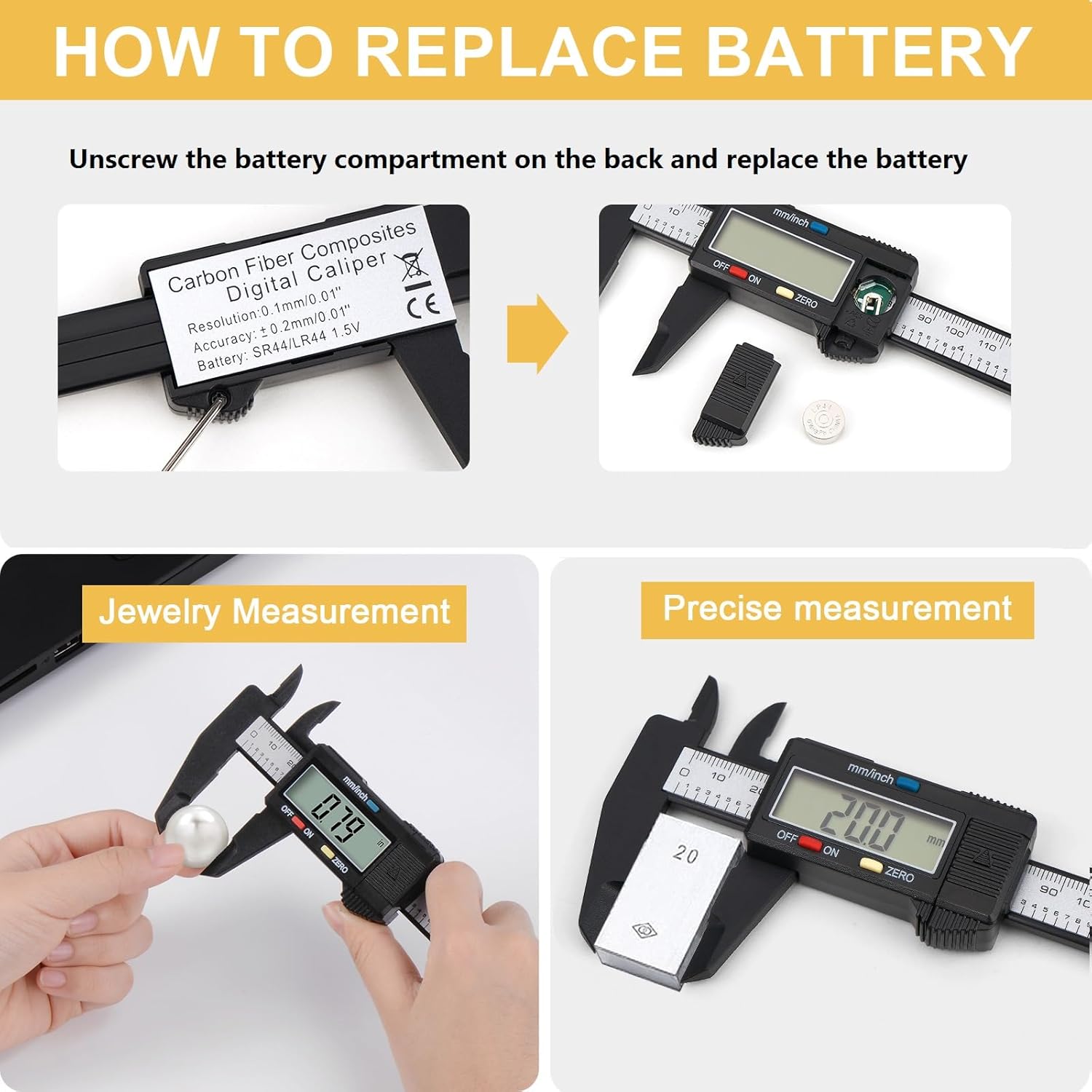
Image 3.2: Demonstrations of the four measuring modes.
4. Техническое обслуживание
Чистка и хранение
- Keep the caliper clean and dry. Wipe the measuring surfaces with a soft, dry cloth after each use.
- Avoid exposing the caliper to direct sunlight, high humidity, or extreme temperatures.
- Store the caliper in a protective case (if available) to prevent damage.
Уход за аккумулятором
- Replace the battery when the display becomes dim or erratic. Refer to Section 2 for battery replacement instructions.
- Remove the battery if the caliper will not be used for an extended period to prevent leakage and damage.
5. Поиск Неисправностей
- Неточные показания: If readings appear inaccurate, slide the LCD screen to the left end (to '0' on the scale) and then press the 'ZERO' button to recalibrate. Ensure measuring surfaces are clean.
- Дисплей не работает: Проверьте правильность установки аккумулятора и его достаточный заряд. При необходимости замените аккумулятор.
- Stuck Display: If the display shows a fixed number and does not change, try removing and reinserting the battery. If the issue persists, the unit may require service.
6. Технические характеристики
| Бренд | Адорик |
| Номер модели | КС24 |
| Материал | Plastic Carbon Fiber Composites |
| Диапазон измерения | 0-6 дюймов / 0-150 мм |
| Разрешение | 0.01 дюйма / 0.1 мм |
| Точность | ±0.2 mm / ±0.01 inches |
| Источник питания | 1 батарейка LR44 1.5 В (в комплекте) |
| Размеры продукта | 9.45 дюйма (Д) x 3 дюйма (Ш) |
| Вес товара | 2.08 унции |
Note: This digital caliper is intended for household and DIY measurements. For industrial applications requiring extreme precision, a professional-grade measuring tool is recommended.
7. Гарантия и поддержка
Adoric products are designed for reliability and performance. For any questions, concerns, or support needs regarding your Digital Caliper KC24, please refer to the product's official support channels or contact the seller directly. Keep your purchase receipt for warranty purposes.