
1. Введение
Thank you for choosing the EWEADN V80 Wired TKL RGB Gaming Keyboard. This manual provides essential information for setting up, operating, maintaining, and troubleshooting your new keyboard. The V80 keyboard features an 80% Tenkeyless (TKL) layout, PBT keycaps, quiet membrane switches, 26-key anti-ghosting, and dynamic RGB backlighting, designed for an ergonomic and efficient user experience.
2. Содержимое упаковки
- Клавиатура EWEADN V80
- USB-кабель
- Руководство пользователя
- 2 Year Manufacturer Warranty Information
3. Инструкции по настройке
The EWEADN V80 keyboard is designed for plug-and-play convenience, requiring no driver installation for basic functionality.
- Подключите USB-кабель: Locate the USB-C port on the keyboard (typically on the top edge). Connect one end of the provided USB cable to this port.
- Подключитесь к вашему устройству: Plug the other end of the USB cable into an available USB-A port on your computer (Laptop, PC, etc.).
- Распознавание системы: Your operating system (Windows, macOS) should automatically detect and configure the keyboard. A setup assistant may appear on macOS to identify the keyboard type; follow the on-screen prompts.
- Отрегулируйте ножки клавиатуры: For optimal typing comfort, extend the two-stage adjustable kickstands located on the underside of the keyboard to achieve your preferred typing angle.
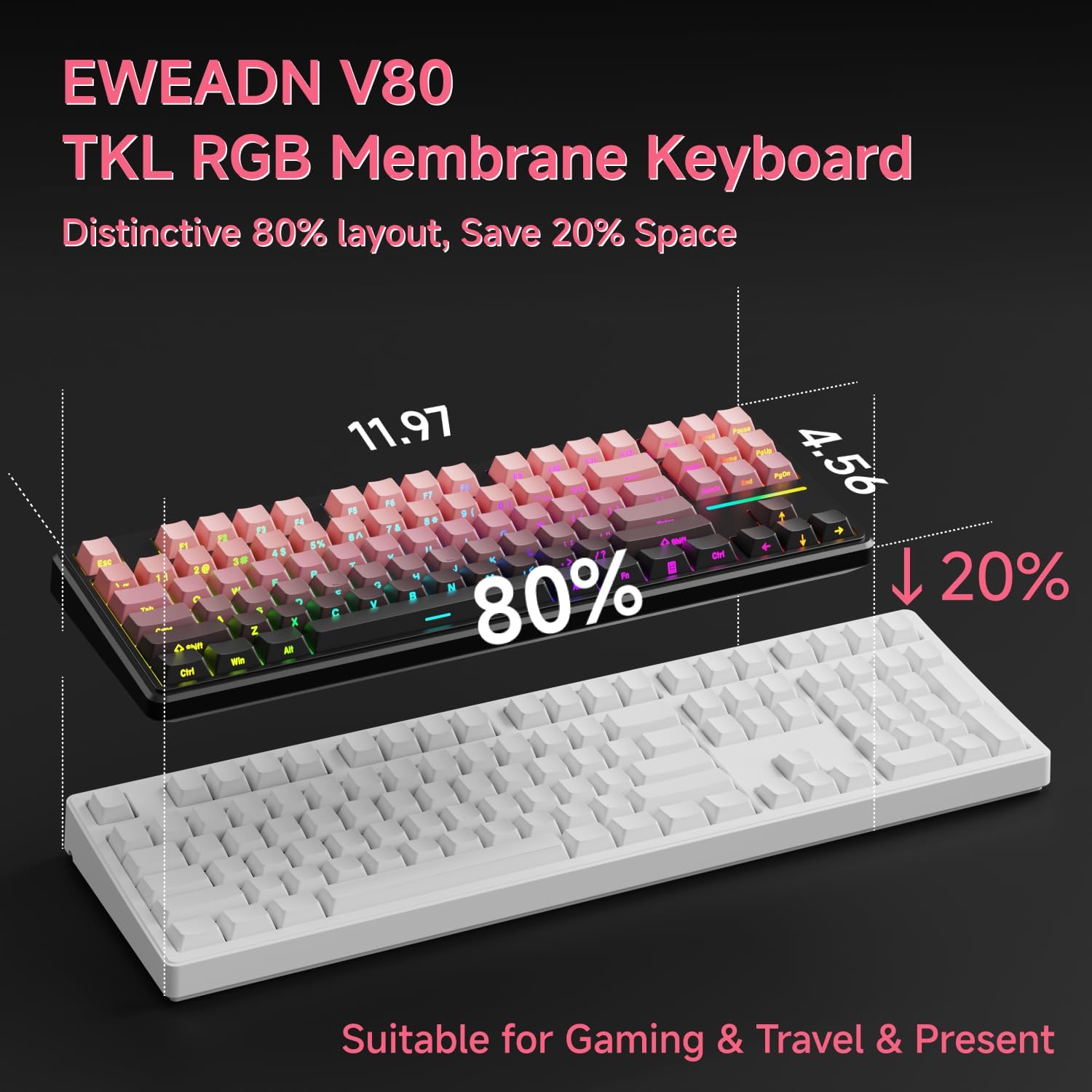
Image: Connecting the USB-C cable to the EWEADN V80 keyboard.

Image: The underside of the EWEADN V80 keyboard with its two-stage adjustable kickstands extended for ergonomic typing.
4. Инструкция по эксплуатации
4.1 Управление подсветкой RGB
The EWEADN V80 features dynamic RGB backlighting with multiple modes and adjustable settings.
- Включение/выключение подсветки: Нажимать Fn + Возврат на одну позицию.
- Изменить режим освещения: Нажимать Fn + Вставлять to cycle through 12 dynamic lighting effects.
- Отрегулируйте яркость: Нажимать Fn + PU (Прокрутите страницу вверх) для увеличения яркости, и Fn + PD (Page Down) to decrease brightness.
- Регулировка скорости освещения: Нажимать Fn + -= снизить скорость, и =+ для увеличения скорости.
- Light Strip Control: Нажимать Fn + P to control the side light strip.

Image: The EWEADN V80 keyboard showcasing various RGB backlight modes, including static colors, rainbow wave, and cycling ripple effects.
Video: Demonstrates the dynamic RGB lighting effects of the EWEADN V80 keyboard, cycling through different colors and patterns.
4.2 Комбинации функциональных клавиш
The V80 keyboard utilizes the Fn key for various multimedia and system functions.
| Комбинированная кнопка | Функция |
|---|---|
| Fn + F1 | Яркость экрана- |
| Fn + F2 | Яркость экрана+ |
| Fn + F3 | Преобразовать окно |
| Fn + F4 | Микрофон |
| Fn + F5 | Мультимедийный |
| Fn + F6 | Предыдущая песня |
| Fn + F7 | Следующая песня |
| Fn + F8 | Объем- |
| Fn + F9 | Объем+ |
| Fn + Ф10 | Немой |
| Fn + Ф11 | Мой компьютер |
| Fn + Ф12 | Калькулятор |
| Комбинированная кнопка | Функция |
|---|---|
| Fn + F1 | Яркость экрана- |
| Fn + F2 | Яркость экрана+ |
| Fn + F3 | Multitasking Control |
| Fn + F4 | Стартовая площадка |
| Fn + F5 | Предыдущая песня |
| Fn + F6 | Следующая песня |
| Fn + F7 | Воспроизведение/Пауза |
| Fn + F8 | Объем- |
| Fn + F9 | Объем+ |
| Fn + Ф10 | Немой |
| Fn + Ф11 | Мой компьютер |
| Fn + Ф12 | Калькулятор |
4.3 Анти-гостинг
The V80 keyboard features 26-key rollover anti-ghosting, ensuring that every keypress is registered accurately, even when multiple keys are pressed simultaneously during intense gaming or fast typing. This prevents missed inputs and enhances performance.

Image: The EWEADN V80 keyboard illustrating its 26-key anti-ghosting capability, showing multiple simultaneous key presses being registered.
5. Особенности
- Wired Connectivity & Multi-System Support: The USB-C wired design provides a stable, interference-free connection with zero input lag. It is compatible with Windows and Mac operating systems, offering versatile integration for various devices.
- 80% компоновка TKL: The Tenkeyless design saves significant desk space, promoting a cleaner and more efficient setup without sacrificing essential keys for gaming or productivity.
- Quiet Membrane Operation: Equipped with quiet membrane switches, the keyboard delivers tactile, mechanical-like feedback while minimizing noise, ideal for environments where quiet operation is preferred.
- Эргономичная регулировка: An integrated two-stage kickstand allows users to adjust the typing angle, providing optimal wrist support and reducing strain during prolonged use.
- Колпачки клавиш PBT: Durable double-shot injection-molded PBT keycaps feature subtle side-printed legends, crisp backlight transmission, and a matte texture that resists shine and improves grip for extended use.
- 26-клавишная защита от фантомных нажатий: Ensures accurate registration of every keypress, even during rapid and simultaneous inputs, crucial for competitive gaming.

Image: The EWEADN V80 keyboard demonstrating its plug-and-play compatibility with various operating systems including Windows, Mac, iOS, and Android.

Изображение: Подробный view of the EWEADN V80's upgraded side-printed PBT keycaps, emphasizing their durability, matte texture, and aesthetic appeal.

Image: A close-up of the EWEADN V80's membrane gaming switches, illustrating their smooth, silent, and strain-free operation.
Video: A short demonstration of the EWEADN V80 Wired RGB Gaming Keyboard, highlighting its compact design and RGB lighting.
Video: Showcases the EWEADN V80 Cute Pink Silent Keyboard, emphasizing its quiet typing experience and aesthetic appeal.
6. Технические характеристики
| Особенность | Деталь |
|---|---|
| Бренд | ЭВИДН |
| Номер модели | В80 |
| Технология связи | USB-C (проводной) |
| Описание клавиатуры | Мембрана |
| Тип переключателя | Mechanical-like |
| Количество ключей | 87 |
| Раскладка клавиатуры | QWERTY |
| Подсветка клавиатуры | RGB (12 dynamic modes) |
| Анти-призрак | 26-клавишное одновременное нажатие |
| Колпачки | Double-shot PBT, Side-Printed Legends |
| Эргономические характеристики | Два-сtagрегулируемая подставка |
| Совместимые устройства | Laptop, PC, Smartphone, Tablet (via compatible adapters) |
| Размеры продукта (Д x Ш x В) | 14.37" x 5.47" x 1.53" |
| Материал | Пластик |
| Цвет | BlackBerry Pink |
7. Техническое обслуживание
Для обеспечения долговечности и оптимальной работы вашей клавиатуры EWEADN V80 следуйте этим рекомендациям по техническому обслуживанию:
- Регулярная уборка: Use a soft, lint-free cloth to wipe down the keycaps and keyboard surface. For deeper cleaning, a can of compressed air can remove dust and debris from between the keys.
- Избегайте жидкостей: Do not spill liquids on the keyboard. If a spill occurs, immediately disconnect the keyboard from your device and allow it to dry completely before reconnecting.
- Обращаться с осторожностью: Avoid dropping the keyboard or subjecting it to excessive force, which can damage internal components or keycaps.
- Управление кабелями: Ensure the USB cable is not kinked or strained, as this can lead to damage over time.
8. Поиск Неисправностей
If you encounter any issues with your EWEADN V80 keyboard, please refer to the following common solutions:
- Клавиатура не отвечает:
- Убедитесь, что USB-кабель надежно подключен к клавиатуре и компьютеру.
- Попробуйте подключить клавиатуру к другому USB-порту вашего компьютера.
- Test the keyboard on another computer to determine if the issue is with the keyboard or your device.
- RGB-подсветка не работает:
- Убедитесь, что подсветка включена, используя Fn + Возврат на одну позицию.
- Adjust brightness levels using Fn + PU/PD.
- Keys Not Registering Correctly (Ghosting):
- The V80 has 26-key anti-ghosting. If you experience issues, ensure your operating system and any gaming software are up to date.
- Clean the affected keys to remove any debris that might be interfering with the switch mechanism.
Если эти шаги не помогли решить вашу проблему, обратитесь в службу поддержки клиентов.
9. Гарантия и поддержка
The EWEADN V80 Wired TKL RGB Gaming Keyboard comes with a Гарантия производителя 2 года. For any inquiries, technical assistance, or warranty claims, please contact our dedicated customer support team.
Поддержка по электронной почте: eweadnkeyboard@outlook.com

Image: EWEADN's commitment to quality and customer support, featuring various products.