
ZEAPON EVO D60
Руководство пользователя моторизованного слайдера для камеры ZEAPON EVO D60
Model: EVO D60 | Brand: ZEAPON
1. Введение
Thank you for choosing the ZEAPON EVO D60 Motorized Camera Slider. This manual provides detailed instructions for the proper setup, operation, and maintenance of your device. Please read this manual thoroughly before use to ensure optimal performance and longevity of your slider.

Image 1.1: The ZEAPON EVO D60 Motorized Camera Slider, showcasinг его компактный дизайн.
2. Что в коробке
- ZEAPON EVO D60 Motorized Camera Slider Unit
- Зарядный кабель USB-C
- Компактный дорожный футляр
- Руководство пользователя
3. Настройка
3.1 Установка слайдера
The EVO D60 can be mounted on a tripod or placed on a flat surface. Ensure the mounting surface is stable and level to prevent movement during operation.

Image 3.1: The EVO D60 slider mounted on a tripod, ready for camera attachment.
3.2 Установка камеры
Secure your camera to the slider's mounting plate. Ensure the camera is firmly attached and balanced. The slider supports both horizontal and vertical loads within specified limits.

Image 3.2: Illustration of the horizontal load capacity, not exceeding 5kg.

Image 3.3: Illustration of the vertical load capacity, not exceeding 2.5kg.
3.3 Питание устройства
Connect the USB-C cable to the slider for power. The side-mounted battery design ensures that the camera body does not interfere with control interfaces, eliminating the need for a ball head to elevate the camera and reducing instability risks.
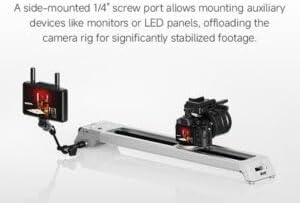
Image 3.4: Detail of the side-mounted battery compartment, designed for convenience and stability.
4. Инструкция по эксплуатации
4.1 Basic Movement and Speed Control
The EVO D60 features an ultra-quiet brushless motor for precise and silent operation. Adjust the speed using the dedicated control knob, ranging from 0.5mm/s to 57mm/s for smooth transitions.

Image 4.1: The control panel with speed dial and A/B point setup buttons.
4.2 Setting Waypoints (A/B Points)
You can set specific start (A) and end (B) points for automated movements. Use the dedicated buttons on the slider or the Zeapon Lab app to define these points. The slider also supports manual point selection.
4.3 Focus-Locked Orbital Shots and Panorama
Achieve mechanically stabilized orbital shots with up to 125° pan. The system keeps your subject centered, eliminating the need for post-production adjustments. The slider also supports precise panoramic movements.

Image 4.2: Close-up of the slider's mechanism for marking and returning to precise positions.

Image 4.3: The magnetic center return feature ensures consistent starting points.
4.4 Управление приложениями
Utilize the Zeapon Lab app for advanced control, including setting waypoints, loop modes, and customizing shooting parameters. The app provides an intuitive interface for precise adjustments.
5. Технические характеристики
| Особенность | Спецификация |
|---|---|
| Модель | EVO D60 |
| Длина | 670 мм |
| Перемещение центральной точки линзы | 440 мм |
| Горизонтальная грузоподъемность | ≤5кг |
| Вертикальная грузоподъемность | ≤2.5кг |
| Минимальная скорость | 0.5мм/с |
| Максимальная скорость | 57мм/с |
| Максимальный угол панорамирования | 55° |
| Максимальный панорамный угол | 125° |
| Вес нетто | 1.7кг |
| Рабочая мощность | 15 Вт |
| Vol входtage | USB-C: 5~12V / Battery: 7.2V~8.4V |
6. Техническое обслуживание
To ensure the longevity and optimal performance of your EVO D60 slider, follow these maintenance guidelines:
- Уборка: Regularly wipe the slider rails and body with a soft, dry cloth to remove dust and debris. Avoid using harsh chemicals or abrasive materials.
- Хранилище: Store the slider in its compact travel case in a dry, cool environment when not in use.
- Уход батареи: If using an external battery, ensure it is charged regularly, even during periods of non-use, to maintain battery health.
- Инспекция: Периодически проверяйте все винты и соединения, чтобы убедиться в их надежности.
7. Поиск Неисправностей
If you encounter issues with your EVO D60 slider, refer to the following common troubleshooting steps:
- Slider Not Moving:
- Ensure the slider is properly powered and the power button is engaged.
- Check for any obstructions on the slider rails.
- Verify that the load on the slider does not exceed the specified capacity.
- Проблемы с подключением приложения:
- Убедитесь, что Bluetooth включен на вашем смартфоне.
- Restart the Zeapon Lab app and the slider.
- Проверьте наличие обновлений приложения.
- Необычный шум:
- Inspect the rails for any foreign particles.
- Ensure the camera and any accessories are securely mounted and not causing imbalance.
If problems persist, please contact ZEAPON customer support for further assistance.
8. Гарантия и поддержка
ZEAPON products are designed for reliability and performance. For warranty information and customer support, please refer to the official ZEAPON webили обратитесь к местному дистрибьютору. Сохраните чек о покупке в качестве подтверждения покупки для предъявления гарантийных претензий.
Для получения технической поддержки или ответов на вопросы посетите сайт. ZEAPON Store on Amazon or the official ZEAPON webсайт.
Ask a question about this manual
Ask about setup, troubleshooting, compatibility, parts, safety, or missing instructions. Manuals+ will review the question and use this page’s manual context to help answer it.