
1. Введение
This manual provides essential information for setting up, operating, maintaining, and troubleshooting your HP Chromebook 14a-ne1013dx. This device is designed for productivity and entertainment, featuring a reliable Intel Celeron N4500 processor, a 14-inch HD display, and the Chrome OS operating system.
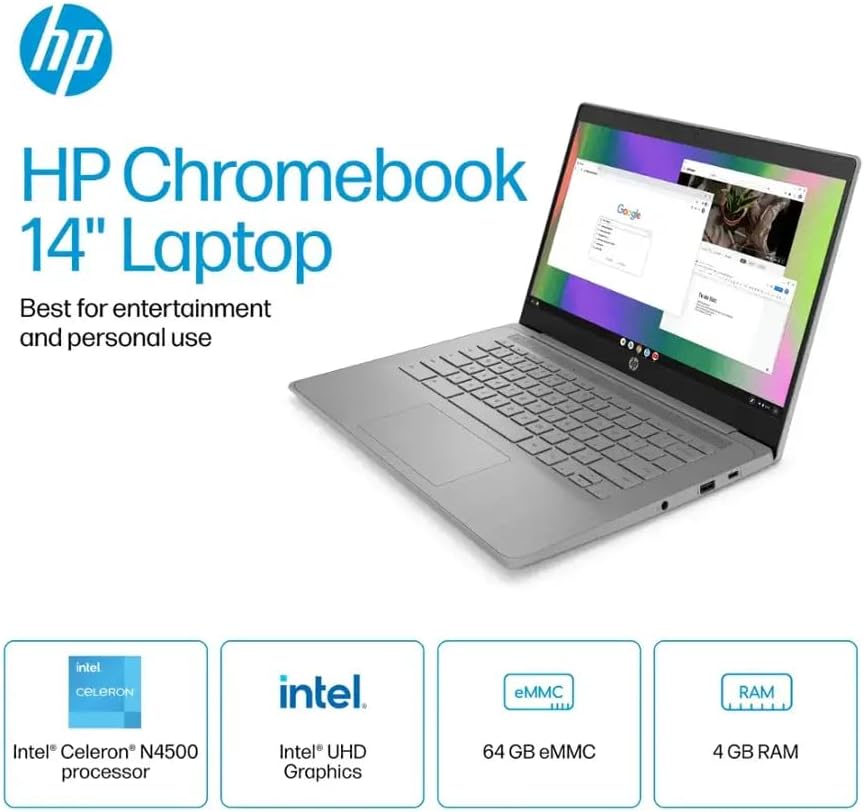
Рисунок 1.1: HP Chromebook 14a-ne1013dx overview, highlighting its core components: Intel Celeron N4500 processor, Intel UHD Graphics, 64GB eMMC storage, and 4GB RAM.
2. Настройка
2.1 Распаковка и первоначальный осмотр
Осторожно извлеките все компоненты из упаковки. Убедитесь, что все перечисленные ниже предметы присутствуют и не повреждены.

Рисунок 2.1: Items included in the box: HP Chromebook 14-inch Laptop, 45W USB Type-C power adapter, and setup instructions.
Что в коробке:
- HP Chromebook 14-inch Laptop (Model: 14a-ne1013dx)
- 45W USB Type-C Power Adapter
- Инструкции по установке
- Интегрированный Webкулачок
2.2 Включение и начальная настройка
- Connect the 45W USB Type-C power adapter to the Chromebook and a power outlet.
- Open the laptop lid. The Chromebook should power on automatically. If not, press the power button located on the keyboard.
- Follow the on-screen prompts to select your language, connect to a Wi-Fi network, and sign in with your Google account. A Google account is required to use Chrome OS.
3. Operating Your Chromebook
3.1 Chrome OS Basics
Your HP Chromebook runs on Chrome OS, a lightweight operating system designed for speed, simplicity, and security. It integrates seamlessly with Google services and provides access to a wide range of web-based applications and Android apps.

Рисунок 3.1: Chrome OS security features, including built-in virus protection and automatic updates, ensuring a secure and efficient user experience.
3.2 Дисплей и мультимедиа
The 14-inch HD (1366 x 768) micro-edge, anti-glare display provides clear visuals for work and entertainment. Dual speakers enhance the audio experience.

Рисунок 3.2: The 14-inch micro-edge display is ideal for streaming and multimedia consumption, allowing multiple applications to be viewизд одновременно.
3.3 Порты и возможности подключения
Your Chromebook is equipped with various ports for connecting peripherals and external displays.

Рисунок 3.3: Port layout of the HP Chromebook 14a-ne1013dx, including HDMI 1.4b, USB Type-A, USB Type-C, and a headphone/microphone combo jack.
- 1x SuperSpeed USB 3.1 Type-C: Для передачи данных, подачи питания и вывода изображения на экран.
- 2x SuperSpeed USB 3.0 Type-A: Для подключения USB-устройств, таких как мыши, клавиатуры и внешние накопители.
- 1x HDMI 1.4: Для подключения к внешним мониторам или телевизорам.
- 1x Headphone/microphone combo: Для аудиовхода и аудиовыхода.
Wireless connectivity includes Wi-Fi (802.11a/b/g/n/ac) and Bluetooth for connecting to wireless networks and accessories.
4. Техническое обслуживание
4.1 Cleaning Your Chromebook
- Экран: Слегка используйте мягкую безворсовую ткань.ampened with water or a screen cleaner specifically designed for electronics. Do not spray cleaner directly onto the screen.
- Клавиатура и корпус: Используйте мягкую сухую ткань. Для удаления стойких загрязнений используйте слегка мягкую ткань.amp Можно использовать ткань. Избегайте использования агрессивных химикатов и абразивных материалов.
- Порты: Ensure ports are free of dust and debris. Use compressed air if necessary, holding the can upright to prevent liquid propellant from spraying.
4.2 Уход за аккумулятором
- Чтобы продлить срок службы батареи, избегайте экстремальных температур.
- Рекомендуется периодически разряжать батарею ниже 20%, а затем полностью заряжать её.
- The Chromebook supports HP Fast Charge for quick recharging.
5. Поиск Неисправностей
5.1 Общие проблемы и решения
| Проблема | Возможное решение |
|---|---|
| Chromebook does not power on. | Ensure the power adapter is securely connected to both the Chromebook and a working power outlet. Try a different outlet. If the battery is completely drained, it may take a few minutes to show signs of charging. |
| Невозможно подключиться к Wi-Fi. | Check if Wi-Fi is enabled in Chrome OS settings. Restart your router and modem. Verify the Wi-Fi password. Try connecting to a different network if available. |
| Внешний дисплей не обнаружен. | Ensure the HDMI cable is securely connected to both the Chromebook and the external display. Check the input source on your external display. Try a different HDMI cable or port if available. |
| Низкая производительность. | Close unnecessary browser tabs and applications. Clear browser cache and cookies. Ensure Chrome OS is up to date. Consider a powerwash (factory reset) as a last resort, backing up your data first. |
| WebКамера не работает. | Ensure no physical cover is obstructing the webcam. Check privacy settings in Chrome OS to ensure applications have permission to access the camera. Restart the Chromebook. |
6. Технические характеристики
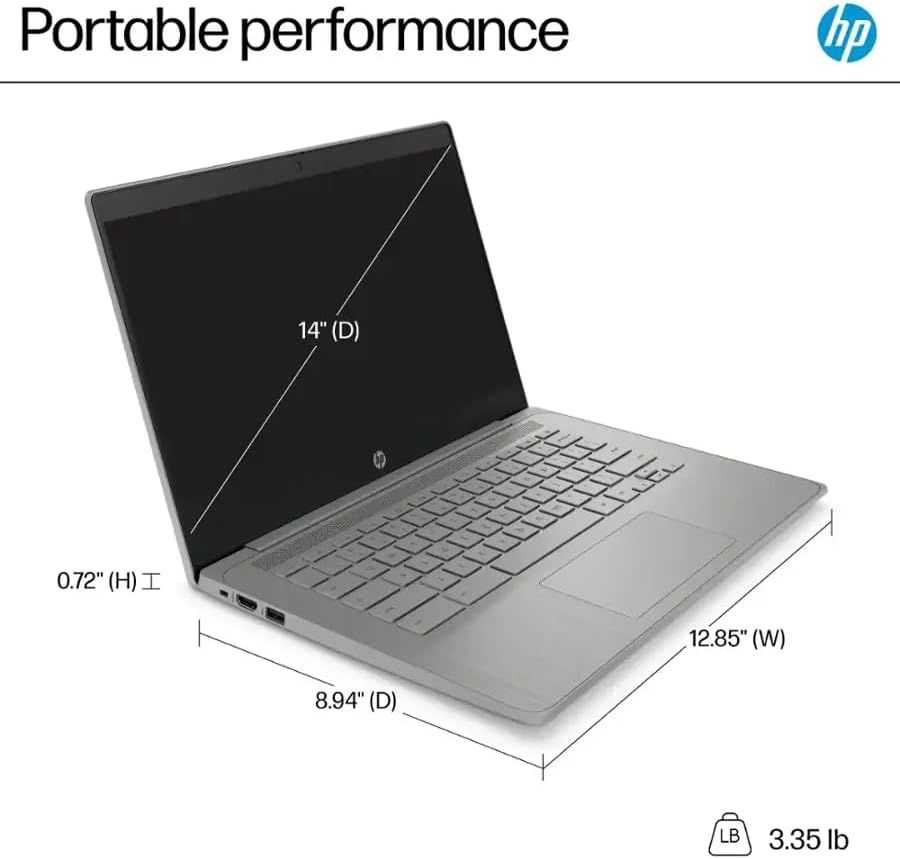
Рисунок 6.1: Physical dimensions and weight of the HP Chromebook 14a-ne1013dx.
| Особенность | Деталь |
|---|---|
| Название модели | 14a-ne1013dx |
| Процессор | Intel Celeron N4500 (1.1 GHz, up to 2.8 GHz burst) |
| Графика | Intel UHD Graphics (интегрированная) |
| Отображать | 14-inch diagonal, HD (1366 x 768), micro-edge, anti-glare, 250 nits, 60Hz LCD |
| БАРАН | 4 ГБ DDR4 SDRAM |
| Хранилище | 64 ГБ eMMC |
| Операционная система | ОС Chrome |
| Беспроводное подключение | Wi-Fi 802.11a/b/g/n/ac, Bluetooth |
| Порты | 1x SuperSpeed USB 3.1 Type-C, 2x SuperSpeed USB 3.0 Type-A, 1x HDMI 1.4, 1x Headphone/microphone combo |
| Встроенные медиа | Webкулачок |
| Размеры (Д x Ш x В) | 12.85 x 8.94 x 0.72 дюйма (32.64 x 22.71 x 1.83 см) |
| Масса | 3.35 фунтов (1.52 кг) |
| Цвет | Серый |
| Особые возможности | Chrome OS, HP Fast Charge |
7. Информация о гарантии
Your HP Chromebook 14a-ne1013dx comes with a Ограниченная гарантия сроком на один год. Please refer to the warranty documentation included with your product for full terms and conditions. Keep your proof of purchase for warranty claims.
8 Поддержка
For technical assistance, driver downloads, or further product information, please visit the official HP support website. You can typically find support resources by searching for your model number (14a-ne1013dx) on the HP support portal.
Поддержка HP Webсайт: www.hp.com/support


