
bmani T16
bmani Wireless Earbuds User Manual
Модель: T16
Brand: bmani
Введение
Welcome to the bmani Wireless Earbuds user manual. These Bluetooth headphones are designed for comfort and performance, featuring a secure over-ear fit, long battery life, and intuitive controls. This manual will guide you through setting up, operating, and maintaining your new earbuds.
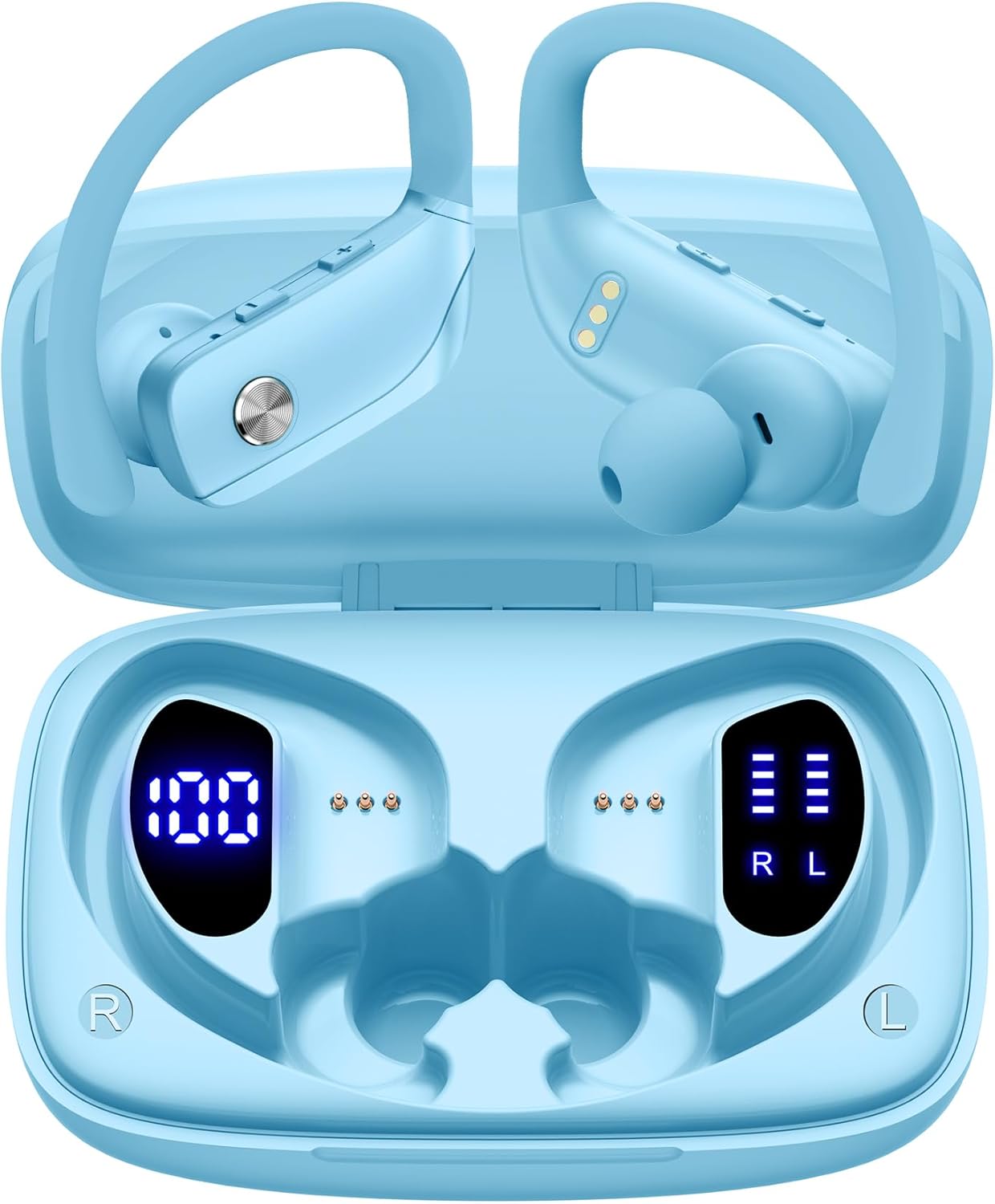
Image: The bmani Wireless Earbuds in their open sky blue charging case, showcasing the earbuds and the case's interior.
Что в коробке?
- Беспроводные наушники
- Зарядный футляр
- Eartips (three size options: L, M, S)
- Кабель типа C
- Руководство пользователя (этот документ)

Image: This image displays all the items included in your bmani Wireless Earbuds package: the two wireless earbuds, their charging case, a set of three different sized eartips (L, M, S), a Type-C charging cable, and the user manual.
Продукт болееview & Характеристики
The bmani Wireless Earbuds are engineered for an exceptional audio experience with user-friendly features.
Dual LED Displays Charging Case
The charging case features dual LED displays. The left display shows the remaining battery power of the case in percentage. The right side indicates the charging process of each earbud with four grids, each representing 25% of the bud's power. The LED indicator light will flash during charging.

Image: This image highlights the dual LED digital display on the charging case. The left screen shows the charging case's battery capacity as a percentage, while the right screen displays the power status of the left (L) and right (R) earbuds using four bars each.
Длительный срок службы батареи
Enjoy extended listening sessions with up to 8 hours of music time per earbud and an additional 40 hours provided by the 600mAh charging case, totaling 48 hours of playback.

Image: This diagram illustrates the impressive battery life: 8 hours of music time per earbud (50mAh each) and an additional 40 hours of listening time provided by the 600mAh charging case, totaling 48 hours of playback.
Bluetooth 5.0 and Hi-Fi Stereo Sound Quality
Equipped with advanced Bluetooth 5.0 technology, these earbuds provide a clear and smooth connection with extended range and fewer dropouts, ensuring crystal-clear calls and uninterrupted music listening. The 10mm speakers deliver Hi-Fi stereo sound.

Image: This image visually represents the 10mm speakers within the earbuds, emphasizing their capability to deliver Hi-Fi stereo sound.

Image: This image emphasizes the Bluetooth 5.0 technology, offering extended range and fewer dropouts, and the integration with voice assistants like Siri.
Designed for Sports (IPX5 Water Resistant)
These sport headphones are designed to stay securely in place during long hours of training, preventing shifting or falling out. They come with flexible earhooks and three pairs of ear caps (S, M, L) to ensure a comfortable and suitable fit, even during intense activities like camping, running, or working out. They are also IPX5 water-resistant, protecting them from splashes and sweat.

Image: This image shows a woman wearing the earbuds during exercise, highlighting their secure fit. An inset graphic demonstrates the flexible earhooks and the three included eartip sizes (L, M, S) for personalized comfort.

Image: This infographic summarizes key features: Dual LED Battery Display, 600mAh Charging Case, Anti-skid Earhooks, IPX5 Waterproof rating, Hi-Fi Stereo sound, and Voice Assistant compatibility.
Настраивать
Зарядка наушников и футляра
Перед первым использованием полностью зарядите наушники и зарядный футляр.
- Connect the provided Type-C cable to the charging port on the back of the case.
- Подключите другой конец к источнику питания USB.
- Светодиодный дисплей на корпусе будет отображать ход зарядки.
- Once fully charged, the display will show 100% for the case and full bars for both earbuds.
Pairing with Your Device (One-step Pairing)
The bmani earbuds feature automatic pairing for convenience.
- Откройте зарядный кейс и достаньте оба наушника. Они автоматически включатся и попытаются подключиться друг к другу.
- На вашем устройстве (смартфоне, планшете, ноутбуке и т. д.) включите Bluetooth.
- Искать В списке доступных устройств Bluetooth выберите устройство "T16" и подключитесь к нему.
- После подключения вы услышите звуковой сигнал, и наушники будут готовы к использованию.
- Наушники автоматически переподключатся к последнему сопряженному устройству при извлечении из чехла.

Image: This image demonstrates the one-step pairing process, showing the earbuds connected to a smartphone. It also highlights their wide compatibility with various Bluetooth-enabled devices, including notebooks, TVs, desktops, smartwatches, and tablets.
Инструкция по эксплуатации
Ношение наушников
Для оптимального звучания и комфорта убедитесь, что наушники надеты правильно.
- Наденьте заушный крючок на заднюю часть уха.
- Insert the ear cap into your ear canal.
- Adjust by twisting the earbud for a comfortable and secure fit.

Image: This visual guide provides three simple steps for wearing your earbuds: 1. Place the ear hook over your ear. 2. Insert the ear cap into your ear. 3. Adjust the earbud by twisting it for a secure and comfortable fit.
Управление
The bmani earbuds feature intuitive button controls.
| Действие | Функция |
|---|---|
| Нажмите один раз | Воспроизведение/Пауза музыки, Ответ/Завершение вызова |
| Quick Double-click (R) | Следующий трек |
| Quick Double-click (L) | Предыдущий трек |
| Press "+" Button | Увеличить громкость |
| Press "-" Button | Уменьшить громкость |
| Quick Triple-click | Активировать голосовой помощник |
| Держать | Включение/выключение питания |

Image: This image illustrates the dual audio controls on the earbuds. It shows the physical volume buttons (+/-) and a diagram explaining single click for play/pause, double click for track navigation, and holding the button for power on/off.

Image: This infographic details the various controls: single click for call answer/end and play/pause, double click for next/previous track, pressing +/- for volume, and triple click for voice assistant.
Обслуживание
To ensure the longevity and optimal performance of your bmani Wireless Earbuds, follow these maintenance guidelines:
- УборкаРегулярно протирайте наушники и зарядный кейс мягкой сухой безворсовой тканью. Не используйте агрессивные химические вещества или абразивные материалы.
- ушные наконечники: Remove and clean the eartips periodically. You can gently wash them with mild soap and water, then ensure they are completely dry before reattaching.
- Водостойкость: The earbuds are IPX5 water-resistant, meaning they can withstand splashes and sweat. Do not submerge them in water or expose them to heavy rain. Ensure they are dry before placing them back in the charging case.
- ХранилищеКогда наушники не используются, храните их в зарядном футляре, чтобы защитить от пыли и повреждений.
- Зарядка: Use only the provided Type-C cable for charging. Avoid extreme temperatures during charging and storage.
Поиск неисправностей
If you encounter any issues with your bmani Wireless Earbuds, please refer to the following common solutions:
Наушники не сопрягаются друг с другом или с устройством:
- Убедитесь, что оба наушника полностью заряжены.
- Place both earbuds back into the charging case, close the lid, wait a few seconds, then open the lid and take them out again. This often resets the pairing.
- On your device, forget or delete "T16" from your Bluetooth device list. Then, try the pairing process again from step 1.
- Убедитесь, что другие устройства Bluetooth не мешают соединению.
Нет звука или низкая громкость:
- Проверьте уровень громкости на наушниках и подключенном устройстве.
- Убедитесь, что наушники правильно расположены в ушах.
- Clean any debris from the eartips or earbud speakers.
- Снова подключите наушники к устройству.
Зарядный кейс не заряжается:
- Убедитесь, что кабель Type-C надежно подключен как к корпусу, так и к источнику питания.
- Попробуйте использовать другой USB-адаптер питания или порт.
- Проверьте зарядный кабель на наличие повреждений.
Наушники выпадают:
- Try different sizes of eartips provided in the box to find the best fit for your ears.
- Убедитесь, что заушные крючки правильно расположены на ушах.
Технические характеристики
| Особенность | Деталь |
|---|---|
| Название модели | Т16 |
| Технология связи | Беспроводная связь (Bluetooth 5.0) |
| Срок службы батареи | До 8 часов (наушники), 40 часов (с зарядным кейсом) |
| Емкость зарядного кейса | 600мАч |
| Емкость аккумулятора наушников | 50 мАч (каждый) |
| Водостойкость | IPX5 |
| Тип управления | Кнопка управления |
| Материал | Пластик |
| Вес товара | 2 унции |
| Размеры продукта | 3.54 x 2.36 x 0.79 дюйма |
| Включенные компоненты | Charging Case, Eartip, Type-C Cable, User Manual, Wireless Earbuds |
| Совместимые устройства | All Bluetooth-enabled mobile phones, tablets, laptops, computers, audiobooks, TV, and all devices with Bluetooth 5.0 |
Гарантия и поддержка
bmani products are designed with quality and reliability in mind. For specific warranty information or technical support, please refer to the contact details provided on the product packaging or visit the official bmani webсайт. Сохраните чек о покупке на случай гарантийных претензий.
Ask a question about this manual
Ask about setup, troubleshooting, compatibility, parts, safety, or missing instructions. Manuals+ will review the question and use this page’s manual context to help answer it.