
Аудиолаб 9000А
Audiolab 9000A Флагманский интегрированный Amplifier/DAC/Phono Preamp
Руководство пользователя
1. Введение
The Audiolab 9000A is a high-performance integrated amplifier designed to be the central component of any advanced audio system. It combines a powerful amplifier, a high-resolution Digital-to-Analog Converter (DAC), and a dedicated phono preamplifier, offering extensive connectivity and advanced features for audiophiles.
This manual provides essential information for setting up, operating, and maintaining your Audiolab 9000A to ensure optimal performance and longevity.
2. Информация по технике безопасности
Внимательно прочтите все инструкции по технике безопасности перед использованием устройства. Сохраните это руководство для дальнейшего использования.
- Источник питания: Connect the unit only to a power supply of the type marked on the rear panel.
- Вентиляция: Обеспечьте достаточную вентиляцию. Не закрывайте вентиляционные отверстия.
- Вода и влага: Не подвергайте устройство воздействию дождя или влаги. Не ставьте на устройство предметы, наполненные жидкостью.
- Нагревать: Не размещайте устройство вблизи источников тепла, таких как радиаторы, отопительные приборы, печи или другие устройства, выделяющие тепло.
- Уборка: Чистить только сухой тканью. Не используйте жидкие чистящие средства или аэрозольные чистящие средства.
- Обслуживание: Не пытайтесь ремонтировать это устройство самостоятельно. По всем вопросам обслуживания обращайтесь к квалифицированному специалисту.
3. Что в коробке
Carefully unpack the contents of the box. You should find the following items:
- Audiolab 9000A Интегрированный Ampпожизненнее
- Шнур питания
- Дистанционное управление
- Руководство пользователя (этот документ)
- Antennas (for Bluetooth connectivity)
4. Продукт закончилсяview
Передняя панель
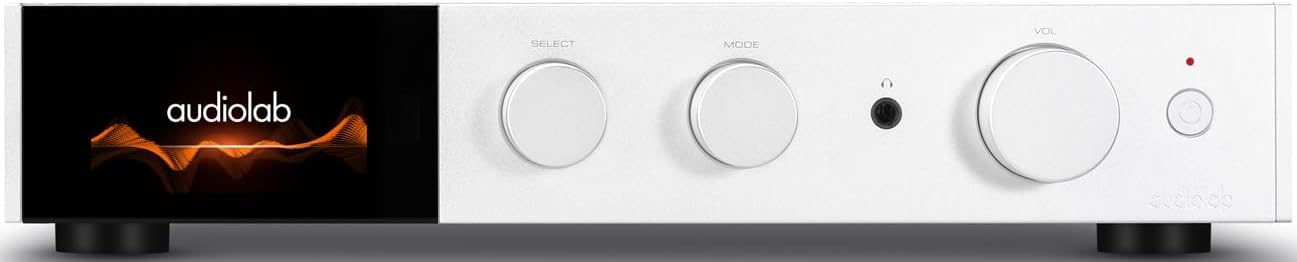
Рисунок 4.1: Передняя часть view of the Audiolab 9000A, displaying the Audiolab logo on its full-color IPS LCD screen. The front panel features three rotary controls for Select, Mode, and Volume, along with a headphone jack and power button.

Рисунок 4.2: Передняя часть view of the Audiolab 9000A, showcasing the full-color IPS LCD screen displaying VU meters. This visual option provides real-time audio level feedback.
The 9000A features a 4.3-inch (800 x 480mm) full-color IPS LCD screen, providing clear and informative playback, source, and file information. It also offers various display options, including two VU meter styles, allowing for visual feedback or a discreet appearance.
Подключения на задней панели

Figure 4.3: Rear panel of the Audiolab 9000A, showing a comprehensive array of input and output connections. These include analog, XLR, phono (MM), power amplifier input, SPDIF (coaxial and optical), PC USB, Bluetooth antenna, pre-amplifier output, stereo speaker terminals, and 12V trigger connections.
The rear panel provides a wide range of connectivity options, including multiple analog and digital inputs, a dedicated phono input, balanced XLR input, and various outputs for speakers and external components. Bluetooth antennas are also located here for wireless streaming.
Основные характеристики
- Ampлификация: Discrete Class AB power amplifier delivering 100W per channel into 8 ohms (160W into 4 ohms). Features Audiolab's CFB (Complementary Feedback) topology for superior linearity.
- Цифро-аналоговый преобразователь (ЦАП): Equipped with the ESS 9038PRO flagship 32-bit DAC chip, supporting PCM up to 32-bit/768kHz and DSD up to DSD512.
- Декодирование MQA: Full MQA decoding capability for high-resolution streaming.
- Фоно Сtage: Dedicated high-performance, low-noise Moving Magnet (MM) phono stage with JFET-based circuitry and precise RIAA equalization.
- Наушники Ampпожизненнее: Специальные наушники с обратной связью по току amplifier with wide bandwidth and high slew rate.
- Связь: Multiple analog inputs (3 x AUX, 1 x XLR), digital inputs (2 x Coaxial, 2 x Optical, 1 x PC USB), Bluetooth 5.1 with aptX HD/AAC/LDAC support.
- Режимы работы: Integrated, Pre-Power, and Pre Only modes for versatile system integration.
5. Настройка
5.1 Размещение
Place the Audiolab 9000A on a stable, level surface away from direct sunlight, heat sources, and excessive moisture. Ensure there is adequate space around the unit for ventilation.
5.2 Подключение динамиков
- Ensure the 9000A is powered off and unplugged from the mains.
- Connect your loudspeakers to the speaker terminals on the rear panel (refer to Figure 4.3). Ensure correct polarity: red (+) to red (+) and black (-) to black (-).
- Tighten the binding posts securely, but do not overtighten.
5.3 Подключение источников звука
Модель 9000A предлагает различные варианты входного сигнала:
- Analog Inputs (AUX1, AUX2, AUX3): Use RCA cables to connect analog sources like CD players, tuners, or tape decks.
- Сбалансированный вход XLR: For high-quality analog sources with XLR outputs.
- Вход Phono (ММ): Connect your turntable directly to this input. Ensure your turntable has a Moving Magnet (MM) cartridge.
- Digital Inputs (COAX1, COAX2, OPT1, OPT2): Connect digital sources such as CD transports, media streamers, or TVs using coaxial or optical cables.
- PC USB (USB B): Connect your computer for high-resolution audio playback.
- Bluetooth: Attach the supplied antennas to the rear panel for optimal Bluetooth signal reception.
5.4 Подключение питания
Once all audio connections are made, connect the supplied power cord to the IEC inlet on the rear panel and then to a suitable mains power outlet.
6. Инструкция по эксплуатации
6.1 Включение/выключение питания
Press the power button on the front panel or the remote control to switch the unit on or off. The display will illuminate upon power-on.
6.2 Выбор источника
Use the "SELECT" rotary control on the front panel or the source buttons on the remote control to cycle through the available input sources (AUX1, AUX2, AUX3, XLR, Phono, COAX1, COAX2, OPT1, OPT2, PC USB, Bluetooth).
6.3 Регулятор громкости
Adjust the listening volume using the "VOL" rotary control on the front panel or the Volume Up/Down buttons on the remote control.
Режимы работы 6.4
The 9000A offers three distinct operating modes, selectable via the menu:
- Интегрированный режим: This is the default mode, where the pre-ampлифт и мощность ampпожизненныйtages are combined. Use this for connecting digital and analog sources directly to the 9000A and driving a pair of speakers.
- Режим предварительного питания: This mode disconnects the pre-ampлифт и мощность ampпожизненныйtages. The 9000A can then be used solely as a power amplifier (e.g., connected to an AV processor) or to insert external signal processing between the pre-out and power-in connections.
- Pre Only Mode: In this mode, the 9000A functions solely as a pre-amplifier, outputting the processed signal via its pre-amplifier outputs to an external power ampпожизненнее.
6.5 Цифровые фильтры
For digital inputs, the 9000A provides user-selectable digital filters to optimize the response to suit the source file and partnering equipment. Access these options through the unit's menu system.
6.6. Bluetooth-подключение
- Ensure the Bluetooth antennas are connected to the rear panel.
- Select "Bluetooth" as the input source on the 9000A.
- На мобильном устройстве (смартфоне, планшете, ноутбуке) включите Bluetooth и выполните поиск доступных устройств.
- Select "Audiolab 9000A" from the list to pair. Once paired, audio from your device will stream wirelessly to the ampпожизненнее.
- The 9000A supports aptX HD, AAC, and LDAC protocols for high-quality wireless audio.
6.7 Выход для наушников
Connect your headphones to the 6.35mm (1/4 inch) headphone jack on the front panel. Connecting headphones will automatically mute the main speaker outputs.
7. Техническое обслуживание
- Уборка: Use a soft, dry, lint-free cloth to clean the unit. Do not use abrasive cleaners, waxes, or solvents.
- Вентиляция: Периодически проверяйте, чтобы вентиляционные отверстия были очищены от пыли и мусора.
- Соединения: Ensure all cables are securely connected. Loose connections can affect sound quality.
- Хранилище: При длительном хранении отключите устройство от электросети и храните его в прохладном, сухом месте.
8. Поиск Неисправностей
| Проблема | Возможная причина | Решение |
|---|---|---|
| Нет электричества | Шнур питания не подключен; Розетка неисправна; Устройство находится в режиме ожидания. | Check power cord connection; Try a different outlet; Press power button on unit or remote. |
| Нет звука от динамиков | Incorrect input selected; Speaker cables loose or incorrectly connected; Volume too low; Mute function active; Headphone connected. | Select correct input; Check speaker connections and polarity; Increase volume; Deactivate mute; Disconnect headphones. |
| Нет звука с одного канала | Speaker cable loose or faulty; Source cable faulty; Speaker faulty. | Check speaker and source cable connections; Test with another speaker or source. |
| Жужжащий или гудящий шум | Контур заземления; Близлежащие электрические помехи; Неисправный кабель. | Ensure all components are properly grounded; Move unit away from other electronics; Try different cables. |
| Проблемы с сопряжением Bluetooth | Antennas not connected; Device too far; Device already paired with another unit. | Connect Bluetooth antennas; Move device closer; Disconnect from other devices and try pairing again. |
9. Технические характеристики
| Категория | Деталь |
|---|---|
| Общее описание | Интегрированный Ampпожизненнее |
| Номинальная выходная мощность | 2 x 100W (8 ohms, THD<1%); 2 x 160W (4 ohms, THD<1%) Class AB |
| Чип ЦАП | ES9038Pro 32-bit DAC |
| Отображать | 4.3" (800 x 480mm) Full View IPS-ЖК-дисплей |
| Декодирование MQA | Built-in Certified MQA Full Decoder (PC USB, Coax/Optical) |
| Bluetooth | Bluetooth 5.1 (aptX/aptX HD/AAC/LDAC) Support |
| Фоно Сtage | Dedicated High-performance, Low-noise MM Phono Stage |
| Наушники AMP | Специализированные наушники с обратной связью по току AMP |
| Режимы работы | Integrated / PRE-POWER / PRE Only Modes |
| USB Upgrade Support | Да |
| Входы | 3 x Analogue, 1 x XLR, 1 x Phono (MM), 1 x Power Amplifier, 2 x SPDIF (Coax), 2 x SPDIF (Optical), 1 x PC USB (USB B), 1 x Bluetooth, 1 x 12V Trigger |
| Выходы | 1 х ПРЕД AmpLifier, 1 х стереодинамик, 1 х наушники, 1 х 12 В триггер |
| Sampling Frequency (Optical/Coaxial) | 44.1кГц-192кГц |
| Sampling Frequency (PC USB) | 44.1kHz-768kHz (PCM) / DSD64, DSD128, DSD256, DSD512 |
| Предварительноamplifier Gain (max.) | +6dB (Line), +53dB (Phono MM) |
| Предварительноampусилитель THD | <0.0004% (1kHz @ 2V, Volume = 0dB) |
| DAC THD | <0.001% (1kHz @ 0dBFS) |
| Власть Ampусилитель THD | <0.002% (1 кГц при 50 Вт / 8 Ом) |
| Наушники Ampусилитель THD | <0.01% (1kHz, 50mW) |
| Вес нетто | 9.4кг |
| Размеры (Ш x В x Г) | 444 х 342 х 89 мм |
| Варианты отделки | Черный/Серебристый |
| Требования к питанию | 100-120В ~ 50/60Гц |
10. Гарантия и поддержка
Audiolab products are manufactured to the highest standards and undergo rigorous quality control. This product is covered by a manufacturer's warranty, the terms of which may vary by region. Please refer to the warranty card included with your product or visit the official Audiolab webсайт для получения подробной информации о гарантии.
For technical support, service, or inquiries regarding your Audiolab 9000A, please contact your authorized Audiolab dealer or distributor. You can also find support resources, FAQs, and contact information on the official Audiolab webсайт: www.audiolab.co.uk
Ask a question about this manual
Ask about setup, troubleshooting, compatibility, parts, safety, or missing instructions. Manuals+ will review the question and use this page’s manual context to help answer it.