
Claiks CL-RC-YZ-LZL
Claiks Zero Gravity Recliner Chair User Manual
Model: CL-RC-YZ-LZL
Введение
Thank you for choosing the Claiks Zero Gravity Recliner Chair. This oversized electric reclining sofa lounge is designed to provide ultimate comfort and relaxation, featuring NASA-inspired zero gravity positioning, USB and Type-C charging ports, and convenient side pockets. This manual provides essential information for the safe and efficient use of your new recliner.
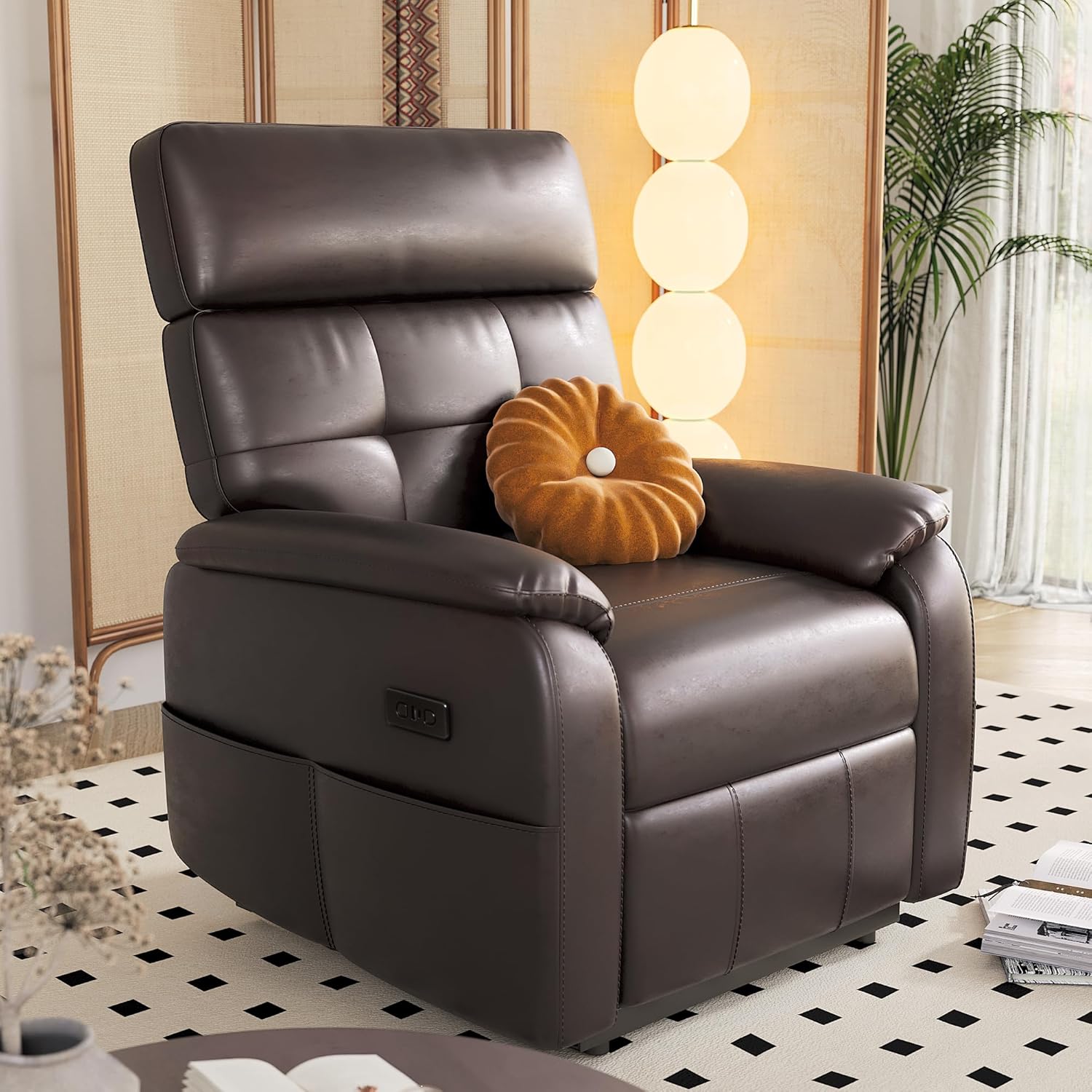
Image: The Claiks Zero Gravity Recliner Chair, showcasing its dark brown PU leather finish and comfortable design.
Информация по безопасности
- Всегда следите за тем, чтобы шнур питания не был зажат или поврежден.
- Keep children and pets away from the moving parts of the recliner during operation.
- Не вставайте на подставку для ног или подлокотники.
- Avoid spilling liquids on the control panel or power components.
- Unplug the chair from the power outlet before cleaning or performing any maintenance.
- Не пытайтесь самостоятельно разбирать или ремонтировать электрические компоненты. Обратитесь за помощью к квалифицированным специалистам.
Содержимое упаковки
Your Claiks Zero Gravity Recliner Chair is typically delivered in two boxes. Please verify that all components are present before beginning assembly.
- Основание кресла-реклайнера
- Сборка спинки
- Подушка сиденья
- Подушка для поясницы
- Подголовник
- Адаптер питания и шнур
- Руководство по эксплуатации (данный документ)

Image: Diagram illustrating the product dimensions and indicating that the chair is delivered in two boxes.
Настройка и сборка
Assembly of your Claiks recliner is designed to be quick and tools-free. Follow these simple steps:
- Carefully unpack all components from the boxes.
- Place the recliner base in your desired location, ensuring there is enough space for full recline.
- Align the backrest assembly with the receiving brackets on the recliner base and slide it down until it clicks securely into place.
- Connect the power cord from the backrest to the corresponding connector on the base.
- Подключите адаптер питания к стандартной электрической розетке.
- Place the lumbar cushion and headrest as desired for optimal comfort.
Your recliner is now ready for use.
Инструкция по эксплуатации
Функция откидывания
The Claiks Zero Gravity Recliner features one-touch motorized controls for effortless adjustment of the backrest and footrest. Locate the control panel on the side of the chair.
- Press the "Up" button to raise the backrest and lower the footrest.
- Press the "Down" button to recline the backrest and raise the footrest.
- Continue pressing the "Down" button to reach the Zero Gravity position (approximately 160°), which helps reduce spinal pressure and promote relaxation.
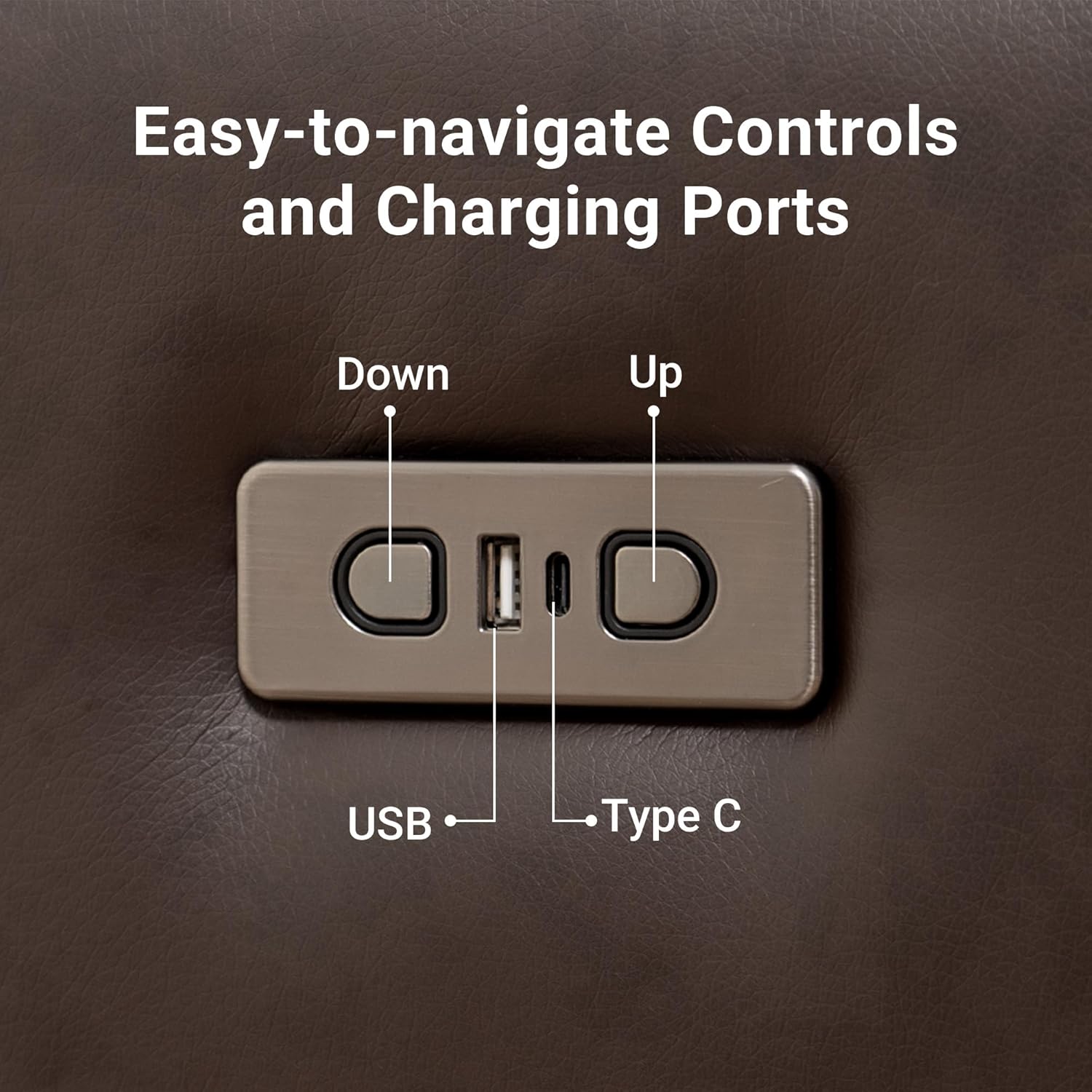
Изображение: подробное view of the easy-to-navigate control panel, highlighting the "Up" and "Down" buttons, along with the USB and Type-C charging ports.

Image: Visual representation of the zero gravity recline feature, showing how it can be used for gaming, watching, or sleeping.
Порты для зарядки
The control panel includes built-in USB and Type-C charging ports, allowing you to conveniently charge your electronic devices while relaxing in the chair.
- Simply plug your device's charging cable into the appropriate USB or Type-C port.
Side Storage Pockets
Utilize the integrated side pockets to keep remotes, magazines, books, or other small items within easy reach.

Image: A close-up of the recliner's side pockets, demonstrating their convenience for storing personal items.
Техническое обслуживание и уход
Proper care will extend the life and appearance of your Claiks recliner.
- Уборка: The chair features wipeable surfaces. For general cleaning, wipe with a soft, damp cloth. For tougher stains, use a mild soap solution and wipe dry immediately. Avoid harsh chemicals or abrasive cleaners. The removable covers are machine-washable; refer to the care label for specific instructions.
- Механизм: The electric reclining mechanism is designed for durability. Avoid forcing the chair into positions manually. If you notice any unusual noises or resistance, discontinue use and contact customer support.
- Размещение: Position the chair away from direct sunlight and heat sources to prevent fading and material degradation.
Поиск неисправностей
| Проблема | Возможная причина | Решение |
|---|---|---|
| Chair does not recline/move. | Not plugged in; power outlet issue; loose connection; power adapter failure. | Ensure power cord is securely plugged into both the chair and a working wall outlet. Check if the outlet works with another device. Verify all internal connections are secure. |
| Необычный шум во время работы. | Obstruction in mechanism; loose hardware. | Inspect for any objects obstructing the mechanism. Ensure all assembly hardware is tightened. If noise persists, contact customer support. |
| Порты USB/Type-C не заряжают. | Chair not powered; device cable issue; port malfunction. | Ensure the chair is powered on. Try a different charging cable or device. If still not working, the port may be faulty. |
If you encounter issues not listed here or if the suggested solutions do not resolve the problem, please contact Claiks customer support for assistance.
Технические характеристики
| Особенность | Деталь |
|---|---|
| Бренд | Клейкс |
| Название модели | CL-RC-YZ-LZL |
| Цвет | Темно-коричневый |
| Размеры продукта (Д x Ш x В) | 37.4"Д x 29.5"Ш x 39.8"В |
| Глубина сиденья | 22.4 дюймов |
| Вес товара | 77 фунта |
| Угол наклона | Up to 160° (Zero Gravity) |
| Тип управления | Motorized, One-touch buttons |
| Порты для зарядки | USB, тип C |
| Материал | PU Leather, High-density foam, Reinforced steel frame |
| Включенные компоненты | Cushion (Lumbar, Headrest) |
Image: Detailed product dimensions including depth, width, and height, along with seat depth and armrest height.
Гарантия и поддержка
Claiks is committed to providing high-quality products. For any warranty claims, technical support, or inquiries regarding your Zero Gravity Recliner Chair, please contact Claiks customer service.
Please refer to your purchase documentation or the official Claiks webсайт для получения подробной информации об условиях гарантии и контактной информации.
You can visit the Claiks Store for more information: Claiks Official Store
Ask a question about this manual
Ask about setup, troubleshooting, compatibility, parts, safety, or missing instructions. Manuals+ will review the question and use this page’s manual context to help answer it.