
Введение
Thank you for choosing the Casio MWA-300H Series watch. This manual provides essential information regarding the setup, operation, and maintenance of your new timepiece. Please read this manual carefully to ensure proper use and to fully understand the features of your watch.
The Casio MWA-300H is an analog watch featuring a chronograph, 100-meter water resistance, and luminous hands for enhanced readability. It is designed for versatile wear, suitable for both daily use and recreational water activities.
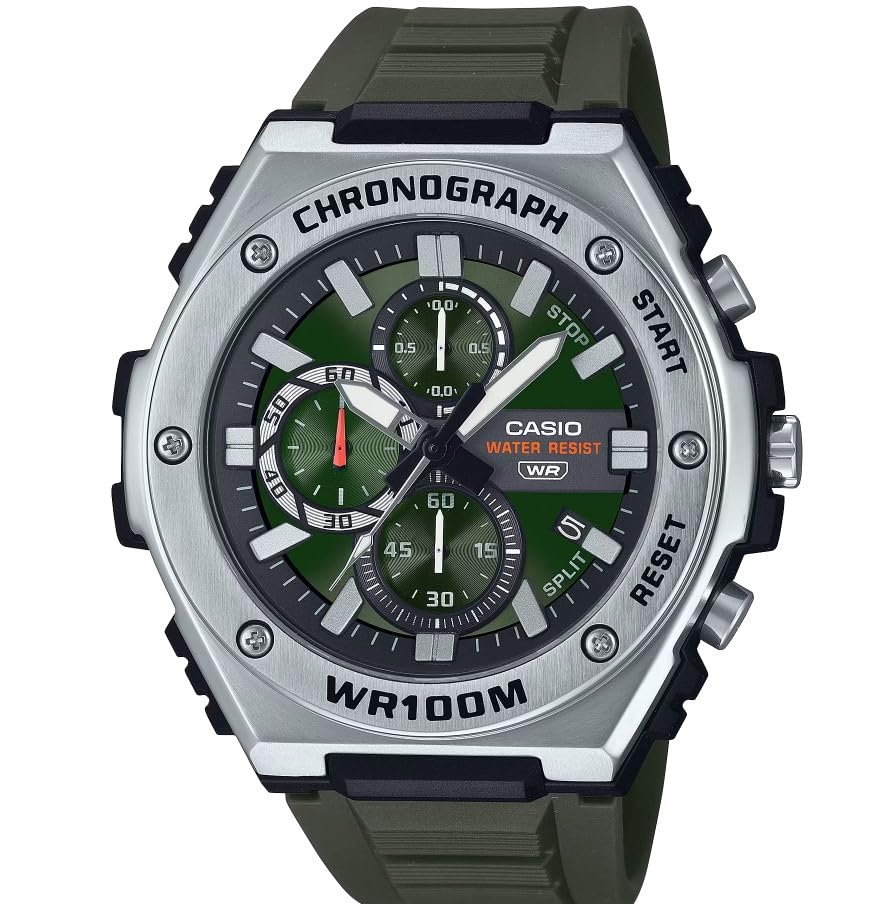
Изображение: Спереди view of the Casio MWA-300H Series watch, highlighting its green dial, chronograph sub-dials, and black resin band.
Setup: Initial Settings
Установка времени
- Pull the crown out to the second click (time setting position). The second hand will stop.
- Rotate the crown to set the hour and minute hands. Ensure the AM/PM setting is correct if your watch has a 24-hour indicator or date changes at midnight.
- Верните заводную головку в нормальное положение. Секундная стрелка возобновит движение.
Установка даты
- Pull the crown out to the first click (date setting position).
- Поверните заводную головку, чтобы установить дату. Избегайте установки даты в период с 9:00 до 1:00, так как это может помешать работе механизма автоматической смены даты.
- Верните заводную головку в нормальное положение.
Информация о батарее
Your Casio MWA-300H watch is powered by 1 LR44 battery, which is included. The battery life is approximately 3 years. When the battery runs low, the watch may exhibit irregular movement or stop. It is recommended to have the battery replaced by a qualified watch technician to maintain water resistance.
Operating: Watch Functions
Использование хронографа (секундомера)
The chronograph function allows for precise timing of events. Your watch features a 1/10-second stopwatch that captures elapsed, split, and 1st/2nd place times across three dedicated sub-dials.
- Starting the Stopwatch: Press button A (typically the upper right button) to start the stopwatch.
- Stopping the Stopwatch: Press button A again to stop the stopwatch.
- Resetting the Stopwatch: After stopping, press button B (typically the lower right button) to reset the stopwatch hands to zero.
- Измерение промежуточного времени: While the stopwatch is running, press button B to measure split times. The stopwatch hands will momentarily stop to indicate the split time, then resume timing. Press button B again to release the split time and display the current elapsed time.
Note: Refer to the specific button layout on your watch for exact button assignments.
Водонепроницаемость (100 метров)
Your Casio MWA-300H watch is water resistant up to 100 meters (330 feet). This rating means the watch is suitable for swimming, showering, and recreational water activities. It is not suitable for diving or snorkeling where significant water pressure changes occur.
- Не используйте заводную головку или кнопки, если часы мокрые или погружены в воду.
- После контакта с соленой водой промойте часы пресной водой и вытрите насухо.
Светящиеся стрелки и маркеры
The watch features luminous hands and markers that absorb light and glow in the dark, providing readability in low-light conditions. The intensity and duration of the glow depend on the amount and type of light exposure.
Обслуживание
Общий уход
- Регулярно протирайте часы мягкой сухой тканью, чтобы удалить грязь и влагу.
- Не подвергайте часы воздействию экстремальных температур, прямых солнечных лучей в течение длительного времени или сильных магнитных полей.
- Keep the watch away from solvents, detergents, perfumes, and cosmetics, as these can damage the resin materials.
Замена батареи
When the battery needs replacement, it is highly recommended to take your watch to an authorized Casio service center or a reputable watch repair shop. This ensures that the watch is properly sealed and its water resistance is maintained after battery replacement.
Проверка водостойкости
To maintain the water resistance of your watch, it is advisable to have it inspected periodically (e.g., every 2-3 years) by an authorized service center, especially if it is frequently exposed to water.
Поиск неисправностей
| Проблема | Возможная причина | Решение |
|---|---|---|
| Watch hands do not move or move irregularly. | Низкий заряд батареи. | Замените батарейку. Обратитесь к профессиональному часовщику. |
| Время неверное. | Time not set correctly; watch has stopped and restarted. | Установите время в соответствии с инструкциями в разделе «Установка времени». |
| Дата меняется на полдень вместо полуночи. | Неправильная настройка AM/PM. | Переведите время на 12 часов вперед. |
| Стрелки хронографа не сбрасываются на ноль. | Chronograph hands misalignment. | Consult the full Casio module manual for chronograph hand adjustment procedures, or contact customer support. |
| Влага внутри часов. | Crown or buttons operated underwater; seals compromised. | Немедленно отнесите часы в авторизованный сервисный центр для осмотра и ремонта, чтобы предотвратить дальнейшие повреждения. |
Технические характеристики
| Название модели | MWA-300H |
| Тип дисплея | Аналоговый |
| Тип движения | Кварц |
| Глубина водонепроницаемости | 100 Meters (330 Feet) |
| Дополнительные возможности | Хронограф, указатель даты, светящиеся стрелки |
| Источник питания | Battery Powered (1 x LR44 included) |
| Материал корпуса | Смола |
| Материал ремешка | Смола |
| Кристалл Материал | Смола |
| Диаметр корпуса | 50.9 миллиметра |
| Толщина корпуса | 14.3 миллиметра |
| Ширина полосы | 22 миллиметра |
| Тип застежки | Пряжка |
Гарантия и поддержка
Ограниченная гарантия
Your Casio MWA-300H watch comes with a limited warranty. Please refer to the warranty card included with your purchase for specific terms, conditions, and duration of coverage. The warranty typically covers manufacturing defects under normal use.
Поддержка клиентов
For further assistance, technical support, or warranty claims, please contact Casio customer service. You can find contact information on the official Casio webсайте или в документации, прилагаемой к вашим часам.
For more detailed information, including specific module operations or advanced settings, please visit the official Casio support website or refer to the full module manual for your watch.