
1. Введение
Welcome to the user manual for your new DEXIN DX-817 Electronic Calculator. This guide provides comprehensive instructions to help you understand and operate your calculator effectively. Please read this manual thoroughly before using the device to ensure proper function and longevity.
2. Продукт закончилсяview
The DEXIN DX-817 is a compact and efficient electronic calculator designed for everyday use. It features a clear display and a user-friendly keypad for various mathematical operations.
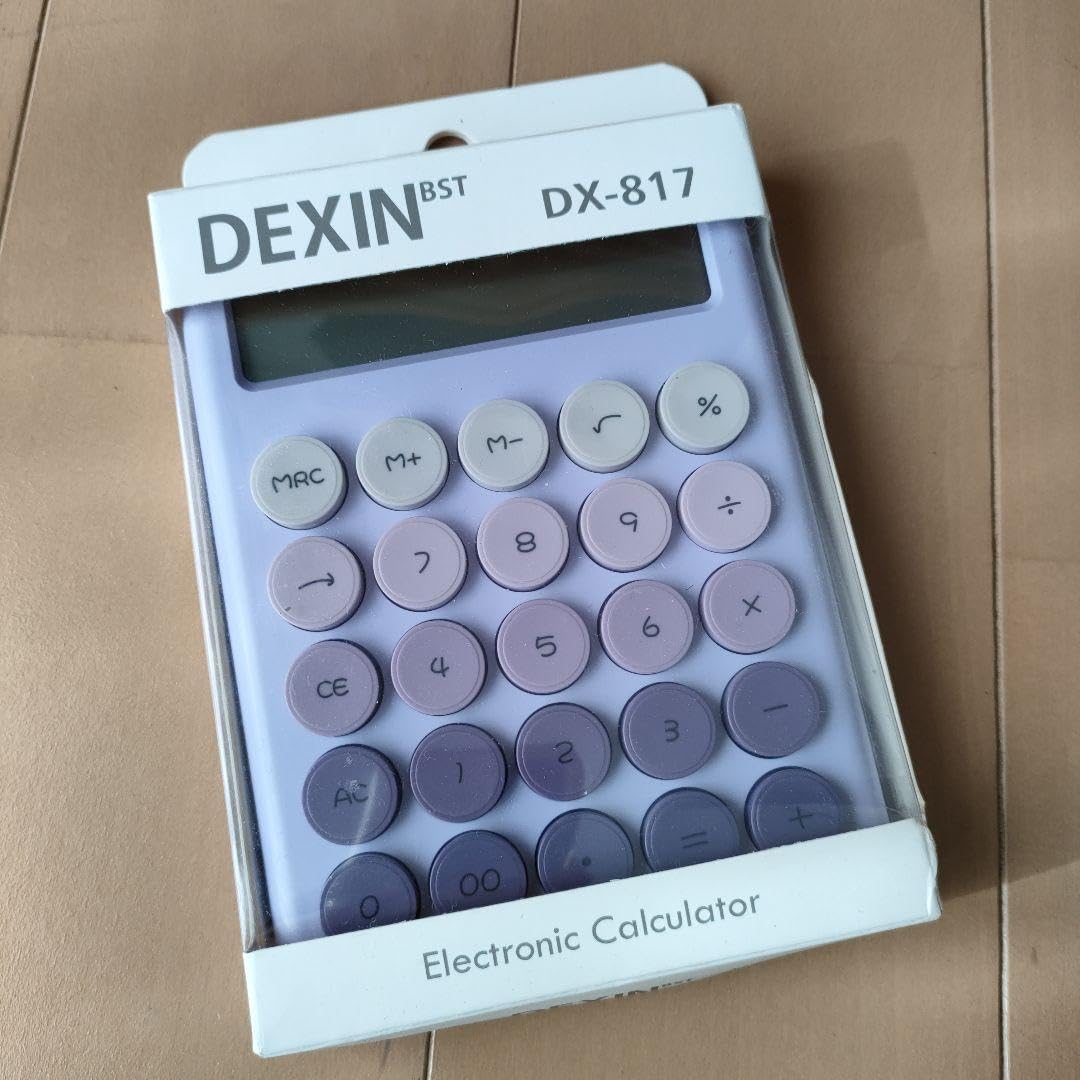
Figure 1: DEXIN DX-817 Electronic Calculator (packaging view). This image displays the calculator's layout, including the display and key functions, as well as product information on its packaging.
2.1 Компоненты
- Отображать: Shows numbers, symbols, and calculation results.
- Клавиатура: Numeric keys (0-9), operation keys (+, -, ×, ÷), and function keys.
- Источник питания: Operates on DC 1.5V (battery).
3. Настройка
3.1 Установка аккумулятора
The DEXIN DX-817 calculator requires a DC 1.5V battery for operation. The specific battery type is not detailed on the packaging, but most calculators of this size typically use a button cell battery (e.g., LR44) or AAA batteries.
- Найдите крышку батарейного отсека на задней панели калькулятора.
- Use a small screwdriver (if necessary) to open the cover.
- Insert the new battery, ensuring the correct polarity (+ and -) is observed.
- Надежно закройте крышку батарейного отсека.
4. Основные операции
4.1 Включение/выключение питания
- Чтобы включить калькулятор, нажмите кнопку [ON/AC] or [CE/C] key once (depending on model variation, usually [CE] or [АС]).
- The calculator typically has an auto-power-off feature to conserve battery life. To manually turn off, if an [OFF] key is present, press it. Otherwise, it will power off automatically after a period of inactivity.
4.2 Основы арифметики
Perform standard calculations using the numeric keys and operation keys.
- Дополнение (+): Введите первую цифру, нажмите [+], введите вторую цифру, нажмите [=].
- Вычитание (-): Введите первую цифру, нажмите [-], введите вторую цифру, нажмите [=].
- Умножение (×): Введите первую цифру, нажмите [×], введите вторую цифру, нажмите [=].
- Деление (÷): Введите первую цифру, нажмите [÷], введите вторую цифру, нажмите [=].
4.3 Очистка функций
- Прозрачный вход ([CE]): Clears the last entered number or calculation, allowing you to correct mistakes without clearing the entire operation.
- Очистить все ([С] or [АС]): Clears all entries and calculations, resetting the calculator to its initial state.
5. Расширенные функции
5.1 Функции памяти
Калькулятор включает в себя функции памяти для хранения и вызова значений.
- Память Плюс ([М+]): Добавляет отображаемое значение в память.
- Память минус[М-]): Вычитает отображаемое значение из памяти.
- Восстановление/очистка памяти ([МРЦ]): Нажмите один раз, чтобы вызвать значение, сохраненное в памяти. Нажмите дважды, чтобы очистить память.
5.2 процентаtagе ([%])
Чтобы рассчитать процентtagэс:
- Exampль: Calculate 10% of 200. Enter 200 [×] 10 [%]Результатом будет 20.
- Exampль: Add 10% to 200. Enter 200 [+] 10 [%]Результатом будет 220.
5.3 Square Root ([√])
To calculate the square root of a number:
- Введите номер, затем нажмите кнопку [√] ключ.
5.4 Grand Total ([ГТ])
The Grand Total function accumulates the results of multiple calculations. After each calculation ending with [=], the result is added to the Grand Total memory. Press [ГТ] to display the accumulated total.
6. Техническое обслуживание
6.1 Очистка
- Протрите калькулятор мягкой сухой тканью.
- Не используйте абразивные чистящие средства, растворители и не распыляйте средство непосредственно на устройство.
6.2 Хранение
- Храните калькулятор в прохладном, сухом месте, вдали от прямых солнечных лучей и экстремальных температур.
- If storing for an extended period, it is advisable to remove the battery to prevent leakage.
7. Поиск Неисправностей
7.1 Общие проблемы
- Дисплей пуст: Проверьте, правильно ли установлена батарея или ее необходимо заменить.
- Неверные расчеты: Ensure all previous calculations are cleared using [АС] or [С] before starting a new one. Verify correct key presses.
7.2 Сообщения об ошибках
- "MINUS MEMORY ERROR GT": This message indicates an issue related to the Grand Total or memory function, possibly due to an attempt to subtract from an empty memory or an overflow. Clear memory and Grand Total using [МРЦ] (twice) and [АС].
8. Технические характеристики
| Особенность | Деталь |
|---|---|
| Модель | DX-817 |
| Цвет | Фиолетовый |
| Размер | 10.8 × 17 × 2.4 см |
| Номинальный объемtage | 1.5 В постоянного тока |
| Тип батареи | Not specified (typically button cell or AAA) |
| Производитель | YIWU DEXIN ELECTRONICS Co., LTD |
| Адрес производства | Suxi Town, Yiwu City, Jinhua City, Zhejiang Province, China |
| Сделано в | Китай |
9. Информация по технике безопасности
ПРЕДУПРЕЖДЕНИЕ: To avoid danger of suffocation, keep the plastic bag packaging away from babies and children. Do not use in cribs, beds, carriages, or playpens. This bag is not a toy.
10 Информация о соответствии
10.1 Соответствие требованиям Федеральной комиссии по связи (FCC)
Это устройство соответствует части 15 Правил FCC. Эксплуатация допускается при соблюдении следующих двух условий:
- Это устройство не может вызывать вредных помех и
- Данное устройство должно принимать любые принимаемые помехи, включая помехи, которые могут вызвать нежелательную работу.
10.2 Authorized Representatives
- Представитель Великобритании: BUSINESS MANAGEMENT AND LEADERSHIP BUSINESS SCHOOL LTD, 14 Kings Court Beddington Gardens, Wellington, Surrey, England, SM6 0HR, United Kingdom.
- Представитель ЕС: BUSINESS DEVELOPMENT & MANAGEMENT, 33 Rue de la République, 69002 Lyon, Auvergne-Rhone-Alps, France.
11. Гарантия и поддержка
For warranty information or technical support, please refer to the retailer where the product was purchased or contact the manufacturer directly using the provided contact information. Keep your purchase receipt as proof of purchase.