
1. Продукт закончилсяview
The COUGAR FV150 RGB is a mid-tower gaming case designed for high-performance PC builds. It features a dual-chamber design, separating the main components from cables, storage drives, and the power supply unit (PSU) for a clean aesthetic and improved airflow. The case supports various motherboard form factors and offers extensive cooling options, including pre-installed ARGB fans.
Основные характеристики:
- Двухкамерная конструкция: Обеспечивает четкое view of your build through glass panels while concealing cables and other components.
- Поддержка графического процессора: Accommodates graphics cards up to 400mm in length, with options for vertical GPU orientation.
- Совместимость с материнской платой: Supports Mini-ITX, Micro-ATX, and ATX motherboards.
- Специально разработанный нижний кронштейн для вентилятора: Simplifies fan installation by allowing attachment prior to setup.
- Extensive Fan & Water Cooling Support: Multiple fan mounting points and radiator support up to 360mm.
- Бесшовная синхронизация RGB: Integrated universal fan hub for easy ARGB lighting control.
- Modern I/O Panel: Includes 2 x USB Type-A and 1 x USB 3.2 Type-C ports.
- Гибкое хранилище: Supports combinations of 3.5" HDDs and 2.5" SSDs.
- Магнитные пылевые фильтры: Located on the top and right side for easy maintenance.

Изображение 1.1: Под углом view of the COUGAR FV150 RGB case, highlighting its dual-chamber design and pre-installed ARGB fans.
2. Настройка и установка
Follow these steps for proper installation of your PC components into the COUGAR FV150 RGB case.
2.1 Распаковка и первоначальный осмотр
- Осторожно извлеките футляр из упаковки.
- Осмотрите чехол на наличие повреждений, полученных во время транспортировки.
- Remove the tempered glass side panel by unscrewing the thumb screws, if present, or by releasing механизм защелки.
2.2 Установка материнской платы
- Ensure the correct standoffs are installed for your motherboard form factor (Mini-ITX, Micro-ATX, or ATX).
- Place the I/O shield into the rear opening of the case.
- Carefully align your motherboard with the standoffs and I/O shield, then secure it with screws.
2.3 Установка блока питания (БП)
- The FV150 RGB supports bottom-mount PSUs.
- Slide the PSU into its designated compartment in the secondary chamber from the rear of the case.
- Secure the PSU with screws from the exterior rear of the case.
2.4 Установка накопителя
- Locate the drive bays in the secondary chamber.
- For 3.5" HDDs, slide the drive into the appropriate tray and secure it.
- For 2.5" SSDs, mount them to the designated brackets or trays.
2.5 Установка видеокарты (GPU)
- Снимите необходимые заглушки слотов расширения на задней панели корпуса.
- Вставьте видеокарту в слот PCIe на материнской плате и закрепите её винтами.
- The case supports GPUs up to 400mm. For vertical GPU mounting, a separate riser cable and bracket (not included) are required.
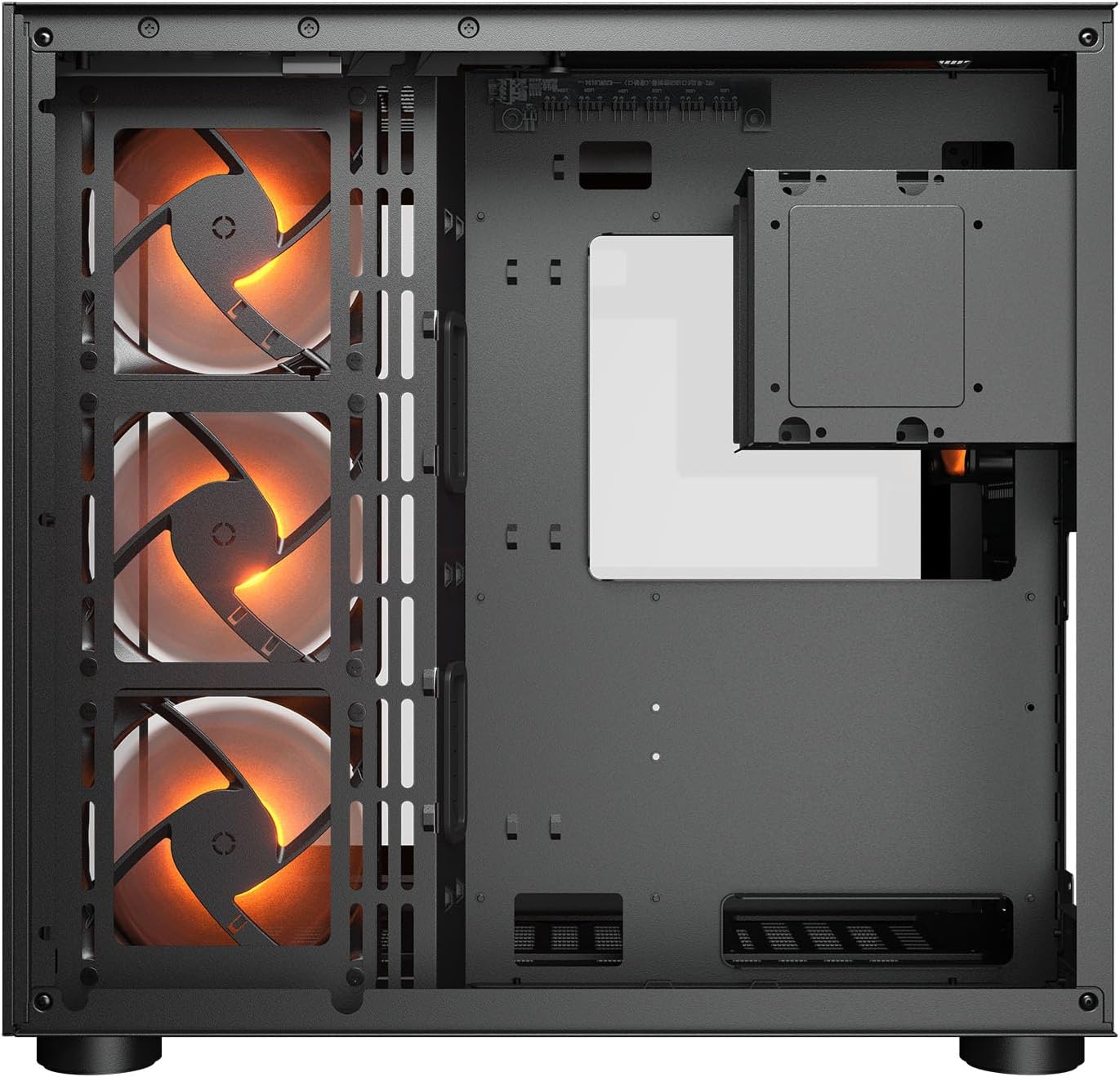
Изображение 2.1: Внутренний вид view illustrating the main chamber for motherboard and GPU installation, with pre-installed side fans.
2.6 Установка вентилятора и радиатора
- The case comes with 3 x 120mm ARGB side fans and 1 x 120mm ARGB rear fan pre-installed.
- Additional fans can be installed at the top (3 x 120mm or 2 x 140mm) and bottom (3 x 120mm or 2 x 140mm).
- Utilize the engineered bottom fan bracket for easier installation of bottom fans.
- For water cooling, radiators up to 360mm can be mounted on the top and 240mm on the side.

Image 2.2: Top internal view, showing potential mounting locations for additional cooling fans or radiators.
2.7 Управление кабелями
- Route all power and data cables through the cutouts to the secondary chamber.
- Используйте ample space and tie-down points in the secondary chamber to organize cables for optimal airflow and a clean appearance.
2.8 Connecting Front I/O Panel
- Connect the front panel cables (USB 3.2 Type-C, USB Type-A, audio, power, reset, LED) to the corresponding headers on your motherboard.
3. Инструкция по эксплуатации
После установки и подключения всех компонентов можно включить систему.
3.1 Включение
- Убедитесь, что переключатель блока питания находится в положении «ВКЛ».
- Нажмите кнопку питания на передней панели ввода/вывода корпуса.
3.2 Управление RGB-подсветкой
- The integrated universal fan hub allows for easy synchronization of ARGB lighting.
- Connect the hub to your motherboard's ARGB header (5V 3-pin) to control lighting effects via motherboard software.
- Alternatively, use the dedicated RGB button on the front I/O panel to cycle through pre-set lighting modes if not connected to a motherboard header.
4. Техническое обслуживание
Регулярное обслуживание помогает обеспечить оптимальную производительность и долговечность компонентов вашего ПК.
4.1 Очистка пылевого фильтра
- The COUGAR FV150 RGB features magnetic dust filters on the top and right side, along with a ventilated bottom cover.
- Gently remove the magnetic dust filters.
- Clean them using compressed air or by rinsing with water (ensure they are completely dry before reattaching).
- Periodically clean the ventilated bottom cover.
4.2 Генеральная уборка
- Для протирки внешних поверхностей чехла используйте мягкую сухую ткань.
- For tempered glass panels, use a glass cleaner and a microfiber cloth to avoid streaks.
- Избегайте использования едких химикатов или абразивных материалов, которые могут повредить покрытие.
5. Поиск Неисправностей
В этом разделе приведены решения распространенных проблем, с которыми вы можете столкнуться.
5.1 Система не включается
- Проверьте блок питания: Ensure the power supply unit is properly connected to the wall outlet and the PSU switch is in the 'ON' position.
- Соединения на передней панели: Убедитесь, что кабель кнопки питания от корпуса правильно подключен к разъему передней панели материнской платы.
- Внутренние силовые кабели: Confirm all necessary power cables (24-pin ATX, 8-pin CPU, PCIe for GPU) are securely connected to the motherboard and components.
5.2 Вентиляторы не вращаются или RGB-подсветка не работает
- Подключение вентиляторов: Ensure all fan power cables are securely connected to the fan hub or motherboard headers.
- Разъемы RGB: Verify the ARGB cables are correctly connected to the fan hub and the hub is connected to a 5V 3-pin ARGB header on the motherboard.
- Software/Button: If connected to the motherboard, check your motherboard's RGB control software. If not, try pressing the RGB button on the case's I/O panel to cycle modes.
5.3 USB-порты не работают
- Внутренние USB-разъемы: Confirm that the USB 3.0 and USB Type-C cables from the front I/O panel are correctly plugged into the corresponding headers on your motherboard.
- Драйверы материнской платы: Ensure you have installed the latest chipset and USB drivers for your motherboard.
6. Технические характеристики
Detailed technical specifications for the COUGAR FV150 RGB Gaming Case.

Image 6.1: Case dimensions for planning your setup.
| Особенность | Спецификация |
|---|---|
| Название продукта | FV150 RGB |
| Форм-фактор корпуса | Средняя башня |
| Совместимость с материнской платой | Мини-ITX, микро-АТХ, АТХ |
| Размеры (Ш x В x Г) | 300 x 400 x 415 мм (11.8 x 15.7 x 16.3 дюйма) |
| Панель ввода/вывода | USB 3.2 Gen 2 Type-C x 1, USB-A 3.0 x 2, 4 Pole Headset Audio Jack, RGB Button |
| 3.5-дюймовый приводной отсек | 2 |
| 2.5-дюймовый приводной отсек | 1+1 (converted from 3.5" drive bays) |
| Слоты расширения | 7+3 |
| Поддержка вертикального графического процессора | Да |
| Опора вентилятора охлаждения (сверху) | 3 x 120 мм или 2 x 140 мм |
| Cooling Fan Support (Bottom) | 3 x 120 мм или 2 x 140 мм |
| Cooling Fan Support (Side) | 3 х 120 мм |
| Cooling Fan Support (Rear) | 1 х 120 мм |
| Pre-installed Fans (Side) | 3 x 120mm ARGB (Reversed) |
| Pre-installed Fans (Rear) | 1 x 120 мм ARGB |
| Pre-installed Fan Speed | 1000 (± 10%) об / мин |
| Pre-installed Fan Connector | 5V 3 Pin (ARGB) / 3 Pin (Fan) |
| Максимальное количество вентиляторов | 10 |
| Поддержка водяного охлаждения (верхняя) | 360mm / 280mm / 240mm |
| Water Cooling Support (Side) | 240мм / 120мм |
| Поддержка водяного охлаждения (сзади) | 120 мм |
| RGB Hub Sync with M/B | Да |
| Максимум. Длина видеокарты | 400 мм (15.7 дюйма) |
| Максимум. Высота кулера процессора | 180 мм (7.1 дюйма) |
| Максимум. Длина блока питания | 210 мм (8.3 дюйма) |
| Материал | Металл |
| Вес товара | 6.83 Килограмма |
7. Информация о гарантии
COUGAR products are manufactured to the highest quality standards. This product is covered by a manufacturer's warranty against defects in materials and workmanship. The specific duration and terms of the warranty may vary by region and retailer. Please retain your proof of purchase for warranty claims.
For detailed warranty information, please refer to the official COUGAR webна сайте или обратитесь к местному продавцу.
8 Поддержка
If you encounter any issues or have questions regarding your COUGAR FV150 RGB Gaming Case that are not covered in this manual, please contact COUGAR customer support.
- Посетите официальный сайт COUGAR webсайт с ответами на часто задаваемые вопросы, загрузкой драйверов и контактной информацией службы поддержки.
- Contact your retailer for assistance with product returns or exchanges.