
1. Введение
This manual provides comprehensive instructions for the MOOER GE100 Guitar Multi Effects Pedal and the MOOER Air P05 Guitar Wireless System. These devices are designed to enhance your guitar playing experience, offering a wide range of effects, practice tools, and wireless freedom. Please read this manual thoroughly to ensure proper operation and to maximize the potential of your new equipment.
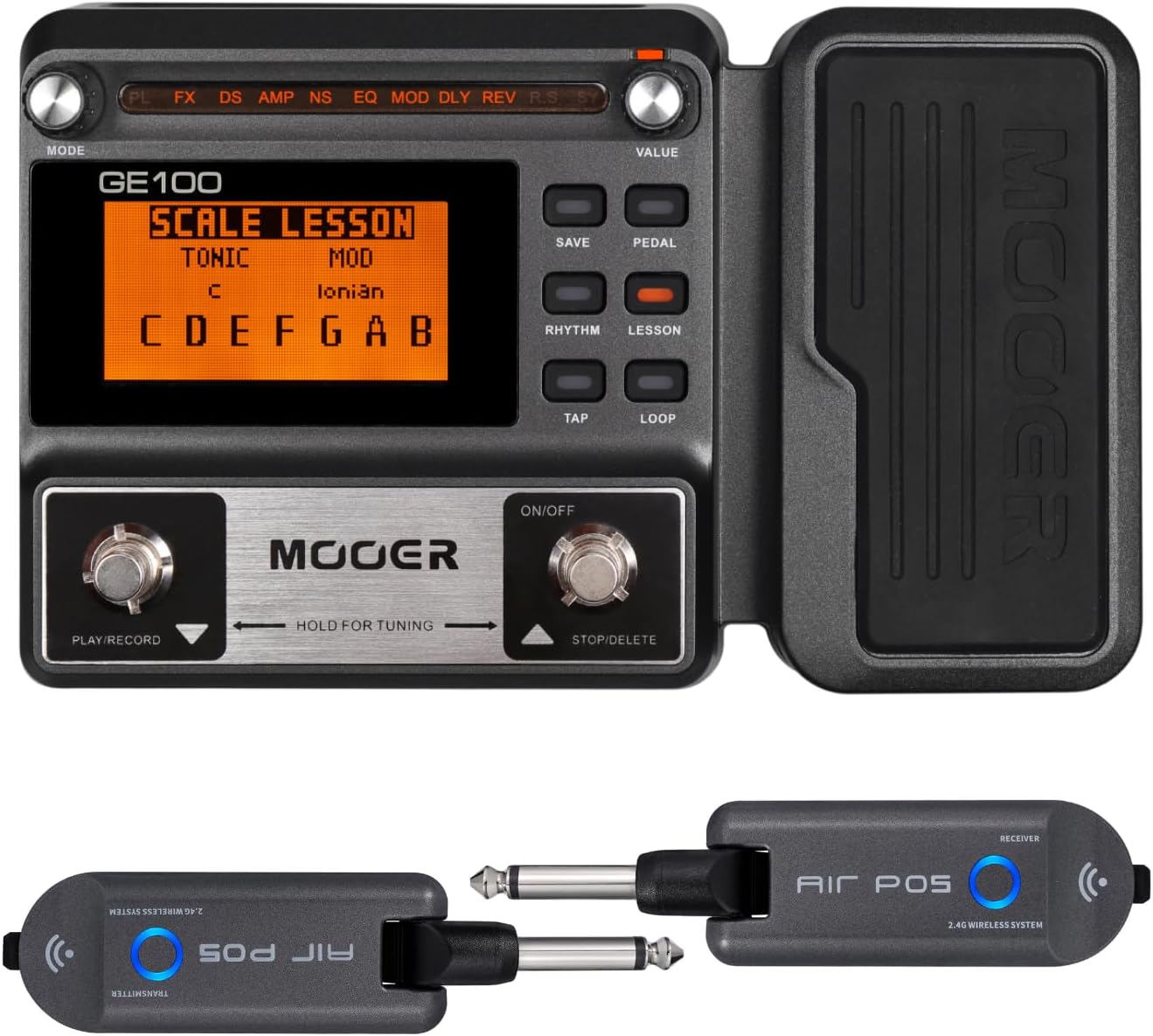
Image: The MOOER GE100 Multi Effects Pedal with its integrated expression pedal, alongside the MOOER Air P05 wireless transmitter and receiver units.
2.Основные характеристики
The MOOER GE100 and Air P05 offer a robust set of features for guitarists:
- MOOER GE100:
- 8 effect modules with 66 effect types.
- 23 drive sounds powered by 7 legendary amp симуляторы.
- Assignable expression pedal for real-time control.
- Функция Tap Tempo.
- 180-second looper for creative layering and practice.
- 40 drum rhythms and 10 metronome rhythms for practice.
- 80 factory preset patches and 80 user patches for custom tones.
- Unique adjustable output mode setting for optimal tone with or without an ampпожизненнее.
- MOOER Air P05 Wireless System:
- 2.4GHz ISM worldwide wireless transmission technology.
- Low-distortion and low-signal-loss audio transmission.
- 20-meter effective transmission range (outdoors).
- Автоматический спящий режим для экономии заряда батареи.
- До 8 XNUMX часов работы от батареи.
- Built-in 400mAh rechargeable battery, chargeable via USB.

Image: The MOOER GE100 displaying its various effect modules and features, including the looper and drum rhythms.
3. Что в коробке
Открыв упаковку товара, вы обнаружите следующие предметы:
- MOOER GE100 Guitar Multi Effects Pedal
- MOOER Air P05 Guitar Wireless System (Transmitter and Receiver)
- USB Charging Cable (for Air P05)
- Руководство пользователя (этот документ)

Image: The contents of the Air P05 Guitar Wireless System packaging, including the transmitter, receiver, USB cable, and manual.
4. Настройка
4.1 Powering the GE100
The MOOER GE100 can be powered in two ways:
- Адаптер постоянного тока 9 В: Connect a standard 9V DC power adapter (center negative, not included) to the DC IN jack on the pedal.
- Батарейки AA: Open the battery compartment on the bottom of the pedal and insert 4 AA batteries (not included). Ensure correct polarity.

Image: The underside of the MOOER GE100, illustrating the battery compartment for 4 AA batteries and the DC 9V adapter input.
4.2 Setting up the Air P05 Wireless System
- Зарядка подразделений: Before first use, ensure both the transmitter and receiver units are fully charged using the provided USB cable. The indicator light will show charging status.
- Подключить передатчик: Plug the Air P05 transmitter unit into your guitar's output jack.
- Подключить приемник: Plug the Air P05 receiver unit into the input jack of your GE100 pedal or ampпожизненнее.
- Включение питания: Press and hold the power button on both the transmitter and receiver until the indicator lights illuminate. They should automatically pair. If not, refer to the Air P05 specific manual for pairing instructions.
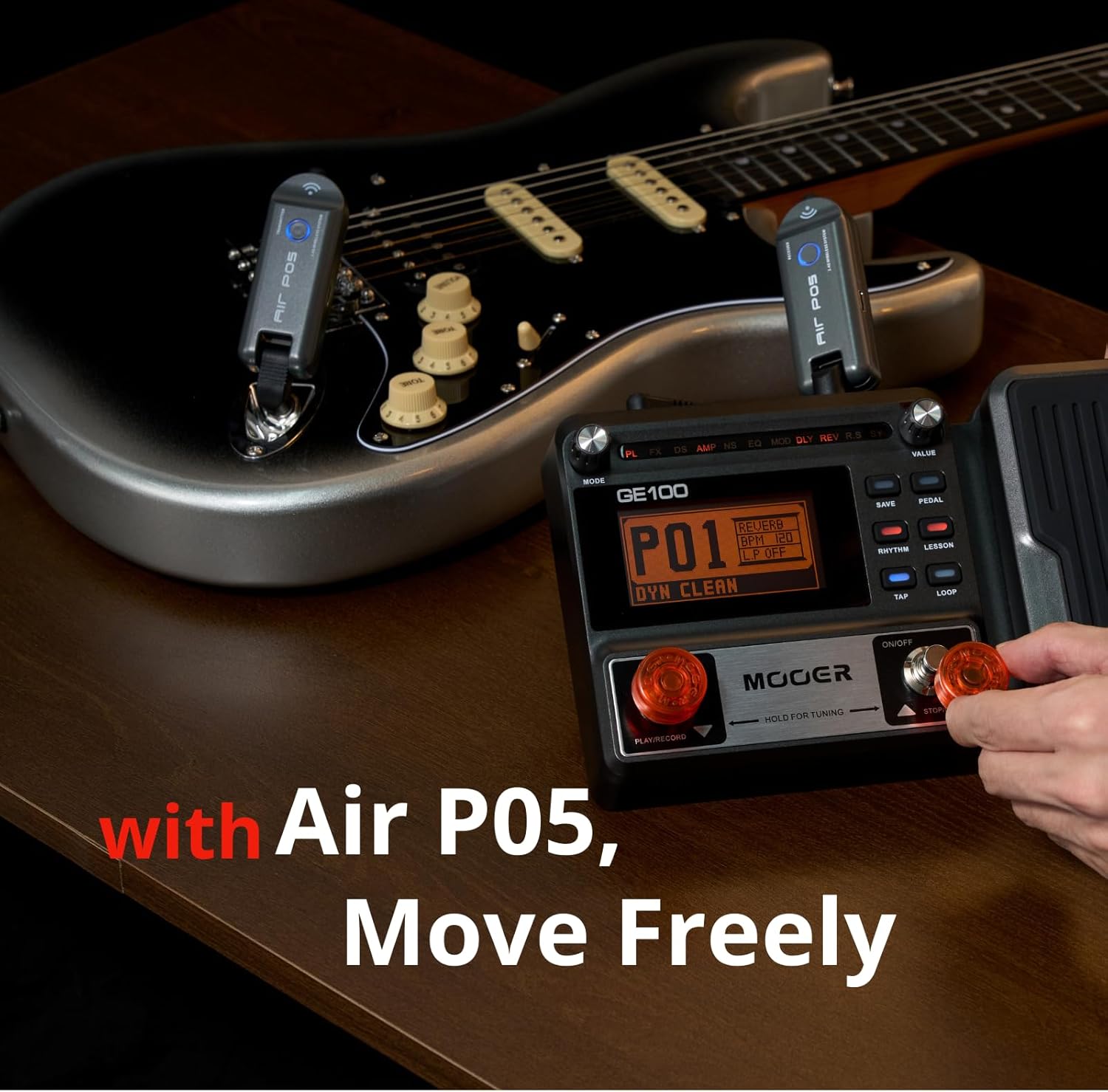
Image: A MOOER GE100 pedal and a guitar with the Air P05 wireless system connected, demonstrating a typical setup for wireless playing.
5. Инструкция по эксплуатации
5.1 MOOER GE100 Basic Operation
- Включение/выключение питания: Press the ON/OFF footswitch to turn the unit on or off.
- Выбор патча: Use the UP/DOWN footswitches to navigate through preset and user patches.
- Модули эффектов: The GE100 features 8 effect modules (FX, DS, AMP, NS, EQ, MOD, DLY, REV). Use the corresponding buttons above the screen to select and edit parameters for each module.
- Педаль экспрессии: The integrated expression pedal can be assigned to control various parameters, such as volume, wah, or modulation depth. Calibrate if necessary as per the full manual.
- Лупер: Engage the looper function to record and layer guitar phrases. The 180-second capacity allows for extensive creativity.
- Drum Machine/Metronome: Access the built-in drum rhythms and metronome for practice and timing improvement.

Image: The MOOER GE100 pedal with its display showing a patch, indicating its intuitive and easy-to-use interface for guitarists.
5.2 MOOER Air P05 Wireless System Operation
- Подключи и работай: Once charged and powered on, the Air P05 system is designed for immediate use. Simply plug the transmitter into your instrument and the receiver into your ampусилитель или педаль.
- Автоматическое сопряжение: The units should automatically pair upon power-on. If connection is lost, power cycle both units.
- Индикатор заряда батареи: The LED indicator on each unit provides information on battery status. Charge when the indicator shows low battery.

Изображение: крупный план view of the Air P05 wireless transmitter plugged into a guitar, highlighting its compact design and indicating its transmission distance and battery life.
5.3 No Official Product Videos Available
At this time, no official product videos from the seller are available for embedding in this manual. Please refer to the text descriptions and images for operational guidance.
6. Техническое обслуживание
To ensure the longevity and optimal performance of your MOOER GE100 and Air P05 system, follow these maintenance guidelines:
- Уборка: Use a soft, dry cloth to clean the exterior of both devices. Avoid using abrasive cleaners or solvents.
- Хранилище: Храните устройства в прохладном, сухом месте, вдали от прямых солнечных лучей и экстремальных температур.
- Battery Care (Air P05): For best battery life, avoid fully discharging the Air P05 units frequently. Recharge them regularly. If storing for extended periods, charge them to about 50% every few months.
- Соединения: Periodically check all cables and jacks for wear and tear. Ensure connections are secure.
7. Поиск Неисправностей
If you encounter issues with your MOOER GE100 or Air P05, consider the following common solutions:
- No Power (GE100): Ensure the power adapter is correctly connected and functional, or that the AA batteries are new and inserted with correct polarity.
- Нет звука:
- Check all cable connections (guitar to Air P05 transmitter, Air P05 receiver to GE100/amp, GE100 to amp).
- Verify the Air P05 units are charged and paired.
- Ensure the GE100's volume is not set to zero and that an active patch is selected.
- Проверьте свой amplifier's power and volume settings.
- Poor Wireless Signal (Air P05):
- Ensure you are within the 20-meter effective range.
- Сведите к минимуму препятствия между передатчиком и приемником.
- Check for other 2.4GHz devices that might cause interference.
- Unexpected Effects/Sound: Reset the GE100 to factory presets if custom settings are causing issues (refer to the full GE100 manual for reset procedure).
If problems persist, consult the full product manual or contact MOOER customer support.
8. Технические характеристики
| Особенность | Спецификация |
|---|---|
| Номер модели | GE100 |
| Материал корпуса | Пластик |
| Тип разъема | USB |
| аппаратный интерфейс | Неизвестный |
| Формат сигнала | Аналоговый |
| Источник питания | Rechargeable Battery (Air P05), DC 9V / AA Batteries (GE100) |
| Томtage | 9 Вольт (постоянный ток) |
| Эффекты аудиовыхода | Многоэффектный |
| Тип управления | Ручка |
| Wireless Frequency (Air P05) | 2.4GHz ISM |
| Wireless Range (Air P05) | 20 метров (на открытом воздухе) |
| Air P05 Battery Life | 8 часа |
9. Гарантия и поддержка
MOOER products typically come with a warranty to cover manufacturing defects. The MOOER GE100 and Air P05 are covered by a Гарантия 2 год с даты покупки.
For warranty claims, technical support, or further inquiries, please contact MOOER customer service through their official webна сайте или в магазине, где вы приобрели товар. Сохраните чек для подтверждения гарантии.