
1. Введение
Thank you for choosing the Kaschun CT120S Professional Audio Mixer. This 12-channel mixer is designed for a wide range of audio applications, including DJing, studio recording, live streaming, and stage performances. It features 48V phantom power, USB recording, Bluetooth connectivity, and a built-in MP3 player, offering versatile control over your audio. This manual provides essential information for the proper setup, operation, and maintenance of your mixer to ensure optimal performance and longevity.
2. Информация по технике безопасности
- Источник питания: Ensure the mixer is connected to a 110V AC power source with an American plug. Do not use incompatible power adapters.
- Вентиляция: Place the mixer in a well-ventilated area. Do not block ventilation openings.
- Влага: Keep the mixer away from water, moisture, and high humidity. Do not operate with wet hands.
- Нагревать: Избегайте размещения миксера рядом с источниками тепла, такими как радиаторы, обогреватели, печи или другие устройства, выделяющие тепло.
- Уборка: Перед чисткой отключите питание. Используйте сухую мягкую ткань. Не используйте жидкие чистящие средства или аэрозольные баллончики.
- Обслуживание: Не пытайтесь ремонтировать этот продукт самостоятельно. Поручите все обслуживание квалифицированному обслуживающему персоналу.
- Призрачная сила: When using 48V phantom power for condenser microphones, ensure the microphone is connected before activating phantom power to prevent damage.
3. Продукт закончилсяview
The Kaschun CT120S is a professional 12-channel audio mixer designed for clarity and control. Its ultra-thin metal body ensures durability and portability. Key features include:
- 12 входных каналов: Multiple microphone (XLR) and line inputs for diverse audio sources.
- Трехполосная эквализация: Dedicated knobs for high, mid, and low frequencies on each channel for precise tone shaping.
- Фантомное питание 48 В: Essential for condenser microphones, available on XLR inputs.
- Bluetooth 5.0 Бесперебойная беспроводная потоковая передача звука с совместимых устройств.
- USB Recording & MP3 Player: Direct recording to USB and playback of MP3 files with an LED display.
- Процессор эффектов: Built-in effects for enhancing vocals and instruments.

Рисунок 3.1: Передняя часть view of the Kaschun CT120S Professional Audio Mixer, showcasing its 12 channels and control layout.
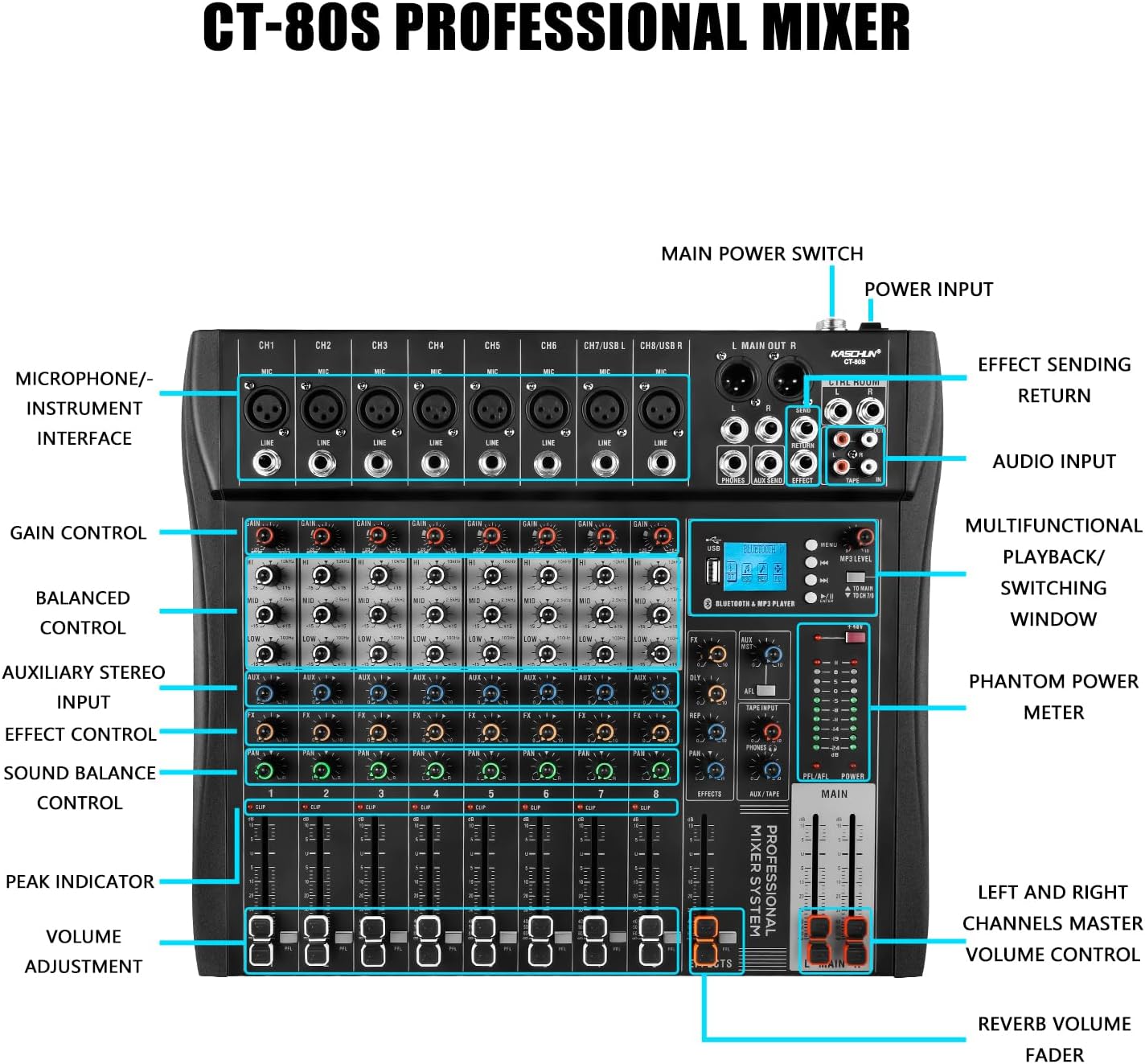
Figure 3.2: Detailed labeled diagram of the CT120S mixer, indicating the function of each control and input/output port.
4. Настройка
Follow these steps to set up your Kaschun CT120S mixer:
- Распаковка: Carefully remove the mixer from its packaging. Inspect for any signs of damage.
- Размещение: Установите миксер на устойчивую ровную поверхность, обеспечив достаточную вентиляцию вокруг устройства.
- Подключение питания: Connect the provided power cord to the mixer's power input and then to a standard 110V AC wall outlet. Do not power on yet.
- Входные соединения:
- Микрофоны: Connect XLR microphones to the MIC inputs (CH1-CH12). If using condenser microphones, ensure 48V phantom power is off before connecting, then activate it once connected.
- Устройства линейного уровня: Connect instruments, keyboards, or other line-level devices to the LINE inputs using 1/4-inch TRS or TS cables.
- Выходные соединения: Connect the MAIN OUT (XLR or 1/4-inch) to your amplifier, powered speakers, or recording interface. Connect headphones to the PHONES output for monitoring.
- Первоначальное включение: Once all connections are secure, turn on the mixer's main power switch.
5. Инструкция по эксплуатации
This section details the primary functions and controls of your CT120S mixer.
5.1 канала управления
- Взять под контроль: Adjusts the input sensitivity for each channel. Set this to achieve a strong signal without clipping (indicated by the PEAK indicator).
- 3-полосный эквалайзер (высокие, средние, низкие частоты): Fine-tune the tonal characteristics of each channel. High controls frequencies above 10kHz, Mid around 2.5kHz, and Low below 100Hz. Adjust these to shape your sound.
- Дополнительный контроль: Sends a portion of the channel signal to the auxiliary output, typically used for monitor mixes or external effects.
- Управление эффектами: Передает часть сигнала канала во внутренний процессор эффектов.
- ПАН-контроль: Adjusts the stereo position of the channel signal (left to right).
- VOLUME Adjustment (Fader): Регулирует уровень выходного сигнала каждого отдельного канала в основном миксе.
- CLIP/PEAK Indicator: Lights up when the input signal is too high, indicating potential distortion. Reduce the GAIN if this light illuminates frequently.
5.2. Bluetooth-подключение
The CT120S features built-in Bluetooth 5.0 for wireless audio playback.

Figure 5.1: Illustration of Bluetooth wireless connection to the CT120S mixer from a mobile device.
- Активируйте Bluetooth на вашем мобильном устройстве (смартфоне, планшете и т. д.).
- On the mixer's MP3 player section, select the Bluetooth mode. The LED display will show 'BT' or a similar indicator.
- On your device, search for available Bluetooth devices and select 'CT120S' (or similar name).
- Once paired, you can play audio from your device through the mixer. Adjust the MP3/USB channel volume on the mixer.
5.3 USB Recording and MP3 Playback
The mixer supports direct USB recording and MP3 playback.
- Воспроизведение MP3: Вставьте флэш-накопитель USB с MP3 files into the USB port. The mixer will automatically detect and begin playing. Use the controls on the MP3 player section to navigate tracks and adjust volume. The LED display shows song names.
- USB-запись: To record your mix, ensure a USB flash drive is inserted. Press the 'REC' button on the MP3 player section. The mixer will record the main stereo output directly to the USB drive. Press 'REC' again to stop recording.
5.4 48 В Фантомное питание
Микшер обеспечивает фантомное питание 48 В для конденсаторных микрофонов.

Figure 5.2: Close-up of the 48V phantom power switch and graphical representation of the 3-stage adjustable balance (EQ curves).
- Locate the '+48V' switch on the mixer.
- Before activating, ensure all condenser microphones are properly connected to their respective XLR inputs.
- Flip the '+48V' switch to the ON position. An indicator light will confirm activation.
- Always turn off phantom power before disconnecting condenser microphones or connecting dynamic microphones.
6. Техническое обслуживание
Правильное техническое обслуживание обеспечивает долговечность и оптимальную работу вашего миксера.
- Уборка: Regularly wipe the mixer's surface with a soft, dry, lint-free cloth. For stubborn dirt, slightly dampСмочите ткань водой. Избегайте использования абразивных чистящих средств и растворителей.
- Защита от пыли: When not in use, cover the mixer with a dust cover to prevent dust accumulation, especially in faders and knobs.
- Хранилище: Храните миксер в прохладном, сухом месте, вдали от прямых солнечных лучей и экстремальных температур.
- Управление кабелями: Убедитесь, что кабели аккуратно уложены и не подвергаются натяжению, чтобы предотвратить повреждение разъемов и портов.
7. Поиск Неисправностей
В этом разделе рассматриваются распространенные проблемы, с которыми вы можете столкнуться.
| Проблема | Возможная причина | Решение |
|---|---|---|
| Нет звука | Main volume fader is down; input gain too low; output cables disconnected or faulty; speakers/ampУсилитель выключен или приглушен. | Increase MAIN fader; adjust channel GAIN; check all cable connections; ensure speakers/ampУсилители включены и не отключены. |
| Искаженный звук | Input signal too high (CLIP indicator on); output level too high; faulty cable. | Reduce channel GAIN; lower MAIN output level; try a different cable. |
| Проблемы с подключением Bluetooth | Device not in pairing mode; mixer not in Bluetooth mode; interference. | Ensure both devices are in pairing mode; select Bluetooth mode on mixer; move closer to mixer; restart both devices. |
| Микрофон не работает (конденсаторный микрофон). | Фантомное питание 48 В не активировано; неисправен микрофон или кабель. | Activate +48V phantom power; test with a different microphone or cable. |
| Запись на USB-накопитель не работает. | USB drive not inserted or formatted incorrectly; drive full. | Ensure USB drive is properly inserted; check drive format (FAT32 recommended); delete old files or use a new drive. |
8. Технические характеристики
| Особенность | Спецификация |
|---|---|
| Номер модели | CT120S |
| Количество каналов | 12 |
| Вес товара | 5.99 фунта |
| Размеры упаковки | 22 x 17.27 x 4.5 дюйма |
| Источник питания | Проводной электрический |
| Томtage | 110 вольт (переменный ток) |
| Технология связи | USB-порт, Bluetooth-порт |
| Тип выходного разъема | XLR |
| Фантомное питание | 48В |
9. Гарантия и поддержка
For any issues encountered before purchase or during product usage, please do not hesitate to contact Kaschun customer service for assistance. We are committed to providing a response within 24 hours. Please refer to your purchase documentation for specific warranty terms and conditions.
For further support, visit the official Kaschun store or contact your retailer.