
1. Введение
The LEOBOG HI75C Pro is a 75% TKL mechanical wireless keyboard designed for versatility and performance. It features an aluminum alloy case, tri-mode connectivity (Bluetooth 5.0, 2.4GHz wireless, and USB-C wired), RGB backlighting, a multi-functional knob, and hot-swappable switches. This manual provides detailed instructions for setting up, operating, and maintaining your keyboard.

Figure 1: LEOBOG HI75C Pro Mechanical Wireless Keyboard Overview
2. Содержимое упаковки
Проверьте наличие всех предметов в посылке:
- LEOBOG HI75C Pro Mechanical Wireless Keyboard
- Съемник Keycap
- USB-кабель (тип C)
- Replace Switch (Spare Switches)
3. Особенности продукта
The LEOBOG HI75C Pro keyboard incorporates several advanced features for an enhanced user experience:
- Aluminium Alloy Cover: Provides superior heat dissipation, robustness, and durability. Features an exquisite powder coating process for a luxurious feel and fingerprint resistance.
- Конструкция прокладки: Significantly reduces cavity noise and improves typing sound for a satisfying low-noise experience.
- Трехрежимное подключение: Supports Bluetooth 5.0, 2.4GHz wireless, and USB wired connections, allowing connection to up to five devices simultaneously.
- 75% компоновка: An 81-key layout that balances concise design with full functionality, saving desk space.
- RGB-подсветка: Features 16.8 million RGB lighting colors with 17 lighting effects and 10 music rhythm modes.
- Ручка с двумя режимами работы: A multi-functional knob for precise control over volume (office mode) and lighting brightness (game mode).
- High Speed Response: Equipped with an advanced gaming keyboard chip for a response speed of up to 2.8ms.
- Коммутаторы с возможностью горячей замены: Позволяет легко заменять переключатели без пайки.
- Аккумулятор емкостью 4000 мАч: Provides extended usage time, approximately one month without backlighting.

Figure 2: Key features of the LEOBOG HI75C Pro keyboard.

Figure 3: Diagram illustrating the multi-layered gasket structure for sound dampтренировать.

Figure 4: Ergonomic keycap height design for comfortable typing.
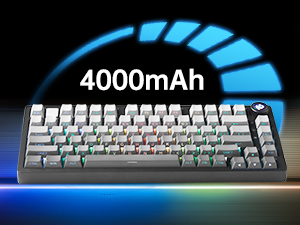
Figure 5: The keyboard is equipped with a 4000mAh battery.
4. Настройка и подключение
The LEOBOG HI75C Pro offers three connection modes: wired, 2.4GHz wireless, and Bluetooth. Use the switch on the side of the keyboard to select your desired mode.
4.1 Проводное соединение
- Ensure the mode switch on the side of the keyboard is set to the wired (USB-C) position.
- Подключите прилагаемый кабель USB-C к клавиатуре и к свободному USB-порту на вашем компьютере.
- Клавиатура будет автоматически распознана и готова к использованию.
4.2 Беспроводное соединение 2.4 ГГц
- Ensure the mode switch on the side of the keyboard is set to the 2.4GHz wireless position.
- Подключите USB-приемник 2.4 ГГц к свободному USB-порту вашего компьютера.
- Клавиатура должна подключиться автоматически. Если этого не произошло, нажмите ФН + ~ чтобы начать сопряжение.
4.3 Подключение Bluetooth 5.0
- Ensure the mode switch on the side of the keyboard is set to the Bluetooth position.
- На вашем устройстве (ПК, Mac, Android, iOS) включите Bluetooth и выполните поиск новых устройств.
- Нажмите и удерживайте ФН + 1, ФН + 2, или ФН + 3 for 3-5 seconds to enter pairing mode for BT1, BT2, or BT3 respectively. The indicator light will flash.
- Select "LEOBOG HI75C Pro" from the list of available Bluetooth devices on your device.
- Once connected, the indicator light will stop flashing. You can switch between paired Bluetooth devices using ФН + 1/2/3.

Figure 6: The keyboard supports Type-C wired, 2.4GHz wireless, and Bluetooth connections.
Video 1: Official LEOBOG overview of the HI75C Pro Mechanical Gaming Keyboard, showcasinг его дизайн и особенности.
5. Операция
5.1 RGB-подсветка
The keyboard features extensive RGB backlighting with 17 preset lighting effects. Additionally, it offers 10 music rhythm RGB lighting modes that synchronize with audio output. You can adjust lighting effects and brightness using the multi-functional knob or dedicated key combinations. To turn off the lights, use the knob in game mode.
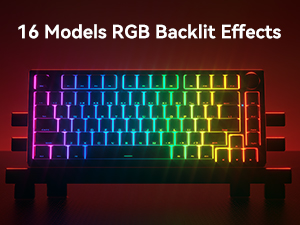
Figure 7: The keyboard offers 16 models of RGB backlit effects.
5.2 Dual-Mode Knob Control
The multi-functional knob allows for quick adjustments based on the selected mode:
- Режимы переключения: Press and hold the knob to toggle between Office Mode and Game Mode.
- Офисный режим: When the indicator light is continuously on, the keyboard is in office mode. Rotate the knob to adjust the system volume.
- Режим игры: When the indicator light is breathing, the keyboard is in game mode. Rotate the knob to adjust the lighting brightness.

Figure 8: The multi-functional knob for volume and lighting control.
5.3 Коммутаторы с возможностью горячей замены
The LEOBOG HI75C Pro supports hot-swappable 3-pin/5-pin mechanical switches, allowing you to easily change switches without soldering. This feature enables customization of typing feel and sound.

Figure 9: The keyboard features hot-swappable switches for customization.
6. Техническое обслуживание
6.1 Очистка
Для поддержания оптимальной производительности и внешнего вида регулярно чистите клавиатуру:
- Перед чисткой отключите клавиатуру от всех источников питания.
- Используйте мягкую, безворсовую ткань, слегкаampДля протирки клавиш и корпуса используйте воду или слабый чистящий раствор.
- Для более глубокой очистки используйте прилагаемый съемник клавиш, чтобы снять их, и очистите нижнюю часть сжатым воздухом или небольшой щеткой.
- Перед повторным подключением убедитесь, что клавиатура полностью высохла.
6.2 Замена клавиш и переключателя
Конструкция с возможностью горячей замены позволяет легко заменять клавиши и переключатели:
- Для аккуратного снятия клавиш используйте прилагаемый съемник клавиш.
- Use a switch puller (not included, but often comes with replacement switches) to carefully remove switches. Grip the switch firmly and pull straight up.
- Совместите контакты нового переключателя с отверстиями на печатной плате и слегка нажмите, пока он не встанет на место со щелчком. Убедитесь, что контакты не согнуты.
- Установите желаемый колпачок клавиши на новый шток переключателя.
7. Поиск Неисправностей
7.1 Проблемы с подключением
- Нет соединения: Ensure the mode switch on the side of the keyboard is set correctly for wired, 2.4GHz, or Bluetooth.
- 2.4GHz Disconnection: Re-plug the USB receiver. Try pairing again by pressing ФН + ~.
- Отключение Bluetooth: Ensure Bluetooth is enabled on your device. Re-enter pairing mode on the keyboard (ФН + 1/2/3) and re-select the keyboard on your device.
- Вмешательство: Move the keyboard closer to the receiver/device or away from other wireless devices that might cause interference.
7.2 Программное обеспечение и микропрограммы
For advanced customization, macro programming, and firmware updates, please visit the official LEOBOG website or authorized distributors' websites. Ensure you download the correct software/firmware version specifically for the LEOBOG HI75C Pro model to avoid compatibility issues.
7.3 RGB-подсветка не работает
- Check if the keyboard is in Game Mode, where the knob controls brightness. Rotate the knob to increase brightness.
- Ensure the battery is sufficiently charged if using wireless mode.
- If using software, verify that lighting effects are enabled and configured correctly.
8. Технические характеристики
| Особенность | Деталь |
|---|---|
| Номер модели | HI75C PRO |
| Размеры продукта | 12.97 x 5.35 x 1.74 дюйма |
| Вес товара | 3.41 фунта |
| Технология связи | Bluetooth, USB-C, беспроводная связь 2.4 ГГц |
| Описание клавиатуры | Механический |
| Совместимые устройства | Игровая консоль, ноутбук, ПК, смартфон, планшет |
| Особые возможности | Customizable Display Keys, Ergonomic, Hot-Swappable, Hotkeys and Media Keys, Programmable Keys |
| Подсветка клавиатуры | РГБ |
| Аккумулятор | 1 A battery required (included), 4000mAh |
9. Гарантия и поддержка
LEOBOG provides a Гарантия 2 год for the HI75C Pro Mechanical Wireless Keyboard, covering manufacturing defects from the date of purchase. For warranty claims, technical assistance, or product inquiries, please contact LEOBOG customer support through their official webсайт или розничный продавец, где был приобретен товар.

Figure 10: LEOBOG customer service is available for support.