
Введение
This manual provides detailed instructions for the AULCMEET RC80B replacement remote control, designed for use with Edifier R1280DBs active speakers. Please read this manual carefully to ensure proper operation and to maximize your experience with the product.
Продукт болееview
The AULCMEET RC80B remote control offers a comprehensive set of functions for your Edifier R1280DBs speakers. Its ergonomic design ensures comfortable handling and intuitive button placement.
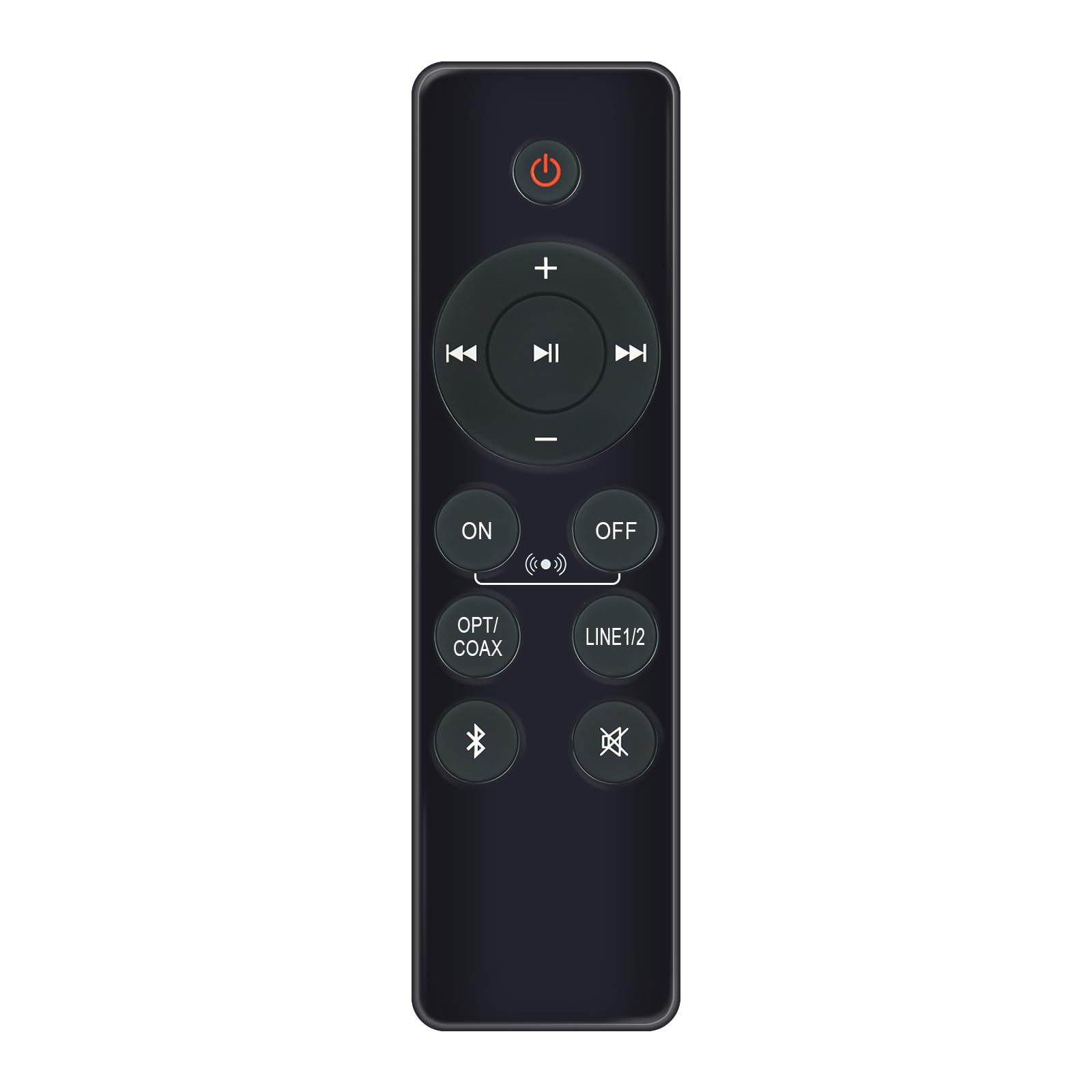
Image: AULCMEET RC80B Replacement Remote Control. The remote measures approximately 13.8 cm (5.43 inches) in length and 3.8 cm (1.5 inches) in width.
Функции кнопок:
- Кнопка питания (⏻): Turns the speakers ON or OFF.
- Увеличение громкости (+) / Уменьшение громкости (-): Adjusts the speaker volume.
- Предыдущий трек (⏮) / Next Track (⏭): Skips to the previous or next audio track.
- Воспроизведение/Пауза (⏯): Plays or pauses audio playback.
- ON / OFF (Input Selection): Toggles between different input modes.
- ОПТ / КОАКС: Selects Optical or Coaxial input.
- ЛИНИЯ1/2: Selects Line In 1 or Line In 2 input.
- Блютуз (☋): Activates or selects Bluetooth input.
- Немой (🛇): Mutes or unmutes the speaker audio.
Настраивать
The AULCMEET RC80B remote control is designed for immediate use without complex setup procedures. Simply install the batteries, and it is ready to operate your compatible Edifier R1280DBs speakers.
Установка аккумулятора:
- Найдите батарейный отсек на задней стороне пульта дистанционного управления.
- Откройте крышку батарейного отсека.
- Вставьте две щелочные батарейки типа AAA, соблюдая правильную полярность (+ и -), указанную внутри отсека.
- Плотно закройте крышку батарейного отсека.
Примечание: No programming or pairing is required for this replacement remote control. It functions directly with the specified Edifier R1280DBs active speakers.
Инструкция по эксплуатации
To operate your Edifier R1280DBs speakers using the AULCMEET RC80B remote control, point the remote directly towards the speakers' infrared receiver. Ensure there are no obstructions between the remote and the speakers.
- Включение/выключение питания: Нажмите кнопку ⏻ button to turn the speakers on or off.
- Регулировка громкости: Используйте + и - кнопки для увеличения или уменьшения громкости.
- Выбор входного сигнала: Нажмите кнопку ВКЛ/ВЫКЛ, ОПТ / КОАКС, ЛИНИЯ1/2, или Bluetooth buttons to switch between the available audio input sources.
- Управление воспроизведением: When using Bluetooth or other compatible sources, use the ⏮ (Предыдущий), ⏭ (Далее), и ⏯ (Play/Pause) buttons to control media playback.
- Функция отключения звука: Нажмите кнопку 🛇 button to temporarily silence the audio. Press it again to restore the sound.
Технические характеристики
| Бренд | AULCMEET |
| Модель | RC80B |
| Совместимые устройства | Edifier R1280DBs Active Speakers |
| Цвет | Черный |
| Функции | Эргономичный дизайн |
| Интерфейс связи | Инфракрасный (ИК) |
| Количество кнопок | 30 |
| Максимальный диапазон | Приблизительно 33 футов (10 метра) |
| Тип батареи | 2 щелочные батарейки типа ААА (в комплект не входят) |
| Размеры (Д х Ш) | 13.8 см x 3.8 см (5.43 дюйма x 1.5 дюйма) |
Поиск неисправностей
If you encounter issues with your AULCMEET RC80B remote control, please refer to the following common solutions:
- Удаленный не отвечает: Ensure the batteries are correctly installed and are not depleted. Replace batteries if necessary.
- Короткий рабочий диапазон: Check for any obstructions between the remote and the speaker's IR receiver. Ensure the remote is pointed directly at the speakers. Low battery power can also reduce range.
- Определенная кнопка не работает: Clean the remote control surface and buttons. If the issue persists, the button may be faulty, or the remote may require battery replacement.
- Speakers not responding to any remote: Ensure the speakers are powered on and functioning correctly. Try using the manual controls on the speaker unit if available.
Обслуживание
Правильный уход и техническое обслуживание продлят срок службы вашего пульта дистанционного управления:
- УборкаПротрите пульт дистанционного управления мягкой сухой тканью. Не используйте абразивные чистящие средства или растворители.
- Уход за аккумулятором: Remove batteries if the remote control will not be used for an extended period to prevent leakage.
- Хранилище: Store the remote control in a cool, dry place, away from direct sunlight and extreme temperatures.
- Избегайте падений: Оберегайте пульт дистанционного управления от физических воздействий, так как падения могут повредить внутренние компоненты.
Гарантия и поддержка
Specific warranty information for this AULCMEET RC80B replacement remote control is not provided in the product details. For warranty claims, technical support, or further assistance, please contact the seller or manufacturer directly through your purchase platform. Keep your purchase receipt or order number handy for faster service.