
1. Продукт закончилсяview
The MIUCDA Smart Wi-Fi Garage Door Opener is a control module designed to integrate your existing garage door motorization with smart home systems. It enables remote control via a mobile application and voice commands through compatible smart assistants.
Основные характеристики:
- Удаленное управление приложением: Manage your garage door from anywhere using the Tuya/Smart Life application.
- Голосовое управление: Совместимость с Amazon Alexa и Google Home для управления без помощи рук.
- Мониторинг статуса: Check the open/closed status of your garage door in real-time via the app.
- Расписание: Set custom schedules for opening and closing your garage door.
- Концентратор не требуется: Подключается напрямую к вашей домашней сети Wi-Fi.

Image 1.1: The MIUCDA Smart Garage Door Opener module, magnetic sensor, and a smartphone displaying the control app interface.

Image 1.2: Visual representation of the smart garage door opener's compatibility with various smart home platforms including Smart Life, Tuya, Amazon Alexa, and Google Home.
2. Информация по технике безопасности
Внимательно ознакомьтесь со всеми инструкциями по технике безопасности перед установкой и использованием. Несоблюдение этих инструкций может привести к поражению электрическим током, пожару или другим травмам.
- Ensure power is disconnected before performing any wiring or installation.
- Если вы не уверены в электропроводке, установку должен выполнять квалифицированный электрик.
- Держите устройство вдали от воды и мест с высокой влажностью.
- Не пытайтесь ремонтировать или модифицировать устройство самостоятельно. Обратитесь в службу поддержки за помощью.
- This device is designed for use with garage door openers that have a low-voltage control input. Verify compatibility with your existing system.
3. Настройка и установка
Follow these steps to install and configure your MIUCDA Smart Wi-Fi Garage Door Opener.
3.1 Содержимое упаковки
- MIUCDA Smart Wi-Fi Garage Door Opener Module
- Magnetic Sensor (for door status detection)
- Кабели для подключения
- Руководство пользователя (этот документ)
3.2 Схема электропроводки
The module can be mounted in a switch box or on a DIN rail. Ensure correct wiring as shown in the diagram below.

Image 3.1: Detailed wiring diagram illustrating how to connect the smart module to your garage door opener's drive head and wall button. It shows connections for signal cables (S1, S2), AC input (L, N), and sensor cables (S3, S4).
- Выключение: Disconnect power to your garage door opener at the circuit breaker.
- Монтируем модуль: Choose a suitable location near your garage door opener. The module can be installed inside a switch box or mounted on a DIN rail.
- Подключите питание: Connect the AC power supply (L and N terminals) to the module. Input Voltage: AC100-240V, 50/60Hz.
- Подключите сигнальные кабели: Connect the signal cables (S1, S2) from the module to the low-voltage control terminals of your garage door opener. These are typically the same terminals used by your wall-mounted push button.
- Установите магнитный датчик: Attach the magnetic sensor to your garage door. One part of the sensor should be mounted on the door frame, and the other part on the moving door itself, ensuring they align and are within 1-2 cm when the door is closed.
- Connect Sensor Cables: Connect the sensor cables (S3, S4) from the magnetic sensor to the corresponding terminals on the module.
- Восстановить мощность: Once all connections are secure, restore power to your garage door opener.
3.3 Сопряжение приложений
- Скачать приложение: Загрузите приложение "Tuya Smart" или "Smart Life" из магазина приложений вашего смартфона.
- Регистрация/Войти: Создайте учетную запись или войдите в приложение.
- Добавить устройство: In the app, tap '+' to add a new device. Select 'Garage Door Opener' or 'Electrician' -> 'Garage Door Switch'.
- Введите данные Wi-Fi: Follow the in-app instructions to connect the device to your 2.4GHz Wi-Fi network. Ensure your phone is connected to the same 2.4GHz network during pairing.
- Подтвердите сопряжение: The app will confirm when the device is successfully added. You can then rename the device for easy identification.
4. Инструкция по эксплуатации
Control your garage door using the mobile app or voice commands.
4.1 Использование мобильного приложения
Open the Tuya Smart or Smart Life app and select your garage door opener device.
- Открыто закрыто: Tap the main button on the device interface to open or close your garage door.
- Проверка статуса: The app displays the current status (Open/Closed) of your garage door based on the magnetic sensor.
- История: View a log of all open and close operations.
- Расписание: Set up automated schedules for your garage door.

Image 4.1: A user operating their garage door remotely via the Smart Life application on a smartphone, shown from inside a car.

Image 4.2: A smartphone screen showing the historical record of garage door open and close events within the control app.
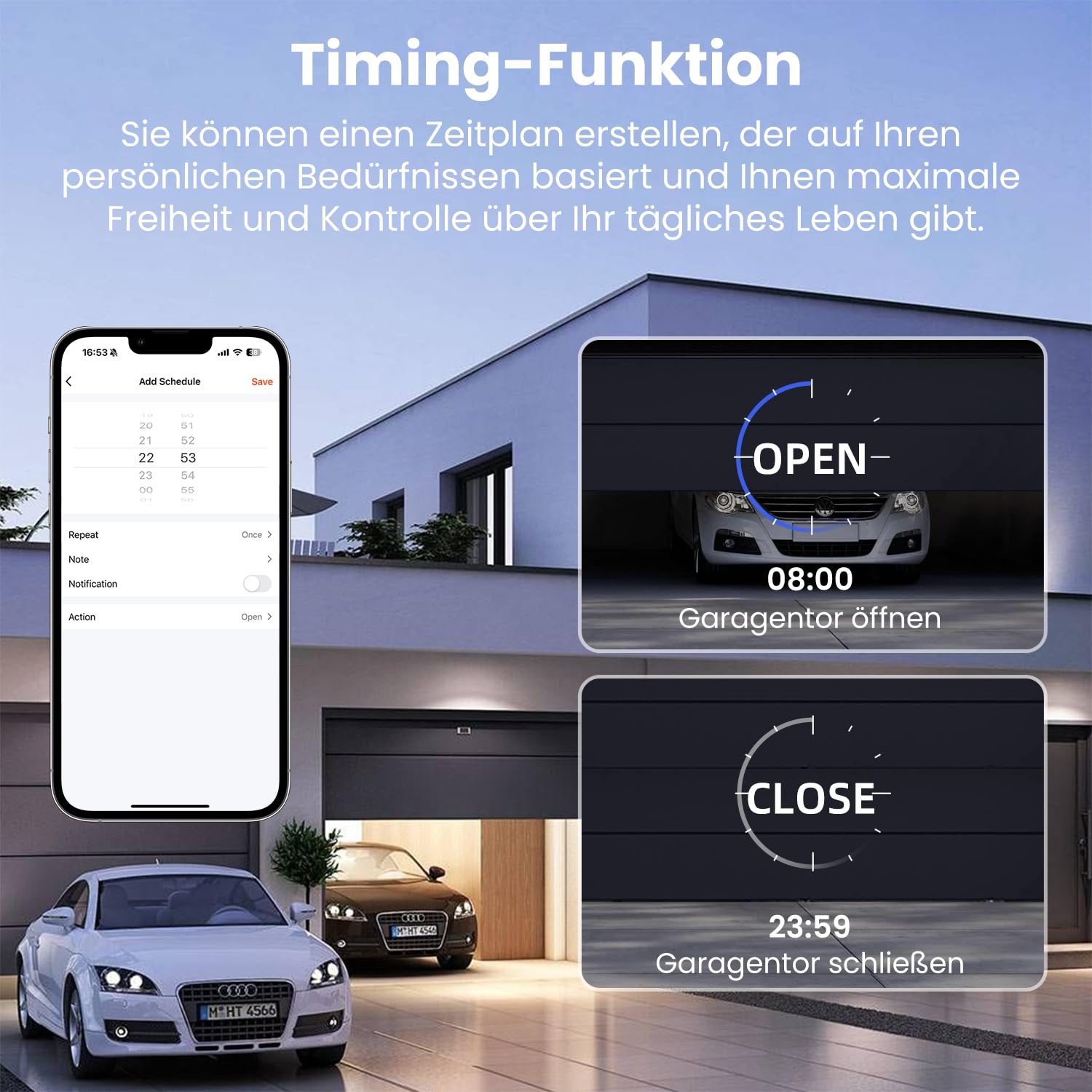
Image 4.3: The scheduling feature within the app, allowing users to set specific times for the garage door to open (e.g., 08:00) and close (e.g., 23:59).
4.2 Голосовое управление
Integrate your device with Amazon Alexa or Google Home for voice commands.
- Связать аккаунт: In the Alexa or Google Home app, enable the "Tuya Smart" or "Smart Life" skill/service and link your account.
- Откройте для себя устройства: Попросите Alexa или Google найти новые устройства.
- Голосовые команды: Используйте такие команды, как:
«Алекса, открой гаражные ворота».
«Эй, Google, закрой гараж».
"Alexa, is the garage door open?"

Image 4.4: A person interacting with an Amazon Alexa device to control their garage door using voice commands.
5. Техническое обслуживание
Regular maintenance ensures optimal performance and longevity of your smart garage door opener.
- Чистота: Keep the module and magnetic sensor clean and free from dust and debris. Use a soft, dry cloth for cleaning.
- Выравнивание датчика: Periodically check the alignment of the magnetic sensor. Ensure the two parts are still within the recommended distance (1-2 cm) when the door is closed.
- Обновления прошивки: Check the Tuya/Smart Life app for any available firmware updates for your device. Install updates to ensure the latest features and security patches.
- Wi-Fi-соединение: Ensure your Wi-Fi network is stable and the device has a strong signal. Poor Wi-Fi can affect performance.
6. Поиск Неисправностей
If you encounter issues with your MIUCDA Smart Wi-Fi Garage Door Opener, refer to the following troubleshooting guide.
Распространенные проблемы и решения:
- Устройство отключено от сети в приложении:
Решение: Check your Wi-Fi router and internet connection. Ensure the device is within Wi-Fi range. Try restarting the module by temporarily disconnecting and reconnecting its power. Re-pair the device if necessary. - Garage Door Not Responding to Commands:
Решение: Verify the module's power supply. Check the signal cable connections (S1, S2) to your garage door opener. Ensure your garage door opener is functioning correctly with its original wall button. - Incorrect Door Status in App:
Решение: Check the magnetic sensor installation and alignment. Ensure the sensor cables (S3, S4) are securely connected to the module. The sensor parts must be close enough when the door is closed. - Голосовое управление не работает:
Решение: Ensure your Tuya/Smart Life account is correctly linked to Alexa/Google Home. Check if the device is discovered and named appropriately in the smart assistant app. Verify your smart assistant device has an active internet connection. - Подбор пар по уровню сложности:
Решение: Ensure your phone is connected to a 2.4GHz Wi-Fi network during pairing. Some routers combine 2.4GHz and 5GHz bands; try temporarily disabling the 5GHz band if you experience issues. Reset the module (refer to app instructions for specific reset procedure, usually involves holding a button).
7. Технические характеристики
| Особенность | Спецификация |
|---|---|
| Бренд | МИУКДА |
| Номер модели | 6cd539ea-f8a9-4e5b-81a1-f917988390a5 |
| Vol входtage | 100-240 В переменного тока, 50/60 Гц |
| Текущий рейтинг | 10 А |
| Режим работы | Автоматический |
| Тип контакта | Нормально закрытый |
| Тип разъема | Винтовые клеммы |
| Тип переключателя | Кнопка нажатия |
| Тип цепи | 1-х полосный |
| Тип крепления | Для установки заподлицо |
| Тип привода | Шарнирный рычаг |
| Размеры упаковки | 15 х 10.2 х 4.5 см |
| Вес упаковки | 210 грамм |
| Наличие запасных частей | Информация недоступна |
8. Информация о гарантии
Specific warranty details for the MIUCDA Smart Wi-Fi Garage Door Opener are not provided in the product information. Please refer to the retailer's return policy or contact MIUCDA customer support for warranty inquiries.
Generally, products purchased on Amazon.com.be come with a standard return policy. For this product, the return policy duration is 31 days for refund/replacement.
9. Поддержка и контакты
For technical support, troubleshooting assistance, or further inquiries regarding your MIUCDA Smart Wi-Fi Garage Door Opener, please contact MIUCDA customer service.
Contact information was not explicitly provided in the product details. Please check the product packaging, the MIUCDA brand website, or your purchase confirmation for support contact details.
You may also refer to the help section within the Tuya Smart or Smart Life application for common questions and support resources related to smart home devices.