
1. Введение
This manual provides essential information for the safe and effective operation of your Hantek DSO4204C Digital Oscilloscope and Arbitrary Function Waveform Generator. Please read this manual thoroughly before using the device to ensure proper functionality and to prevent damage.
The Hantek DSO4204C is a versatile instrument combining a 4-channel digital oscilloscope with an integrated arbitrary function waveform generator. It features a 200 MHz bandwidth, 1GSa/s real-time sample rate, and advanced measurement capabilities, making it suitable for a wide range of electronic testing and measurement applications.
2. Информация по технике безопасности
WARNING: To prevent electric shock or personal injury, and to avoid damage to the instrument or connected equipment, observe the following safety precautions:
- Use the provided power cord and ensure it is properly grounded.
- Не используйте прибор во влажных или сухих условиях.amp условия.
- Do not operate the instrument in explosive atmospheres.
- Обеспечьте надлежащую вентиляцию, чтобы предотвратить перегрев.
- Do not attempt to service the instrument unless you are qualified to do so. Refer all servicing to qualified personnel.
- Before making connections to the input or output terminals, ensure the instrument is powered off.
- Use only probes and accessories specified for this instrument.
3. Содержимое упаковки
Убедитесь, что все перечисленные ниже товары включены в вашу посылку. Если какие-либо товары отсутствуют или повреждены, пожалуйста, свяжитесь с вашим поставщиком.
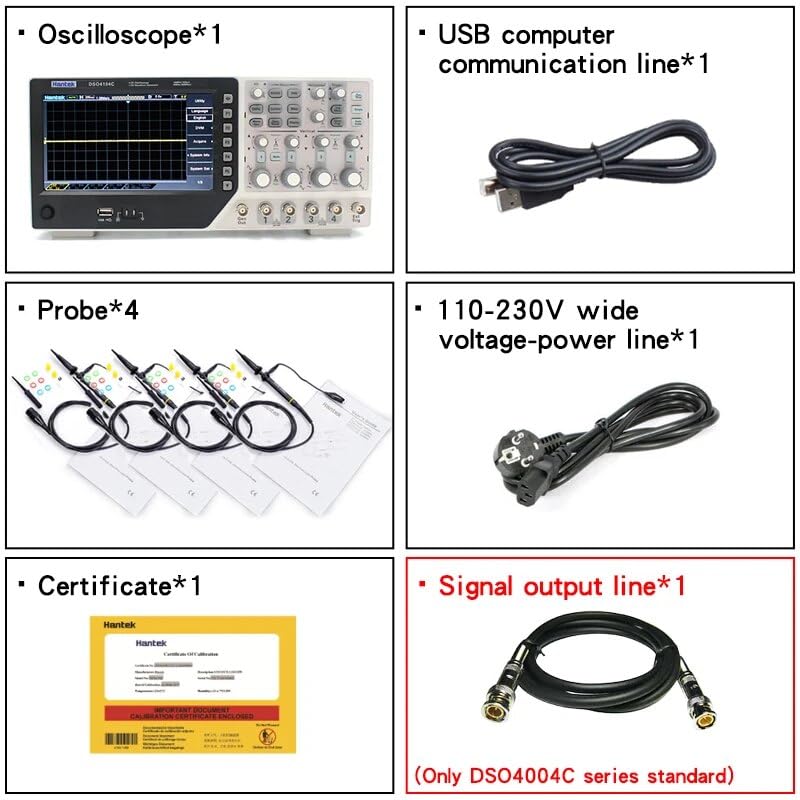
Рисунок 3.1: Надview of included accessories. This image displays the Hantek oscilloscope unit, four probes, a USB communication cable, a 110-230V power line, a quality certificate, and a signal output line.

Рисунок 3.2: The Hantek DSO4204C oscilloscope and its various accessories, still sealed in their protective plastic packaging, as they appear upon unboxing.
- Hantek DSO4204C Digital Oscilloscope Unit
- Щупы осциллографа (4 шт.)
- USB-кабель связи
- Power Cord (110-230V wide voltage)
- Сертификат качества
- Signal Output Line (for Arbitrary Function Generator)
- Руководство пользователя (этот документ)
4. Продукт закончилсяview
The Hantek DSO4204C integrates multiple functions into a single compact device, designed for efficiency and accuracy in electronic testing.

Рисунок 4.1: Передний view of the Hantek DSO4204C, highlighting the display screen, function buttons, rotary encoders, and BNC input connectors for channels 1-4, signal output, and external trigger.
4.1 Элементы управления и разъемы на передней панели
- Экран дисплея: High-resolution color display for waveform visualization and menu navigation.
- Функциональные кнопки (F1-F6): Контекстно-зависимые кнопки для выбора пунктов меню.
- Ручки управления: For adjusting vertical scale (Volts/Div), horizontal scale (Sec/Div), trigger level, and menu navigation.
- Входы каналов (CH1-CH4): Разъемы BNC для подключения щупов осциллографа.
- Генерал Выход: Output for the arbitrary function waveform generator.
- Ext Trig: Внешний вход триггера.
- USB Host/Device Ports: For data storage (U-stick) and PC communication.
4.2 Боковые и задние панели

Рисунок 4.2: Левая сторона view of the oscilloscope, showing ventilation openings for heat dissipation.

Рисунок 4.3: Правая сторона view of the oscilloscope, also featuring ventilation slots to maintain optimal operating temperature.
The side panels primarily feature ventilation slots to ensure adequate cooling during operation. The rear panel typically houses the power input and any optional communication ports (e.g., RS232, LAN).
5. Настройка
5.1 Подключение питания
- Подключите прилагаемый сетевой кабель к разъему питания на задней панели осциллографа.
- Другой конец шнура питания подключите к заземленной розетке переменного тока.
- Press the power button, usually located on the front or side panel, to turn on the instrument.
5.2 Подключение и компенсация зонда
- Connect an oscilloscope probe to one of the BNC input channels (CH1-CH4).
- Attach the probe tip to the probe compensation output (usually a square wave test point on the front panel).
- Adjust the compensation trimmer on the probe until a flat-top square wave is displayed on the screen. This ensures accurate measurements.
5.3 Начальные настройки
Upon first power-on or after a factory reset, the oscilloscope will typically default to standard settings. It is recommended to perform a self-calibration if available in the utility menu for optimal performance.
6. Инструкция по эксплуатации
6.1 Основные принципы работы осциллографа
- Вертикальные элементы управления: Use the Volts/Div knobs for each channel to adjust the vertical scale of the waveform. Use the position knobs to shift the waveform vertically.
- Горизонтальные элементы управления: Use the Sec/Div knob to adjust the horizontal time base. The position knob shifts the waveform horizontally.
- Система спуска: The advanced digital trigger system offers high sensitivity. Use the Trigger Level knob to set the trigger point. Select trigger types (edge, overtime, pulse, pattern, interval, etc.) from the trigger menu.
- Автоматическое измерение: The device supports over 32 types of auto measurement functions. Access these through the measurement menu to automatically display parameters like Vpp, Vmax, Vmin, Frequency, Period, etc.
- Serial Bus Triggering and Decode: For analyzing serial communication protocols, use the dedicated functions to trigger on and decode bus data. Information can be displayed in a table format.
6.2 Arbitrary Function Waveform Generator (AFG)
The integrated AFG can generate various waveforms up to 25MHz with 12-bit resolution.
- Connect the signal output line from the "Gen Out" port to your circuit or another oscilloscope input.
- Access the AFG menu to select waveform types (ARB, square, sine, triangular, trapezoidal, impulse, DC), frequency, ampамплитуда и смещение.
- The AFG is useful for simulating sensors and testing circuit responses.
6.3 Data Storage and Communication
- USB-хост: Insert a U-stick into the USB Host port for saving waveforms, screenshots, or instrument settings.
- USB-устройство: Connect the oscilloscope to a PC using the USB Device port for remote control and data transfer via Hantek software.
- Команды SCPI: The instrument supports a variety of SCPI remote control commands for automated testing.
- Optional Ports: If equipped, RS232 and LAN ports provide additional communication options.
7. Техническое обслуживание
7.1 Очистка
Регулярно очищайте внешнюю поверхность прибора мягкой тряпкой.amp Не используйте абразивные чистящие средства или растворители, которые могут повредить ткань.asing or display. Ensure the instrument is powered off and disconnected from the power source before cleaning.
7.2 обновлений прошивки
Периодически проверяйте официальный сайт Hantek. website for firmware updates. Updates can improve performance, add features, or fix bugs. Follow the instructions provided with the firmware update package carefully to avoid damaging the device.
7.3 Хранение
Когда осциллограф не используется, храните его в сухом, защищенном от пыли месте, вдали от прямых солнечных лучей и экстремальных температур. Для защиты во время транспортировки используйте оригинальную упаковку или подходящий чехол.
8. Поиск Неисправностей
| Проблема | Возможная причина | Решение |
|---|---|---|
| Прибор не включается. | Шнур питания не подключен; розетка неисправна; внутренний предохранитель перегорел. | Check power cord connection; test power outlet; contact support for fuse replacement. |
| Осциллограмма не отображается. | Probe not connected; channel disabled; vertical/horizontal scale incorrect; trigger not set. | Ensure probe is connected and functional; enable channel; adjust Volts/Div and Sec/Div; set trigger correctly or use Auto Set. |
| Waveform is distorted. | Probe compensation incorrect; probe faulty; input signal too large/small. | Perform probe compensation; try a different probe; adjust vertical scale. |
| USB-накопитель не распознан. | USB drive formatted incorrectly; drive faulty; port faulty. | Ensure USB drive is FAT32 formatted; try a different USB drive; contact support. |
For issues not covered here, please refer to the official Hantek support resources or contact customer service.
9. Технические характеристики
| Особенность | Спецификация |
|---|---|
| Модель | DSO4204C |
| Каналы | 4 Oscilloscope Channels + 1 Arbitrary Function Generator Channel |
| Пропускная способность | 200 MHz (for DSO4204C variant) |
| Sampле Скорость | 1 Гвыб/с (в реальном времени) |
| Вертикальная чувствительность | 500 µV/div - 10 V/div |
| Auto Measurement Functions | Более 32 видов |
| Типы триггеров | Edge, Overtime, Pulse, Pattern, Interval, etc. (Over 14 types) |
| Arbitrary Function Generator Frequency | 25 МГц |
| Arbitrary Function Generator Resolution | 12-битный |
| Связность | USB Host/Device, Optional RS232, Optional LAN |
| SCPI Support | Да |
| Размеры продукта (Д x Ш x В) | 8.27 x 4.33 x 6.3 дюйма (210 x 110 x 160 мм) |
| Вес товара | 3.31 фунта (1.5 килограмма) |
| Производитель | Хантек Циндао |
| Сертификаты | CE, ISO 9001, RoHS |
10. Гарантия и поддержка
Hantek products are designed for reliability and performance. This instrument is covered by a standard manufacturer's warranty against defects in materials and workmanship. For specific warranty terms and duration, please refer to the warranty card included with your product or visit the official Hantek webсайт.
For technical support, troubleshooting assistance, or service inquiries, please contact Hantek customer service through their official channels. You may need to provide your product model number (DSO4204C) and serial number (if applicable) when seeking support.
Официальный Хантек Webсайт: www.hantek.com