
GODOX X3-N
Руководство пользователя беспроводного синхронизатора вспышки Godox X3-N
Model: X3-N
Торговая марка: ГОДОКС
1. Введение
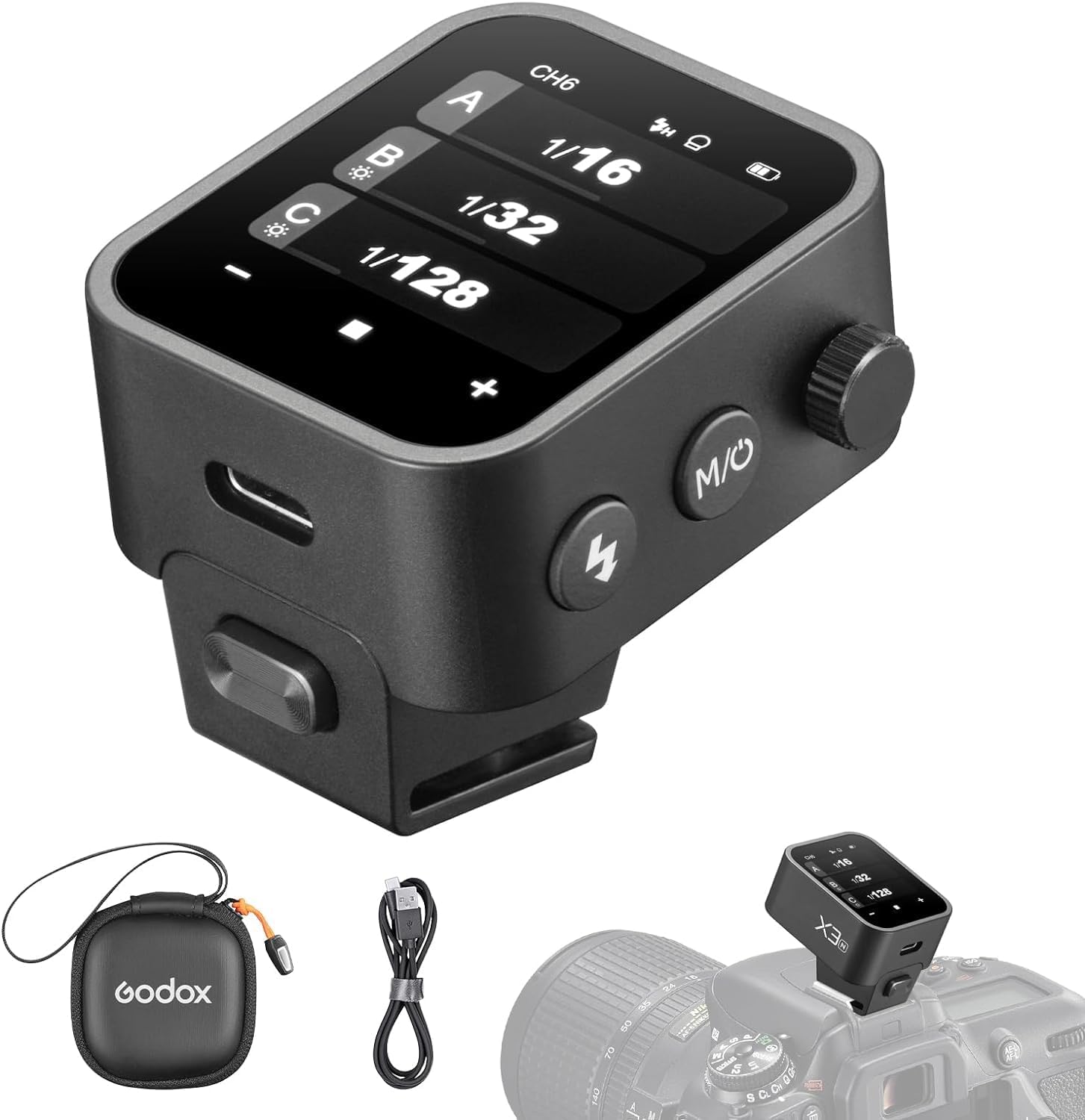
The Godox X3-N is a state-of-the-art touchscreen TTL wireless flash trigger designed for Nikon cameras. It offers advanced features such as 1/8000s High-Speed Sync (HSS), TTL autoflash, and TCM (TTL Convert Manual) function, providing photographers with precise control over their lighting setups. Its compact design, intuitive OLED touchscreen, and built-in rechargeable battery make it an essential tool for both studio and on-location shooting.
2. Что в коробке
- 1 x Flash Trigger (Godox X3-N)
- Зарядный кабель 1 x USB-C
- 1 х сумка для хранения

3. Продукт закончилсяview
The Godox X3-N features a compact and robust design, integrating an intuitive touchscreen interface with physical controls for versatile operation.
3.1.Основные характеристики
- OLED-сенсорный экран: High-definition display with high contrast and fast refresh rate. Adjustable brightness for various lighting conditions. Includes a screen lock function to prevent accidental touches.
- Built-in Li-Ion Battery: Charges from 0% to 100% in 2 hours via USB-C port. Supports firmware updates via USB-C.
- Durable Hot-shoe: Easy and quick mounting onto your camera.
- 2.4GHz Godox Wireless X System: Operating distance up to 100 meters. Features spare channel scanning to avoid interference.
- Full TTL Functions: Supports 1/8000s High-Speed Sync, Manual Flash, Flash Exposure Compensation, TCM Function, Modeling Lamp Control, Zooming setting, and Screen brightness control.
- Совместимость с Nikon: Compatible with Nikon Z6, Z6II, Z7II, D780, Zfc, D5, D4, D60, D70S, D90, D100, D200, D300S, D300, D500, D610, D700, D750, D800, D810, D3100, D3200, D3300, D5000, D5100, D5200, D5300, D7000, D710.


Видео 3.1: Официальная версия продуктаview of the Godox X3 TTL Wireless Flash Trigger, highlighting its key features and compact design.
4. Настройка
4.1. Mounting the Trigger
Slide the Godox X3-N onto your camera's hot-shoe until it clicks into place. Ensure it is securely fastened.

4.2. Включение и выключение
To power on the device, press and hold the power button located on the side. To power off, repeat the same action.
4.3. Начальная настройка языка
Upon first use or after a reset, you may need to set the language. Swipe down from the top of the screen, select the gear icon (Settings) in the bottom right. Scroll down until you see the globe icon (Language) and select it. You will then have the option to switch to English or other available languages.
5. Инструкция по эксплуатации
The Godox X3-N offers flexible control via its touchscreen and physical buttons.
5.1. Навигация по сенсорному экрану
The OLED touchscreen allows for intuitive control. Swipe and tap gestures are used to navigate menus and adjust settings. For fine adjustments or when wearing gloves, the side knob can be used.

5.2. Adjusting Flash Power and Groups
From the main display, you can see and adjust power levels for multiple flash groups (A, B, C, etc.). Tap on a group to enter its individual settings, or use the +/- buttons to adjust all groups simultaneously. The side knob can also be rotated to change values.

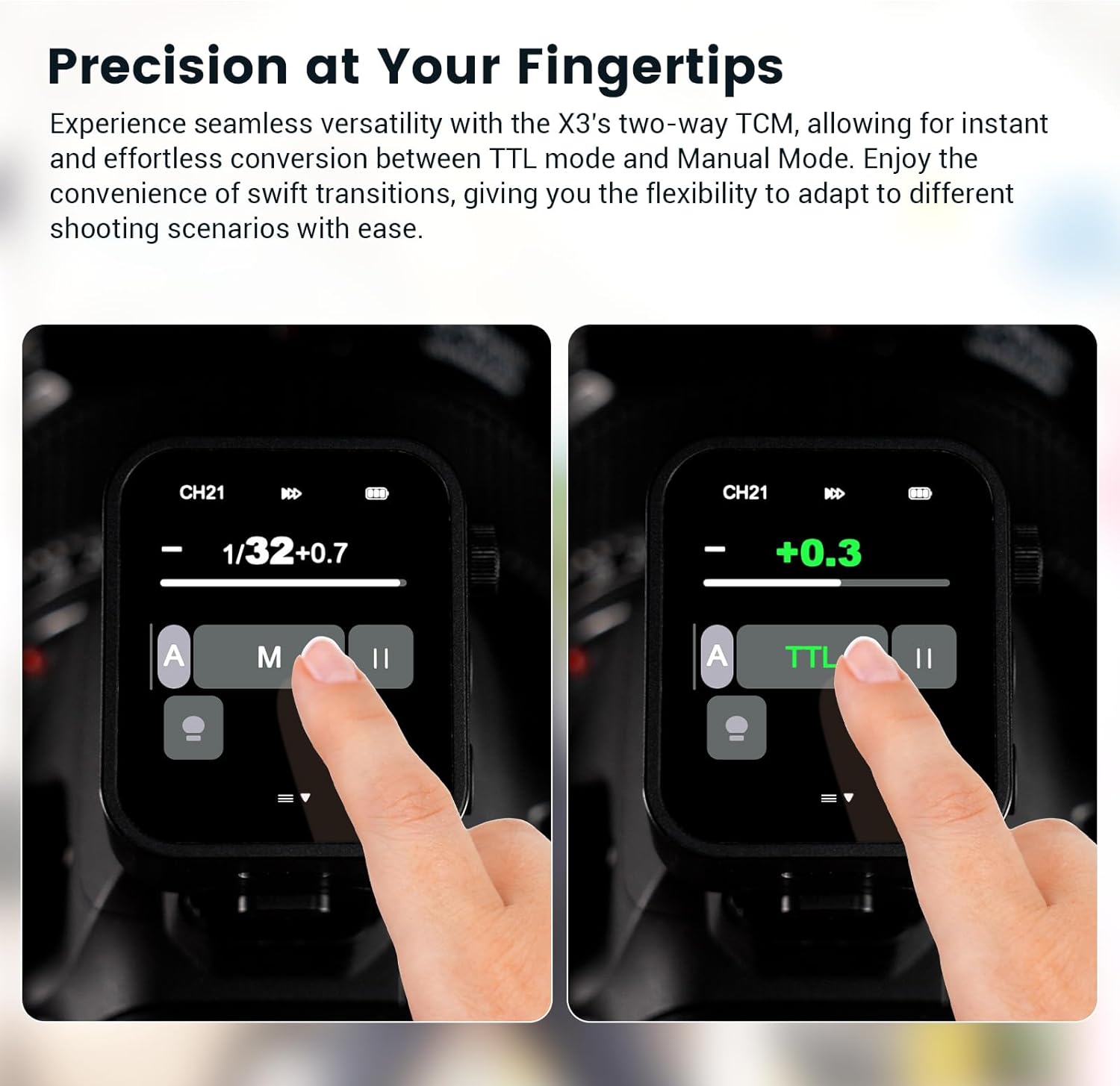
5.3. TTL and Manual Mode (TCM Function)
The X3-N supports both TTL (Through-The-Lens) autoflash and Manual flash modes. The TCM (TTL Convert Manual) function allows for quick conversion of a TTL exposure value into a manual power setting, providing flexibility in various shooting scenarios.
5.4. Высокоскоростная синхронизация (HSS)
The trigger supports High-Speed Sync up to 1/8000s, allowing you to use flash at faster shutter speeds to freeze action or overpower ambient light.

5.5. Screen Brightness and Lock
Adjust the screen brightness by sliding left or right on the screen. To prevent unintentional touches, activate the screen lock function.
Video 5.6: Detailed operation video for the Godox X3 TTL Wireless Flash Trigger, demonstrating various settings and functions.
6. Техническое обслуживание
- Держите устройство сухим. Не берите его мокрыми руками и не погружайте в воду.
- Протрите экран и корпус мягкой сухой тканью. Избегайте использования агрессивных химикатов.
- Хранить в прохладном, сухом месте, вдали от прямых солнечных лучей и экстремальных температур.
- Regularly check for firmware updates via the USB-C port to ensure optimal performance.
7. Поиск Неисправностей
| Проблема | Возможная причина | Решение |
|---|---|---|
| Устройство не включается. | Низкий заряд батареи. | Зарядите устройство с помощью прилагаемого кабеля USB-C. |
| Вспышка не срабатывает. | Incorrect channel/ID settings. | Ensure the trigger and flash units are set to the same channel and ID. Use the spare channel scanning function. |
| Экран не реагирует. | Блокировка экрана активирована. | Tap and hold the screen for 2 seconds to unlock. |
| Incompatible with camera. | Camera model not supported. | Verify your camera model is listed in the compatibility section. |
8. Технические характеристики
- Размеры продукта: 1.61 x 1.54 x 1.85 дюйма
- Вес товара: 1.69 унции
- Номер модели: Х3-Н
- Аккумуляторы: 1 литий-ионный аккумулятор (входит в комплект)
- Совместимые крепления: Никон
- Скорость синхронизации вспышки: 1/8000 сек
- Производитель: Годокс
- Страна происхождения: Китай
9. Гарантия и поддержка
Информацию о гарантии и технической поддержке можно получить на официальном сайте Godox. webили обратитесь к местному дистрибьютору. Сохраните чек о покупке для предъявления гарантийных претензий.
Ask a question about this manual
Ask about setup, troubleshooting, compatibility, parts, safety, or missing instructions. Manuals+ will review the question and use this page’s manual context to help answer it.