
1. Введение
The LEAUDIO XDUOO XD05 Plus 2 is a high-performance portable Digital-to-Analog Converter (DAC) and headphone amplifier designed to deliver exceptional audio quality. It features advanced decoding capabilities, powerful output, and versatile connectivity options for various audio sources and headphones.
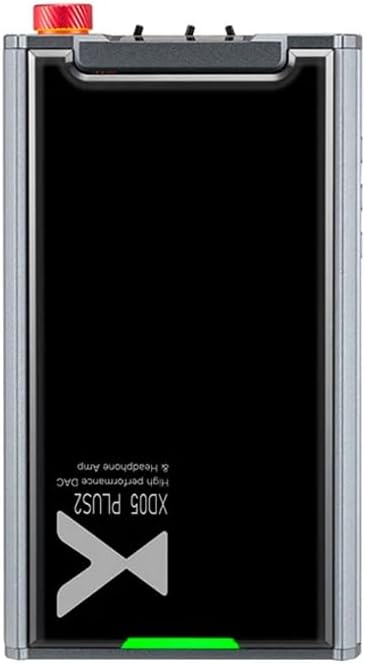
Рисунок 1: Вверху view of the XDUOO XD05 Plus 2, highlighting its compact design and model branding.
2. Содержимое упаковки
Проверьте комплектацию на наличие следующих предметов:
- XDUOO XD05 Plus 2 Portable DAC Headphone Ampпожизненнее
- USB-кабель
- Руководство пользователя (этот документ)
3. Компоновка устройства
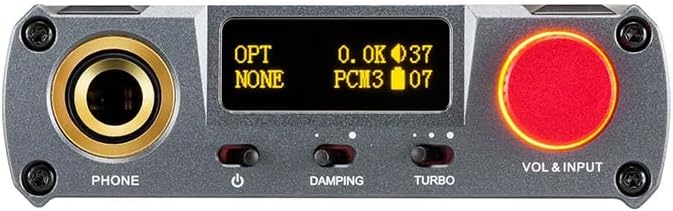
Figure 2: Front panel controls including the headphone output, OLED display, Damping switch, Turbo switch, and Volume/Input knob.

Figure 3: Rear panel connections featuring AUX In/Out, USB In, UAC 1.0/2.0 switch, Charge port, and Digital In (Optical/Coaxial).
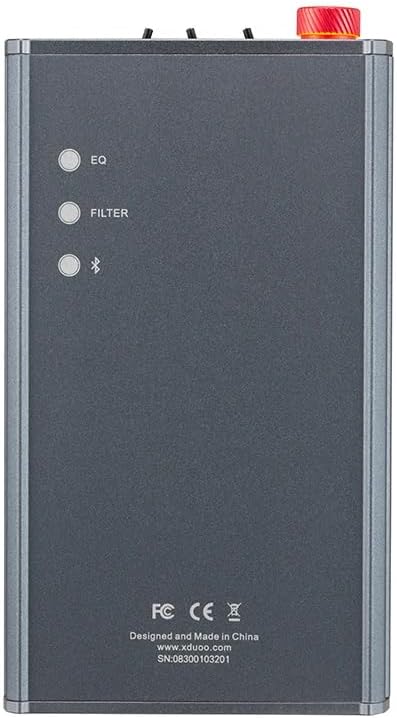
Figure 4: Side panel buttons for EQ, Filter, and Bluetooth functions.
4. Настройка и подключение
4.1 Зарядка устройства
Connect the provided USB cable to the 'CHARGE' port on the rear panel (Figure 3) and plug the other end into a USB power adapter (not included) or a computer's USB port. The charging time is approximately 3 hours for fast charging and 5 hours for slow charging.
4.2 Подключение к источникам звука
The XD05 Plus 2 offers multiple input options:
- USB-вход: Connect to computers (Windows/Linux/Mac OSX), smartphones (iOS/Android), or other USB audio sources using the 'USB IN' port (Figure 3). Ensure the UAC switch is set to the appropriate mode (UAC 1.0 or UAC 2.0) for your device.
- Digital Input (Optical/Coaxial): Connect to desktop CDs, Hi-Fi players, or digital turntables via the 'DIGITAL IN' port (Figure 3).
- Вход Bluetooth: For wireless audio streaming, refer to Section 5.4 for Bluetooth pairing instructions.
- Вход/выход AUX: Use the 'AUX IN/OUT' port (Figure 3) for analog input or output connections.
4.3 Подключение наушников
Plug your headphones into the 'PHONE' output jack on the front panel (Figure 2).
5. Инструкция по эксплуатации
5.1 Включение/выключение питания и выбор входа
Press and hold the power button (located near the 'PHONE' jack, Figure 2) to turn the device on or off. Rotate the 'VOL & INPUT' knob (Figure 2) to adjust the volume. Press the 'VOL & INPUT' knob to cycle through available input sources (USB, Optical, Coaxial, Bluetooth, AUX).
5.2 Регулятор громкости
The device features a 99-level digital volume adjustment, ensuring balanced left and right channels at any volume setting. Rotate the 'VOL & INPUT' knob to precisely set your desired listening level.
5.3 Sound Adjustments (EQ, Filter, Damping, Turbo)
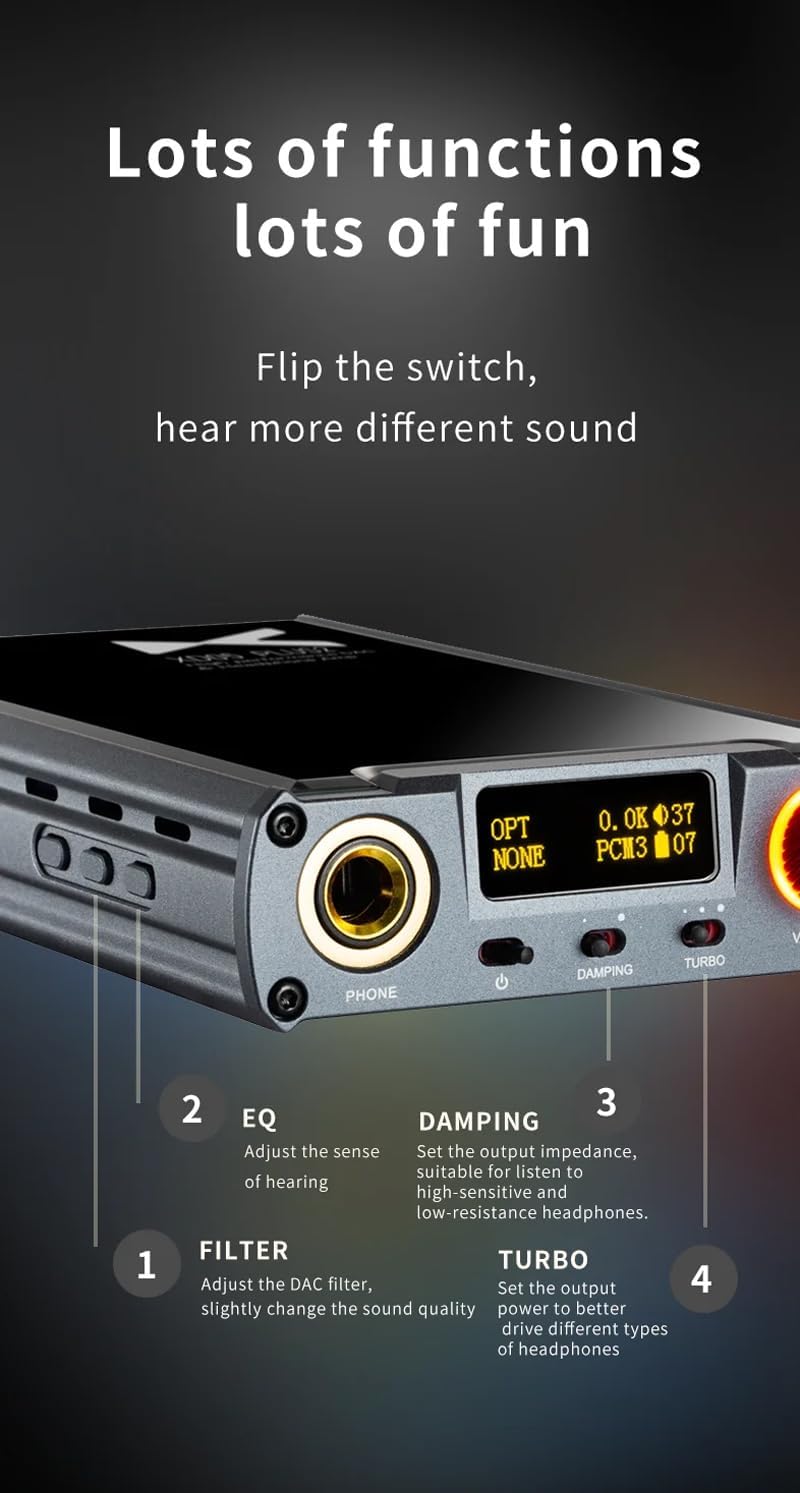
Рисунок 5: Подробная информация view of sound adjustment controls and their functions.
- Эквалайзер (EQ): Press the 'EQ' button (Figure 4) to adjust the sense of hearing and tailor the sound to your preference.
- Фильтр: Press the 'FILTER' button (Figure 4) to slightly change the sound quality by adjusting the DAC filter settings.
- Damping: Use the 'DAMPING' switch (Figure 2) to set the output impedance, suitable for high-sensitivity and low-resistance headphones.
- Турбо: Use the 'TURBO' switch (Figure 2) to set the output power, allowing the device to better drive different types of headphones.
5.4 Сопряжение по Bluetooth
To pair your device via Bluetooth 5.1:
- Ensure the XD05 Plus 2 is powered on and Bluetooth input is selected.
- Press the 'Bluetooth' button (Figure 4) to enter pairing mode. The Bluetooth indicator on the OLED screen will flash.
- On your source device (e.g., smartphone, tablet), search for available Bluetooth devices and select "XDUOO XD05 Plus 2".
- После установления соединения индикатор Bluetooth перестанет мигать.
Supported Bluetooth formats include AAC, SBC, aptX, aptX LL, aptX HD, and LDAC.
5.5 Замена Ampжизненный чип
The amplifier chip is user-replaceable, allowing for customization of your audio experience. Refer to the manufacturer's guidelines or a qualified technician for instructions on safely replacing the op-amp чипсы.
6. Технические характеристики
| Особенность | Спецификация |
|---|---|
| Аккумулятор | 3.8 В/5000 мАч |
| Экран | 0.91-дюймовый OLED-дисплей |
| Совместимая ОС | Windows/Linux/Mac OSX/iOS/Android |
| Frequency Response (USB/SPDIF) | 20 Гц ~ 20 кГц (± 0.5 дБ) |
| Частотный отклик (AMP) | 10 Гц ~ 80 кГц (± 0.5 дБ) |
| USB-SampСкорость линга (PCM) | 16-32BIT/44.1-384KHZ |
| USB-SampСкорость передачи данных (DSD) | DOP/NATIVE DSD64-256 |
| USB-Sampling Rate (MQA) | OFS rendering layer decoding |
| OPT/COA SampСкорость линга (PCM) | 16-24BIT/44.1-192KHZ |
| OPT/COA SampСкорость передачи данных (DSD) | DSD64 (DOP) |
| Форматы Bluetooth | AAC/SBC/aptX/aptX LL/aptX HD/LDAC |
| Прирост | +0 дБ/3 дБ/6 дБ |
| Выходная мощность наушников | 1200 мВт (нагрузка 32 Ом) |
| Наушники THD+N | 0.0015%@1кГц |
| Headphone S/N | 121дБ |
| Headphone Crosstalk | >76дБ |
| AUX OUT Output Level | 2.0Vrms |
| AUX OUT THD+N | 0.0009%@1кГц |
| AUX OUT S/N | 122дБ |
| AUX OUT Crosstalk | ≥109дБ |
| Battery Life (USB IN) | ≥9H |
| Battery Life (SPDIF IN) | ≥15H |
| Battery Life (BT IN) | ≥18H |
| Время зарядки (быстрое) | ≤3 часа |
| Время зарядки (медленное) | ≤5 часа |
| Размер | 13.0 х 7.5 х 2.2 см |
| Масса | 0.29 кг |
7. Техническое обслуживание
To ensure the longevity and optimal performance of your XDUOO XD05 Plus 2, follow these maintenance guidelines:
- Поддерживайте чистоту устройства, протирая его мягкой сухой тканью. Избегайте использования едких химикатов и абразивных материалов.
- Защищайте устройство от экстремальных температур, прямых солнечных лучей и влаги.
- Не роняйте устройство и не подвергайте его сильным ударам.
- Если устройство не используется в течение длительного времени, храните его в прохладном, сухом месте.
8. Поиск Неисправностей
If you encounter issues with your XDUOO XD05 Plus 2, please refer to the following common troubleshooting steps:
- Нет звука:
- Проверьте, включено ли устройство.
- Убедитесь, что наушники правильно подключены.
- Убедитесь, что выбран правильный источник входного сигнала.
- Отрегулируйте уровень громкости.
- Check the audio source device for proper playback and volume settings.
- Плохое качество звука:
- Убедитесь, что все кабели надежно подключены.
- Попробуйте другой аудиокабель или источник.
- Check EQ and Filter settings; reset them to default if necessary.
- Ensure the UAC switch is set correctly for your USB connection.
- Проблемы с подключением Bluetooth:
- Убедитесь, что устройство находится в режиме сопряжения Bluetooth.
- Поднесите источник сигнала ближе к ampпожизненнее.
- Clear previous Bluetooth pairings on both devices and try pairing again.
- Устройство не заряжается:
- Verify the USB cable is connected to the 'CHARGE' port.
- Попробуйте другой USB-кабель или адаптер питания.
- Убедитесь, что источник питания исправен.
9. Официальное видео о продукте
Видео 1: Оверview of the LEAUDIO XDUOO XD05 Plus 2 DAC Amp, шоуasing its features and design. This video provides a visual guide to the product's capabilities and physical aspects.
10. Гарантия и поддержка
For warranty information and technical support, please refer to the documentation included with your product or contact LEAUDIO customer service directly. You may also visit the official LEAUDIO webсайт для получения самых актуальных ресурсов поддержки.