
BOXPUT X88 PRO 13
Руководство пользователя смарт-ТВ-приставки BOXPUT X88 PRO 13
Model: X88 PRO 13
1. Введение
This manual provides detailed instructions for the setup, operation, and maintenance of your BOXPUT X88 PRO 13 Smart TV Box. Please read this manual thoroughly before using the device to ensure proper functionality and to maximize your user experience. Keep this manual for future reference.
2. Содержимое упаковки
Убедитесь, что все перечисленные ниже товары входят в комплект поставки. Если какие-либо товары отсутствуют или повреждены, пожалуйста, свяжитесь с продавцом.
- BOXPUT X88 PRO 13 Smart TV Box
- Дистанционное управление
- HDMI-кабель
- Адаптер питания (5 В постоянного тока/2 А)
- Руководство пользователя
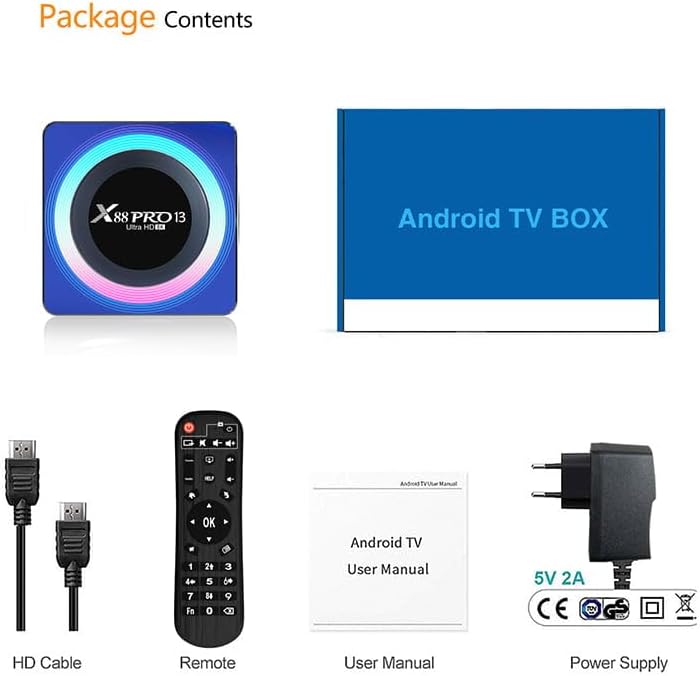
Image: Contents of the product package, including the TV box, HDMI cable, remote control, user manual, and power adapter.
3. Продукт закончилсяview
The BOXPUT X88 PRO 13 is a high-performance Smart TV Box designed to deliver an enhanced media experience. It features the Android 13.0 operating system and a powerful RK3528 Quad-Core processor.

Image: The BOXPUT X88 PRO 13 Smart TV Box and its accompanying remote control.
Основные характеристики
- Операционная система Android 13.0
- RK3528 Quad-Core 64bit Cortex-A53 Chipset
- Mali 450 MP2 GPU
- Support for 8K HD Video Decoding
- Dual-band Wi-Fi (2.4G/5G) with Wi-Fi 6
- Bluetooth V5.0
- Screen Cast Functionality

Image: Visual representation of key features including Android 13.0, 8K video support, RK3528 processor, WiFi 6, and Screen Cast.
4. Руководство по установке
Follow these steps to set up your BOXPUT X88 PRO 13 Smart TV Box.
- Подключение к ТВ: Подключите один конец кабеля HDMI к порту HDMI на ТВ-приставке, а другой конец — к свободному входу HDMI на вашем телевизоре.
- Подключите питание: Подключите адаптер питания к разъему DC 5V/2A на ТВ-приставке, а затем подключите адаптер к настенной розетке.
- Включение питания: Устройство должно включиться автоматически или его можно включить с помощью кнопки питания на пульте дистанционного управления.
- Выберите ввод: On your television, select the correct HDMI input source using your TV's remote control.
- Начальная настройка: Follow the on-screen instructions to complete the initial setup, including language selection and network configuration.
5. Инструкция по эксплуатации
5.1 Базовая навигация
Use the provided remote control to navigate the Android interface. The directional buttons (up, down, left, right) are used to move the cursor, and the 'OK' button confirms selections. The 'Back' button returns to the previous screen, and the 'Home' button returns to the main menu.
5.2 Сетевое подключение
The TV Box supports both wired and wireless network connections.
- Проводное соединение (Ethernet): Подключите кабель Ethernet от маршрутизатора к порту LAN на ТВ-приставке.
- Беспроводное соединение (Wi-Fi): Перейти к Настройки > Сеть и Интернет > Wi-Fi, select your network, and enter the password. The device supports 2.4GHz and 5GHz dual-band Wi-Fi 6 for faster and more stable connections.

Image: An illustration demonstrating the improved speed and stability offered by WiFi 6 technology.
5.3. Bluetooth-подключение
The TV Box features Bluetooth V5.0, allowing connection to various external devices.
- Перейти к Настройки > Подключенные устройства > Сопряжение нового устройства.
- Put your Bluetooth device (e.g., speaker, headphones, game controller) into pairing mode.
- Select the device from the list on your TV screen to pair.

Image: The TV box demonstrating Bluetooth 5.0 connectivity with a speaker, headphones, and a game controller.
5.4 Воспроизведение медиа
The BOXPUT X88 PRO 13 supports advanced media formats, including 8K H.265 ultra-high-definition content and 3D video playback.
- Декодирование видео 8K: Enjoy crystal-clear visuals with support for 8K resolution.
- Поддержка 3D: Experience immersive 3D content when connected to a compatible 3D television.

Изображение: телевизионный экранasing a high-resolution winter scene, illustrating the 8K video decoding capability of the device.
5.5 Взаимодействие на нескольких экранах
The device supports various multi-screen interaction protocols, allowing you to cast content from your mobile devices to your TV.
- Трансляция: Для устройств Apple.
- DLNA: For compatible devices across various platforms.
- Miracast: Для устройств Android.
To use these features, ensure your mobile device and the TV Box are connected to the same Wi-Fi network. Activate the casting feature on your mobile device and select the TV Box from the available devices.

Image: A television screen displaying a racing car, demonstrating multi-screen interaction capabilities such as Airplay, DLNA, and Miracast.
6. Техническое обслуживание
To ensure the longevity and optimal performance of your TV Box, follow these maintenance guidelines:
- Уборка: Для чистки устройства используйте мягкую сухую ткань. Не используйте жидкие чистящие средства или аэрозоли.
- Вентиляция: Убедитесь, что устройство находится в хорошо проветриваемом помещении, чтобы предотвратить перегрев. Не закрывайте вентиляционные отверстия.
- Обновления программного обеспечения: Периодически проверяйте наличие обновлений системы через Settings > About > System update чтобы обеспечить наличие у вас самых последних функций и обновлений безопасности.
- Хранилище: Avoid placing heavy objects on the device. Store in a cool, dry place away from direct sunlight and extreme temperatures.
7. Поиск Неисправностей
If you encounter issues with your BOXPUT X88 PRO 13, refer to the following common problems and solutions:
- Нет питания:
- Убедитесь, что адаптер питания надежно подключен к устройству и к исправной розетке.
- Убедитесь, что розетка исправна.
- Нет сигнала на ТВ:
- Check that the HDMI cable is properly connected to both the TV Box and the TV.
- Убедитесь, что ваш телевизор настроен на правильный источник входного сигнала HDMI.
- Попробуйте использовать другой кабель HDMI или порт HDMI на вашем телевизоре.
- Нет подключения к Wi-Fi:
- Confirm your Wi-Fi router is powered on and functioning.
- Check Wi-Fi settings on the TV Box (Настройки > Сеть и Интернет > Wi-Fi) and ensure the correct network is selected and password entered.
- Перезагрузите ТВ-приставку и Wi-Fi-роутер.
- Пульт дистанционного управления не отвечает:
- Замените батарейки в пульте дистанционного управления.
- Убедитесь, что между пультом ДУ и ТВ-приставкой нет препятствий.
- Приложения аварийно завершают работу или зависают:
- Закройте и перезапустите приложение.
- Clear the cache of the problematic application via Настройки > Приложения > [Название приложения] > Хранилище и кэш > Очистить кэш.
- Убедитесь, что на устройстве достаточно свободного места для хранения данных.
- Perform a system update if available.
8. Технические характеристики
| Особенность | Спецификация |
|---|---|
| Модель | X88 ПРО 13 |
| Операционная система | Андроид 13.0 |
| Чипсет | RK3528 Четырехъядерный 64-битный Cortex-A53 |
| ГПУ | Мали 450 MP2 |
| БАРАН | 4 ГБ |
| ПЗУ (внутреннее хранилище) | 64 ГБ EMMC |
| USB-хост | 1 * USB 3.0; 1 * USB 2.0 |
| Локальная сеть/Ethernet | Стандартный разъем RJ-45 10/100 М |
| Wireless/Wi-Fi | 2.4G / 5G Dual-band Wi-Fi 802.11 a/b/g/n/ac/ax (Wi-Fi 6) |
| Bluetooth | В5.0 |
| Источник питания | Постоянный ток 5В/2А |
| Декодирование видео | 8K H.265, 3D Support |
| Размеры продукта | 107 х 107 х 21 мм |
9. Гарантия и поддержка
Для получения информации о гарантии и технической поддержке, пожалуйста, обратитесь к документации, прилагаемой к вашей покупке, или свяжитесь с продавцом. Сохраните чек о покупке для предъявления гарантийных претензий.