
Введение
This manual provides detailed instructions for the safe and efficient use of your Fockety Portable MP3 Player. Please read this manual thoroughly before operating the device and retain it for future reference.
Содержимое упаковки
Убедитесь, что в вашей посылке присутствуют все перечисленные ниже предметы:
- 1 x Fockety MP3 Player
- Наушники 1 x
- 1 х USB-кабель для зарядки

Image: Fockety MP3 Player, included headphones, and USB charging cable.
Продукт болееview
The Fockety MP3 Player is designed for portable music playback. It features a compact design, an LCD screen, and a clip for easy attachment.
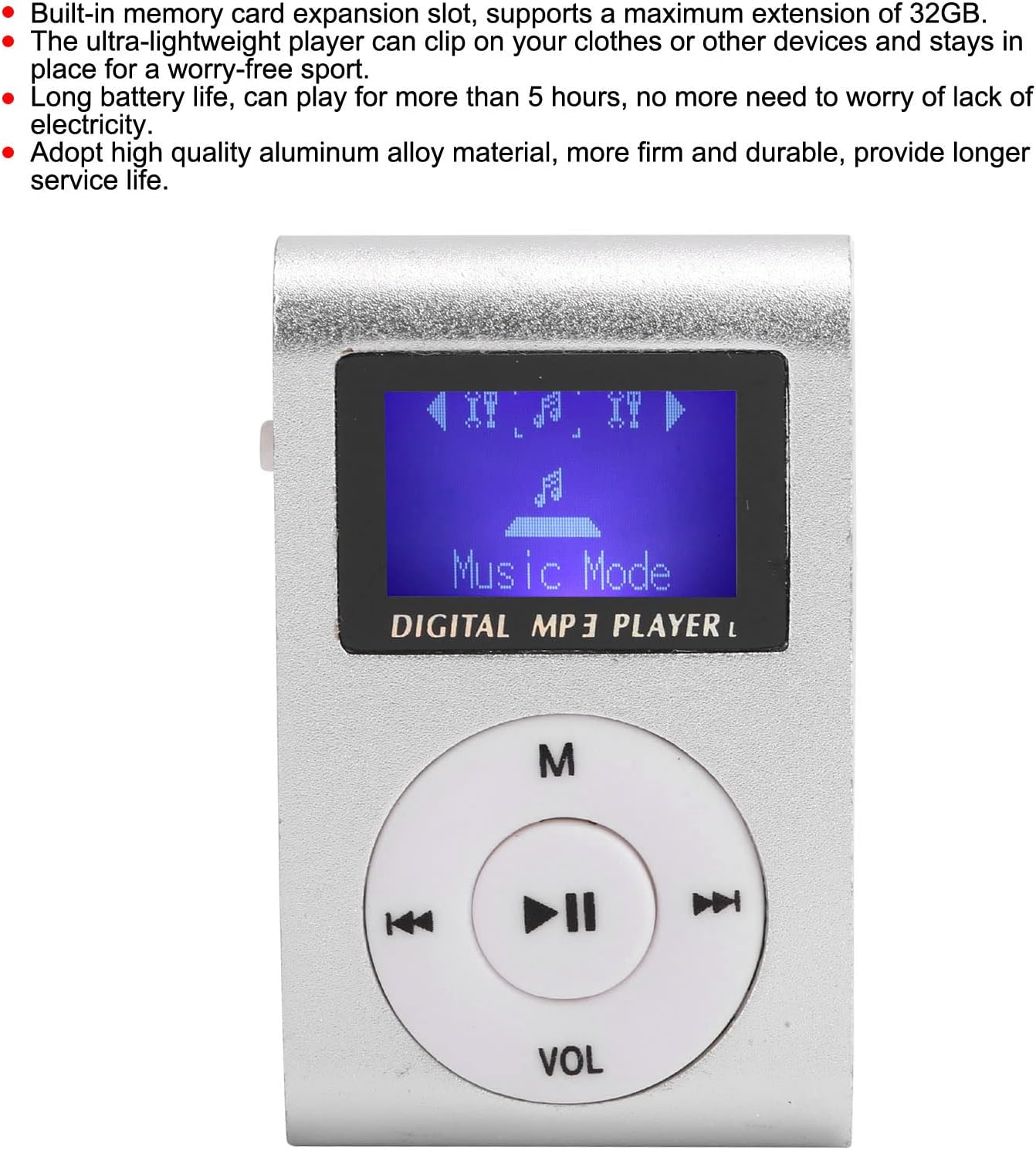
Изображение: Спереди view of the MP3 player, displaying the LCD screen and circular control panel with 'M', play/pause, skip, and 'VOL' buttons.
Основные характеристики:
- Memory Card Expansion: Supports up to 32 GB via a memory card slot (memory card not included).
- Портативная конструкция: Ultra-lightweight with a clip for secure attachment to clothing or other items.
- Увеличенный срок службы батареи: Provides over 5 hours of continuous playback on a full charge.
- ЖК-экран: Displays song progress and navigation information clearly.
- Прочная конструкция: Made from high-quality aluminum alloy for enhanced durability.
Макет устройства
Familiarize yourself with the various ports and controls of your MP3 player.

Изображение: сбоку view of the MP3 player, highlighting the 3.5mm headphone jack, MicroSD card slot, and the On/Off power switch.
- Аудиоразъем 3.5 мм: Для подключения наушников.
- Слот для карты MicroSD: Вставьте карту памяти сюда.
- Выключатель: Slide to turn the device On or Off.
- Мини-USB-порт: Используется для зарядки устройства.
- Кнопки управления: (M) Menu, Play/Pause, Skip Forward, Skip Backward, (VOL) Volume.
Настраивать
1. Установка карты памяти
- Ensure the MP3 player is powered off.
- Найдите слот для карты MicroSD на боковой панели устройства.
- Gently insert a MicroSD card (up to 32GB, not included) into the slot until it clicks into place.
- Чтобы вынуть карту, аккуратно нажмите на нее еще раз, пока она не выскочит.
2. Подключение наушников
Plug the 3.5mm jack of your headphones into the audio port on the side of the MP3 player.
Инструкция по эксплуатации
Включение/выключение питания
- To turn on: Slide the power switch to the "ON" position. The LCD screen will illuminate.
- To turn off: Slide the power switch to the "OFF" position. The screen will turn off.
Воспроизведение музыки
- Ensure a memory card with MP3 files вставлено.
- Включите устройство.
- The player should automatically enter "Music Mode" or display a menu. Use the skip buttons (<< / >>) to navigate through songs or menu options.
- Нажмите Воспроизведение/Пауза button (center button) to start or pause playback.
- Нажмите M button to access the menu for different modes or settings.
Регулятор громкости
Нажмите ОБЪЕМ button. While the volume indicator is displayed on the screen, use the skip buttons (<< / >>) to adjust the volume level. Press ОБЪЕМ again or wait a few seconds for the volume indicator to disappear.
Зарядка устройства
The MP3 player has a built-in rechargeable lithium battery. When the battery is low, the device will indicate this on the screen or power off automatically.
- Locate the Mini USB port on the side of the MP3 player.
- Connect the smaller end of the provided USB charging cable to the Mini USB port on the player.
- Подключите стандартный разъем USB-A кабеля к USB-адаптеру питания (не входит в комплект) или к USB-порту компьютера.
- The device will begin charging. A full charge provides over 5 hours of playback time.
Important Note: The USB port on this device is for charging only. It cannot be used to transfer files to or from a computer.

Image: The Fockety MP3 Player with its Mini USB charging port visible on the side.
Обслуживание
- Держите устройство сухим. Избегайте воздействия влаги и жидкостей.
- Протирайте устройство мягкой сухой тканью. Не используйте едкие химикаты или абразивные чистящие средства.
- Не роняйте устройство и не подвергайте его сильным ударам.
- Храните устройство в прохладном сухом месте, когда оно не используется.
- Не пытайтесь разбирать или ремонтировать устройство самостоятельно. Это аннулирует гарантию.
Поиск неисправностей
| Проблема | Возможное решение |
|---|---|
| Устройство не включается. |
|
| Нет звука в наушниках. |
|
| Не могу найти музыку files. |
|
| Устройство зависает или не отвечает. |
|
Технические характеристики
| Название модели | Fockety0aq9m3vb6e-11 |
| Бренд | Фокети |
| Отображать | LCD Mini Screen |
| Тип памяти | Memory Card (MicroSD) |
| Макс. расширение | 32 ГБ |
| Поддерживаемые аудиоформаты | МП3 |
| Интерфейс | 1 x Mini USB (charging only), 1 x 3.5mm Audio Jack, 1 x Memory Card Slot |
| Тип батареи | Встроенный литиевый аккумулятор емкостью 250 мАч |
| Рабочие часы | Более 5 часов |
| Материал | Алюминиевый сплав |
| Вес товара | 47 грамм |
Гарантия и поддержка
For warranty information or technical support, please refer to the documentation provided at the time of purchase or contact Fockety customer service directly. Keep your purchase receipt as proof of purchase.
Do not attempt to open or modify the device, as this may void your warranty.