
1. Введение
This manual provides essential information for the safe and efficient use of your iWALK USB-C Portable Charger, Model DBL5000PNC. Please read these instructions carefully before using the product.
2. Продукт закончилсяview
The iWALK USB-C Portable Charger is a compact power bank designed for on-the-go charging. It features an integrated USB-C connector for direct device charging and a digital display to monitor battery status.

Image: iWALK USB-C Portable Charger connected to a smartphone, showing its compact design.
Компоненты:
- Встроенный разъем USB-C: Для прямого подключения к совместимым устройствам.
- Цифровой дисплей: Shows the remaining battery capacity of the power bank.
- Кнопка питания: Активирует цифровой дисплей и запускает зарядку.
- Входной порт USB-C: For recharging the portable charger itself.

Image: Close-up of the iWALK USB-C Portable Charger's digital display, indicating battery percentage.
3. Настройка
Первоначальная зарядка Power Bank:
- Connect the provided USB-C charging cable to the USB-C input port on the side of the iWALK portable charger.
- Подключите другой конец кабеля USB-C к совместимому USB-адаптеру питания (не входит в комплект).
- The digital display will show the charging progress. Charge until the display shows 100%.
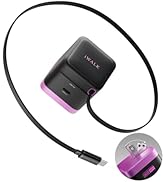
Image: The iWALK portable charger connected to a USB-C cable for recharging.
4. Инструкция по эксплуатации
Зарядка вашего устройства:
- Remove the protective cap from the integrated USB-C connector.
- Align the integrated USB-C connector with your device's USB-C charging port.
- Gently push the portable charger onto your device until it is securely connected.
- Press the power button on the portable charger to begin charging. The digital display will show the power bank's remaining charge.
- To stop charging, simply disconnect the portable charger from your device.

Image: A smartphone connected to the iWALK USB-C Portable Charger, illustrating direct charging.
5. Особенности
- Широкая совместимость: Designed for iPhone 15/16 series, Samsung S25, S24, S23 Ultra series, Galaxy, Pixel, LG, Huawei, OnePlus, and other USB-C Android phones.
- 20W Быстрая зарядка: Capable of charging an iPhone 15 from 0% to 50% in approximately 30 minutes.
- Интеллектуальное управление питанием: A digital display tracks the 4,800mAh capacity and charging progress in real-time.
- Mini & Lightweight: Compact design allows for easy portability in pockets or small bags.
- Емкость 4,800 мАч: Provides sufficient power for a complete charge of an iPhone 15.

Image: A visual representation of the iWALK portable charger's compatibility with iPhone 15 series and various Android devices.

Image: A graphic demonstrating the 20W fast charging capability, showing an iPhone 15 charging from 0% to 50% in 30 minutes.
6. Технические характеристики
| Атрибут | Ценить |
|---|---|
| Размеры продукта | 3 x 1 x 2 дюйма |
| Вес товара | 6.4 унции |
| Номер модели товара | DBL5000PNC |
| Емкость аккумулятора | 4800 миллиamp Часы |
| Требуются батареи | 1 батарейка типа C (в комплекте) |
| Тип разъема | USB-тип C |
| Особые возможности | Auto Shut-Off, Fast Charging, LED Indicator Lights, Pocket Size, Slim |
| Производитель | U2O ГЛОБАЛ CO., LTD. |
7. Поиск Неисправностей
- Устройство не заряжается: Ensure the portable charger is adequately charged. Verify the connection between the charger and your device is secure.
- Portable charger not recharging: Check that the USB-C charging cable is properly connected to both the power bank and the power adapter. Ensure the power adapter is functioning correctly.
- Цифровой дисплей не работает: Press the power button to activate the display. If it remains unresponsive, the battery may be fully depleted or require service.
8. Техническое обслуживание
- Keep the portable charger dry and away from moisture.
- Не подвергайте устройство воздействию экстремальных температур (высоких или низких).
- Протирайте устройство мягкой сухой тканью. Не используйте едкие химикаты или абразивные материалы.
- Store the portable charger in a cool, dry place when not in use.
9. Гарантия и поддержка
For warranty information or technical support, please refer to the documentation included with your product or visit the official iWALK webСохраните чек в качестве подтверждения покупки.