
1. Введение
Thank you for choosing the AUSEK UltraHD 4K Action Camera. This manual provides essential information for setting up, operating, and maintaining your camera. Please read it thoroughly before use to ensure optimal performance and longevity of your device.

Image: The AUSEK UltraHD 4K Action Camera, shown with its transparent waterproof housing and a separate view of the camera itself, highlighting its compact design and 4K Ultra HD and Wi-Fi capabilities.
2.Основные характеристики
- 4K 60FPS Video & 24MP Photos: Capture high-resolution videos and still images.
- Стабилизация EIS: Advanced Electronic Image Stabilization for smooth footage.
- Широкоугольный объектив 170°: Широкое поле view for immersive captures.
- Водонепроницаемость 30 м: Durable waterproof case for underwater use up to 30 meters.
- Wi-Fi-подключение: Connect to your smartphone or tablet for remote control and sharing.
- Беспроводной пульт дистанционного управления 2.4G: Удобное дистанционное управление.
- Универсальные режимы съемки: Includes time-lapse, slow-motion, and burst photo modes.

Image: An illustration highlighting the key features of the AUSEK 4K Action Camera, including its 2-inch HD screen, 4K HD display, 30m diving depth, 1050mAh battery, remote controller, multi-language support, 170-degree wide angle, and built-in Wi-Fi.
3. Идентификация компонентов и деталей изделия
3.1. Что в коробке
В стандартную комплектацию входят следующие позиции:
- AUSEK 4K Action Camera
- Водонепроницаемый чехол
- Беспроводное дистанционное управление 2.4G
- Подставка для велосипеда
- Multi-functional Mount Clip
- Крепления для шлема
- Бинты
- USB-кабель
- Зарядное устройство переменного тока
- Ткань объектива
- Quick Reference Guide (User Manual)

Image: A comprehensive display of all accessories included with the AUSEK 4K Action Camera, such as various mounts, straps, cables, and the waterproof case, alongside the camera itself and the user manual.
3.2. Camera Parts Identification
Ознакомьтесь с кнопками и портами камеры:

Image: A detailed diagram of the AUSEK 4K Action Camera, labeling its various components including the Power/Mode Button, Shutter/Select Button, Status Indicator Light, Microphone, Lens, Charging Status Light, Micro SD Slot, Micro USB Port, and Micro HD OUT Port.
- Кнопка питания/режима: Press to power on/off or switch between modes.
- Shutter / Select Button: Press to start/stop recording or take a photo. Also used to confirm selections in menus.
- Индикатор состояния: Indicates camera status (e.g., recording, charging).
- Микрофон: Встроенный микрофон для записи звука.
- Объектив: The camera's optical lens.
- Индикатор состояния зарядки: Указывает состояние зарядки.
- Слот для Micro SD: Вставьте сюда карту Micro SD.
- Порт Micro USB: Для зарядки и передачи данных.
- Micro HD OUT Port: Для подключения к внешнему дисплею.
4. Настройка
4.1. Зарядка аккумулятора
- Connect the camera to the AC charger using the provided USB cable.
- The Charging Status Light will indicate charging progress.
- Once fully charged, the light will change or turn off.
4.2. Установка карты Micro SD
A Micro SD card (not included) is required to store photos and videos. Use a Class 10 or higher Micro SD card, up to 64GB capacity.
- Locate the Micro SD Slot on the side of the camera.
- Вставьте карту Micro SD золотыми контактами к задней части камеры до щелчка.
- Чтобы вынуть карту, аккуратно нажмите на нее, пока она не выскочит.
4.3. Использование водонепроницаемого чехла
The waterproof case allows the camera to be used underwater up to 30 meters and protects it from dust, dirt, and scratches.
- Перед тем как поместить камеру в водонепроницаемый чехол, убедитесь, что она полностью сухая.
- Close the case securely, ensuring the latch is fully engaged and the rubber seal is clean and free of debris.
- Перед первым использованием под водой проведите проверку на герметичность с пустым кейсом.
4.4. Attaching Mounts and Accessories
Various mounts are included to attach your camera to helmets, bicycles, and other surfaces.
- Refer to the specific mount's instructions for proper attachment.
- Ensure all connections are secure before engaging in activities.
5. Инструкция по эксплуатации
5.1. Включение/выключение питания
- Для включения: Press and hold the Power / Mode Button for a few seconds.
- Чтобы выключить: Press and hold the Power / Mode Button for a few seconds until the screen turns off.
5.2. Переключение режимов
Press the Power / Mode Button repeatedly to cycle through the different modes:
- Режим записи видео: Обозначается значком видеокамеры.
- Режим фото: Обозначается значком камеры.
- Режим воспроизведения: Indicated by a play icon, for reviewзахваченных медиа.
- Режим настроек: Indicated by a gear icon, for adjusting camera settings.
5.3. Запись видео
- Переключитесь в режим видеозаписи.
- Press the Shutter / Select Button to start recording. A red dot or recording indicator will appear on the screen.
- Press the Shutter / Select Button again to stop recording.
5.4. Фотографирование
- Переключитесь в режим фотосъемки.
- Скомпонуйте кадр.
- Press the Shutter / Select Button to take a photo.
5.5. Электронная стабилизация изображения (ЭИС)
The camera features EIS technology to reduce blur and stabilize footage, especially during fast-action activities.

Image: A side-by-side comparison demonstrating the effect of Electronic Image Stabilization (EIS) on the AUSEK 4K Action Camera. The left side shows a clear, stable image with EIS ON, while the right side shows a blurred image with EIS OFF, both depicting a person riding a mountain bike.
EIS can be enabled or disabled in the camera's settings menu. For best results in high-vibration environments, ensure EIS is turned on.
5.6. Подключение к Wi-Fi и использование приложений
Connect your camera to a smartphone or tablet via Wi-Fi for remote control, live previewи легко делиться.
- Download the compatible app (check user manual for app name) from your device's app store.
- В меню настроек камеры включите Wi-Fi. На экране отобразятся имя и пароль сети Wi-Fi камеры.
- На смартфоне/планшете перейдите в настройки Wi-Fi и подключитесь к сети Wi-Fi камеры.
- Откройте приложение, чтобы управлять камерой. view жить фуtagи загрузить files.

Image: An illustration showing the AUSEK 4K Action Camera's Wi-Fi sharing capability, allowing users to instantly review and share videos and photos on social media via a mobile phone. Examples of shared content include underwater footage, skateboarding, and skydiving.
5.7. Использование беспроводного пульта дистанционного управления
The included 2.4G wireless remote control allows you to operate the camera from a distance of up to 10 meters.

Image: A depiction of the AUSEK 4K Action Camera being controlled by its 2.4GHz wireless wrist remote control, illustrating the convenience of starting photo taking or video recording even when the camera is mounted in hard-to-reach places.
- Красная кнопка: Для фотографирования.
- Gray Button: For starting/stopping video recording.
Ensure the remote control battery is charged and it is paired with the camera (refer to the quick reference guide for pairing instructions if needed).
5.8. Универсальные режимы съемки
Explore various creative shooting options:
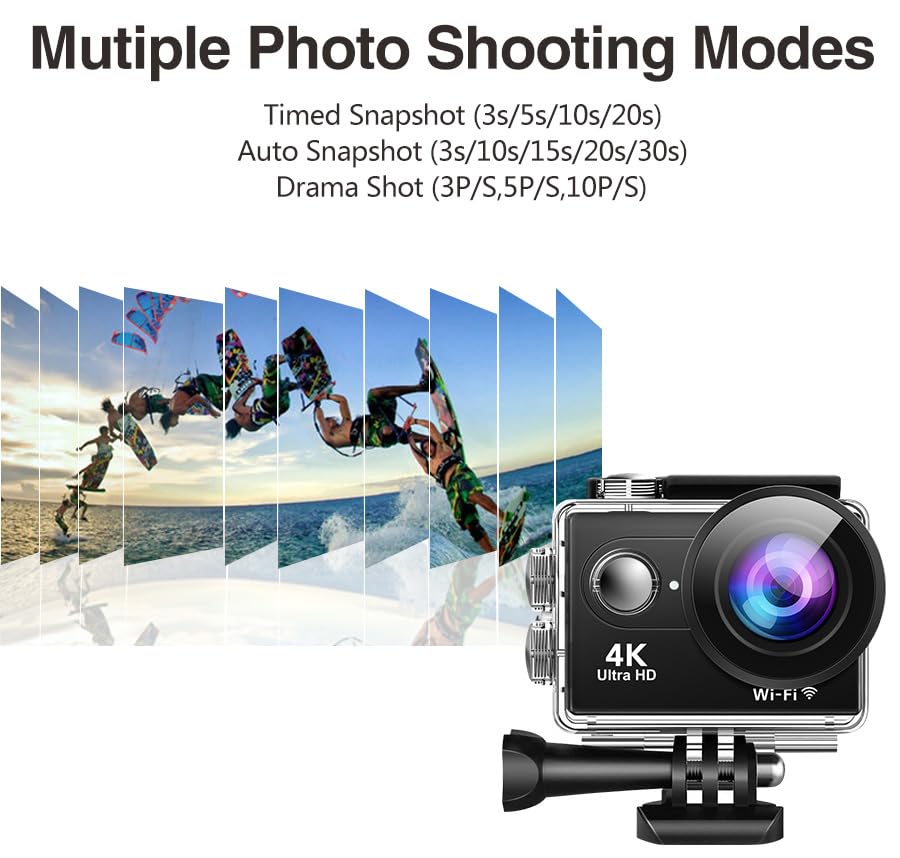
Изображение: Иллюстрация показываетasing the multiple photo shooting modes available on the AUSEK 4K Action Camera, including Timed Snapshot (3s/5s/10s/20s), Auto Snapshot (3s/10s/15s/20s/30s), and Drama Shot (3P/S, 5P/S, 10P/S), with a visual representation of burst photography.
- Покадровое видео: Захватывает кадры через заданные интервалы для создания ускоренного видео.
- Slow-Motion Recording: Records at a higher frame rate for smooth slow-motion playback.
- Фотографии, сделанные в режиме серийной съемки: Делает несколько фотографий подряд.
- Циклическая запись: Переписывает самые старые продуктыtagКогда карта памяти заполнена, идеально подходит для использования в видеорегистраторе.
These modes can be selected and configured within the camera's settings menu.
6. Техническое обслуживание
6.1. Чистка камеры и чехла
- Use the provided lens cloth or a soft, lint-free cloth to clean the camera lens and screen.
- For the waterproof case, rinse with fresh water after saltwater use and allow it to air dry. Ensure the rubber seal is clean and free of sand or debris.
- Не используйте агрессивные химикаты или абразивные чистящие средства.
6.2. Хранение
- Храните камеру в прохладном, сухом месте, вдали от прямых солнечных лучей и экстремальных температур.
- Remove the battery if storing for extended periods to prevent damage.
7. Поиск Неисправностей
| Проблема | Возможная причина | Решение |
|---|---|---|
| Камера не включается. | Разряжена батарея; Батарея вставлена неправильно. | Charge the battery; Reinsert battery correctly. |
| Невозможно записать видео/сделать фотографии. | Нет карты Micro SD; карта SD заполнена; ошибка карты SD. | Insert SD card; Delete files or use a new card; Format SD card (backup data first). |
| ФуtagИзображение размытое/дрожит. | EIS is off; Lens is dirty; Insufficient lighting. | Enable EIS in settings; Clean the lens; Ensure adequate lighting. |
| Проблемы с подключением к Wi-Fi. | Incorrect password; Too far from camera; App not updated. | Re-enter password; Move closer to camera; Update app. |
| Audio is muffled in waterproof case. | Waterproof case inherently reduces audio clarity. | This is normal. For clear audio, use the camera without the waterproof case in dry environments. |
8. Технические характеристики
| Особенность | Деталь |
|---|---|
| Модель | Rider Moto Vlogging Camera |
| Разрешение видео | 4K/60FPS, 2.7K/30FPS, 1080P/120FPS, 720P/120FPS |
| Разрешение фото | 24 МП |
| Угол обзора объектива | 170° широкоугольный |
| Стабилизация изображения | Электронная стабилизация изображения (EIS) |
| Водонепроницаемая глубина | До 30 м (с водонепроницаемым футляром) |
| Экран дисплея | 2.0 дюйма |
| Хранилище | Micro SD (up to 64GB, Class 10 or higher recommended) |
| Связность | Wi-Fi, Micro USB, Micro HD OUT |
| Дистанционное управление | Беспроводной пульт 2.4G |
| Поддерживаемые аудиоформаты | ААК |
| Формат захвата видео | MP4, AVI |
| Технология фотодатчика | КМОП |
9. Гарантия и поддержка
9.1. Информация о гарантии
This product comes with a 1-year warranty from the date of purchase. Please retain your purchase receipt as proof of warranty. The warranty covers manufacturing defects but does not cover damage caused by misuse, accidents, unauthorized repairs, or normal wear and tear.
9.2. Поддержка клиентов
For any questions, technical assistance, or warranty claims, please contact AUSEK customer support:
- Телефон службы поддержки клиентов: 08048977694
- Производитель: AUSHA EXPORTS P LTD- 140, Sector 27, Gurugram-122009
You can also visit the official AUSEK webсайт для ответов на часто задаваемые вопросы и дополнительных ресурсов.