1. Введение
Thank you for choosing the YUNTX Android 14 Car Stereo. This manual provides detailed instructions for the installation, operation, and maintenance of your new car stereo system. Please read this manual thoroughly before installation and use to ensure proper functionality and to maximize your user experience. Keep this manual for future reference.
2. Продукт закончилсяview и особенности
The YUNTX Android 14 Car Stereo is an advanced infotainment system designed for Nissan Qashqai and X-Trail models from 2013 to 2017. It features a high-resolution IPS touchscreen and a powerful Octa-Core processor for smooth performance.
Основные характеристики:
- Операционная система: Андроид 14
- Процессор: Octa Core-2.0GHz
- Память: 6GB RAM, 128GB ROM
- Отображать: 10.1-inch IPS 2.5D Digital Touchscreen with 1280*600 resolution
- Аудиовыход: 4*50W with Integrated DSP (64-band equalizer, surround sound)
- Связь: Built-in Wireless/Wired Apple CarPlay & Android Auto, Bluetooth 5.0, Integrated WIFI, 4G compatibility (optional modem)
- Навигация: Pre-installed online and offline GPS applications with 3D map support and voice guidance
- Радио: NXP TEF7708 Radio IC, AM/FM tuner, RDS support
- Зеркальная ссылка: Supports smartphone screen mirroring via USB or Wi-Fi
- Дополнительные функции: Rear camera input (camera included), Steering Wheel Control support, OBD support (optional adapter), 4K video playback, 360° panoramic camera support (optional)
Входящие в комплект аксессуары:
The package includes essential components for installation and operation:
- Силовой кабель
- RCA Output Cables (A, B, C, D)
- GPS-антенна
- USB-кабель
- Внешний микрофон
- Радио антенна
- Задняя камера
- Autoradio Unit
- Монтажные кронштейны
- Руководство пользователя (этот документ)

Рисунок 2.1: Болееview системных функций
3. Настройка и установка
Правильная установка имеет решающее значение для оптимальной работы вашей автомобильной стереосистемы. Рекомендуется, чтобы установку выполнял квалифицированный специалист.
3.1 Совместимость с транспортными средствами
This unit is specifically designed for Nissan Qashqai and X-Trail models manufactured between 2013 and 2017. If you are unsure about compatibility, please consult with the seller or a professional installer, providing a photo of your car's dashboard.
3.2 Этапы установкиview
- Подготовка: Перед началом установки убедитесь, что зажигание автомобиля выключено, а аккумулятор отсоединен.
- Удалить исходный блок: Carefully remove the existing car stereo and dashboard panel.
- Монтаж: Use the provided installation brackets to secure the new autoradio unit into the dashboard opening.
- Соединения проводки: Connect all necessary cables as per the wiring diagram. This includes power, GPS antenna, USB cables, RCA output sockets, external microphone, and the rear camera.
- Тестовая функциональность: Before fully reassembling the dashboard, reconnect the battery and perform a basic test of the unit's functions (power, audio, radio, touchscreen).
- Окончательная сборка: Once confirmed working, carefully reassemble the dashboard panels.
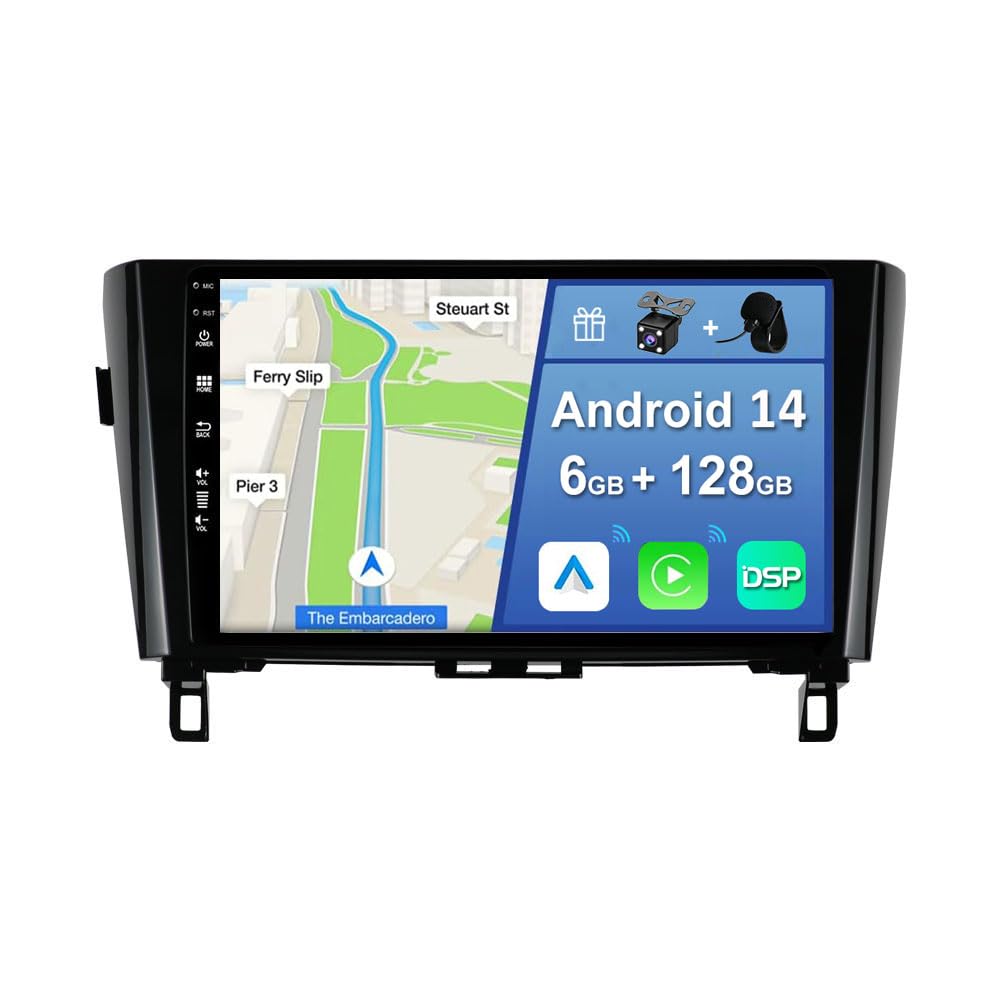
Figure 3.1: Autoradio and OEM Panel Integration
3.3 Схема электропроводки
Refer to the diagram below for detailed wiring connections. Ensure each cable is connected to its corresponding port.
- Розетка: Подключается к жгуту проводов автомобиля.
- GPS-антенна: Подключитесь для использования функций навигации.
- USB-кабели: For data transfer, media playback, and smartphone connectivity.
- Выходные разъемы RCA: Для подключения внешнего ampусилители, сабвуферы или дополнительные дисплеи.
- Вход для задней камеры: Connect the included rear camera for automatic reverse view.
- Внешний микрофон: Подключитесь для улучшения качества связи.
- CAN-ШИНА: If applicable to your vehicle model, connect the CANBUS decoder for steering wheel controls and other vehicle data integration.

Figure 3.2: Installation Tips and Package Contents
4. Инструкция по эксплуатации
This section details the various functions and how to operate your YUNTX car stereo.
4.1 Основные операции
- Включение/выключение питания: The unit powers on automatically with the vehicle's ignition. To manually power off or restart, press and hold the power button (if available) or use the system menu.
- Сенсорный экран: Навигация по интерфейсу осуществляется касаниями, свайпами и масштабированием на 10.1-дюймовом IPS-дисплее.
- Регулятор громкости: Отрегулируйте громкость с помощью элементов управления на экране или кнопок на рулевом колесе автомобиля.
4.2 Apple CarPlay и Android Auto
Connect your smartphone via USB or wirelessly to access CarPlay or Android Auto. This allows you to use navigation, make calls, send messages, and listen to music directly from your phone's interface on the car stereo screen.
4.3 Навигация (GPS)
The unit comes with pre-installed online and offline GPS navigation applications. Select your preferred navigation app from the main menu. The system supports 3D maps and voice guidance. You can listen to radio, Bluetooth audio, or USB/SD media while navigation is active.
4.4 Bluetooth 5.0
Подключите свой мобильный телефон через Bluetooth для совершения звонков в режиме громкой связи и потоковой передачи аудио.
- Зайдите в настройки Bluetooth на автомобильной магнитоле.
- Включите Bluetooth на своем смартфоне и найдите доступные устройства.
- Select the car stereo's Bluetooth name (e.g., "YUNTX Car Stereo") and pair.
- Once paired, you can access your phonebook, make calls, and play music.
4.5 Радио (AM/FM/RDS)
Access the Radio application from the main menu. You can scan for stations, save presets, and view Информация о системе RDS (Radio Data System), если таковая имеется.
4.6 Зеркальная ссылка
Mirror Link allows you to display your smartphone's screen on the car stereo. Connect your phone via USB or Wi-Fi and follow the on-screen instructions in the Mirror Link application.
4.7 Цифровой звуковой процессор (DSP)
The integrated DSP allows for advanced audio customization. Access the DSP settings to adjust the 64-band equalizer, control surround sound, and independently adjust front and rear speaker settings for optimal sound quality.
4.8 элементов управления на руле
If properly connected via CANBUS, the unit supports your vehicle's original steering wheel controls. This allows you to conveniently change tracks, adjust volume, and answer calls without taking your hands off the wheel.
4.9 Функция задней камеры
The included rear camera automatically displays the rear view На экране отображается информация о включении задней передачи, что повышает безопасность при парковке и маневрировании.
4.10 Режим разделенного экрана
Utilize the split-screen function to run two applications simultaneously, such as navigation and music playback, for enhanced multitasking.
4.11 Fast Boot
The Fast Boot feature allows the system to start up quickly, typically within 2 seconds, after the initial boot cycle.
4.12 Многоцветная подсветка
Customize the button illumination color to match your vehicle's interior or your personal preference. This setting can usually be found in the system's display or general settings menu.

Figure 4.1: Feature Demonstrations
5. Техническое обслуживание
Для обеспечения долговечности и оптимальной работы вашей автомобильной стереосистемы YUNTX следуйте этим рекомендациям по техническому обслуживанию:
- Очистка экрана: Аккуратно протрите сенсорный экран мягкой безворсовой тканью. Для удаления стойких загрязнений слегка потрите.ampСмочите ткань водой или безопасным для экранов чистящим средством. Избегайте использования агрессивных химикатов и абразивных материалов.
- Генеральная уборка: Следите за тем, чтобы устройство не загрязнялось пылью и мусором. Для очистки вентиляционных отверстий и щелей используйте мягкую щетку или сжатый воздух.
- Обновления программного обеспечения: Периодически проверяйте наличие доступных обновлений программного обеспечения от производителя, чтобы убедиться, что у вас установлены последние функции и исправления ошибок.
- Избегайте экстремальных температур: Не подвергайте устройство воздействию экстремальных температур (жары или холода) в течение длительного времени, так как это может повредить его электронные компоненты.
6. Поиск Неисправностей
If you encounter issues with your car stereo, refer to the following common troubleshooting steps. If the problem persists, contact customer support.
6.1 Нет питания / Устройство не включается
- Проверьте все соединения электропитания и убедитесь, что они надежно закреплены.
- Проверьте предохранитель автомобиля, отвечающий за работу автомобильной магнитолы.
- Убедитесь, что аккумулятор автомобиля правильно подключен и заряжен.
6.2 Нет звука / Искаженный звук
- Проверьте соединения динамиков и убедитесь в правильности их подключения.
- Проверьте уровень громкости на устройстве и подключенных к нему устройствах.
- Check DSP settings; reset to default if necessary.
- Ensure RCA cables are properly connected if using external ampспасатели.
6.3 GPS не работает / Неточное позиционирование
- Убедитесь, что GPS-антенна правильно подключена и размещена в безопасном месте. view неба.
- Проверьте настройки GPS в навигационном приложении.
- Обновите данные карты, если они доступны.
6.4 Проблемы с подключением Bluetooth
- Убедитесь, что Bluetooth включен как на автомобильной магнитоле, так и на вашем смартфоне.
- Удалите предыдущие сопряжения на обоих устройствах и попробуйте выполнить сопряжение заново.
- Move the smartphone closer to the car stereo to rule out interference.
6.5 Сенсорный экран не реагирует
- Restart the unit by turning the vehicle's ignition off and on.
- Убедитесь, что экран чистый и на нем нет мусора.
- Если проблема не исчезнет, может потребоваться сброс к заводским настройкам (обратите внимание: при этом будут удалены все пользовательские данные и настройки).
6.6 Installation Fit Issues
One user reported that the frame was too large, making installation difficult. Ensure you have the correct model for your specific vehicle year and trim. If the frame does not fit, contact the seller for assistance or to verify compatibility.
7. Технические характеристики
| Особенность | Спецификация |
|---|---|
| Операционная система | Андроид 14 |
| Процессор | Rockchip AC8257 Octa Core-2.0GHz |
| БАРАН | 6 ГБ LPDDR4 |
| ПЗУ | SSD-накопитель 128 ГБ |
| Размер экрана | 10.1 дюймов |
| Тип экрана | IPS 2.5D Digital Touchscreen |
| Разрешение | 1280*600 |
| Аудиовыход | 4*50 Вт |
| Версия Bluetooth | 5.0 |
| РадиоИС | NXP TEF7708 |
| Размеры (Д x Ш x В) | 2 х 3 х 1 см |
| Масса | 2 Килограмма |
| CarPlay / Android Авто | Built-in Wireless/Wired |
| ЦСП | Integrated 64-band equalizer |
8. Гарантия и поддержка
Specific warranty information for this product is not provided in the available documentation. For details regarding warranty coverage, return policies, or technical support, please contact the seller directly through your purchase platform. Ensure you have your purchase details and product model number ready when contacting support.