
1. Введение
The iZEEKER GD850 is a high-performance 4K WiFi Dual Dashcam designed to provide comprehensive road surveillance for your vehicle. Featuring a 4K front camera and a 1080P rear camera, it captures clear footage with a wide 170° angle lens, minimizing blind spots. The intuitive 3-inch IPS touchscreen allows for easy monitoring and playback. Equipped with built-in WiFi and GPS, the GD850 offers convenient connectivity for managing recordings via the "iZEEKER Tour" app and precise location/speed tracking.
Key features include 24/7 parking monitoring (requires hardwire kit), automatic loop recording, and G-sensor activated emergency recording to secure critical footage. The dashcam supports up to 256GB microSD cards and comes with a 32GB card to get you started. Two mounting options, a suction cup and an adhesive mount, are provided for flexible installation.
2. Что в коробке
Upon opening your iZEEKER GD850 package, you should find the following components:
- iZEEKER GD850 4K Dual Dashcam (Front Unit)
- Rear Camera (1080P)
- Карта памяти MicroSD на 32 ГБ
- Крепление на присоске
- Клейкое крепление
- Автомобильное зарядное устройство с GPS-модулем
- Кабель задней камеры
- Руководство пользователя
- Hardwire Kit (for 24/7 Parking Monitoring, may be included or require separate purchase depending on package)

Image: All components included in the iZEEKER GD850 Dashcam package.
3. Настройка
3.1. Установка карты MicroSD
Before first use, insert the provided 32GB MicroSD card into the dashcam. Ensure the dashcam is powered off before inserting or removing the card. The GD850 supports up to 256GB MicroSD cards.
3.2. Установка видеорегистратора
The iZEEKER GD850 offers two primary mounting options:
- Крепление на присоске: Ideal for easy removal and repositioning. Attach the suction cup to a clean, dry area on your windshield, then twist the locking mechanism to secure it.
- Клейкое крепление: Provides a more permanent and compact installation. Clean the desired area on your windshield thoroughly. Apply the adhesive mount firmly. It is recommended to use the provided clear cling film pieces on the glass before applying the adhesive directly.
Mount the front camera in a position that does not obstruct your view of the road. The rear camera should be mounted on the rear windshield, ensuring a clear view.

Image: Illustration of the two mounting methods: suction cup and 3M adhesive.
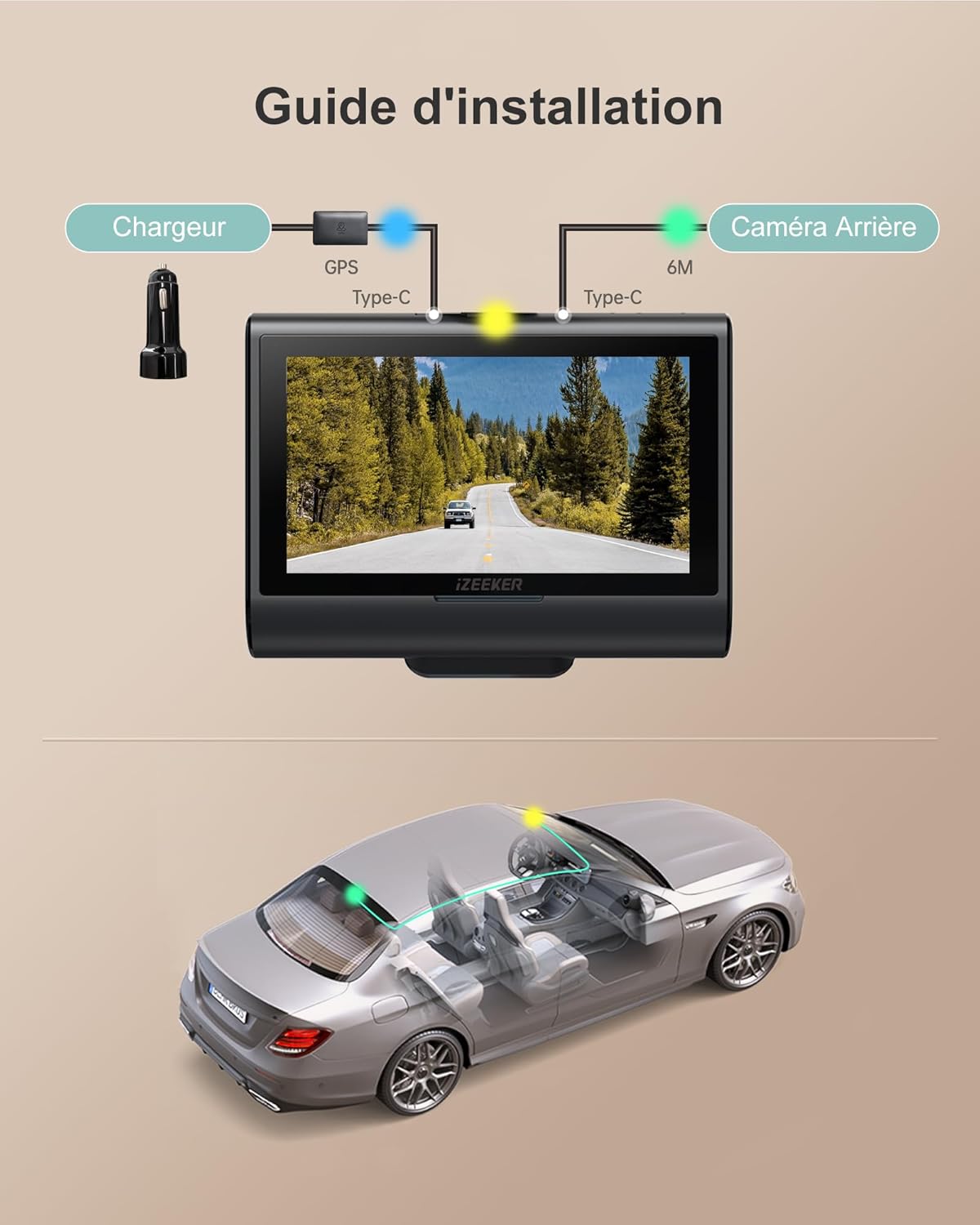
Image: Wiring diagram for connecting the front camera, rear camera, and car charger with GPS.
3.3. Powering the Dashcam
Connect the car charger to your vehicle's cigarette lighter socket and the dashcam's Type-C port. The dashcam will automatically power on and begin recording when your vehicle starts.
3.4. Initial Setup and SD Card Formatting
It is crucial to format the MicroSD card before first use and periodically thereafter to ensure optimal performance and prevent data corruption. You can format the SD card directly on the dashcam.
- Включите видеорегистратор.
- Tap the "Menu" icon on the touchscreen.
- Перейдите в раздел «Системные настройки».
- Scroll down and select "Format".
- Confirm to delete all data and format the card.
Video Instruction: How to Format SD Card
Video: A short instructional video demonstrating how to format the SD card on the iZEEKER GD850 dashcam.
4. Операция
4.1. Базовая запись
The dashcam automatically starts recording when powered on and stops when the vehicle is turned off. Videos are saved in 3-minute segments. Unlocked videos are overwritten by new recordings when the memory card is full (Loop Recording).

Image: G-sensor protection and loop recording functionality.
4.2. Аварийная запись (G-сенсор)
The built-in G-sensor automatically detects sudden vibrations or impacts (e.g., in case of a collision) and locks the current video segment to prevent it from being overwritten. You can also manually lock a video by pressing the "!" icon on the screen.
4.3. Мониторинг парковки.
When the parking protection function is enabled, the dashcam will record approximately three 30-second locked video segments upon detecting vibrations while the vehicle is off. For continuous 24/7 parking monitoring, a hardwire kit is required to provide constant power to the dashcam. Please note that while a hardwire kit may be included, its installation is necessary for full 24/7 functionality.

Image: Parking mode options, highlighting the need for a hardwire kit for 24/7 surveillance.
4.4. WiFi Connectivity and iZEEKER Tour App
The GD850 features built-in WiFi for convenient management of your dashcam via the "iZEEKER Tour" app on your iOS or Android device. This allows you to view жить фуtage, download recordings, and share videos.
- Download the "iZEEKER Tour" app from Google Play Store (Android) or Apple App Store (iOS).
- On the dashcam, tap the WiFi icon to turn on WiFi. The screen will display the WiFi SSID and password.
- On your phone/tablet, go to WiFi settings and connect to the GD850's WiFi network using the provided password.
- Open the "iZEEKER Tour" app. Once successfully connected, you can control recording and access files.
Video Instruction: How to Use the iZEEKER Tour App
Video: A short instructional video demonstrating how to connect to and use the iZEEKER Tour app with the GD850 dashcam.

Image: The iZEEKER Tour app on a mobile device and the GPS Player software on a computer, displaying video footagи данные GPS.
4.5. GPS Tracking and GPS Player
The external GPS module ensures precise tracking of your vehicle's position and speed. You can review эти данные вместе с вашим видео с едойtage using the dedicated GPS Player software on your computer.
- Передача видео files from the dashcam's SD card to your computer using a Type-C USB cable or an SD card reader.
- Open the "GPS Player" folder (usually found on the SD card or provided by iZEEKER).
- If your computer does not support 4K video playback, download and install the recommended codec pack (e.g., K-Lite Mega Codec Pack) first.
- Launch the GPS Player application.
- Click to select the video file you wish to play. The player will display the video, map, speed, and other GPS data.
Video Instruction: How to Install and Use GPS Player
Video: A short instructional video demonstrating how to install and use the GPS Player software for the GD850 dashcam.
4.6. Сенсорный интерфейс
The 3-inch IPS touchscreen provides a simple and intuitive way to navigate menus, adjust settings, and review фуtagе прямо на устройстве.
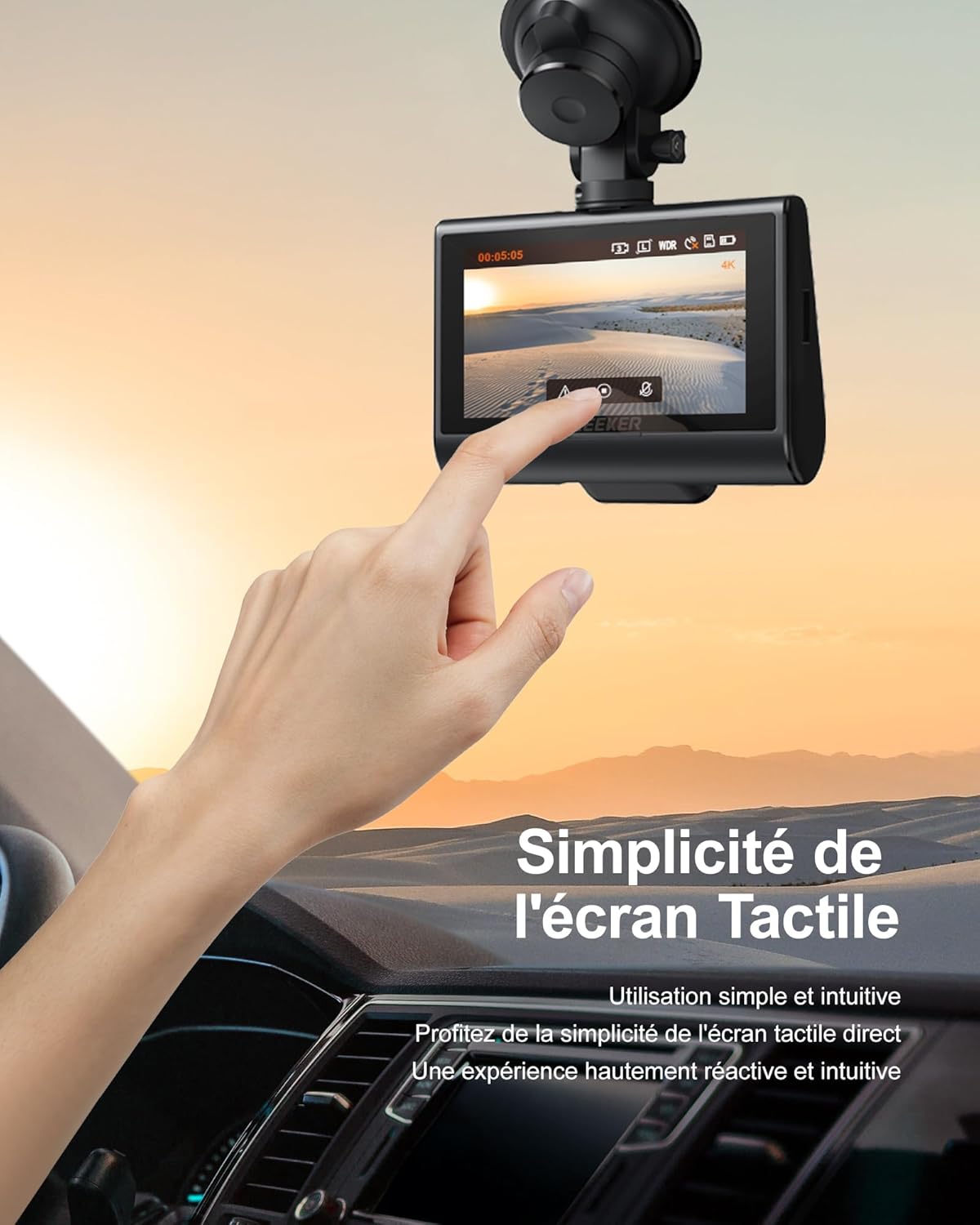
Image: User interacting with the responsive and intuitive touchscreen of the dashcam.
4.7. Качество видео и ночное видение
The GD850 records in 4K (front) and 1080P (rear) resolutions. With WDR (Wide Dynamic Range) technology and a Sony Starvis sensor, the dashcam captures clear video even in challenging lighting conditions, including low-light environments at night.

Image: Visual comparison of 4K front camera and 1080P rear camera footage.

Image: Enhanced night vision capturing details in low-light conditions.
5. Техническое обслуживание
- Обслуживание SD-карты: Format the MicroSD card regularly (e.g., once a month) to prevent data corruption and ensure smooth recording. Replace the SD card if you notice any recording errors or performance degradation.
- Уборка: Use a soft, dry cloth to clean the dashcam lens and screen. Avoid using abrasive cleaners or solvents.
- Температура: Avoid exposing the dashcam to extreme temperatures for extended periods. If the vehicle is parked in direct sunlight, consider removing the dashcam or using a sunshade.
- Обновления прошивки: Check the iZEEKER webРегулярно проверяйте сайт или приложение на наличие обновлений прошивки, чтобы обеспечить оптимальную производительность и доступ к новым функциям.
6. Поиск Неисправностей
| Проблема | Возможная причина | Решение |
|---|---|---|
| Видеорегистратор не включается. | Отсутствует электропитание; неисправное автомобильное зарядное устройство; ненадежное соединение. | Check car charger connection and vehicle's cigarette lighter socket. Try another power source if available. |
| Dashcam stops recording unexpectedly. | SD card full or corrupted; power interruption; G-sensor sensitivity too high. | Format the SD card. Reduce G-sensor sensitivity in settings. Ensure stable power supply. |
| видеоtagИзображение e размытое или нечеткое. | Protective film on lens; dirty lens; incorrect focus (unlikely for fixed focus dashcam); low light conditions. | Remove any protective film. Clean the lens with a soft cloth. Ensure WDR is enabled for low light. |
| Проблемы с подключением к WiFi. | Incorrect password; WiFi not enabled on dashcam; interference. | Ensure WiFi is enabled on the dashcam and the correct password is entered. Try reconnecting. |
| Parking monitoring not working 24/7. | Hardwire kit not installed or incorrectly installed; parking mode not enabled. | Ensure the hardwire kit is correctly installed and connected to a constant power source. Verify parking mode settings. |
7. Технические характеристики
| Особенность | Деталь |
|---|---|
| Бренд | iZEEKER |
| Название модели | ГД850 |
| Разрешение видеозаписи | Front: 4K (2160p), Rear: 1080P |
| Размер экрана | 3-дюймовый IPS-сенсорный экран |
| Технология связи | Wi-Fi |
| Особые возможности | 4K UHD Dual Camera, Easy Mounting Options, MicroSD Card Included, Automatic & Loop Recording, Automatic & Manual Emergency Recording, Built-in WiFi & GPS, 24/7 Parking Monitoring (requires hardwire kit) |
| Включенные компоненты | 32GB SD Card, Suction Cup Mount, Adhesive Mount, User Manual, Hardwire Kit |
| Тип крепления | Windshield Mount, License Plate Mount (Rear Camera) |
| Поле View | 170 градусов |
| Метод контроля | Трогать |
| Тип флэш-памяти | микроSD |
| Максимальная диафрагма | f/1.8 |
| Тип батареи | Литий-ионный |
| Частота кадров | 30 кадров в секунду |
| Max Supported Memory Card Size | 256 ГБ |
| Размеры изделия (Д x Ш x В) | 13 x 14 x 12 миллиметров |
8. Гарантия и поддержка
iZEEKER предоставляет Гарантия 2 год for the GD850 dashcam. Dedicated customer service personnel are available to provide technical assistance and support for replacement parts.
For any inquiries, technical support, or warranty claims, please contact iZEEKER customer support at support@izeeker.co.
Please have your product model (GD850) and purchase details ready when contacting support for faster service.