
1. Введение
This manual provides essential information for the safe and correct operation of your Vonyx VMM100 4-Channel DJ Mixer. Please read this manual thoroughly before using the device to ensure optimal performance and to prevent damage. Keep this manual for future reference.
2. Инструкции по технике безопасности
- Убедитесь, что источник питания vol.tage соответствует требованиям, указанным для устройства.
- Do not expose the device to rain or moisture to avoid electric shock.
- Не размещайте устройство рядом с источниками тепла или под прямыми солнечными лучами.
- Не открывайте сasing; внутри нет деталей, подлежащих обслуживанию пользователем. По всем вопросам обслуживания обращайтесь к квалифицированному персоналу.
- Disconnect the power adapter during thunderstorms or when not in use for extended periods.
- Держите устройство в недоступном для детей месте.
3. Особенности продукта
- Compact 4-channel analog mixer.
- Подключение по Bluetooth для беспроводной потоковой передачи аудио.
- Integrated USB MP3 player with digital display.
- Adjustable delay effect with dedicated volume control.
- Effect send/return on channels 1 and 2.
- High and low tone controls for each channel.
- USB power supply (5V) for mobile use, compatible with power banks.
- Channels 1 and 2 feature +48V phantom power for condenser microphones.
- LED VU meter and peak indicators for signal monitoring.
- Includes USB power adapter and USB cable.
4. Содержимое упаковки
При распаковке, пожалуйста, проверьте наличие всех предметов:
- Vonyx VMM100 4-Channel DJ Mixer
- USB Power Adapter
- USB-кабель
- Руководство пользователя (этот документ)
5. Элементы управления и функции
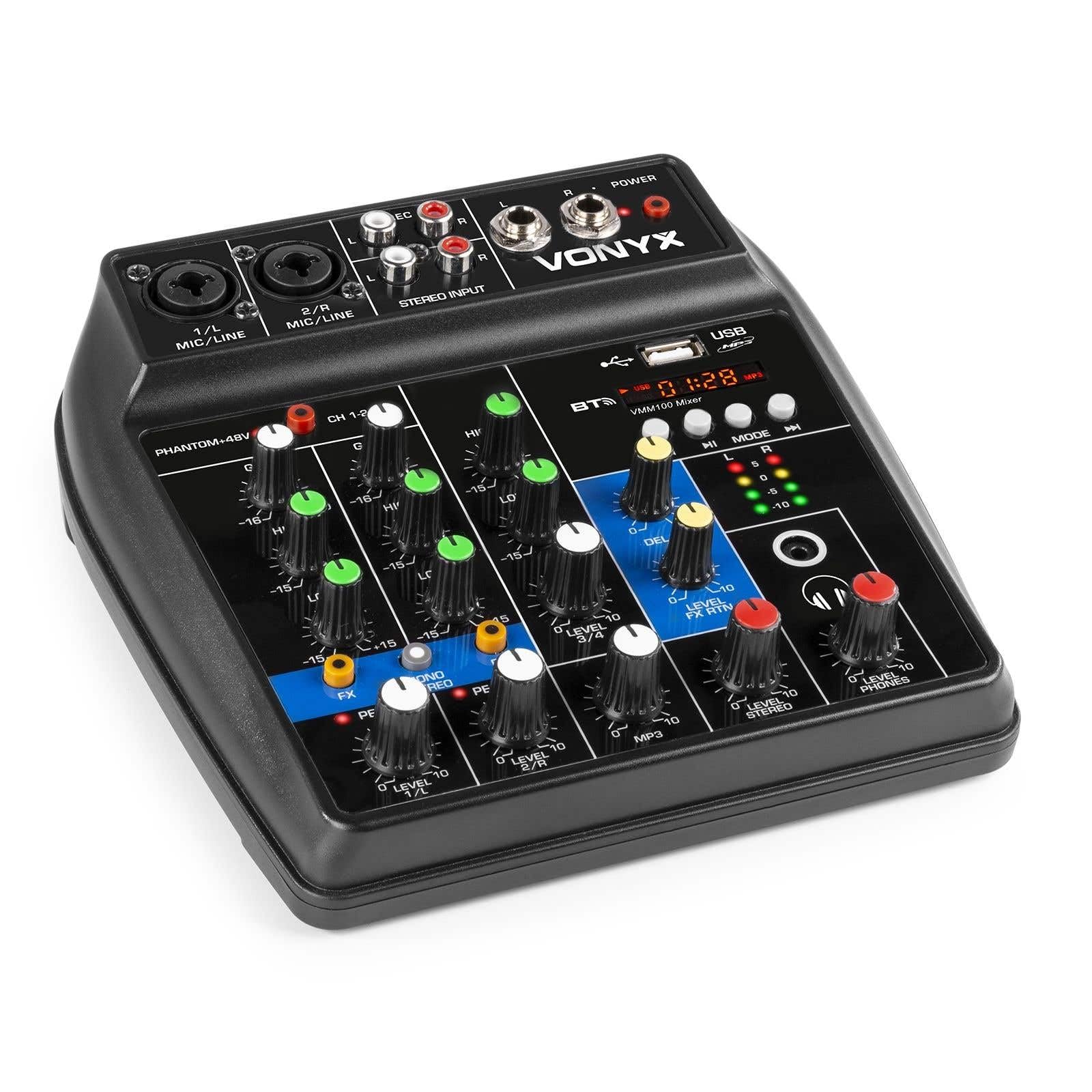
Рисунок 1: Общий view of the Vonyx VMM100 mixer, highlighting the layout of all controls, inputs, and outputs.

Рисунок 2: Close-up of the mixer's control panel, showing individual channel controls, EQ, gain, and effect knobs.
5.1 Input Channels (1 & 2)
- Combi XLR / 6.3mm Jack: Connect microphones (XLR) or line-level instruments (6.3mm jack).
- Фантомный выключатель +48 В: Activates phantom power for condenser microphones on channels 1 and 2.
- Регулятор усиления: Adjusts the input sensitivity for the connected device.
- Высокая ручка: Adjusts the high-frequency (treble) level for the channel.
- Низкая ручка: Adjusts the low-frequency (bass) level for the channel.
- Регулятор эффектов: Controls the amount of delay effect applied to the channel.
- Пиковый светодиод: Индикатор загорается, когда входной сигнал слишком высокий, указывая на возможное искажение. Отрегулируйте усиление, чтобы предотвратить это.
- Ручка УРОВНЯ: Регулирует общий уровень выходного сигнала канала.
5.2 Stereo Input (Channel 3)
- Входы RCA (левый/правый): Connect external stereo audio sources such as CD players or other line-level devices.
- Ручка УРОВНЯ: Adjusts the output level of the stereo input.
5.3 MP3/Bluetooth Channel (Channel 4)

Рисунок 3: USB port with a USB drive, demonstrating media playback capability.

Рисунок 4: Bluetooth and USB player section, showing the display and control buttons.
- USB-порт: Вставьте USB-флеш-накопитель для воспроизведения MP3.
- Отображать: Shows track information, playback time, and mode.
- Control Buttons (Play/Pause, Skip, Mode): Navigate tracks and switch between USB and Bluetooth modes.
- Bluetooth (BT) Indicator: Lights up when Bluetooth is active and paired.
- Ручка УРОВНЯ: Adjusts the output level of the MP3/Bluetooth channel.
5.4 Основной раздел
- Ручка задержки: Adjusts the overall intensity of the delay effect.
- LEVEL FX RTN Knob: Controls the return level of the delay effect.
- LEVEL STEREO Knob: Регулятор общей громкости для основного стереовыхода.
- LEVEL PHONES Knob: Регулирует громкость выхода для наушников.
- VU Meter (LED): Displays the main output level.
- Main Output (6.3mm Jack L/R): Подключается к ampподъемники или активные динамики.
- Record Output (RCA L/R): Connects to recording devices.
- Выход для наушников (разъем 6.3 мм): Connects stereo headphones.
- ИНДИКАТОР ПИТАНИЯ: Indicates when the mixer is powered on.
5.5 Потребляемая мощность

Рисунок 5: Сторона view of the mixer, illustrating the 5V DC USB power input port.
- 5V DC USB Input: Connect the provided USB power adapter or a compatible USB power source (e.g., power bank) to power the mixer.
6. Настройка
6.1 Подключение питания
- Connect the supplied USB cable to the 5V DC USB input on the mixer.
- Подключите другой конец USB-кабеля к прилагаемому USB-адаптеру питания.
- Plug the USB power adapter into a suitable wall outlet. The POWER LED on the mixer will illuminate.
6.2 Подключение источников звука
- Microphones/Line Instruments: Connect microphones via XLR or line-level instruments via 6.3mm jack to channels 1 and 2. If using condenser microphones, activate the +48V phantom power switch.
- Stereo Line Devices: Connect devices like CD players to the RCA inputs of channel 3.
- USB-накопитель: Вставьте флэш-накопитель USB с MP3 files into the USB port on channel 4.
6.3 Подключение выходов
- Основной выход: Connect the 6.3mm jack main outputs (L/R) to your ampусилитель, активные колонки или система звукоусиления.
- Наушники: Connect your headphones to the 6.3mm headphone jack.
- Записывающее устройство: Connect the RCA record outputs (L/R) to an external recording device if desired.
7. Инструкция по эксплуатации
7.1 Основные принципы смешивания
- Ensure all LEVEL and GAIN knobs are set to their minimum positions before powering on.
- Power on the mixer and any connected audio equipment.
- Gradually increase the GAIN knob for each active input channel until the PEAK LED flashes only occasionally during the loudest parts of the signal.
- Adjust the HIGH and LOW EQ knobs for each channel to shape the tone as desired.
- Use the individual LEVEL knobs to balance the volume of each channel.
- Adjust the main STEREO LEVEL knob to control the overall output volume. Monitor the VU meter to avoid clipping.
- Adjust the PHONES LEVEL knob for comfortable headphone monitoring.
7.2 Работа Bluetooth
- Press the MODE button on the MP3/Bluetooth channel until the display shows "BT" or the Bluetooth indicator flashes.
- On your smartphone, tablet, or PC, search for Bluetooth devices and select "Vonyx VMM100".
- Once paired, the Bluetooth indicator will glow steadily. You can now stream audio wirelessly to the mixer.
- Use the playback controls on the mixer or your device to manage audio.
7.3 Воспроизведение MP3 через USB
- Вставьте флэш-накопитель USB с MP3 files в порт USB.
- Press the MODE button on the MP3/Bluetooth channel until the display shows track information.
- Use the playback controls (Play/Pause, Skip) to navigate and play tracks.
7.4 Использование эффектов
- Turn the FX knob on channels 1 and 2 to send a portion of that channel's signal to the internal delay effect.
- Adjust the main DELAY knob to control the overall intensity and characteristics of the delay.
- Use the LEVEL FX RTN knob to control how much of the processed effect signal is mixed back into the main output.
8. Запись
The VMM100 mixer allows for easy recording of your mix. Connect the RCA record outputs (L/R) to the input of a suitable recording device (e.g., computer audio interface, dedicated recorder). Ensure your recording software or device is configured to receive audio from the connected inputs. The signal sent to the record output is a stereo mix of all active channels, post-fader.
9. Техническое обслуживание
- Уборка: Для очистки внешней поверхности миксера используйте мягкую сухую ткань. Не используйте абразивные чистящие средства или растворители.
- Хранилище: Храните миксер в прохладном, сухом месте, вдали от прямых солнечных лучей и экстремальных температур.
- Умение обращаться: Не допускайте падений миксера и сильных ударов по нему.
10. Поиск Неисправностей
| Проблема | Возможная причина | Решение |
|---|---|---|
| Нет электричества | Адаптер питания не подключен или неисправен. | Check power connections. Try a different USB port or adapter. |
| Нет звука | Incorrect cable connections; volume knobs too low; incorrect input selection. | Verify all audio cables are securely connected. Increase channel LEVEL and STEREO LEVEL knobs. Ensure correct input mode (e.g., USB/BT). |
| Искаженный звук | Input GAIN too high; output level too high. | Reduce GAIN for the affected channel until the PEAK LED stops flashing excessively. Lower STEREO LEVEL. |
| Bluetooth не сопряжен | Микшер не в режиме Bluetooth; устройство находится слишком далеко; подключено ранее сопряженное устройство. | Ensure mixer is in BT mode. Move device closer. Disconnect from other Bluetooth devices. |
| Воспроизведение USB не работает | USB-накопитель неправильно отформатирован; не поддерживается file type; mixer not in USB mode. | Убедитесь, что USB-накопитель отформатирован в FAT32 и содержит MP3-файлы. files. Press MODE to select USB. |
11. Технические характеристики
- Входные данные:
- Channels 1 & 2: Combi XLR / 6.3mm Jack (Line or Microphone)
- Channel 3: RCA (Stereo)
- Channel 4: Bluetooth or USB MP3 Player
- Выходы:
- Main: 6.3mm Jack (Stereo)
- Record: RCA (Stereo)
- Headphone: 6.3mm Jack
- Диапазон частот: 20 Гц - 20 000 Гц
- Эквалайзер: 2-band (High, Low) per channel
- Призрачная сила: +48V (Channels 1 & 2)
- Подключение Voltage: 5 В постоянного тока (через USB)
- Размеры (Д x Ш x В): 18 x 19.5 x 5.8 см (7.09 x 7.68 x 2.28 дюймов)
- Масса: 0.5 кг (1.1 фунта)
- Материал: нейлон
12. Гарантия и поддержка
Vonyx products are designed and manufactured to the highest quality standards. In the unlikely event of a problem with your product, please contact your retailer for warranty service. Please retain your proof of purchase. For technical support or further inquiries, refer to the official Vonyx webсайте или обратитесь в их отдел обслуживания клиентов.