
Введение
This manual provides detailed instructions for the installation, operation, and maintenance of your Tiandy TC-C38XS 8MP IR Turret Camera. Please read this manual thoroughly before using the product to ensure correct usage and to prevent damage.
Информация по безопасности
- Ensure the power supply meets the camera's requirements (DC 12V or PoE).
- Не подвергайте камеру воздействию экстремальных температур, влажности или агрессивных сред.
- Избегайте прямого направления камеры на яркие источники света в течение длительного времени.
- Обращайтесь с камерой осторожно, чтобы избежать механических повреждений.
- Установка должна выполняться квалифицированным персоналом в соответствии с местными электротехническими нормами.
Содержимое упаковки
Убедитесь, что в упаковке присутствуют все компоненты:
- Tiandy TC-C38XS IR Turret Camera
- Монтажные винты и дюбели
- Водонепроницаемый разъем для кабеля Ethernet
- Краткое руководство пользователя (если применимо)
- Шаблон сверления (если применимо)
Продукт болееview
The Tiandy TC-C38XS is an 8MP IR Turret Camera designed for outdoor surveillance, featuring a full metal housing and advanced imaging capabilities.
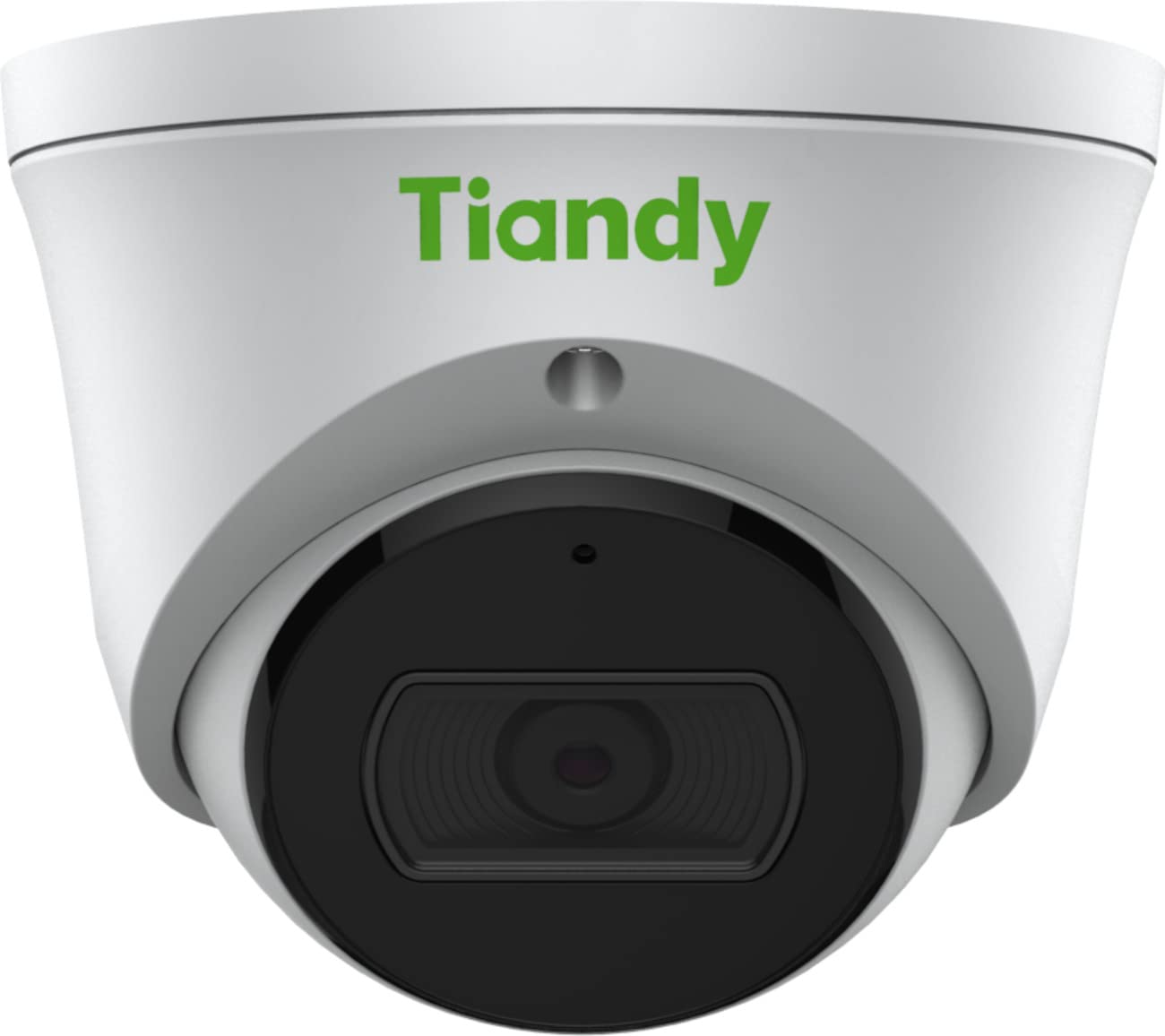
Рисунок 1: Передний view of the Tiandy TC-C38XS IR Turret Camera, showing the lens and IR illuminators.

Рисунок 2: Угловой view of the Tiandy TC-C38XS IR Turret Camera, highlighting its compact turret design.

Рисунок 3: Technical drawing showing the dimensions of the Tiandy TC-C38XS IR Turret Camera (approx. 116.6mm diameter, 96mm height).
Основные характеристики:
- Разрешение 8 мегапикселей: Captures video at up to 3840x2160 at 20fps.
- 1/2.8" CMOS-сенсор: Provides clear images even in low-light conditions.
- Умный ИК: Infrared illumination up to 30 meters (98.42 feet) for night vision.
- 120dB WDR: Wide Dynamic Range for balanced images in high-contrast scenes.
- Встроенный микрофон: Для мониторинга звука.
- Встроенное хранилище: Supports MicroSD cards up to 512 GB.
- Цельнометаллический корпус: Прочная конструкция для использования на открытом воздухе.
Настраивать
1. Установка камеры
The TC-C38XS is designed for wall mounting. Choose a suitable location that provides the desired field of view and is within reach of network and power cables.
- Use the provided drill template (if included) to mark the screw holes on the mounting surface.
- Drill pilot holes and insert wall plugs if mounting on masonry or drywall.
- Закрепите основание камеры на монтажной поверхности с помощью прилагаемых винтов.
- Adjust the camera's angle: The camera supports pan 0 to 340°, tilt 0 to 75°, and rotate 0 to 360° for optimal positioning. Loosen the adjustment screws, position the camera, and then tighten the screws to secure it.
2. Проводка и подключение питания
Камера поддерживает питание по Ethernet (PoE) или от источника питания постоянного тока 12 В.
- PoE-соединение: Connect a standard Ethernet cable from a PoE-enabled switch or NVR to the camera's RJ45 port. This provides both power and data connectivity. Ensure the waterproof connector is properly installed to protect the Ethernet port from moisture.
- Подключение к источнику постоянного тока 12 В: If PoE is not used, connect a DC 12V power adapter (not included) to the camera's power input port. Then, connect a standard Ethernet cable from your network to the camera's RJ45 port for data.
After connecting, the camera will power on and begin its startup sequence.
Операционная
1. Первоначальная конфигурация сети
To access the camera's web interface for configuration, you will need to find its IP address on your network. This can typically be done using a manufacturer-provided IP search tool or by checking your router's connected devices list.
- Подключите компьютер к той же сети, что и камера.
- Откройте web Введите IP-адрес камеры в браузере.
- Log in using the default username and password (refer to the Quick Start Guide or manufacturer's documentation for default credentials). It is highly recommended to change the default password immediately for security.
2. Основные функции
- Жить View: Получите доступ к прямой видеотрансляции через web interface or compatible NVR/VMS software.
- Запись: Configure recording schedules and methods (continuous, motion-triggered) to the on-board MicroSD card (up to 512 GB) or a connected NVR.
- Обнаружение движения: Set up motion detection zones and sensitivity. The camera can trigger alarms (e.g., email notifications) upon detection.
- Умный ИК: The camera automatically adjusts IR intensity to prevent overexposure in night vision, ensuring clear images up to 30 meters.
- Настройки изображения: Adjust saturation, brightness, contrast, and sharpness via the client software or web browser to optimize image quality.
- Аудио: Utilize the built-in microphone for audio monitoring.
Обслуживание
1. Уборка
Регулярная чистка помогает поддерживать оптимальное качество изображения.
- Gently wipe the camera lens with a soft, clean cloth. If necessary, use a mild lens cleaning solution.
- Do not use harsh chemicals or abrasive materials, as they can damage the lens coating or housing.
- Periodically clean the camera housing to remove dust and debris.
2. Обновления прошивки
Периодически проверяйте информацию производителя. website for firmware updates. Firmware updates can improve performance, add new features, and enhance security. Follow the instructions provided with the firmware update package carefully.
3. Управление картами MicroSD
If using on-board storage, regularly check the status of the MicroSD card. Format the card periodically to maintain performance and prevent data corruption. Back up important recordings before formatting.
Поиск неисправностей
| Проблема | Возможная причина | Решение |
|---|---|---|
| Нет изображения/Нет питания | Incorrect power supply; Loose cable connection; PoE issue. | Check power adapter (DC 12V) or PoE switch. Ensure all cables are securely connected. |
| Невозможно получить доступ к камере через сеть. | Incorrect IP address; Network configuration error; Firewall blocking. | Verify IP address. Check network cable. Disable temporary firewall for testing. Ensure camera and computer are on the same subnet. |
| Плохое качество изображения | Dirty lens; Insufficient lighting; Incorrect image settings. | Clean the lens. Adjust image settings (brightness, contrast, WDR). Ensure IR is functioning correctly at night. |
| Обнаружение движения не работает | Неправильные настройки чувствительности; не настроена зона обнаружения; препятствия. | Review Настройки обнаружения движения в web interface. Adjust sensitivity and redraw detection zones. Clear any obstructions in the camera's view. |
| Карта MicroSD не записывает | Card full; Card not formatted; Card faulty; Recording schedule not set. | Check card capacity. Format the MicroSD card via the camera's interface. Replace card if faulty. Verify recording schedule. |
Технические характеристики
| Особенность | Деталь |
|---|---|
| Модель | TC-C38XS |
| Датчик изображения | 1/2.8" КМОП |
| Макс. разрешение | 3840x2160 (8 МП) |
| Частота кадров | Up to 20fps (3840x2160), 30fps (1080p) |
| Мин. освещенность | Цвет: 0.003 люкс при (F1.6, АРУ включена), черно-белый: 0 люкс с ИК-подсветкой. |
| Линза | Фиксированный 2.8мм |
| Поле View (поле обзора) | Горизонтально: 100.1° |
| ИК диапазона | До 30 м (98.42 фута) с технологией Smart IR. |
| Широкий динамический диапазон (WDR) | 120дБ |
| Сжатие видео | S+265/H.265/H.264/M-JPEG |
| Аудио | Встроенный микрофон |
| Встроенное хранилище | Карта MicroSD до 512 ГБ |
| Сетевой интерфейс | 1 самоадаптивный порт Ethernet RJ45 10M / 100M |
| Источник питания | DC 12V, PoE (802.3af) |
| Материал | Цельнометаллический корпус |
| Размеры | Approx. 4.59 x 4.59 x 3.77 inches (116.6mm diameter, 96mm height) |
| Масса | прибл. 0.88 фунта (0.4 кг) |
| Условия эксплуатации | Наружное использование |
| Протоколы | TCP/IP, HTTP, HTTPS, DHCP, DNS, RTP, RTSP, etc. |
| Триггер тревоги | Motion Detection, Mask Alarm, Disk Full, etc. |
| Видеоаналитика | Tripwire, Perimeter |
Информация о гарантии
Tiandy products typically come with a limited manufacturer's warranty. For specific warranty terms and conditions, please refer to the warranty card included with your product or visit the official Tiandy webСохраните чек о покупке в качестве подтверждения покупки для предъявления гарантийных претензий.
Поддерживать
If you encounter any issues or have questions regarding your Tiandy TC-C38XS camera that are not covered in this manual, please contact your authorized Tiandy reseller or visit the official Tiandy support website for further assistance. You may also find FAQs and additional resources online.
- Производитель: Тианди
- Номер модели: TC-C38XS
- СКП: 785249841675