
1. Введение
This manual provides essential information for the installation, operation, and maintenance of the Yavor replacement optical pickup unit designed for the Technics SC-DV150 CD Player. Please read this manual thoroughly before attempting any installation or repair to ensure proper function and to prevent damage to the unit or your equipment.
This replacement part is intended for use by individuals with appropriate technical knowledge and experience in electronics repair. Incorrect installation can lead to malfunction or permanent damage.
2. Продукт закончилсяview
The Yavor replacement optical pickup unit (laser lens assembly) is a critical component responsible for reading data from CDs in your Technics SC-DV150 CD Player. It includes the laser diode, lens, and associated mechanisms for precise disc tracking and data retrieval.
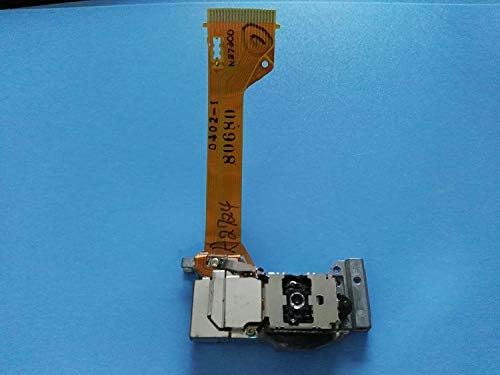
Рисунок 2.1: Вершина view of the Yavor replacement optical pickup unit. This image displays the main laser lens assembly with its flexible circuit board connector, showing the intricate electronic pathways and the laser mechanism.
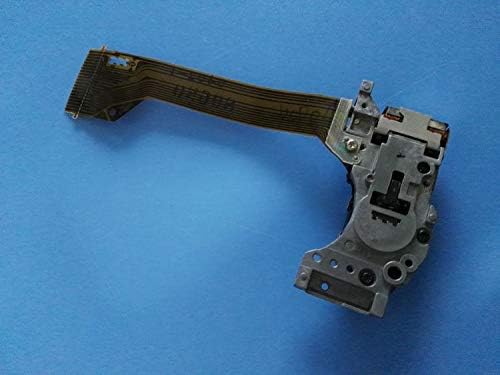
Рисунок 2.2: Нижний view of the Yavor replacement optical pickup unit. This perspective highlights the metallic chassis, mounting screw holes, and the underside of the optical block, indicating its structural design for secure integration.
3. Технические характеристики
- Тип продукта: Replacement Optical Pickup Unit (Laser Lens Assembly)
- Совместимость: Technics SC-DV150 CD Player
- Производитель: Yavor
- Вес товара: 231 грамм
- ASIN: B0B3HTWD5J
4. Руководство по установке
Отказ от ответственности: Installation of this component requires technical expertise. If you are not comfortable performing this procedure, it is recommended to seek assistance from a qualified technician. Always disconnect the CD player from the power supply before beginning any installation.
- Подготовка: Ensure the Technics SC-DV150 CD Player is unplugged from the power outlet. Gather necessary tools, which typically include small Phillips head screwdrivers, a flathead screwdriver, and possibly anti-static wrist straps.
- Access the CD Mechanism: Carefully open the CD player casing. This usually involves removing screws from the back and bottom panels. Refer to the original service manual for your Technics SC-DV150 for specific disassembly instructions.
- Locate the Old Optical Pickup: Identify the existing optical pickup unit within the CD mechanism. It is typically mounted on a sliding rail system.
- Отсоедините кабели: Gently disconnect the flexible ribbon cable and any other associated wiring from the old optical pickup unit. Be extremely careful not to damage the connectors or cables.
- Удалить старый блок: Unscrew and carefully remove the old optical pickup unit from its mounting points. Note its orientation for correct installation of the new unit.
- Установить новый блок: Position the Yavor replacement optical pickup unit in the same orientation as the old one. Secure it with the appropriate screws.
- Соединительные кабели: Reconnect the flexible ribbon cable and any other wiring to the new unit. Ensure all connections are firm and correctly seated.
- Защита лазерного диода: Many new optical pickups come with a solder shorting point to protect the laser diode from static electricity during shipping and handling. This solder point MUST be removed before operation. Locate this point (often marked as "ESD" or similar) and carefully desolder it using a fine-tipped soldering iron. Failure to remove this protection will prevent the unit from functioning.
- Собрать заново: Carefully reassemble the CD player casinг) необходимо убедиться, что все винты затянуты и никакие кабели не зажаты.
- Тест: Plug in the CD player and test its functionality with a known good CD.
5. Операция
Once correctly installed, the replacement optical pickup unit will function automatically as part of your Technics SC-DV150 CD Player. Its primary role is to accurately read the data from audio CDs. Normal operation involves:
- Inserting a CD into the disc tray.
- The optical pickup unit moving into position and emitting a laser beam to read the disc's surface.
- The unit tracking the disc as it spins, converting optical signals into electrical data for playback.
If the CD player previously had issues reading discs, skipping, or failing to recognize discs, the new optical pickup unit should resolve these problems, restoring normal CD playback functionality.
6. Техническое обслуживание
Optical pickup units are sensitive components. Proper maintenance can extend their lifespan:
- Содержать в чистоте: Ensure the CD player operates in a clean, dust-free environment. Dust and debris are the primary enemies of optical lenses.
- Avoid Touching the Lens: Never touch the laser lens with your fingers. Oils and dirt can severely impair its performance.
- Cleaning (If Necessary): If disc reading issues persist and are suspected to be due to a dirty lens, use a specialized CD lens cleaning disc or a soft, lint-free cotton swab very lightly dampened with isopropyl alcohol (99% pure) to gently wipe the lens. Avoid excessive pressure. This should only be done if absolutely necessary and with extreme caution.
- Обращайтесь с дисками осторожно: Always handle CDs by their edges to prevent fingerprints and scratches on the playing surface, which can force the laser to work harder and potentially shorten its lifespan.
7. Поиск Неисправностей
If you encounter issues after installing the replacement unit, consider the following:
- No Disc Detected / Disc Error:
- Check Solder Short: Ensure the laser diode protection solder short has been completely removed. This is the most common reason for a new unit not working.
- Ribbon Cable Connection: Verify that the flexible ribbon cable is securely and correctly seated at both ends (on the optical pickup and on the main board). A loose or improperly inserted cable can prevent communication.
- Состояние диска: Test with multiple clean, unscratched CDs.
- Skipping / Intermittent Playback:
- Чистота линз: The lens might be dirty. Refer to the maintenance section for cleaning instructions.
- Состояние диска: Ensure the CD itself is clean and free of scratches.
- Монтаж: Verify the optical pickup unit is securely mounted and not loose, which could affect tracking.
- Нет питания / Устройство не отвечает:
- This issue is unlikely to be caused by the optical pickup unit itself, as it does not control the main power. Check the CD player's power supply and other internal connections.
If problems persist after checking these points, professional diagnosis may be required.
8. Поддержка и гарантия
For technical support or inquiries regarding this Yavor replacement part, please refer to the seller's contact information on the platform where the purchase was made. Specific warranty terms, if any, are typically provided by the seller at the time of purchase.
Рекомендуется сохранить чек о покупке для предъявления гарантийных претензий.