
СУГОН Т3602
Руководство пользователя профессиональной паяльной станции SUGON T3602
Модель: T3602
1. Введение
This user manual provides detailed instructions for the safe and efficient operation of the SUGON T3602 Professional Soldering Station. The T3602 is a high-performance, dual-channel soldering station designed for precision welding, featuring rapid heat-up times and independent temperature control for two soldering handles. Please read this manual thoroughly before using the device to ensure proper function and safety.
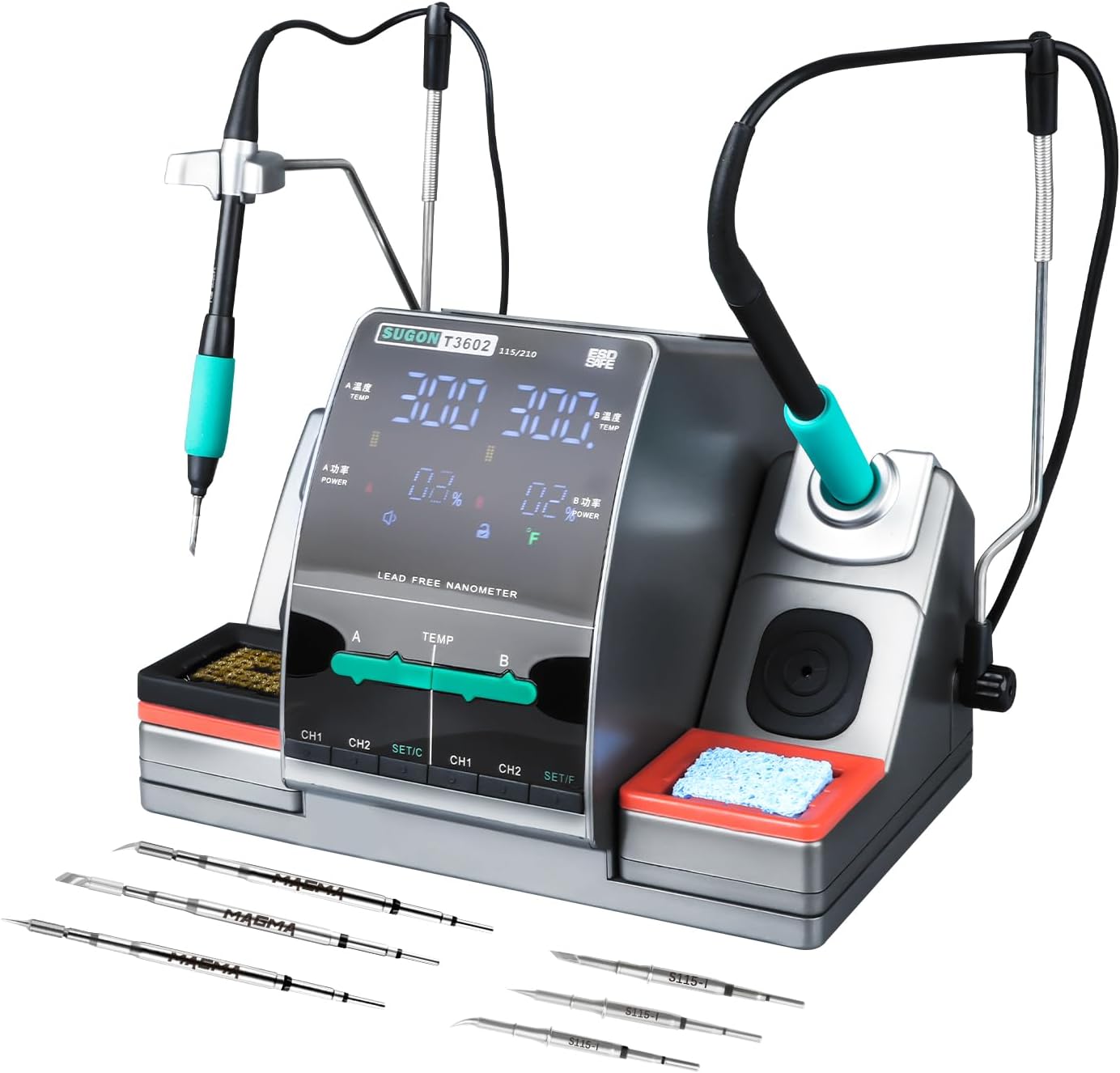
Figure 1.1: SUGON T3602 Professional Soldering Station with included tips.
This image displays the complete SUGON T3602 soldering station, showcasing its compact design, dual soldering iron handles, and the assortment of soldering tips provided with the unit. The station features a central display and control panel, flanked by two soldering iron holders with cleaning accessories.
2. Информация по технике безопасности
Always observe the following safety precautions to prevent injury or damage to the soldering station:
- Убедитесь, что паяльная станция подключена к надежно заземленной розетке.
- Do not operate the station in damp или влажные условия.
- Soldering irons reach very high temperatures. Avoid direct contact with the tip and allow it to cool before handling.
- Use adequate ventilation to disperse fumes generated during soldering.
- Когда паяльник не используется, всегда кладите его на предназначенный для него держатель.
- Перед чисткой или техническим обслуживанием отключите устройство от сети.
- Хранить в недоступном для детей месте.
3. Содержимое упаковки
Убедитесь, что все перечисленные ниже предметы включены в ваш пакет:
- 1 x SUGON T3602 Soldering Station Unit
- 1 x 115 Soldering Handle
- 1 x 210 Soldering Handle
- 6 x Soldering Iron Tips (various models, including 115 and 210 types)
- 1 х провод заземления
- 1 х Кабель питания
- 1 x Wire Brush for tip cleaning
- 1 x Чистящая губка

Figure 3.1: Included 115 and 210 model soldering iron tips.
This image illustrates the different types of soldering iron tips included with the SUGON T3602, specifically highlighting the 115 and 210 models, which are suitable for various precision welding applications.
4. Продукт закончилсяview
Familiarize yourself with the components of your SUGON T3602 Soldering Station:

Figure 4.1: Labeled components of the SUGON T3602.
Эта диаграмма дает четкое представление оview of the SUGON T3602 soldering station, labeling key components such as Handle A, Handle B, the display area, temperature adjustment controls, quick soldering tip changer, copper wire cleaning ball, cleaning sponge, save keys (CH1, CH2), and set keys (SET/C, SET/F).
- Область отображения: Shows temperature, power, and status indicators.
- Handle A / Handle B: Connectors for the two soldering iron handles.
- Регулировка температуры: Controls for setting the desired temperature for each channel.
- CH1 / CH2 Buttons: Memory channels for quick temperature recall.
- SET/C / SET/F Buttons: Used for setting parameters and switching temperature units.
- Quick Soldering Tip Changer: Mechanism for easy and safe tip replacement.
- Copper Wire Cleaning Ball / Cleaning Sponge: Integrated tools for soldering tip maintenance.
5. Настройка
- Размещение: Place the soldering station on a stable, heat-resistant, and non-flammable surface. Ensure adequate space for ventilation around the unit.
- Подключение питания: Connect the power cable to the station and then to a grounded 110V AC power outlet.
- Подключение заземляющего провода: If applicable, connect the ground wire to an appropriate grounding point.
- Handle and Tip Installation:
- Insert the 115 handle into the designated port (e.g., Handle A) and the 210 handle into the other port (Handle B).
- Select the desired soldering tip (115 or 210 model) and insert it firmly into the corresponding soldering iron handle. Ensure the tip is securely seated.

Figure 5.1: Proper insertion of a soldering iron tip into the handle.
This image demonstrates the correct method for inserting a soldering iron tip into its handle, ensuring a secure and stable connection for optimal performance.
- Prepare Cleaning Accessories: If using the cleaning sponge, dampen it slightly with water before use.
6. Инструкция по эксплуатации
- Включение: Press the power button to turn on the soldering station. The LCD display will illuminate.
- Регулировка температуры:
The T3602 features independent temperature control for Handle A and Handle B. The temperature range is 212-842°F (100-450°C).
- Use the dedicated temperature adjustment controls for Area A and Area B on the front panel to set the desired temperature.
- The LCD touch screen allows for precise temperature input and monitoring.

Figure 6.1: Independent temperature control for A/B zones.
This image highlights the independent temperature adjustment capability for both A and B zones on the soldering station, allowing users to set and recall specific temperatures for each handle without interference.

Figure 6.2: Adjusting temperature via the touch interface.
This image shows a finger interacting with the touch-sensitive temperature adjustment bar on the display, illustrating how users can precisely control the heat settings for their soldering tasks.
- Переключение единиц измерения температуры:
The station supports switching between Fahrenheit (°F) and Celsius (°C).
- Press the SET/C or SET/F button to toggle between the temperature units.

Figure 6.3: Display showing temperature unit switching.
This image illustrates the soldering station's display as it switches between Celsius (°C) and Fahrenheit (°F) temperature units, demonstrating the user's ability to select their preferred measurement system.
- Memory Channels (CH1, CH2):
The station allows you to save and recall frequently used temperature settings.
- Установите желаемую температуру.
- Press and hold the CH1 or CH2 button for a few seconds to save the current temperature to that channel.
- Press the CH1 or CH2 button briefly to recall the saved temperature.

Figure 6.4: Saving and recalling temperature settings using CH1 and CH2 buttons.
This image shows a finger pressing the CH1 and CH2 buttons, indicating the process of saving or recalling preset temperature settings for quick access during soldering operations.
- Автоматический спящий режим:
When a soldering handle is placed in its corresponding holder, the station will automatically enter a sleep state to conserve energy and prolong tip life. The corresponding area will quickly resume operation when the handle is lifted.
- Одновременная работа:
The T3602 allows both soldering handles (A and B) to operate simultaneously, each with its independently set temperature, significantly improving work efficiency for tasks requiring different temperature settings or multiple users.

Figure 6.5: Dual soldering handles in simultaneous operation.
This image demonstrates the SUGON T3602's capability to operate two soldering handles concurrently, each maintaining its own temperature, which is ideal for complex tasks or collaborative work.
- Быстрый нагрев:
The station features 240 watts of high power, enabling rapid heating of the soldering tips. This allows the station to reach operational temperature quickly, minimizing waiting time.

Figure 6.6: Illustration of rapid heating capability.
This image visually represents the rapid heating feature of the soldering station, showing the quick temperature rise to 716°F in approximately 2 seconds, highlighting its efficiency.
- Выключение: Press and hold the power button to turn off the station. Allow soldering tips to cool completely before storing.
7. Техническое обслуживание
- Очистка паяльного наконечника:
- Regularly clean soldering tips using the provided copper wire cleaning ball or the damp cleaning sponge. This removes excess solder and oxidation, ensuring optimal performance and tip longevity.
- For stubborn residue, use a tip tinner or activator.
- Генеральная уборка:
Wipe the exterior of the soldering station with a soft, dry cloth. Do not use abrasive cleaners or solvents. Ensure the unit is unplugged and cool before cleaning.
- Хранилище:
Store the soldering station in a dry, dust-free environment when not in use. Ensure all components are cool before storage.
8. Поиск Неисправностей
| Проблема | Возможная причина | Решение |
|---|---|---|
| Станция не включается. | Отсутствие питания; неисправный кабель питания; внутренняя неисправность. | Check power cable connection and outlet. Try a different outlet. If problem persists, contact customer support. |
| Паяльник не нагревается. | Handle not properly connected; faulty tip; internal fault. | Ensure handle is fully inserted. Try replacing the soldering tip. If issue continues, contact customer support. |
| Температура нестабильна или неточна. | Tip not properly seated; dirty tip; sensor issue. | Re-seat the tip. Clean the tip thoroughly. Ensure the station is on a stable surface away from drafts. |
| Дисплей работает некорректно. | Программный сбой; аппаратная проблема. | Try restarting the station. If the problem persists, contact customer support. |
9. Технические характеристики
| Особенность | Деталь |
|---|---|
| Номер модели | Т3602 |
| Производитель | СУГОН |
| Входная мощность | 110 В переменного тока |
| Ватtage | 240 Вт |
| Количество каналов | 2 |
| Диапазон температур | 212 - 842°F (100 - 450°C) |
| Температурная стабильность | Maintains stable temperature up to 842°F |
| Тип дисплея | ЖК-дисплей |
| Материал | Нержавеющая сталь |
| Размеры продукта (Д x Ш x В) | 8.7 x 7 x 9.6 дюйма |
| Вес товара | 10.73 фунта |
| Включенные компоненты | 1 x 115 Handle, 1 x 210 Handle, 1 x Ground Wire, 1 x Power Cable, 1 x wire brush |
| СКП | 784121417069 |
10. Гарантия
The SUGON T3602 Professional Soldering Station comes with a Гарантия 12 месяца from the date of purchase. This warranty covers manufacturing defects and malfunctions under normal use. Please retain your proof of purchase for warranty claims. The warranty does not cover damage caused by misuse, accidents, unauthorized modifications, or improper maintenance.
11. Поддержка клиентов
For technical assistance, troubleshooting beyond this manual, or warranty inquiries, please contact SUGON customer support. Refer to the product packaging or the manufacturer's official webсайт для получения самой актуальной контактной информации.
Мы стремимся предоставлять высококачественную продукцию и поддержку, чтобы гарантировать ваше удовлетворение.
Ask a question about this manual
Ask about setup, troubleshooting, compatibility, parts, safety, or missing instructions. Manuals+ will review the question and use this page’s manual context to help answer it.