
1. Введение
The Retevis RA619 is a versatile two-way radio designed for reliable communication in various outdoor and recreational settings. It features a compact design, Bluetooth headset compatibility, multiple charging options, and essential safety functions like vibration alerts and an SOS button. This manual provides detailed instructions for the proper setup, operation, and maintenance of your RA619 walkie talkie.

Image 1.1: The Retevis RA619 walkie talkie with its included Bluetooth headset, showcasing its compact design and accessories.
2. Что в коробке
Upon unpacking your Retevis RA619 walkie talkie, please verify that all the following items are included:
- 2x Retevis RA619 Bluetooth Walkie Talkie
- 2x Wireless Bluetooth Headset
- 2x зарядное устройство
- Зарядный кабель USB 2x
- 2x Battery Cover with Li-ion Battery
- 1x Руководство пользователя

Image 2.1: A visual representation of all components included in the Retevis RA619 walkie talkie package.
3. Продукт закончилсяview
Familiarize yourself with the various parts and controls of your Retevis RA619 walkie talkie.

Image 3.1: Detailed diagram illustrating the physical components and control buttons of the RA619 walkie talkie and its Bluetooth headset.
3.1 Walkie Talkie Components
- Антенна: Для передачи и приема сигналов.
- Фонарик: Integrated LED flashlight for illumination.
- Ручка регулировки громкости: Rotates to adjust speaker volume and powers the unit on/off.
- ЖК-дисплей: Shows channel number, battery status, and feature indicators.
- Разъемы для динамика/микрофона: Для внешних аудиоаксессуаров.
- Кнопка PTT (нажми и говори): Нажмите и удерживайте, чтобы передать свой голос.
- Кнопка режима: Цикличное переключение между различными режимами работы.
- Кнопка меню: Предоставляет доступ к настройкам и параметрам.
- Кнопки вверх / вниз: Navigate menus and adjust settings (e.g., channel selection).
- Кнопка монитора (MON): Временно отключает шумоподавление для прослушивания слабых сигналов.
- Кнопка вызова: Initiates a call tone.
- Кнопка SOS: Активирует функцию аварийной сигнализации.
- Спикер: Для аудиовыхода.
3.2 Bluetooth Headset Components
- High Volume Button: Increases headset volume.
- Low Volume Button: Decreases headset volume.
- Переключатель ВКЛ / ВЫКЛ: Powers the headset on or off.
- Кнопка РТТ: Activates transmission when connected to the walkie talkie.
4. Настройка
4.1 Установка и зарядка аккумулятора
The RA619 walkie talkie offers flexible power options, including a rechargeable lithium-ion battery and compatibility with AA batteries.
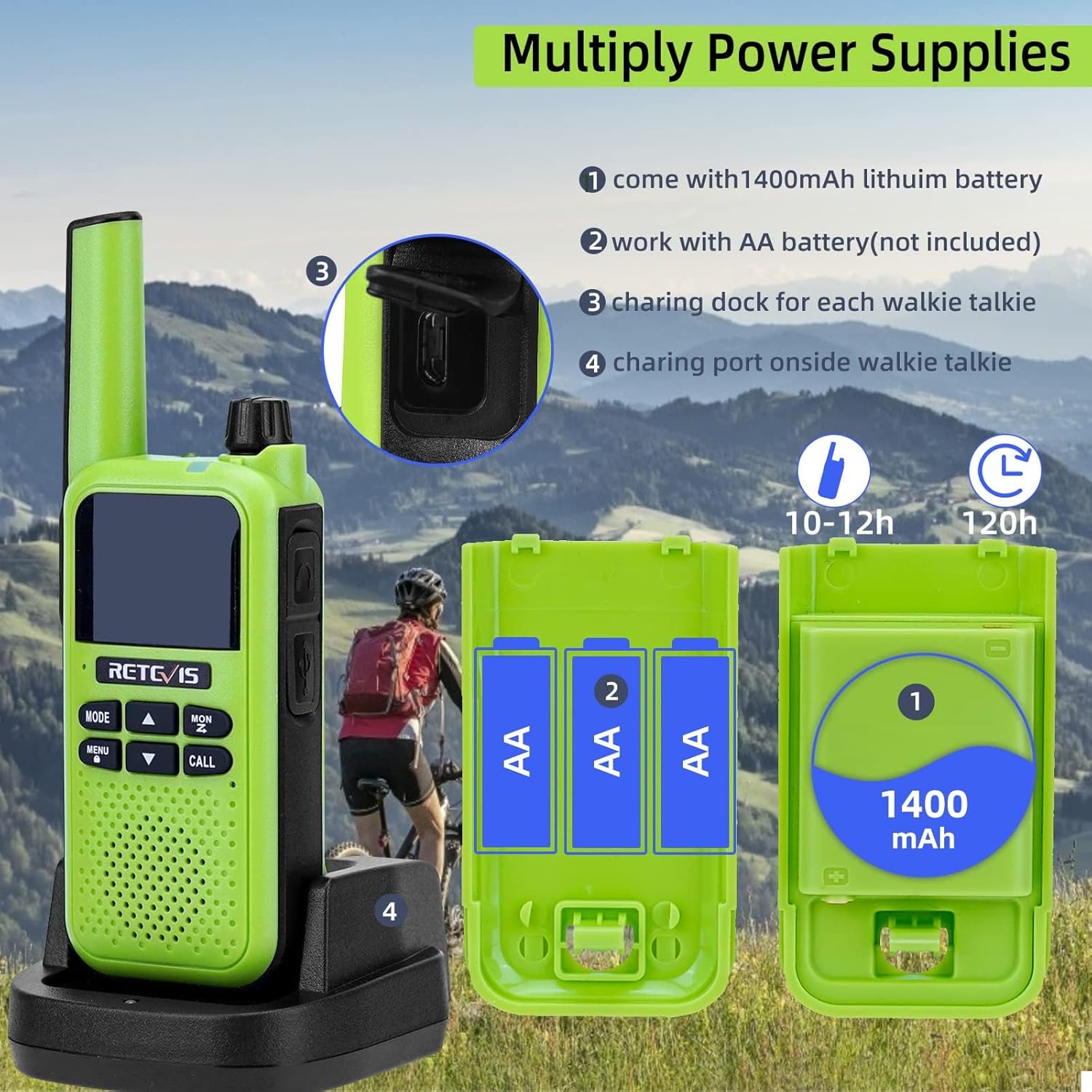
Image 4.1: Illustration of the various power supply methods for the RA619, including the 1400mAh lithium battery, AA battery compartment, charging dock, and micro USB port.
- Литий-ионный аккумулятор: The walkie talkie comes with a 1400mAh lithium-ion battery pack. Insert this battery into the compartment on the back of the radio and secure it with the provided battery cover.
- Батарейки типа АА (в комплект не входят): Alternatively, you can power the walkie talkie using 3 AA batteries. Open the battery compartment, insert the AA batteries according to the polarity markings, and close the cover.
- Зарядка через док-станцию: Place the walkie talkie into the charging dock. Connect the USB charging cable to the dock and a suitable USB power source. The charging indicator will show the charging status.
- Зарядка через Micro USB: For direct charging, connect the micro USB charging cable to the port on the side of the walkie talkie and a USB power source.
A full charge typically takes 10-12 hours and provides approximately 120 hours of standby time.
5. Инструкция по эксплуатации
5.1 Включение/выключение и регулировка громкости
- To power on the walkie talkie, rotate the Volume Knob clockwise until you hear a click.
- To power off, rotate the Volume Knob counter-clockwise until you hear a click.
- Adjust the volume by rotating the Volume Knob clockwise to increase and counter-clockwise to decrease.
5.2 Выбор канала
The RA619 supports 16 channels for communication.
- Нажмите МЕНЮ кнопка для входа в меню.
- Используйте UP or ВНИЗ arrow buttons to navigate to the channel selection option.
- Нажимать МЕНЮ again to select the channel.
- Используйте UP or ВНИЗ arrow buttons to choose your desired channel (1-16).
- Нажимать МЕНЮ для подтверждения выбора, затем нажмите РЕЖИМ для выхода из меню.
5.3 Связь «нажми и говори» (PTT)
- Убедитесь, что обе рации настроены на один и тот же канал.
- Нажмите и удерживайте ПТТ button on the side of the walkie talkie.
- Чётко говорите в микрофон.
- Выпустите ПТТ кнопку, чтобы прослушать ответ.
5.4 Функция VOX (голосовое управление)
The VOX function allows for hands-free communication, activating transmission when it detects your voice.

Image 5.1: A user on a motorcycle communicating hands-free, demonstrating the VOX feature of the RA619 walkie talkie.
- Чтобы активировать VOX, нажмите кнопку МЕНЮ button, navigate to the VOX setting, and select your desired sensitivity level.
- When using a headset, ensure VOX is enabled on the walkie talkie for hands-free operation.
5.5 Bluetooth Headset Pairing
The RA619 walkie talkie can be paired with the included Bluetooth headset for wireless communication.

Image 5.2: A Retevis RA619 walkie talkie and its Bluetooth headset, with a background depicting outdoor activity, highlighting its hands-free capability.

Image 5.3: Visual guide demonstrating the simple steps to pair the RA619 walkie talkie with its Bluetooth headset by pressing the dedicated Bluetooth button.
- Ensure both the walkie talkie and the Bluetooth headset are powered on.
- Press and hold the Bluetooth button on the side of the walkie talkie until the pairing indicator flashes.
- The headset should automatically connect. A confirmation tone or indicator light will signal a successful connection.
5.6 Call Vibration Function
The RA619 features a vibration alert for incoming calls, useful in noisy environments or when discretion is required.

Image 5.4: The RA619 walkie talkie vibrating, indicating an incoming call, useful for discreet alerts in various settings.

Image 5.5: A visual representation of the RA619's vibration alert feature, ensuring notifications are received even in challenging conditions.
To enable or disable the vibration function, access the menu settings and locate the 'Vibration' option.
5.7 Функция экстренного вызова SOS
In emergency situations, the SOS function can be activated to alert others.

Image 5.6: Close-up of the RA619 showing the dedicated SOS button and the LED torch button.

Image 5.7: A scenario depicting the use of the RA619's SOS emergency function after an accident, highlighting its safety utility.
Нажмите и удерживайте специальную кнопку. СОС button to activate the emergency alarm. This will transmit an alert signal to other radios on the same channel.
Светодиодный фонарик 5.8
The integrated LED flashlight provides illumination in dark environments.

Image 5.8: The RA619 walkie talkie illuminating a dark camping area with its built-in LED flashlight.
Нажмите специальную кнопку фонарик кнопка включения или выключения фонарика.
5.9 Функция беспроводного копирования
The wireless copy function allows for quick and simultaneous duplication of settings between multiple RA619 walkie talkies.

Image 5.9: Diagram illustrating the wireless copy function, enabling quick synchronization of settings across multiple RA619 units.

Image 5.10: Two RA619 walkie talkies demonstrating the wireless copy feature, simplifying setup for multiple devices.
Refer to the specific instructions in the full user manual for detailed steps on initiating and completing the wireless copy process.
6. Техническое обслуживание
- Уборка: Используйте мягкий, damp cloth to clean the exterior of the walkie talkie. Avoid using harsh chemicals or abrasive cleaners.
- Хранилище: Store the walkie talkie in a cool, dry place away from direct sunlight and extreme temperatures when not in use for extended periods. Remove batteries if storing for several months.
- Уход батареи: Fully charge the lithium-ion battery before first use. Avoid overcharging or completely draining the battery to prolong its lifespan.
- Водостойкость: Note that the Retevis RA619 is не водостойкий. Avoid exposure to rain, splashes, or immersion in water to prevent damage.
7. Поиск Неисправностей
If you encounter issues with your Retevis RA619 walkie talkie, refer to the following common problems and solutions:
| Проблема | Возможная причина | Решение |
|---|---|---|
| Нет электричества | Батарея разряжена или установлена неправильно. | Charge the battery or replace AA batteries. Ensure batteries are correctly inserted. |
| Невозможно передать или получить | Неправильный канал, выход за пределы зоны действия или низкий заряд батареи. | Verify both radios are on the same channel. Move closer to the other radio. Charge battery. |
| Плохое качество звука | Volume too low, interference, or microphone/speaker obstruction. | Adjust volume. Move away from sources of interference. Ensure microphone and speaker are clear. |
| Bluetooth-гарнитура не сопрягается. | Headset not in pairing mode or too far from radio. | Ensure headset is on and in pairing mode. Bring headset closer to the walkie talkie. |
Если проблема сохраняется после попытки применения этих решений, обратитесь в службу поддержки клиентов Retevis для получения дополнительной помощи.
8. Технические характеристики
| Особенность | Деталь |
|---|---|
| Номер модели | EUA9217BX2 |
| Бренд | Ретевис |
| Цвет | Зеленый |
| Количество каналов | 16 |
| Диапазон частот | 446.00625-446.19375 МГц |
| Максимальный диапазон разговора | 1.5 Mile (approximately 2.4 km) |
| Тип батареи | 1400mAh Lithium Ion (included) or 3x AA (not included) |
| Томtage | 3.7 Вольт |
| Размеры продукта | 3.4D x 5.5W x 15.8H сантиметров |
| Масса | 325 г |
| Уровень водонепроницаемости | Не водостойкий |
| Особые возможности | Call Vibration, Emergency Alarm, Bluetooth Headset, VOX, LED Flashlight, Wireless Copy |
9. Информация по технике безопасности
- Не эксплуатируйте радиостанцию во взрывоопасной атмосфере (например, вблизи горючего газа, частиц пыли, металлических порошков).
- Do not attempt to disassemble or modify the radio. Repairs should only be performed by authorized service personnel.
- Во избежание повреждений и для обеспечения безопасности используйте только сертифицированные аккумуляторы и зарядные устройства.
- Храните радиоприемник и его принадлежности в недоступном для маленьких детей месте.
- Избегайте длительного воздействия прямых солнечных лучей или экстремальных температур.
- Do not immerse the radio in water, as it is not water resistant.
10. Гарантия и поддержка
For warranty information and customer support, please refer to the documentation provided with your purchase or visit the official Retevis website. Contact details for support are typically available on the manufacturer's webсайт.