
Введение
This manual provides comprehensive instructions for the proper use and maintenance of your Haiz HZ-M77 16-Channel USB Walkie Talkie. Please read this manual thoroughly before operating the device to ensure optimal performance and safety. The Haiz HZ-M77 is an Anatel-approved two-way radio, designed for reliable communication over distances ranging from 1km to 12km, depending on environmental conditions.

An image showing two Haiz HZ-M77 walkie-talkies placed on their charging bases. This illustrates the product's appearance and how it sits on the charger.
Содержимое упаковки
The Haiz HZ-M77 package includes the following items:
- 2 x HZ-M77 Walkie Talkie Radios
- 2 литий-ионных аккумулятора
- 2 зарядных баз
- 2 x Антенны
- 2 х ремешка на запястье
- 2 x поясные клипы
- 2 х наушники
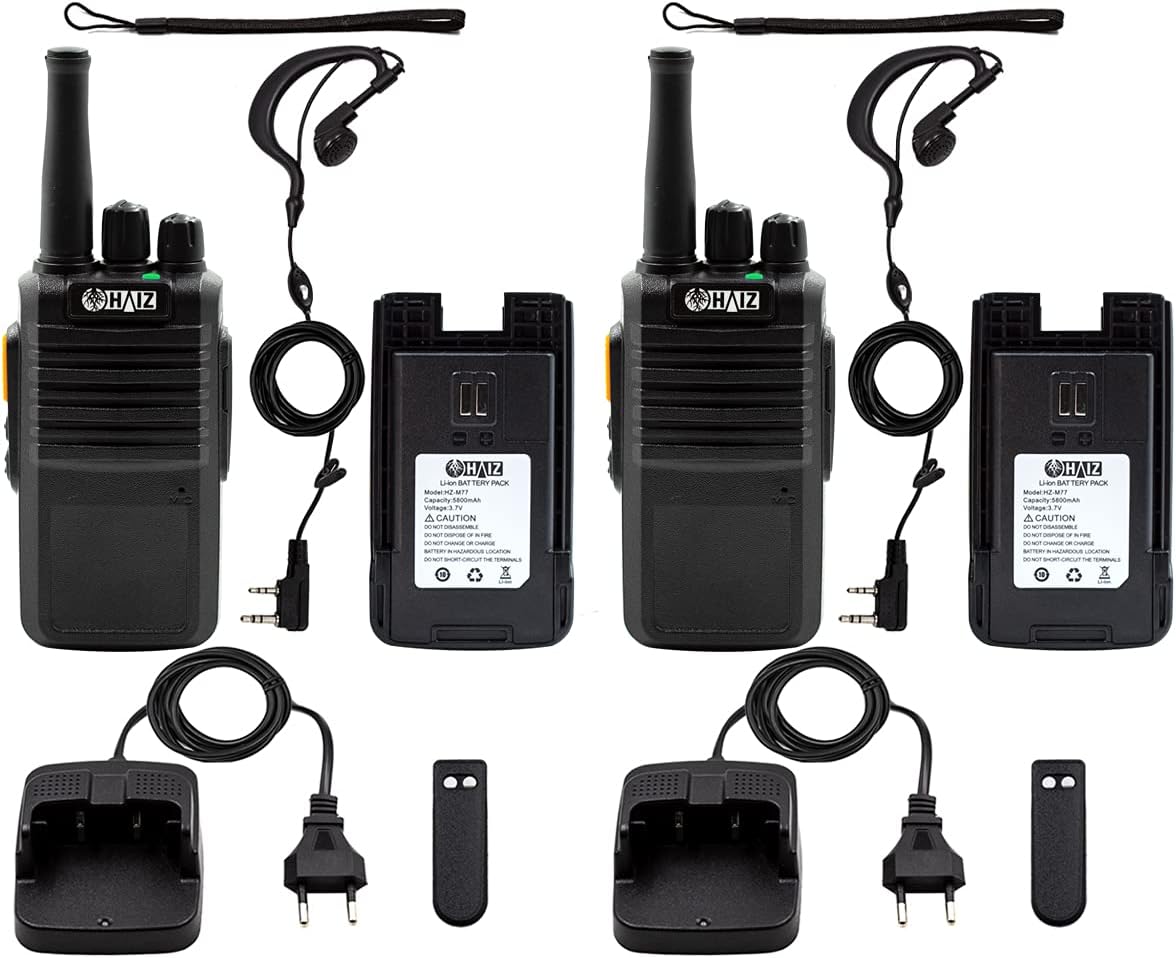
An image showing all components included in the Haiz HZ-M77 walkie-talkie package: two radios, two batteries, two charging bases, two antennas, two wrist straps, two belt clips, and two earpieces.
Продукт болееview
Familiarize yourself with the various parts and controls of your Haiz HZ-M77 walkie-talkie.
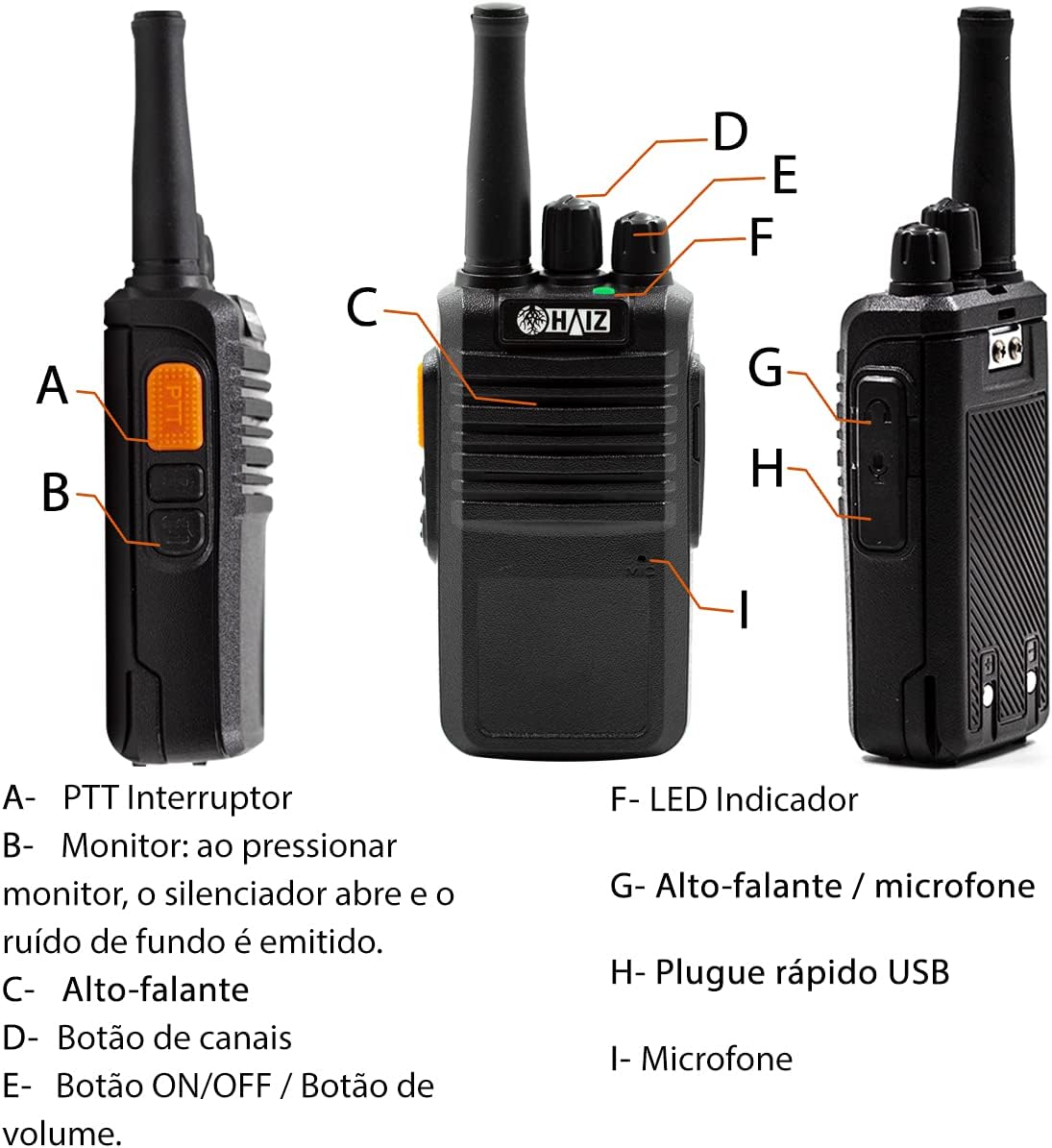
A diagram illustrating the different parts of the Haiz HZ-M77 walkie-talkie. Key components labeled include: A-PTT Switch, B-Monitor Button, C-Speaker, D-Channel Knob, E-ON/OFF & Volume Knob, F-LED Indicator, G-Speaker/Microphone Jack, H-USB Charging Port, I-Microphone.
Органы управления и функции:
- A - PTT (Push-To-Talk) Switch: Нажмите и удерживайте для передачи, отпустите для приема.
- B - Monitor Button: Press to open the squelch and listen for weak signals or background noise.
- C - Speaker: Выводит полученный звук.
- D - Channel Knob: Rotate to select one of the 16 available communication channels.
- E - ON/OFF / Volume Knob: Поверните по часовой стрелке, чтобы включить устройство и увеличить громкость; поверните против часовой стрелки, чтобы уменьшить громкость и выключить устройство.
- F - LED Indicator: Provides visual feedback on radio status (e.g., transmitting, receiving, battery low).
- G - Speaker / Microphone Jack: Connect external earpieces or microphones.
- H - USB Charging Port: For charging the radio using a Micro USB V8 cable (not included).
- I - Microphone: Записывает ваш голос во время передачи.
Настраивать
1. Установка аккумулятора
Insert the provided Li-ion battery into the back compartment of the walkie-talkie, ensuring it clicks securely into place.
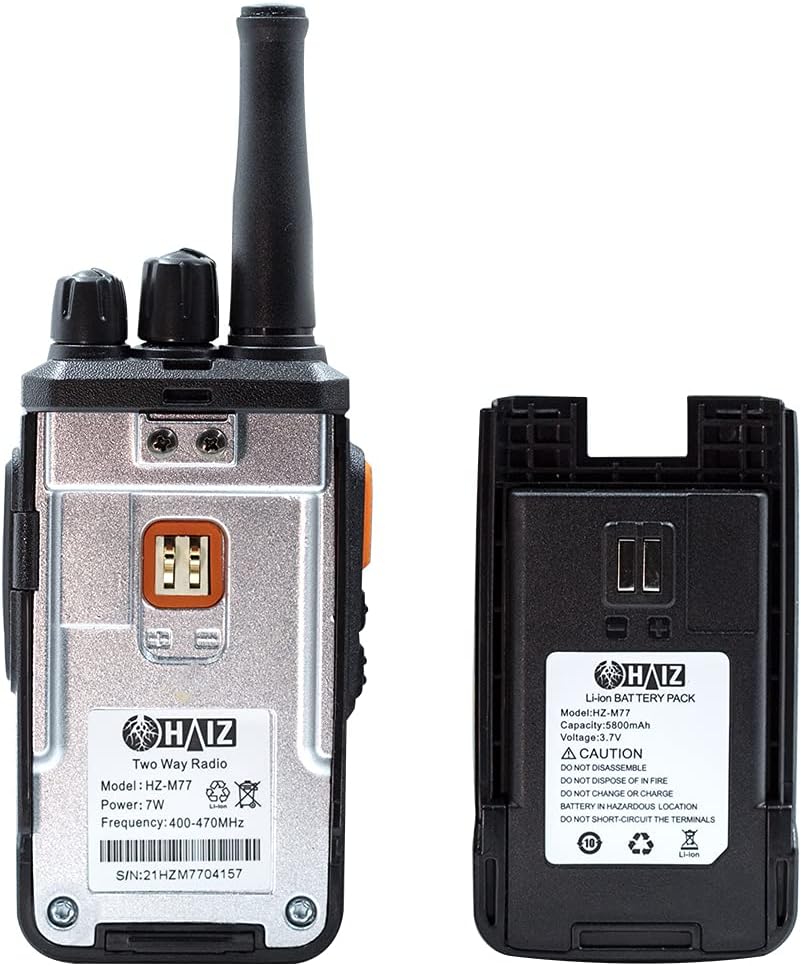
An image showing the back of the Haiz HZ-M77 walkie-talkie with its battery removed, and the separate Li-ion battery pack. This illustrates how the battery connects to the radio.
2. Зарядка аккумулятора
Your walkie-talkie can be charged using the included charging base or a Micro USB V8 cable (not included).
Использование зарядной базы:
- Connect the charging base to a standard 110V or 220V power outlet using the included power adapter.
- Place the walkie-talkie into the charging base. Ensure the charging contacts align.
- The LED indicator on the radio or base will show the charging status.

A close-up image of the Haiz HZ-M77 walkie-talkie charging base and its power adapter, ready to be plugged into an electrical outlet.
Использование USB-порта для зарядки:
- Connect a Micro USB V8 cable (not included) to the USB charging port (H) on the side of the radio.
- Подключите другой конец USB-кабеля к совместимому источнику питания USB (например, компьютеру, сетевому адаптеру USB).
Примечание: Для оптимальной производительности полностью зарядите аккумулятор перед первым использованием.
3. Установка антенны
Screw the antenna clockwise into the connector on the top of the walkie-talkie until it is finger-tight.
4. Установка зажима для ремня
Для удобства переноски прикрепите зажим для ремня к специальному слоту на задней панели радиостанции.
5. Подключение наушника
If desired, connect the included earpiece to the Speaker/Microphone Jack (G) on the side of the radio.

A detailed image of the included earpiece for the Haiz HZ-M77 walkie-talkie, showing its two-pin connector for audio input and output.
Инструкция по эксплуатации
1. Включение/выключение и регулировка громкости
Rotate the ON/OFF / Volume Knob (E) clockwise to turn on the radio. Continue rotating clockwise to increase the volume. Rotate counter-clockwise to decrease the volume and turn off the radio.
2. Выбор канала
Rotate the Channel Knob (D) to select one of the 16 available channels. Ensure all radios intended for communication are set to the same channel.
3. Передача и прием (PTT)
To transmit, press and hold the PTT Switch (A) on the side of the radio. Speak clearly into the microphone (I). Release the PTT Switch to stop transmitting and return to receive mode.
4. Функция мониторинга
Press and hold the Monitor Button (B) to temporarily disable the squelch. This allows you to listen for very weak signals or to hear background noise on a channel, which can be useful for checking if a channel is clear.
5. Battery Low Alert
The radio will emit an audible alert when the battery level is low, indicating that it needs to be recharged.
6. Режим экономии заряда батареи
The Haiz HZ-M77 features a battery save mode to extend battery life. This mode automatically activates when the radio is not actively transmitting or receiving for a certain period.
Технические характеристики
| Особенность | Спецификация |
|---|---|
| Модель | HZ-M77 |
| Диапазон частот | УВЧ 400-470MHz |
| Количество каналов | 16 |
| Дальность связи | 1km to 12km (varies with terrain and obstacles) |
| Выходная мощность | 5W |
| Тип батареи | Литий-ионный аккумулятор |
| Емкость аккумулятора | 1500мАч |
| Рабочий объемtage | 3.7V (Radio), 7.4V (Battery) |
| Вход для зарядки | Bivolt (110V/220V) via charging base; Micro USB V8 (cable not included) |
| Особые возможности | Noise Reduction Circuit, LED Indicators, Battery Save Mode, Low Battery Alert, Automatic Channel Search |
| Размеры (радио) | 16 cm (height with antenna) x 5 cm (width) x 2.5 cm (depth) |
| Weight (Radio with battery & antenna) | Примерно 159 г |
| Сертификация Anatel | 10362-21-14108 |

An image displaying the dimensions of the Haiz HZ-M77 walkie-talkie, showing a height of 16cm (with antenna), width of 5cm, and depth of 2.5cm. The weight is listed as 159g with battery and antenna.
Обслуживание
Уборка:
Протрите поверхность радиоприемника мягкой тряпкой.amp ткань. Не используйте агрессивные химикаты или абразивные чистящие средства.
Уход батареи:
Чтобы продлить срок службы аккумулятора, избегайте его перезарядки или полной разрядки. Храните радиостанцию и аккумулятор в прохладном, сухом месте, если не используете его в течение длительного времени.
Уход за антенной:
Do not bend or force the antenna, as this can damage the radio's performance.
Поиск неисправностей
| Проблема | Возможная причина | Решение |
|---|---|---|
| Нет электричества | Аккумулятор разряжен или установлен неправильно. | Зарядите аккумулятор. Убедитесь, что аккумулятор вставлен правильно. |
| Невозможно связаться с другими радиостанциями | Радиостанции работают на разных каналах. Вне зоны действия. | Ensure all radios are set to the same channel. Move closer to the other radio. |
| Плохое качество звука / Помехи | Weak signal. Interference. Volume too low. | Move to an open area. Adjust volume. Use the Monitor function to check for activity. |
| Аккумулятор быстро разряжается | Аккумулятор не полностью заряжен. Старый аккумулятор. | Убедитесь, что батарея полностью заряжена. Если батарея старая, подумайте о её замене. |
Информация по безопасности
- Не разбирайте и не модифицируйте радиостанцию.
- Не подвергайте радиоприемник воздействию экстремальных температур, прямых солнечных лучей или влаги.
- Используйте только сертифицированные аккумуляторы и зарядные устройства.
- Keep the radio away from medical devices that may be affected by radio frequency energy.
- Observe all local regulations regarding radio communication.
Гарантия и поддержка
For warranty information or technical support, please refer to the contact details provided by your retailer or visit the official Haiz webСохраните чек в качестве подтверждения покупки.