
125 125q4csagk5u21502
SF P101N CD Player Completer Mechanism User Manual
Model: 125q4csagk5u21502 | Brand: 125
Введение
This manual provides essential information for the SF P101N CD Player Completer Mechanism. This component is designed as a replacement part for various CD players and HiFi systems that utilize the SF-P101N laser unit. It is crucial to verify compatibility, particularly regarding the ribbon connector pin count, before installation.
Технические характеристики продукта
| Тип | Голова |
| Диапазон частот | Видимый свет |
| Режим работы | Непрерывный |
| Incentive Method | Optical Pump |
| Working Substance | Полупроводник |
| Light Way | Inner Light Way |
| Форма выхода | NPN Triode Type |
| Тип ворот | Three-State Gate Type |
| Скорость | Низкая скорость |
| Канал | Один канал |
| Размеры продукта | 0.39 x 0.39 x 0.39 дюйма |
| Вес товара | 4.9 унции |
| Поддерживаемый аудиоформат | МП3 |
Основные характеристики
- Широкая совместимость: This mechanism is applicable to many brands of CD players and HiFi systems that utilize SF-P101N lasers.
- Конфигурация выводов: The provided version is the 16-pin type, which is the most common. It is essential to verify your existing unit's pin count as 6-pin and 15-pin versions are not interchangeable.
- Effective Repair Solution: Replacing the entire mechanism, including the SF-P101N laser, offers a comprehensive repair by replacing all moving parts involved in CD reading.
- Идентификация: The model number (SF-P101N) is typically printed on the housing of the laser unit. Confirm this marking and the 16-pin connector count for proper identification.
Содержимое упаковки
- 1 x SF P101N CD Player Completer Mechanism
Руководство по установке
Важный: Installation of this component requires technical proficiency and familiarity with electronics, including soldering and desoldering. If you are not comfortable with these procedures, it is recommended to seek professional assistance.
- Подготовка:
- Ensure the CD player or HiFi system is completely powered off and unplugged from the mains.
- Gather necessary tools: screwdrivers, desoldering iron, soldering iron, solder, anti-static wrist strap.
- Работайте в чистом, хорошо освещенном и защищенном от статического электричества помещении.
- Accessing the Mechanism:
- Осторожно откройте сasing of your CD player/HiFi system according to its service manual or common disassembly procedures.
- Locate the existing CD player mechanism.
- Disconnecting the Old Mechanism:
- Gently disconnect the ribbon cable from the old mechanism. Note the orientation.
- Решающий шаг: The SF-P101N laser unit typically has a solder blob (anti-static point) that needs to be desoldered before installation. This blob protects the laser diode from static discharge during transport. Failure to desolder this point will prevent the unit from functioning. Locate this small solder bridge, usually on the flexible PCB near the connector, and carefully remove it using a desoldering iron.
- Unscrew and remove the old mechanism from its mounting points.
- Installing the New Mechanism:
- Carefully place the new SF P101N mechanism into position.
- Закрепите его соответствующими винтами.
- Connect the ribbon cable, ensuring correct orientation and a secure fit. Double-check that it is the 16-pin version if your original was 16-pin.
- Тестирование и повторная сборка:
- Before fully reassembling the device, perform a preliminary test. Power on the unit and attempt to load and play a CD.
- If the CD reads correctly, proceed to carefully reassemble the casing of your CD player/HiFi system.
- Если проблемы сохраняются, обратитесь к разделу «Устранение неполадок».

Рисунок 1: Вверху view of the mechanism, highlighting the main gears and laser assembly.
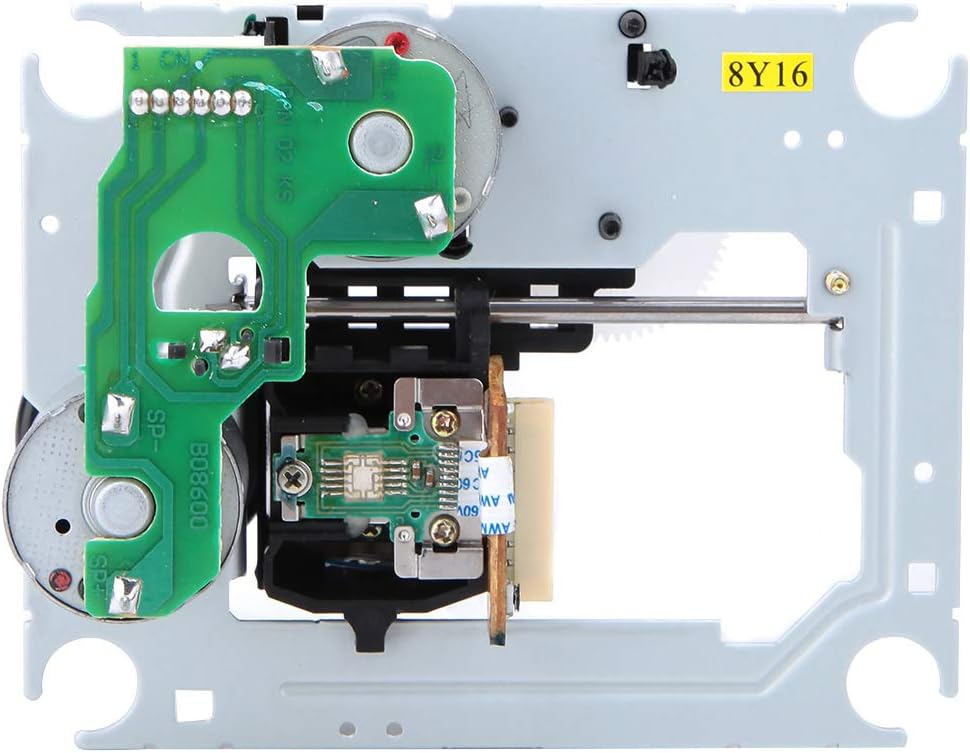
Рисунок 2: Внизу view, illustrating the circuit board and the 16-pin ribbon cable connector. The anti-static solder blob is typically located near this connector.

Рисунок 3: Наклонный view, demonstrating the compact design suitable for various CD player and HiFi applications.
Принципы работы
The SF P101N mechanism functions as the core optical reading unit within a CD player. Once installed, it works in conjunction with the player's control circuitry to:
- Disc Loading: Facilitate the proper positioning of the CD for reading.
- Лазерное излучение: Emit a low-power laser beam (visible light spectrum) onto the CD's surface.
- Обнаружение сигнала: Detect the reflected laser light, which carries the digital audio information encoded on the disc.
- Tracking and Focusing: Continuously adjust the laser's focus and tracking to accurately read data as the disc spins.
- Конверсия данных: Convert the optical signals into electrical signals for further processing by the CD player's digital-to-analog converter (DAC).
The mechanism operates in a continuous mode, ensuring stable and uninterrupted data retrieval from the compact disc.
Обслуживание
As an internal component, the SF P101N mechanism generally requires minimal user maintenance. However, proper care of the overall CD player can extend its lifespan:
- Не допускайте попадания пыли: Ensure the CD player's environment is as dust-free as possible. Dust can accumulate on the laser lens, affecting reading performance.
- Обращайтесь с дисками осторожно: Always handle CDs by their edges to avoid fingerprints and scratches on the playing surface, which can cause reading errors.
- Избегайте физических ударов током: Protect the CD player from sudden impacts or vibrations, as these can misalign internal components.
- Professional Cleaning (If Necessary): If persistent reading issues occur after installation, and you suspect a dirty laser lens, consider professional cleaning. Avoid attempting to clean the laser lens yourself unless you have specialized tools and knowledge, as improper cleaning can cause damage.
Поиск неисправностей
If you encounter issues after installing the SF P101N mechanism, consider the following:
| Проблема | Возможная причина | Решение |
|---|---|---|
| CD player does not read discs or shows "No Disc" error. |
|
|
| Disc spins but no audio or skipping. |
|
|
| Mechanism makes unusual noises. |
|
|
Гарантия и поддержка
На данный товар распространяется стандартная гарантия производителя на дефекты материалов и изготовления. Для предъявления гарантийных претензий сохраните чек о покупке.
For technical support or warranty inquiries, please contact the retailer or manufacturer directly. Provide your product model number (125q4csagk5u21502) and a detailed description of the issue.