
1. Введение
Thank you for choosing the BolyGuard MG984G-36M Trail Camera. This manual provides detailed instructions for the setup, operation, and maintenance of your camera. Designed for outdoor surveillance, this camera captures high-resolution images and videos, offering 4G connectivity for cloud services and remote management via a dedicated application.
Перед использованием камеры внимательно ознакомьтесь с данным руководством, чтобы обеспечить ее оптимальную работу и долгий срок службы.
2. Продукт закончилсяview
The BolyGuard MG984G-36M is a robust trail camera featuring a camouflage design for discreet outdoor placement. It is equipped with a high-resolution sensor, infrared LEDs for night vision, and an external antenna for reliable 4G communication.
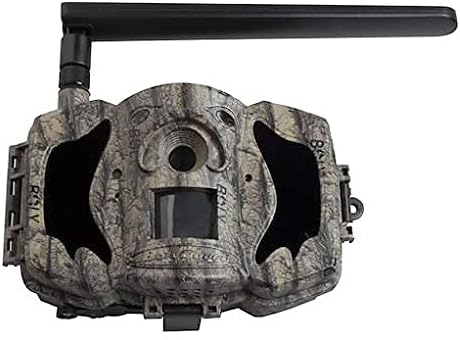
Рисунок 1: Передняя часть view of the BolyGuard MG984G-36M trail camera. This image displays the front view of the BolyGuard MG984G-36M trail camera. It features a camouflage pattern casing, a prominent external antenna on the top left, and the main lens and sensor area visible on the front. The camera is designed for outdoor use and blends with natural environments.
Ключевые компоненты:
- Основная линза: Захватывает изображения и видео.
- ИК-датчик: Обнаруживает движение для запуска записи.
- Инфракрасные светодиоды: Обеспечивает освещение для ночного видения.
- Внешняя антенна: Ensures stable 4G network connectivity.
- ЖК-экран: For menu navigation and settings adjustment (located inside the camera).
- Отсек для батареи: Holds required batteries (not included).
- Слот для SD-карты: Для хранения захваченных носителей информации.
- Слот для SIM-карты: For 4G network access.
3. Настройка
3.1 Установка аккумулятора
- Откройте камеру casing защёлки.
- Найдите батарейный отсек.
- Insert the required batteries (e.g., AA batteries, not included) according to the polarity indicators (+/-). Ensure all batteries are new and of the same type.
- Надежно закройте батарейный отсек.
3.2 Установка SIM-карты и SD-карты
- With the camera powered off, locate the SIM card slot. Insert a activated 4G SIM card into the slot until it clicks into place.
- Locate the SD card slot. Insert a compatible SD card (up to 32GB, Class 10 recommended, not included) into the slot until it clicks.
- Attach the external antenna to the designated port on the camera.
3.3 Initial Power-On and App Setup
- Switch the camera to the 'SETUP' mode. The internal LCD screen will power on.
- Follow the on-screen prompts to set the date, time, and other basic settings.
- Download the official BolyGuard app from your smartphone's app store.
- Register an account and add your camera to the app by following the in-app instructions, typically involving scanning a QR code or entering the camera's serial number.
- Ensure the camera has a stable 4G signal, indicated on the LCD screen.
4. Инструкция по эксплуатации
4.1 Основные режимы работы
- OFF: Камера выключена.
- НАСТРОИТЬ: Allows access to the camera's menu for configuration and viewзахваченных медиа.
- НА: Camera is in active surveillance mode, detecting motion and capturing media according to settings.
4.2 Конфигурация настроек
In 'SETUP' mode, use the navigation buttons to access and modify settings:
- Режим: Выберите Фото, Видео или Фото+Видео.
- Размер изображения: Set photo resolution (e.g., 36MP, 24MP).
- Размер видео: Set video resolution (e.g., 1080P, 720P).
- Чувствительность PIR: Adjust motion detection sensitivity (High, Normal, Low).
- Интервал срабатывания: Установите задержку между последовательными срабатываниями.
- Промежуток времени: Configure time-lapse photography settings.
- Режим отправки: Configure how media is sent via 4G (e.g., instant, daily report).
- Облачный сервис: Enable or disable cloud storage and app connectivity.
4.3 Remote Management via App
Once connected to the BolyGuard app, you can:
- Receive real-time notifications of detected activity.
- View captured photos and videos remotely.
- Change camera settings from your smartphone.
- Monitor camera status (battery level, signal strength, SD card capacity).
5. Техническое обслуживание
- Уборка: Regularly clean the camera lens and PIR sensor window with a soft, dry cloth. Avoid abrasive materials or harsh chemicals.
- Замена батареи: Replace all batteries when the low battery indicator appears or when performance degrades. Always use fresh batteries of the same type.
- Управление SD-картой: Periodically format the SD card in the camera's menu to maintain optimal performance and prevent data corruption. Back up important files перед форматированием.
- Обновления прошивки: Check the BolyGuard official website for any available firmware updates. Follow the provided instructions carefully for installation.
- Хранилище: При длительном неиспользовании извлеките батарейки и храните камеру в прохладном, сухом месте, вдали от прямых солнечных лучей.
6. Поиск Неисправностей
- Камера не включается: Ensure batteries are correctly inserted with correct polarity and are fully charged. Check if the power switch is in the 'SETUP' or 'ON' position.
- Нет сигнала 4G: Verify the SIM card is active and correctly inserted. Ensure the external antenna is securely attached. Move the camera to an area with better network coverage.
- Нет изображений/видеозаписей: Check if the SD card is inserted and has sufficient free space. Verify PIR sensitivity settings and ensure the camera is in 'ON' mode.
- Плохое качество изображения/видео: Clean the camera lens. Ensure the camera is securely mounted and not subject to excessive vibration. Check resolution settings.
- Проблемы с подключением приложения: Ensure the camera has a stable 4G connection. Verify your smartphone has internet access. Re-add the camera to the app if necessary.
7. Технические характеристики
| Особенность | Деталь |
|---|---|
| Номер модели | МГ984Г-36М |
| Разрешение изображения | До 36 мегапикселей |
| Разрешение видео | Full HD (1080P) |
| Технология связи | Беспроводная связь (4G) |
| Размеры продукта | 50 х 50 х 28 см |
| Вес товара | 5.66 кг |
| Аккумуляторы | Требуется (не входит в комплект) |
| ASIN | B087V4SWGH |
| Дата первой доступности | 7 июля 2020 г. |
8. Гарантия и поддержка
For warranty information and technical support, please refer to the official BolyGuard webили обратитесь к авторизованному дилеру. Сохраните чек о покупке в качестве подтверждения покупки для предъявления гарантийных претензий.
Online resources, including FAQs and additional troubleshooting guides, may be available on the manufacturer's support pages.


