
1. Введение
This manual provides detailed instructions for the installation, operation, and maintenance of your Axis Communications M3064-V Mini Dome Camera. This camera is designed for indoor surveillance, offering HDTV 720p video quality, dust resistance, and IK08 impact protection. Please read this manual thoroughly before using the product to ensure proper functionality and safety.
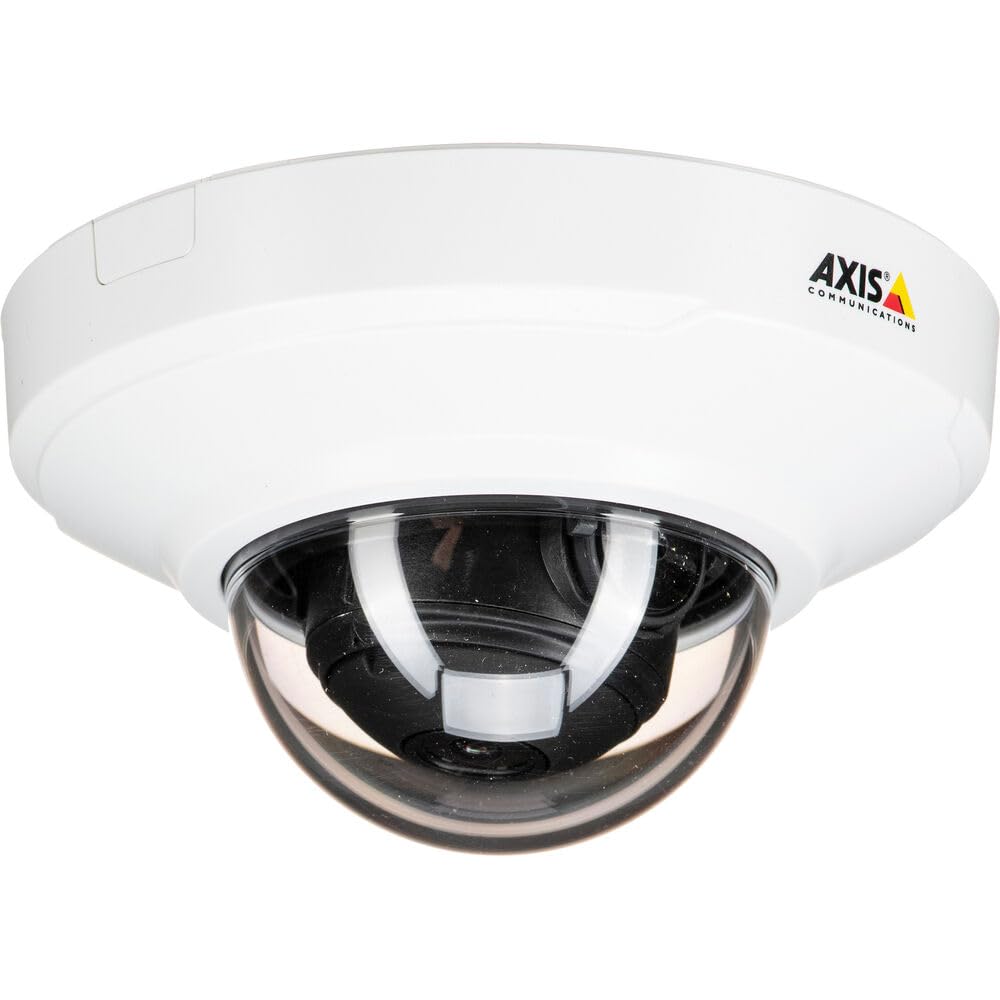
Рисунок 1: Передняя часть view of the Axis M3064-V Mini Dome Camera. This image shows the compact dome design suitable for discreet indoor surveillance.
2. Информация по технике безопасности
- Источник питания: Use only the specified power supply (AC/DC, 220 Volts, 1.6 Watts) to prevent damage or fire.
- Установка: Installation should be performed by qualified personnel and comply with all local electrical codes. Ensure the mounting surface can support the camera's weight.
- Среда: This camera is designed for indoor use. While dust-resistant and IK08 rated, avoid exposing it to extreme temperatures, direct water spray, or corrosive substances.
- Уборка: Отключите устройство от сети перед чисткой. Используйте мягкую сухую ткань. Не используйте жидкие или аэрозольные чистящие средства.
- Обслуживание: Не пытайтесь ремонтировать этот продукт самостоятельно. Поручите все обслуживание квалифицированному обслуживающему персоналу.
3. Содержимое упаковки
Убедитесь, что все товары находятся в упаковке. Если какие-либо товары отсутствуют или повреждены, свяжитесь с поставщиком.
- Axis M3064-V Mini Dome Camera (1 unit)
- Руководство по установке
- Монтажный кронштейн
- Монтажные винты и дюбели
- Resistorx L-key
4. Настройка и установка
4.1 Установка камеры
The Axis M3064-V camera can be mounted on a ceiling or wall. Ensure the mounting surface is stable and can support the camera's weight.
- Подготовка поверхности: Choose a suitable location. Use the mounting bracket as a template to mark drill holes.
- Отверстия для сверления: Drill pilot holes for the mounting screws. Insert wall plugs if necessary.
- Прикрепите кронштейн: Закрепите монтажный кронштейн на поверхности с помощью прилагаемых винтов.
- Соединительные кабели: Route the network cable (wired connectivity) through the bracket and connect it to the camera's Ethernet port.
- Прикрепить камеру: Secure the camera body to the mounting bracket. Ensure it clicks into place or is fastened according to the specific bracket design.

Figure 2: Illustrative diagram of the camera mounting process on a ceiling. This shows the steps from marking holes to securing the camera.
4.2 Включение питания и подключение к сети
- Проводное подключение: Connect an Ethernet cable from your network switch or router to the camera's Ethernet port. The camera supports Power over Ethernet (PoE), simplifying power delivery.
- Wi-Fi-соединение: The camera supports Wi-Fi connectivity. After initial wired setup, you can configure wireless settings via the camera's web интерфейс.
- Источник питания: If not using PoE, connect a compatible AC/DC power adapter (220V, 1.6W) to the camera's power input.
- Первоначальный доступ: Once powered, the camera will obtain an IP address from your network (DHCP). Use an Axis IP Utility tool or your network router's client list to find the camera's IP address.
5. Инструкция по эксплуатации
5.1 Доступ к интерфейсу камеры
Откройте web browser (e.g., Chrome, Firefox) and enter the camera's IP address in the address bar. You will be prompted to create a new password for the root user upon first access. Follow the on-screen instructions.
5.2 Прямой эфир View and Video Settings
- Жить View: The main interface provides a live video feed. You can adjust the viewing angle remotely if the camera supports pan/tilt/zoom (PTZ) functions, though this model features a fixed dome with 3x optical zoom.
- Разрешение: The camera supports HDTV 720p video capture resolution. You can configure streaming profiles for different quality and frame rate needs.
- Ночное видение: The camera includes Night Color functionality, providing enhanced visibility in low-light conditions. This feature can be configured in the image settings.
- Оптический зум: Utilize the 3x optical zoom feature through the web interface to focus on specific areas within the 83-degree viewугол наклона.
5.3 Запись и хранение
Камера поддерживает различные режимы записи:
- Edge Storage: The camera has 128 GB of flash memory installed for local recording. Insert a compatible microSD card (not included) for additional storage.
- Сетевой видеорегистратор (NVR): Integrate the camera with an NVR or video management system (VMS) for centralized recording and management.
- Запись событий: Configure motion detection or other event triggers to start recording, saving storage space.
6. Техническое обслуживание
6.1 Чистка камеры
Регулярная чистка помогает поддерживать оптимальное качество изображения.
- Выключение: Always disconnect the camera from its power source before cleaning.
- Объектив: Gently wipe the lens cover with a soft, lint-free cloth. For stubborn dirt, slightly dampen the cloth with water or a mild lens cleaning solution. Avoid abrasive materials.
- Жилье: Wipe the camera housing with a soft, dry cloth. Do not use strong detergents or solvents.
6.2 обновлений прошивки
Периодически проверяйте Axis Communications. website for firmware updates. Keeping your camera's firmware up-to-date ensures optimal performance, security, and access to new features. Follow the instructions provided with the firmware update package.
7. Поиск Неисправностей
| Проблема | Возможная причина | Решение |
|---|---|---|
| Камера не включается | No power supply; Faulty PoE switch/injector; Damaged cable. | Check power connection. Verify PoE functionality. Test with a different Ethernet cable or power adapter. |
| Нет видеопотока | Network connectivity issue; Incorrect IP address; Firewall blocking access; Camera not configured. | Verify network connection. Confirm camera's IP address. Check firewall settings. Ensure camera is properly configured via its web интерфейс. |
| Плохое качество изображения | Загрязнённый объектив; Неправильная фокусировка; Условия низкой освещённости; Проблемы с пропускной способностью сети. | Clean the lens. Adjust focus settings in the web interface. Ensure adequate lighting or verify Night Color settings. Check network bandwidth. |
| Невозможно получить доступ web интерфейс | Incorrect IP address; Network issue; Browser compatibility. | Confirm IP address. Ping the camera's IP. Try a different web браузер. Очистите кэш браузера. |
8. Технические характеристики
| Особенность | Деталь |
|---|---|
| Название модели | М3064-В |
| Номер модели | 01716-001 |
| Бренд | Axis Коммуникации |
| Форм-фактор | Купол |
| Технология связи | Проводной, Wi-Fi |
| Разрешение видеозахвата | 720p (HDTV) |
| Эффективное разрешение неподвижного изображения | 64 MP (Note: This might refer to sensor resolution, actual video output is 720p) |
| Разрешение фотодатчика | 5 МП |
| Viewугол наклона | 83 градусов |
| Оптический зум | 3x |
| Ночное Видение | Ночной цвет |
| Рейтинг водонепроницаемости | IP42 (Dust-resistant) |
| Защита от ударов | ИК08 |
| Источник питания | AC/DC, PoE |
| Томtage | 220 Вольт |
| Ватtage | 1.6 Вт |
| Установленный размер флэш-памяти | 128 ГБ |
| Размеры изделия (ДхШхВ) | 3.98 x 3.98 x 2.2 дюйма |
| Вес товара | 150 грамм |
| Цвет | Черный/Белый |
9. Гарантия и поддержка
9.1 Гарантия на продукт
Axis Communications products typically come with a limited manufacturer's warranty. Please refer to the warranty card included with your product or visit the official Axis Communications website for detailed warranty terms and conditions specific to the M3064-V model. Keep your proof of purchase for warranty claims.
9.2 Техническая поддержка
For technical assistance, troubleshooting beyond this manual, or service inquiries, please contact Axis Communications customer support. You can find contact information, FAQs, and additional resources on the official Axis Communications support website. When contacting support, please have your product model number (M3064-V or 01716-001) and serial number ready.
Интернет-ресурсы: www.axis.com/support