
1. Введение
Welcome to your Garmin Approach S62 Premium GPS Golf Watch. This manual provides detailed instructions for setting up, operating, maintaining, and troubleshooting your device. Please read this manual thoroughly to ensure optimal performance and longevity of your watch.
2. Что в коробке
- Garmin Approach S62 Premium GPS Golf Watch
- Кабель для зарядки/передачи данных
- Документация
- Wearable4U Power Bank (E-Bank)
- Wearable4U Wall Charger
- Wearable4U Car Charger

Image: Contents of the Wearable4U bundle, including the Garmin Approach S62 watch, power bank, wall charger, and car charger.
3. Устройство перешлоview
The Garmin Approach S62 is a premium GPS golf watch designed to provide essential golf course information and smart features directly on your wrist. It features a large, easy-to-read color touchscreen display.

Image: The Garmin Approach S62 watch displaying the time, steps count, and current date.

Image: The Garmin Approach S62 watch displaying detailed golf course information for a specific hole, including distances to the green.
4. Настройка
4.1. Зарядка устройства
Before first use, fully charge your Approach S62. Connect the charging clip to the watch and plug the USB cable into a power source. A full charge typically takes approximately 2 hours.
4.2. Включение и выключение
- Для включения: Нажмите и удерживайте кнопку питания (обычно это верхняя правая кнопка), пока не появится логотип Garmin.
- Чтобы выключить: Press and hold the power button until the power options menu appears, then select 'Power Off'.
4.3. Первоначальная настройка и сопряжение
Upon first power-on, the watch will guide you through initial setup steps, including language selection and personal data input. To unlock full smart features, pair your watch with the Garmin Golf app on your smartphone via Bluetooth. Follow the on-screen instructions on both the watch and the app.
5. Инструкция по эксплуатации
5.1. Особенности поля для гольфа
The Approach S62 is preloaded with over 41,000 golf courses worldwide. Once you start a round, the watch automatically detects your location and displays course information.
5.1.1. Virtual Caddie
The Virtual Caddie feature suggests a club based on your typical hitting distance for each club, considering wind speed and direction. It also indicates where to aim on the course map.

Image: The Garmin Approach S62 watch showing the Virtual Caddie feature, suggesting a club and aim point for a shot.
5.1.2. Hazard View
Quickly scroll through each hazard on the map to view distances to the front and back of bunkers, water hazards, and other obstacles.
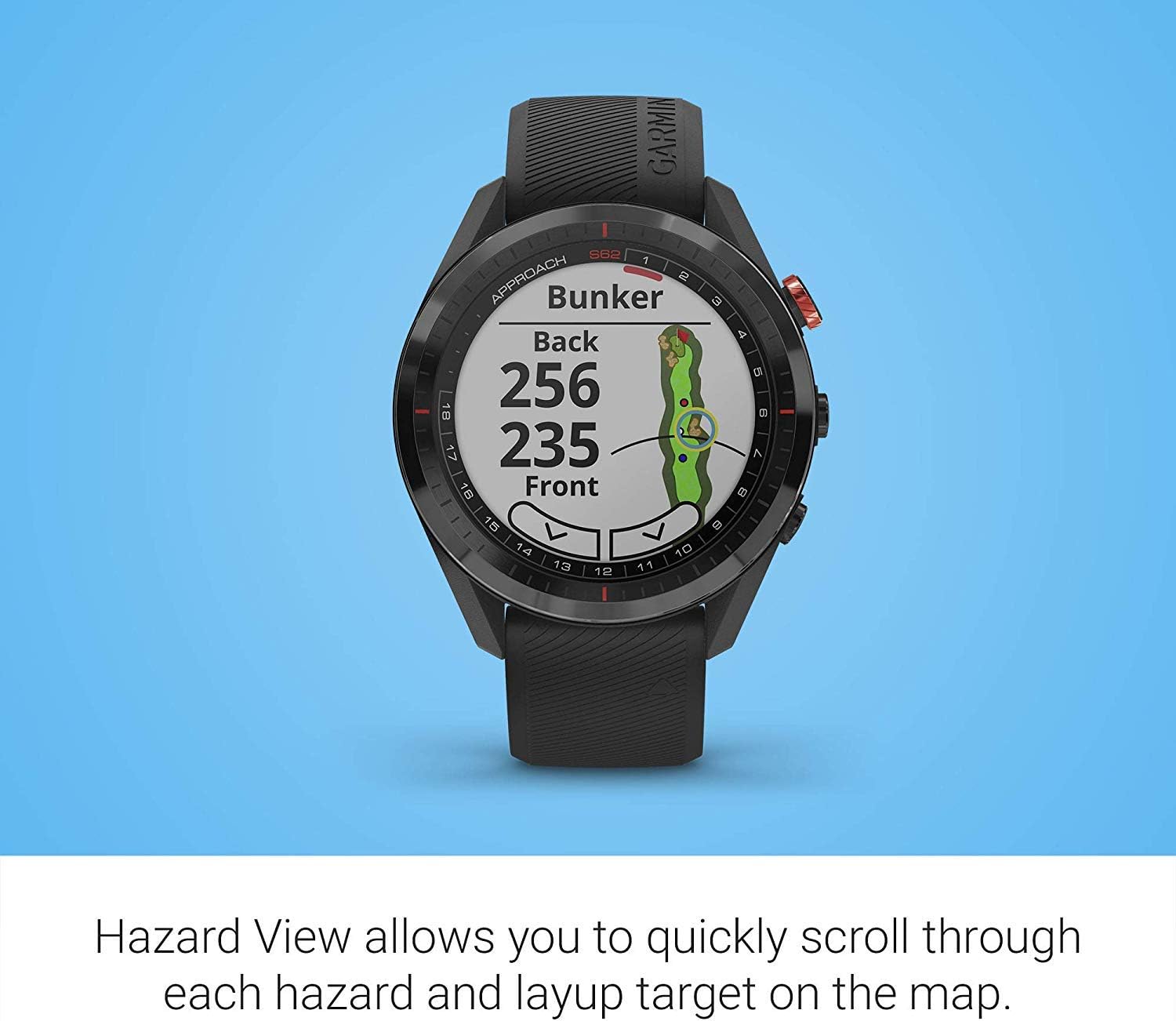
Image: The Garmin Approach S62 watch displaying the Hazard View, showing distances to the front and back of a bunker.
5.1.3. PlaysLike Distance
This feature adjusts yardage measurements to account for uphill and downhill shots, providing a more accurate distance to the target.
5.1.4. Зеленый View
Зеленый View feature allows you to manually position the pin for the day, providing precise distances to the front, middle, and back of the green, as well as to hazards and doglegs.

Image: The Garmin Approach S62 watch displaying the Green View, showing the green layout and allowing for manual pin positioning.
5.1.5. Course Selection and Scoring
The watch automatically detects nearby courses. Select your course and begin your round. The watch can track your score, shots, and other statistics, which can be reviewed on the watch or in the Garmin Golf app.
5.2. Умные функции
5.2.1. Garmin Pay
Garmin Pay is a contactless payment solution that allows you to make convenient payments directly from your watch. Set up your cards in the Garmin Connect app.
5.2.2. Уведомления
Receive smart notifications for calls, texts, and app alerts directly on your watch when paired with your smartphone.
5.3. Customizing Your Watch
You can customize watch faces, widgets, and settings through the watch menu or the Garmin Connect app to suit your preferences.
6. Техническое обслуживание
6.1. Очистка устройства.
Регулярно чистите часы мягкой тряпкой.amp Ткань. Избегайте использования агрессивных химикатов и абразивных материалов. Перед зарядкой убедитесь, что зарядные контакты чистые и сухие.
6.2. Уход за аккумулятором
To maximize battery life, avoid exposing the watch to extreme temperatures. Charge the device regularly, but avoid leaving it fully discharged for extended periods. The battery life is approximately 20 hours in GPS mode.
6.3. Обновления программного обеспечения
Keep your watch's software updated to ensure optimal performance and access to the latest features. Updates can be performed via the Garmin Connect app or Garmin Express on a computer.
7. Поиск Неисправностей
7.1 Распространенные проблемы
- Часы не включаются: Ensure the watch is fully charged. Try connecting it to a power source.
- GPS не получает сигнал: Убедитесь, что вы находитесь на открытой местности с чистым view of the sky. Allow several minutes for the watch to acquire satellites.
- Проблемы с подключением Bluetooth: Ensure Bluetooth is enabled on both your watch and smartphone. Try restarting both devices and re-pairing them through the Garmin Connect app.
- Inaccurate distances: Ensure the course map is up-to-date. Perform a software update if available.
- Сенсорный экран не отвечает: Try restarting the device. If the issue persists, contact Garmin support.
8. Технические характеристики
| Особенность | Деталь |
|---|---|
| Вес товара | 1.25 фунта |
| Размеры продукта | 1.85 x 0.58 x 1.85 дюйма |
| Номер модели товара | wa001 |
| Аккумуляторы | 2 Требуются литий-ионные батареи |
| Размер дисплея | 3 дюйма |
| Срок службы батареи (режим GPS) | 20 часов |
| Голосовое управление | Сенсорный экран |
| Технология связи | Bluetooth Smart and ANT+ |
| Тип карты | Северная Америка |
| Тип крепления | Крепление на запястье |
| Тип дисплея | Видимая при солнечном свете трансфлективная память в пикселях (MIP) |
9. Гарантия и поддержка
Информацию о гарантии см. в документации, прилагаемой к вашему изделию, или на официальном сайте Garmin. webСайт. Для технической поддержки, регистрации продукта и получения дополнительных ресурсов посетите garmin.com/support.
10. Официальное видео о продукте
Video: Official product video demonstrating key features and benefits of the Garmin Approach S62 Premium GPS Golf Watch.