
Продукт болееview
The Marantz SR5014 7.2 channel 4K Ultra HD AV receiver is designed to deliver a refined surround sound home theater experience. It supports advanced object-based audio formats and offers high-definition video processing with superior connectivity. Tuned by world-renowned acousticians, the SR5014 produces musical sound from various sources, including vinyl and digital streaming. It provides immersive audio with Dolby Atmos, Dolby Atmos Height Virtualization Technology, DTS:X, and DTS Virtual:X. The receiver also supports voice control via Amazon Alexa, Google Assistant, and Apple Siri, and allows music streaming from popular services through Bluetooth, AirPlay 2, or the HEOS app.
Основные характеристики
- 7.2-Channel Discrete Power Ampпожизненнее: Refine your surround sound home theater experience with advanced object-based audio formats, high definition video processing, and superior connectivity.
- Make the Most of Your 4K Ultra HD TV Investment: Drive exceptional visual clarity with full-rate pass-through, SD/HD video upscaling to UHD, 4:4:4 Pure Color sub-sampling, HDR10, BT.2020, 3D, 21:9 video, Dolby Vision, and HLG.
- Complement Premium Video with the Ultimate Cinematic Audio Experience: 100W per channel high power and latest audio formats including Dolby Atmos, DTS:X, DTS Virtual:X, and Dolby Atmos Height Virtualization Technology for a virtually heightened realism effect.
- Versatile HDMI eARC Connectivity: All 8 HDMI inputs support HDCP 2.3 Digital Content Protection, including 1 front-panel input for quick connections. Includes 2 HDMI outputs with 1 offering full eARC support.
- Effortless Voice Control with Leading Voice Agents: Use your voice to play, pause and stop music, switch inputs, turn the volume up & more with all major voice agents like Alexa, Siri and including, including the top smart home automation systems.
- Stream Unlimited Music or Videos: Using popular services like Spotify, TuneIn, Deezer, Tidal, Netflix, Amazon Prime & others via Bluetooth, AirPlay 2, or HEOS app across one room, or multiple rooms with built-in WIRELESS HEOS MULTI-ROOM AUDIO TECHNOLOGY.
- Easy-to-Understand and User-Friendly Setup Assistant: Comes with an advanced graphical user interface that guides you through the step-by-step process and connects all your audio sources to this stereo receiver.
Содержимое упаковки
При открытии упаковки убедитесь, что все перечисленные ниже предметы присутствуют и находятся в хорошем состоянии:
- Marantz SR5014 AV Receiver
- Пульт дистанционного управления
- 2 AA Batteries (for remote controller)
- Краткое руководство пользователя
Руководство по настройке
В этом разделе представлен общий обзорview of the setup process. For detailed, step-by-step instructions, please refer to the comprehensive User Manual PDF linked in the "Warranty and Support" section.
- Распаковка: Аккуратно извлеките приемник и все аксессуары из упаковки.
- Размещение: Place the receiver on a stable, flat surface with adequate ventilation. Ensure there is enough space around the unit for proper airflow.
- Подключение динамика: Connect your speakers to the appropriate speaker terminals on the rear of the receiver. Pay attention to polarity (+/-) for each speaker. The SR5014 supports 7.2 channels.
- Подключение исходного устройства: Connect your audio/video source devices (e.g., Blu-ray player, game console, cable/satellite box) to the HDMI input ports. Use high-quality HDMI cables for optimal performance.
- Подключение к телевизору: Connect the HDMI OUT (ARC/eARC) port on the receiver to the corresponding HDMI input on your television.
- Подключение питания: Plug the power cord into the receiver and then into a wall outlet.
- Помощник по начальной настройке: Turn on the receiver and follow the on-screen instructions provided by the Marantz Setup Assistant. This guide will help you configure network settings, speaker calibration (Audyssey MultEQ XT), and input assignments.
Операция
Once the receiver is set up, you can begin enjoying your audio and video content. For detailed operational procedures, refer to the full User Manual PDF.
- Включение/выключение питания: Use the power button on the front panel or the remote control to turn the unit on or off.
- Выбор входа: Select the desired input source (e.g., Blu-ray, Game, CBL/SAT) using the input selector knob on the front panel or the dedicated buttons on the remote control.
- Регулятор громкости: Регулировка общей громкости осуществляется с помощью большой ручки на передней панели или кнопок VOLUME +/- на пульте дистанционного управления.
- Звуковые режимы: Explore various sound modes (e.g., Stereo, Multi-Channel Stereo, Dolby Atmos, DTS:X) to optimize your listening experience for different content types.
- Сетевые возможности: Access streaming services, internet radio, and HEOS multi-room audio via the network connection. Control these features using the HEOS app on your smartphone or tablet.
- Голосовое управление: If configured, use compatible voice assistants (Amazon Alexa, Google Assistant, Apple Siri) to control basic functions of the receiver.
Обслуживание
Proper maintenance ensures the longevity and optimal performance of your Marantz SR5014 AV Receiver.
- Уборка: Regularly wipe the exterior of the receiver with a soft, dry cloth. Avoid using abrasive cleaners, waxes, or solvents.
- Вентиляция: Убедитесь, что вентиляционные отверстия сверху и по бокам приемника не заблокированы. Правильная циркуляция воздуха крайне важна для предотвращения перегрева.
- Накопление пыли: Periodically use a soft brush or a low-power vacuum cleaner to remove dust from the vents and surfaces.
- Управление кабелями: Keep cables neatly organized and ensure they are not kinked or pinched, which can affect signal quality or cause damage.
- Обновления прошивки: Check for and install available firmware updates to ensure your receiver has the latest features and performance enhancements. This can typically be done through the receiver's network settings.
Поиск неисправностей
If you encounter issues with your Marantz SR5014, refer to the following common troubleshooting steps. For more complex problems, consult the detailed troubleshooting section in the full User Manual PDF.
- Нет питания:
- Check if the power cord is securely plugged into the receiver and the wall outlet.
- Убедитесь, что розетка исправна.
- Нет звука:
- Убедитесь, что выбран правильный источник входного сигнала.
- Check speaker connections and ensure speaker wires are properly connected to both the receiver and speakers.
- Убедитесь, что громкость не отключена и не установлена слишком низко.
- Check audio output settings on your source device (e.g., TV, Blu-ray player).
- Нет картинки:
- Ensure HDMI cables are securely connected between the source, receiver, and TV.
- Verify that the correct HDMI input on your TV is selected.
- Check the HDMI output settings on the receiver and source device.
- Проблемы с сетевым подключением:
- Перезагрузите маршрутизатор и модем.
- Ensure the Ethernet cable is securely connected if using a wired connection, or check Wi-Fi settings if using wireless.
- Perform a network diagnostic test through the receiver's setup menu.
- Пульт дистанционного управления не работает:
- Замените батарейки в пульте дистанционного управления.
- Убедитесь, что между пультом ДУ и ИК-датчиком приемника нет препятствий.
- Сброс к заводским настройкам: As a last resort for persistent issues, a factory reset can resolve many problems. Refer to the User Manual for instructions on how to perform a factory reset, as this will erase all custom settings.
Технические характеристики
| Особенность | Спецификация |
|---|---|
| Размеры продукта | 13.38 x 17.38 x 6.38 дюйма |
| Вес товара | 26.1 фунта |
| Производитель | Маранц |
| ASIN | B07SW88DXR |
| Номер модели товара | SR5014 |
| Аккумуляторы | Требуется 2 батарейки АА (в комплекте) |
| Дата первой доступности | 10 июля 2019 г. |
| Бренд | Маранц |
| Технология связи | Bluetooth, HDMI |
| Тип контроллера | Amazon Alexa, Google Ассистент |
| Специальная характеристика | Амазон Музыка |
| Совместимые устройства | Телевидение, Спикер |
| Всего портов HDMI | 7 |
| Тип разъема | HDMI |
| Кодирование аудио | Стерео |
| Режим аудиовыхода | Объемный |
| Конфигурация каналов объемного звука | 7.2 |
Визуальные изображения продукта
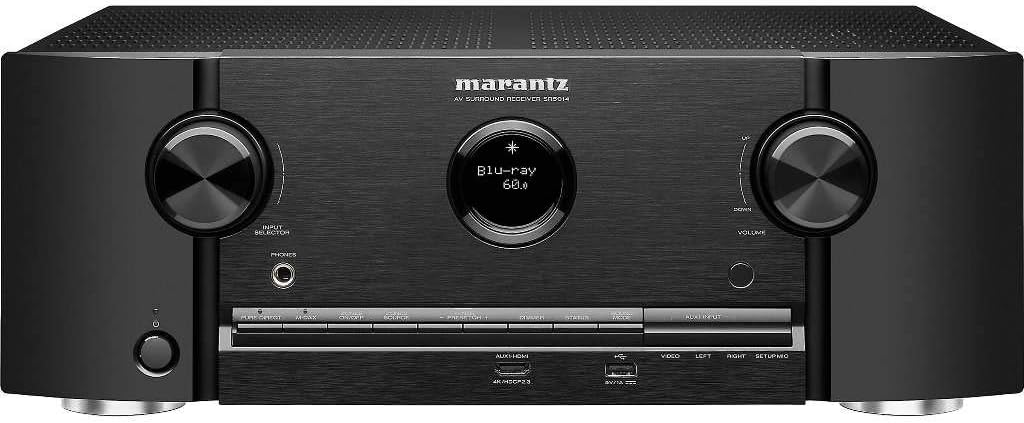
Передний view of the Marantz SR5014 AV Receiver, showcasing its sleek design with two large control knobs for input selection and volume, a central display, and front-panel inputs.

Rear panel of the Marantz SR5014 AV Receiver, displaying a comprehensive array of input and output ports, including multiple HDMI, analog audio, digital audio, and speaker terminals for a 7.2 channel setup.

Внутренний view of the Marantz SR5014 AV Receiver, showing the meticulously arranged circuit boards and components, highlighting the quality engineering within the unit.

The included remote control for the Marantz SR5014 AV Receiver, featuring clearly labeled buttons for power, input selection, volume, navigation, and sound modes.
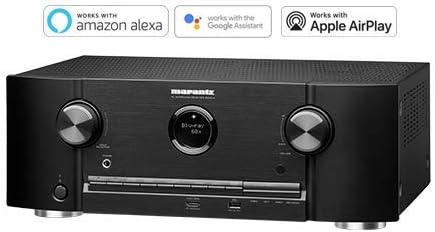
The Marantz SR5014 AV Receiver displayed alongside logos indicating compatibility with Amazon Alexa, Google Assistant, and Apple AirPlay for convenient voice control and streaming.
Гарантия и поддержка
Marantz products are designed for reliability and performance. For detailed warranty information, please refer to the warranty card included with your product or contact Marantz customer support.
For comprehensive instructions, detailed setup guides, advanced features, and in-depth troubleshooting, please download the full User Manual PDF:
Загрузить полное руководство пользователя (PDF)
For further assistance, please visit the official Marantz support webсайт или свяжитесь с их службой поддержки.