
1. Введение
This manual provides detailed instructions for the OPPO Reno 10x Zoom smartphone, model CPH1919. It covers essential information regarding device setup, operation, maintenance, and troubleshooting to ensure optimal use of your device. Please read this manual thoroughly before using your phone.
2. Продукт закончилсяview
The OPPO Reno 10x Zoom is a high-performance smartphone featuring advanced camera capabilities and a powerful processor. It is designed for a seamless user experience with its large AMOLED display and efficient battery management.

Рисунок 2.1: Передняя часть view of the OPPO Reno 10x Zoom, showcasing its full-screen display and in-display fingerprint sensor.

Figure 2.2: Diagram highlighting key features including the triple rear camera, 10x hybrid zoom, hidden fingerprint unlock, Shark Fin Rising Camera, Ultra Night Mode, Qualcomm Snapdragon 855, AMOLED screen, Corning Gorilla Glass 6, 4065mAh battery, VOOC Flash Charge 3.0, Hyper Boost 2.0, Dolby Atmos, 8GB RAM, and 256GB ROM.
3. Что в коробке
Upon unboxing your OPPO Reno 10x Zoom, verify that all the following items are included:
- Handset (OPPO Reno 10x Zoom)
- Adapter (for charging)
- Гарнитура
- Зарядный кабель USB-C
- SIM Card Tray Ejecter
- Защитный чехол
- Важная информационная брошюра с гарантийным талоном.
- Краткое руководство пользователя
4. Компоновка устройства и компоненты
Ознакомьтесь с физической компоновкой вашего устройства:
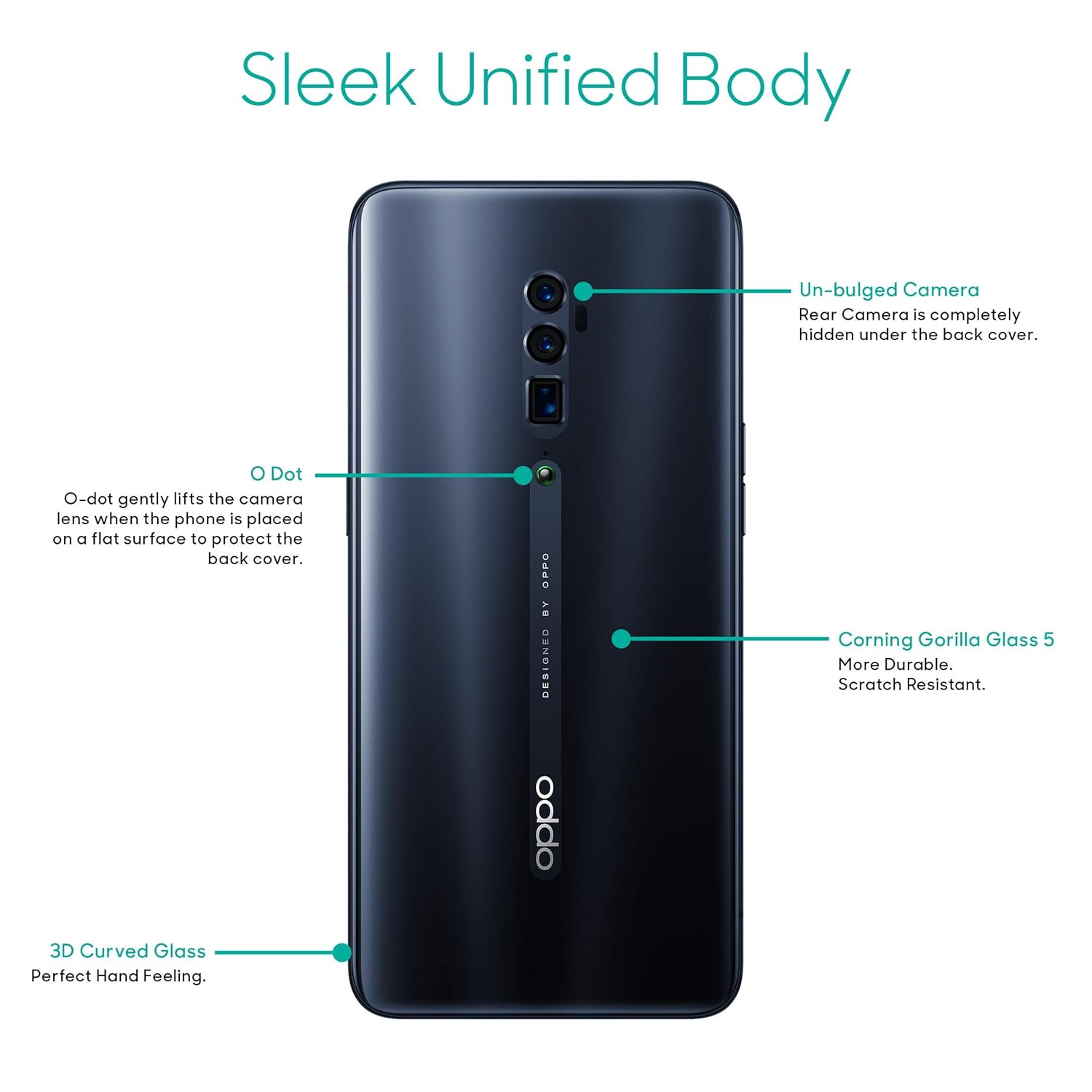
Рисунок 4.1: Сзади view of the OPPO Reno 10x Zoom, showing the un-bulged camera system, the O-Dot ceramic point, Corning Gorilla Glass 5, and the 3D curved glass design.

Рисунок 4.2: Сторона view of the OPPO Reno 10x Zoom, illustrating the slim profile и размещение кнопок.
Ключевые компоненты:
- Отображать: 6.65-inch AMOLED capacitive touchscreen.
- Shark Fin Rising Camera: Houses the front camera and other sensors, retracts when not in use.
- Система задней камеры: Triple camera setup (48MP + 8MP + 13MP) for versatile photography.
- O-Dot: A small ceramic point on the back that gently lifts the phone when placed on a flat surface to protect the camera lenses.
- Кнопка питания: Расположен с правой стороны.
- Кнопки громкости: Расположен с левой стороны.
- Порт USB-C: Для зарядки и передачи данных, расположен снизу.
- Лоток для SIM-карты: Located on the side, requires the ejecter tool for access.
5. Начало работы
5.1. Установка SIM-карты
- Найдите лоток для SIM-карты на боковой панели устройства.
- Insert the SIM ejecter tool into the small hole on the tray and press gently until the tray pops out.
- Place your Nano-SIM cards into the designated slots on the tray. Ensure the gold contacts face downwards. The device supports dual SIM with dual standby (4G+4G).
- Аккуратно вставьте лоток обратно в телефон, пока он не прилегает плотно к боковой поверхности устройства.
5.2. Включение и выключение
- Для включения: Нажмите и удерживайте кнопку питания справа, пока не появится логотип OPPO.
- Чтобы выключить: Press and hold the Power button, then select 'Power Off' from the options displayed on the screen.
- Начать заново: Нажмите и удерживайте кнопку питания, затем выберите «Перезагрузить» из предложенных вариантов.
5.3. Начальная настройка
The first time you power on your device, you will be guided through an initial setup process. Follow the on-screen prompts to:
- Выберите свой язык и регион.
- Подключитесь к сети Wi-Fi.
- Принять положения и условия.
- Настройте свой аккаунт Google.
- Configure screen lock (PIN, pattern, password, fingerprint, face unlock).
5.4. Зарядка устройства
Connect the USB-C charge cable to the phone's USB-C port and the other end to the provided adapter. Plug the adapter into a power outlet. The device features a 4065mAH lithium-polymer battery and supports VOOC Flash Charge 3.0 for rapid charging.
6. Основные операции
6.1. Дисплей и навигация
The 6.65-inch AMOLED display offers vibrant colors and deep blacks with a resolution of 2340 x 1080 pixels. Navigation is primarily touch-based. The device also features a hidden in-display fingerprint unlock for secure access.
6.2 Операционная система
The OPPO Reno 10x Zoom runs on Android v9 Pie with ColorOS 6.0. This operating system provides a customized user interface and various features for enhanced usability and performance.
6.3. Связь
Устройство поддерживает различные варианты подключения:
- Wi-Fi: Для доступа в интернет.
- Bluetooth: Для подключения к беспроводным аксессуарам.
- 4G LTE: For mobile data connectivity.
- GPS: Для служб определения местоположения и навигации.
6.4. аудио
Experience immersive audio with dual stereo speakers and Dolby Atmos support, providing enhanced sound quality for media consumption.
7. Характеристики камеры
The OPPO Reno 10x Zoom is equipped with a versatile camera system for capturing high-quality photos and videos.

Рисунок 7.1: Передняя часть view of the OPPO Reno 10x Zoom with the Shark Fin Rising Camera module extended, revealing the front-facing camera.

Рисунок 7.2: Сзади view of the OPPO Reno 10x Zoom, showing the triple camera setup and the extended Shark Fin Rising Camera module from a different angle.
7.1. Основная камера
- Система из трех камер: Consists of a 48MP main sensor, an 8MP wide-angle lens, and a 13MP telephoto lens.
- 10-кратный гибридный зум: Allows for significant optical and digital zoom capabilities.
- Режимы фотосъемки: Includes Photo, Video, Expert, Time-lapse, Pano, Night, and Portrait modes.
- Ultra Night Mode: Улучшает качество фотосъемки в условиях недостаточного освещения.
7.2. Передняя камера.
- 16-мегапиксельный сенсор: Для селфи высокого разрешения и видеозвонков.
- Shark Fin Rising Mechanism: The front camera is housed in a motorized pop-up module that deploys when needed.
8. Производительность и батарея
8.1. Процессор и память
The device is powered by a 2.8GHz Qualcomm Snapdragon 855 octa-core processor, ensuring smooth performance for demanding applications and multitasking. It comes with 8GB of RAM and 256GB of internal storage, expandable up to 256GB via microSD card.
8.2. Срок службы батареи
The 4065mAH lithium-polymer battery provides approximately 40 hours of talk time and up to 331 hours of standby time. VOOC Flash Charge 3.0 technology allows for quick recharging.
8.3. Оптимизация игр
Hyper Boost 2.0 is integrated to optimize gaming performance, providing a smoother and more responsive experience.
9. Техническое обслуживание и уход
- Уборка: Для чистки экрана и корпуса используйте мягкую ткань без ворса. Избегайте использования абразивных материалов и едких химикатов.
- Условия окружающей среды: Не подвергайте устройство воздействию экстремальных температур, прямых солнечных лучей или чрезмерной влажности.
- Обновления программного обеспечения: Регулярно проверяйте и устанавливайте обновления системы, чтобы обеспечить оптимальную производительность и безопасность.
- Хранилище: Не храните устройство вблизи магнитных полей.
- Защита: Use the provided protective case to guard against physical damage.
10. Поиск Неисправностей
This section addresses common issues you might encounter with your OPPO Reno 10x Zoom.
10.1. Устройство не включается
- Убедитесь, что батарея заряжена. Подключите устройство к зарядному устройству как минимум на 15 минут.
- Press and hold the Power button for an extended period (10-15 seconds) to force a restart.
10.2. Проблемы с зарядкой
- Убедитесь, что зарядное устройство и кабель USB-C надежно подключены как к телефону, так и к розетке.
- Try using a different charger and cable to rule out faulty accessories.
- Убедитесь, что порт зарядки чистый и на нем нет мусора.
10.3. Проблемы с сетевым подключением
- Проверьте, правильно ли вставлена и активирована ваша SIM-карта.
- Перезагрузите устройство.
- Включать и выключать режим полета.
- Go to Settings > Wi-Fi or Settings > Mobile Network to ensure they are enabled and configured correctly.
10.4. Приложения вылетают или зависают
- Закройте и снова откройте проблемное приложение.
- Clear the app's cache and data (Settings > App Management > [App Name] > Storage Usage).
- Убедитесь, что приложение обновлено до последней версии.
- Если проблема не исчезнет, попробуйте удалить и переустановить приложение.
10.5. Сброс настроек к заводским
Если у вас постоянно возникают проблемы с программным обеспечением, их можно устранить с помощью сброса настроек к заводским. Предупреждение: This will erase all data on your phone. Back up important data before proceeding. To perform a factory reset, go to Settings > Additional Settings > Back up and Reset > Erase all data (factory reset).
11. Технические характеристики
Below are the detailed technical specifications for the OPPO Reno 10x Zoom (Model: CPH1919):
| Особенность | Спецификация |
|---|---|
| Операционная система | Android 9.0 Pie (ColorOS 6.0) |
| Процессор | 2.8 GHz Qualcomm Snapdragon 855 Octa-Core |
| БАРАН | 8 ГБ |
| Внутреннее хранилище | 256 ГБ (с возможностью расширения до 256 ГБ) |
| Отображать | 6.65-inch AMOLED, 2340 x 1080 pixels, 387 ppi, 16M colors, 430 nits (Typical) |
| Задняя камера | 48MP + 8MP + 13MP (Triple Camera) |
| Передняя камера | 16MP (Shark Fin Rising Camera) |
| Аккумулятор | 4065 мАч литий-полимерный |
| Время разговора | До 40 часов |
| Время в режиме ожидания | До 331 часов |
| Связность | Bluetooth, Wi-Fi, GPS, 4G LTE |
| Размеры | 16.2 х 0.9 х 7.7 см |
| Масса | 215 г |
| Тип SIM-карты | Две SIM-карты (Nano-SIM) |
| Особые возможности | Dual SIM, GPS, Music Player, Video Player, Magnetic Induction, Light sensor, Proximity Sensor, G-sensor/Acceleration sensor, E-mail |
12. Гарантия и поддержка
12.1. Информация о гарантии
The OPPO Reno 10x Zoom comes with a Гарантия производителя 1 года Гарантия распространяется на устройство с даты покупки. На аксессуары, входящие в комплект поставки, включая батареи, распространяется гарантия. Гарантия производителя 6 месяцев.
12.2. Контактная информация производителя
For support, service, or warranty claims, please contact OPPO Mobiles India Pvt. Ltd. at:
5-й ЭТАЖ, Башня B, ЗДАНИЕ, N-8, DLF Cyber City, DLF Phase 2, Гургаон, Харьяна 122002Служба поддержки клиентов Тел: 18001032777
Please refer to the 'Important Information Booklet with Warranty Card' included in your product box for complete warranty terms and conditions.