
1. Введение
The Lomvum T28B Auto-Ranging Digital Multimeter is a versatile and high-precision electrical testing instrument. It is designed for accurate measurement of various electrical parameters, making it suitable for household, automotive, and general electrical applications. This manual provides detailed instructions for the safe and effective use of your multimeter.
The T28B features a 6000-count LCD backlight display, True RMS measurement capability, and functions including AC/DC Voltage, Current, Resistance, Continuity, Diode, Temperature, and Capacitance testing.
2. Содержимое упаковки
После вскрытия упаковки убедитесь, что все перечисленные ниже предметы присутствуют и находятся в исправном состоянии:
- Lomvum Auto-Ranging Digital Multimeter (T28B)
- 4 батарейки типа ААА 1.5 В
- Руководство пользователя на английском языке
- Тестовые провода (красные и черные)
- Термопара типа К
- Зажимы типа «крокодил» (для измерительных проводов)
- 2 запасных предохранителя

Image 2.1: Lomvum T28B Digital Multimeter with test leads, K-type thermocouple, alligator clips, and AAA batteries.
3.Основные характеристики
- Большой диапазон измерения: Меры DC Voltage up to 1000V, AC Voltage up to 750V, AC/DC Current up to 10A, Resistance up to 60MΩ, and Capacitance up to 100mF.
- Дисплей на 6000 отсчетов: Обеспечивает высокое разрешение для точных измерений.
- Функция автоматического определения диапазона: Автоматически выбирает правильный диапазон измерений, упрощая эксплуатацию.
- Истинное среднеквадратичное значение: Обеспечивает точные показания для несинусоидальных форм переменного тока.
- ЖК-дисплей с подсветкой: A 2.7-inch large display with backlight for clear visibility in dimly lit environments.
- Встроенный фонарик: Enhances visibility in dark work areas.
- Бесконтактный объемtage (NCV) Обнаружение: Обнаруживает переменный токtage without direct contact, indicating presence with LED lights and an audible beeper.
- Функция удержания данных: Замораживает отображаемое значение для удобной записи.
- Интегрированная подставка: Обеспечивает работу без использования рук.
- Соблюдение правил безопасности: Meets 600V CAT IV and 1000V CAT III safety standards.
4. Информация по технике безопасности
Always adhere to safety precautions when using the multimeter to prevent electric shock or damage to the instrument. Read and understand all safety instructions before operation.
- Не превышайте максимальные входные значения, указанные для каждой функции.
- Будьте осторожны при работе с томомtagвыше 30 В переменного тока (среднеквадратичное значение), 42 В пикового значения или 60 В постоянного тока. Эти объемыtagпредставляют опасность поражения электрическим током.
- Ensure the test leads are properly connected to the correct input terminals for the selected measurement function.
- Перед использованием осмотрите измерительные провода на предмет повреждений изоляции или оголённого металла. Замените при наличии повреждений.
- Не используйте мультиметр, если он поврежден или если его корпус открыт.
- Перед изменением функций или диапазонов отсоедините измерительные щупы от цепи.
- При появлении индикатора низкого заряда батареи немедленно заменяйте ее, чтобы обеспечить точность показаний.
- Всегда отключайте питание цепи и разряжайте все высоковольтныеtagПроверьте конденсаторы перед проведением проверки сопротивления, целостности цепи или диодов.
5. Продукт закончилсяview
5.1. Физическая планировка и размеры
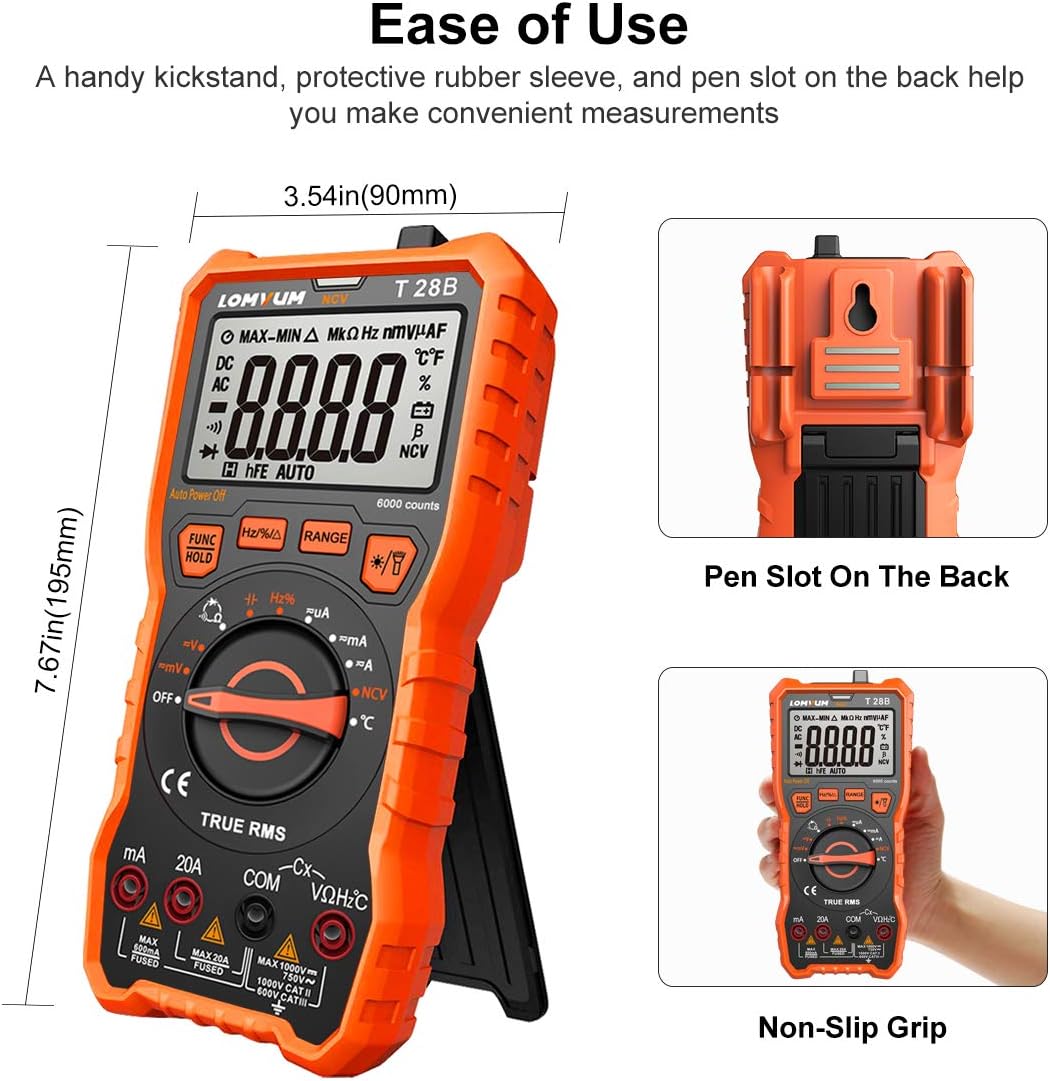
Изображение 5.1: Спереди view of the Lomvum T28B Multimeter showing dimensions (7.67 inches height, 3.54 inches width), integrated kickstand, and pen slot on the back.
The Lomvum T28B is designed with a protective rubber sleeve for durability and a non-slip grip. It features a handy kickstand for convenient hands-free measurements and a pen slot on the back for storing test leads.
5.2. Дисплей и элементы управления

Image 5.2: Close-up of the 3.0-inch backlit LCD screen displaying measurement units and function symbols including AC/DC Voltage (V), AC/DC Current (A), Frequency (Hz), Resistance (Ω), Temperature (°C/°F), Duty Cycle (%), Capacitance, Diodes, Continuity, True RMS (TRMS), Non-Contact Voltage (NCV), and Auto Ranging (AUTO).
The multimeter features a large, backlit LCD screen for clear readings. The rotary dial is used to select the desired measurement function. Buttons on the front panel provide additional controls:
- FUNC/HOLD: Press to cycle through sub-functions (e.g., AC/DC for voltage/current, Diode/Continuity) or to activate/deactivate Data Hold.
- Hz/%/RANGE: Press to switch between Frequency and Duty Cycle measurement, or to manually select measurement range (when not in auto-ranging mode).
- ★/🔆: Activates/deactivates the backlight and flashlight simultaneously.
6. Настройка
6.1. Установка аккумулятора
The Lomvum T28B requires four 1.5V AAA batteries for operation. The battery compartment is located on the back of the unit.
- Убедитесь, что мультиметр выключен.
- Найдите крышку батарейного отсека на задней панели мультиметра.
- С помощью небольшой крестовой отвертки ослабьте винт, крепящий крышку батарейного отсека.
- Снимите крышку.
- Insert the four AAA batteries, observing the correct polarity (+ and -) as indicated inside the compartment.
- Установите на место крышку аккумуляторного отсека и затяните винт.
6.2. Подключение тестовых проводов
Always connect the test leads correctly to the multimeter terminals before making any measurements.
- Вставьте черный щуп в КОМ (Общий) терминал.
- Для большинства объемовtage, resistance, capacitance, diode, continuity, frequency, and temperature measurements, insert the red test lead into the VΩHzC Терминал.
- Для измерения тока до 600 мА вставьте красный измерительный щуп в... mA Терминал.
- For current measurements up to 10A, insert the red test lead into the 20А Терминал.
7. Инструкция по эксплуатации
7.1. Общая эксплуатация
To power on the multimeter, rotate the central dial from the OFF position to any desired measurement function. The multimeter features an auto-power-off function to conserve battery life if left idle.

Image 7.1: The Lomvum T28B Multimeter in use, measuring voltage on an automotive battery.
7.2. Измерение громкости переменного/постоянного токаtagе (В)
- Установите поворотный переключатель в положение V положение. Мультиметр автоматически определит переменное или постоянное напряжение.tage. При необходимости нажмите ФУНКЦИЯ/УДЕРЖАНИЕ button to manually switch between AC and DC.
- Подключите черный измерительный провод к КОМ терминал и красный тестовый провод к VΩHzC Терминал.
- Подключите измерительные щупы параллельно к измеряемой цепи или компоненту.
- Читать томtagзначение e на дисплее.
7.3. Measuring AC/DC Current (A)
- Установите поворотный переключатель в положение mA or 20А position, depending on the expected current.
- Подключите черный измерительный провод к КОМ terminal. Connect the red test lead to the mA terminal for currents up to 600mA, or to the 20А terminal for currents up to 10A.
- Disconnect power to the circuit. Open the circuit and connect the multimeter in series with the circuit or component to be measured.
- Подайте питание на цепь и прочитайте значение тока на дисплее.
7.4. Измерение сопротивления (Ом)
- Установите поворотный переключатель в положение Ω позиция.
- Подключите черный измерительный провод к КОМ терминал и красный тестовый провод к VΩHzC Терминал.
- Ensure the circuit or component is de-energized and all capacitors are discharged.
- Подключите щупы к измеряемому компоненту.
- Считайте значение сопротивления на дисплее.
7.5. Measuring Capacitance (C)
- Установите поворотный переключатель в положение C позиция.
- Подключите черный измерительный провод к КОМ терминал и красный тестовый провод к VΩHzC Терминал.
- Перед проверкой убедитесь, что конденсатор полностью разряжен.
- Подсоедините щупы к клеммам конденсатора.
- Считайте значение емкости на дисплее.
7.6. Diode Test (→|•))
- Установите поворотный переключатель в положение →|•)) положение. Нажмите. ФУНКЦИЯ/УДЕРЖАНИЕ if necessary to select the diode test function.
- Подключите черный измерительный провод к КОМ терминал и красный тестовый провод к VΩHzC Терминал.
- Убедитесь, что диод отключен от цепи.
- Подключите красный щуп к аноду, а черный щуп к катоду диода. Прямое напряжениеtagЭлектронная капля будет отображаться.
- Поменяйте местами щупы. При исправном диоде на дисплее должно отобразиться «OL» (разомкнутая цепь).
7.7. Continuity Test (•))
- Установите поворотный переключатель в положение →|•)) положение. Нажмите. ФУНКЦИЯ/УДЕРЖАНИЕ if necessary to select the continuity test function.
- Подключите черный измерительный провод к КОМ терминал и красный тестовый провод к VΩHzC Терминал.
- Убедитесь, что цепь или компонент обесточены.
- Подключите щупы к цепи или компоненту.
- If continuity exists (resistance below approximately 50Ω), the multimeter will emit an audible beep.
7.8. Бесконтактный Voltage (NCV) Обнаружение
- Установите поворотный переключатель в положение НТС позиция.
- Move the top end of the multimeter (where the NCV sensor is located) close to the conductor or outlet you wish to test.
- Если переменный токtage is detected, the visible LED lights will illuminate (low, medium, high intensity) and the beeper will sound at varying frequencies, indicating the signal strength.

Image 7.2: The Lomvum T28B Multimeter performing a Non-Contact Voltage (NCV) test near a power strip to detect live wires.
7.9. Измерение температуры (°C/°F)
- Установите поворотный переключатель в положение ° C / ° F позиция.
- Connect the K-type thermocouple to the multimeter. The red plug connects to the VΩHzC terminal and the black plug connects to the КОМ Терминал.
- Приложите наконечник термопары к объекту, температуру которого вы хотите измерить, или к нему.
- Считайте значение температуры на дисплее. Нажмите ФУНКЦИЯ/УДЕРЖАНИЕ для переключения между градусами Цельсия и Фаренгейта.

Image 7.3: The Lomvum T28B Multimeter measuring the temperature of water using the included K-type thermocouple.
7.10. Frequency (Hz) and Duty Cycle (%) Measurement
- Установите поворотный переключатель в положение Гц /% позиция.
- Подключите черный измерительный провод к КОМ терминал и красный тестовый провод к VΩHzC Терминал.
- Подключите измерительные щупы к источнику сигнала.
- Read the frequency (Hz) or duty cycle (%) value on the display. Press the Hz/%/RANGE Кнопка для переключения между частотой и коэффициентом заполнения.
8. Техническое обслуживание
8.1. Уборка
Чтобы очистить мультиметр, протрите его корпус.amp cloth and a mild detergent. Do not use abrasives or solvents. Ensure the multimeter is completely dry before use.
8.2. Замена батареи
Когда на дисплее загорится индикатор низкого заряда батареи, незамедлительно замените батареи, чтобы обеспечить точность измерений. Инструкции по установке батарей см. в разделе 6.1.
8.3. Замена предохранителя
If the multimeter fails to measure current, the fuse may be blown. The Lomvum T28B uses ceramic fuses. Two spare fuses are included in the package.
- Убедитесь, что мультиметр выключен и все измерительные провода отсоединены.
- Carefully pry off the outer rubber protective cover from the bottom of the multimeter.
- Remove the four screws that secure the back cover of the meter.
- Gently lift the back cover to expose the internal circuit board. The fuses are typically located at the bottom of the circuit board.
- Identify the blown fuse (often visually indicated by a broken filament or discolored glass). You may use another multimeter to test continuity across the fuses if unsure.
- Carefully remove the blown fuse and replace it with a new fuse of the same type and rating. (Refer to specifications for fuse ratings).
- Reassemble the multimeter by replacing the back cover, tightening the screws, and reattaching the rubber protective cover.
8.4. Хранение
If the multimeter is not used for an extended period, remove the batteries to prevent leakage and damage to the instrument. Store the multimeter in a cool, dry place away from direct sunlight and extreme temperatures.
9. Поиск Неисправностей
This section addresses common issues encountered during multimeter operation.
| Проблема | Возможная причина | Решение |
|---|---|---|
| Мультиметр не включается. | Разряженные или неправильно установленные батареи. | Проверьте полярность батарей; замените батареи. |
| Отсутствуют показания счетчика или отображается сообщение «OL» (перегрузка). | Incorrect range selected (if not auto-ranging); open circuit; input limits exceeded. | Ensure correct function/range; check circuit continuity; verify input is within limits. |
| Неточные показания. | Low battery; damaged test leads; external interference. | Замените батарейки; проверьте/замените измерительные провода; избегайте сильных электромагнитных полей. |
| Измерение тока не удалось. | Blown fuse; incorrect terminal connection. | Check/replace fuse (refer to Section 8.3); ensure red lead is in mA or 20A terminal. |
| NCV function is inconsistent. | Слабый сигнал; факторы окружающей среды. | Ensure close proximity to live conductor; NCV is for indication, not precise measurement. |
| Backlight/Flashlight stays on. | Normal operation for a set duration; no separate control. | The backlight and flashlight operate simultaneously and will turn off automatically after a period of inactivity or when the meter is turned off. |
10. Технические характеристики
| Параметр | Ценить |
|---|---|
| Отображать | 6000 отсчетов, ЖК-дисплей с подсветкой |
| DC Томtage Диапазон | До 1000 В |
| том переменного токаtage Диапазон | До 750 В |
| Диапазон постоянного тока | До 10А |
| Диапазон переменного тока | До 10А |
| Диапазон сопротивления | До 60 МОм |
| Диапазон емкостного сопротивления | До 100 мФ |
| Диапазон температур | -20°C до 1000°C (-4°F до 1832°F) |
| Диапазон частот | Да (Гц) |
| Рабочий цикл | Yes (%) |
| Диодный тест | Да |
| Тест на непрерывность | Yes (with audible beep) |
| NCV (Бесконтактный объемtage) | Да |
| Истинное среднеквадратичное значение | Да |
| Источник питания | 4 батарейки типа ААА 1.5 В |
| Рейтинг безопасности | 600 В, категория IV, 1000 В, категория III |
| Вес товара | 380 грамм (13.4 унции) |
| Размеры | Прибл. 7.67 х 3.54 х 2.44 дюйма (195 х 90 х 62 мм) |
| Номиналы предохранителей | F600mA/250V (mA input), F10A/250V (10A input) - *Note: Review mentions 250V rating, but safety rating is higher. Always use specified fuses.* |
11. Гарантия и поддержка клиентов
11.1. Информация о гарантии
The Lomvum Digital Multimeter T28B comes with a Гарантия 24 месяца from the date of purchase. This warranty covers defects in materials and workmanship under normal use. It does not cover damage resulting from misuse, unauthorized modification, accident, or neglect.
11.2. Поддержка клиентов
For technical assistance, warranty claims, or any inquiries regarding your Lomvum T28B multimeter, please contact Lomvum customer support. You can find more information and contact details on the official Lomvum store page: