
Mamibot W120
Contents
Mamibot W120 Window Cleaning Robot
User Manual
Introduction
The Mamibot W120 is an intelligent robotic window cleaner designed to simplify the task of cleaning glass surfaces. It features powerful suction, multiple control options, and smart cleaning routes to ensure thorough cleaning. This manual provides essential information for safe and effective operation of your Mamibot W120.

The Mamibot W120 Window Cleaning Robot, shown with its remote control and a smartphone displaying the iGLASSBOT app interface. The robot is white with a grey handle and black accents.
Safety Information
Always adhere to the following safety guidelines to prevent injury or damage to the device:
- Ensure the safety rope is securely attached before operation, especially for high-rise windows.
- The built-in 600mAh battery is for backup only, providing approximately 30 minutes of suction in case of power loss. The robot must be connected to power during operation.
- Do not use the robot on windows with gaps in the middle, skylights, or inclined work surfaces.
- Keep hands and loose clothing away from moving parts during operation.
- Do not immerse the robot in water or other liquids.
- Use only the provided adapter and accessories.
Product Components
The Mamibot W120 package includes the following items:
- Mamibot W120 Robot
- Power Adapter
- Remote Control
- Extension Cable
- Cleaning Pads (Grey and Yellow)
- Cleaning Solution
- Safety Rope
- User Manual (this document)
An overhead view of all components included in the Mamibot W120 package: the robot, power adapter, remote control, extension cable, safety rope, and cleaning pads.
Setup
- Attach Cleaning Pads: Securely attach the appropriate cleaning pads to the bottom of the robot. For initial cleaning, use a dry grey pad to remove dust. For wet cleaning, use a yellow pad lightly sprayed with cleaning solution.
- Connect Power: Plug the power adapter into the robot and then into a power outlet. Ensure the connection is secure.
- Attach Safety Rope: Always attach the safety rope to the robot and secure the other end to a sturdy object indoors, especially when cleaning exterior windows or high surfaces.
- Placement: Place the robot on the glass surface you wish to clean. The robot will automatically suction onto the surface once powered on.
Operating Instructions
The Mamibot W120 offers flexible control options and intelligent cleaning modes.
Control Methods
- One-Touch Button: Press the power button on the robot to start or stop cleaning.
- Remote Control: Use the included remote control to start, stop, and select cleaning modes.
- iGLASSBOT APP: Download the iGLASSBOT app on your smartphone for advanced control and monitoring.

The Mamibot W120 can be controlled via its dedicated remote control or through the iGLASSBOT smartphone application, offering convenient operation.
Intelligent Cleaning Modes
The robot utilizes three AI Smart Cleaning Modes:
- Z-pattern: Cleans in a Z-shaped path.
- N-pattern: Cleans in an N-shaped path.
- Z-to-N: Combines both Z and N patterns for comprehensive coverage.

Diagram illustrating the intelligent Z and N cleaning routes the Mamibot W120 follows to ensure thorough coverage of the window surface.
Application Surfaces
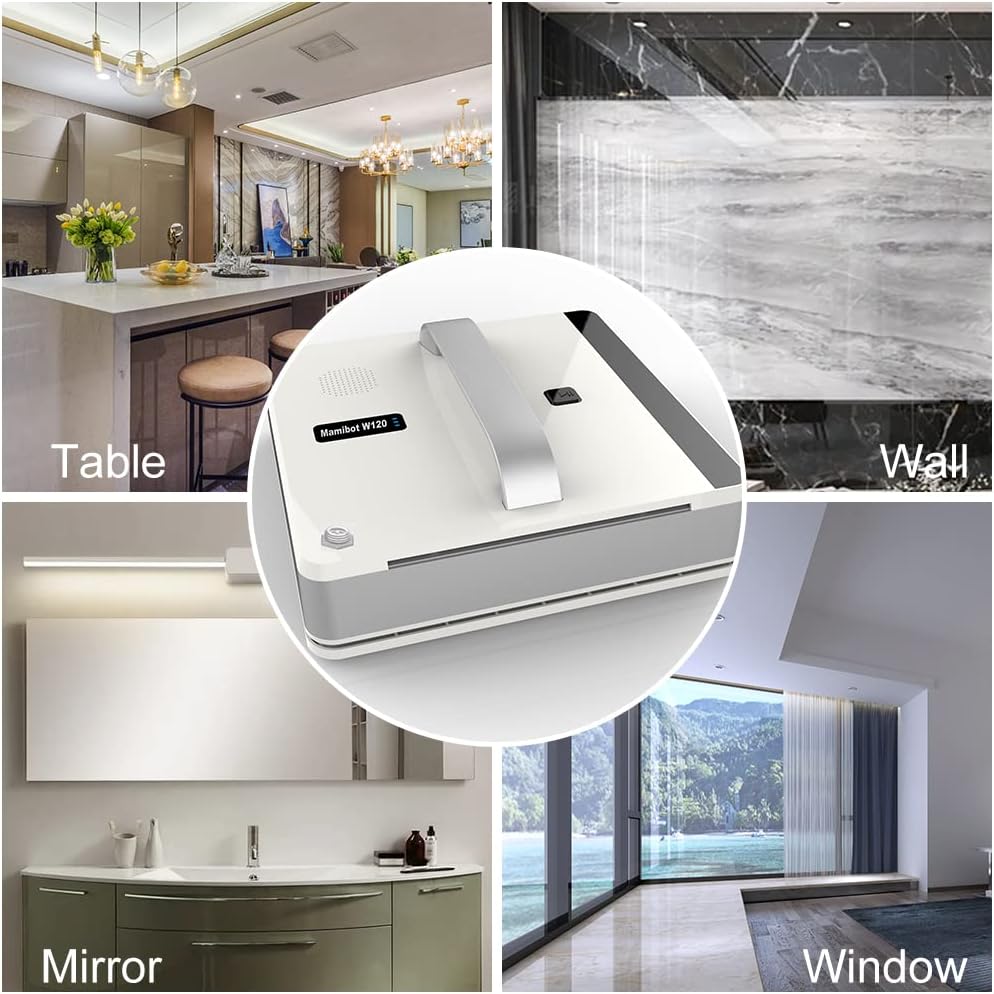
The Mamibot W120 is suitable for various smooth surfaces:
- Frame and frameless glass
- Tables
- Smooth floors
- Bathroom walls
- Internal and external windows

The Mamibot W120 is versatile, capable of cleaning various smooth surfaces including tables, walls, mirrors, and windows, as depicted in this collage.
Maintenance
Regular maintenance ensures optimal performance and longevity of your Mamibot W120.
Cleaning Pads
The cleaning pads should be cleaned or replaced regularly, especially if the windows are very dirty. Use grey pads for dry wiping and yellow pads for wet cleaning.

A visual comparison of the grey dry cleaning cloth, used for initial dust removal, and the yellow wet cleaning cloth, used for final surface cleaning.
Cleaning Procedure for Best Results
For optimal streak-free cleaning, especially on very dirty windows or in sunny conditions, follow these steps:
- 1st Round (Dry Clean): Use a dry yellow cloth to wipe off dust and dirt first.
- 2nd Round (Wet Clean): Lightly spray cleaning solution onto a clean grey pad and perform a wet clean.
- 3rd Round (Wet Clean - Optional): For very dirty surfaces, repeat the wet clean with a fresh, lightly sprayed grey pad.
- 4th Round (Final Dry Clean): Finish with a clean, dry yellow cloth to remove any remaining moisture or streaks.

A visual guide demonstrating the recommended four-step cleaning process for the Mamibot W120, involving initial dry cleaning, subsequent wet cleaning rounds, and a final dry polish.
Robot Cleaning
Wipe the exterior of the robot with a soft, dry cloth. Do not use abrasive cleaners or immerse the device in water.
Troubleshooting
Refer to the following common issues and their solutions:
| Problem | Possible Cause / Solution |
|---|---|
| Arcuate marks after cleaning | Clean the glass surface with a dry cleaning cloth first. Spray a little water or detergent (do not use too much) on a clean cleaning cloth, replace the used cloth, and ensure the new cloth is dry and clean before restarting the job. |
| Robot falls from window / Suction failure | Ensure the power cable is securely connected and the robot is receiving continuous power. The internal battery is for backup only. Check if the cleaning pads are excessively wet or dirty, which can reduce suction. Ensure the glass surface is clean and free of large debris. |
| Robot does not clean corners effectively | The Mamibot W120 is designed for rectangular windows and may not reach extreme corners due to its design and wheel placement. Manual touch-up may be required for very tight corners. |
| Remote control not responding | Check the batteries in the remote control and replace if necessary. Ensure there are no obstructions between the remote and the robot. |
| Robot is noisy during operation | Some operational noise is normal due to the suction motor. If the noise is excessive or unusual, ensure the cleaning pads are properly attached and there are no foreign objects obstructing the fan. |
Specifications
- Dimensions: 9.84 x 9.84 x 3.15 inches (25 x 25 x 8.5 cm)
- Item Weight: 2.98 pounds (1.45 kg)
- Cleaning Speed: 2.5 minutes per square meter
- Charging Time: Approximately 1 hour
- Noise Level: < 65dB
- Battery: 1 Lithium Ion battery (included, for backup only)
- Suction Power: Up to 3000pa
- Form Factor: Robotic
Warranty & Support
The Mamibot W120 comes with a 1-Year Warranty from the date of purchase. For warranty claims, technical support, or further inquiries, please refer to the manufacturer's official website or contact their customer service department. Keep your proof of purchase for warranty validation.
Documents and downloads
Ask a question about this manual
Ask about setup, troubleshooting, compatibility, parts, safety, or missing instructions. Manuals+ will review the question and use this page’s manual context to help answer it.