
ADORIC NZ-881B3EN
ADORIC Digital Alarm Clock (Clear) User Manual
Model: NZ-881B3EN
Brand: ADORIC
Продукт болееview
The ADORIC Digital Alarm Clock (Clear) is a versatile bedside alarm clock featuring a large mirror screen LED display, adjustable brightness, snooze function, and dual USB charging ports. It is designed for ease of use and clear visibility.

Рисунок 1: Передняя часть view of the ADORIC Digital Alarm Clock displaying the time.
Настраивать
Содержимое упаковки
- ADORIC Digital Alarm Clock
- Кабель питания USB
- Адаптер питания (если входит в комплект)
- CR2032 Button Cell (pre-installed or for backup)
Питание устройства
The alarm clock can be powered via a USB device or directly plugged into a wall socket using the provided adapter. A CR2032 button cell battery is included to retain settings during a power outage.
- Connect the USB power cable to the input port on the back of the alarm clock.
- Другой конец USB-кабеля подключите к USB-источнику питания (например, компьютеру, USB-адаптеру).
- Ensure the CR2032 button cell is correctly installed in its compartment for backup power.
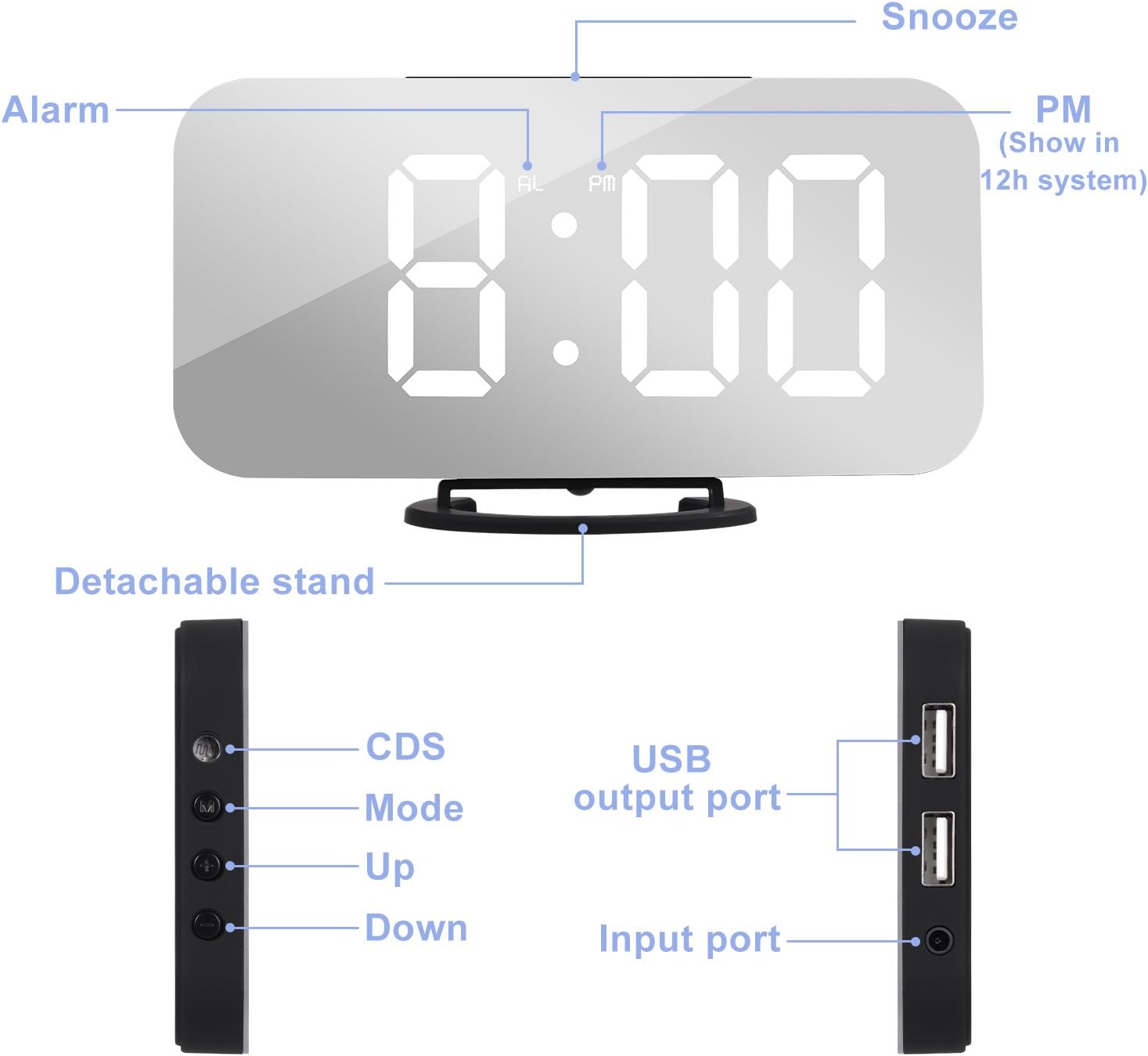
Figure 2: Labeled diagram of the alarm clock's components, including the detachable stand, CDS sensor, Mode button, Up/Down buttons, USB output ports, and input port.
The alarm clock features a detachable stand for stable placement. Its compact and slim design allows for flexible positioning.

Figure 3: Dimensions of the ADORIC Digital Alarm Clock: 15.8cm length, 8.6cm height (with stand), 7.8cm height (without stand), and 1.2cm thickness.
Инструкция по эксплуатации
Регулировка времени
- Нажмите и удерживайте кнопку "M" button for 3 seconds to enter the time setting mode. The "AL" indicator will not be displayed.
- The current adjustment object (e.g., 12/24 hour format, hour, minute) will flash.
- Используйте "+" или "-" buttons to adjust the data.
- Нажмите кнопку "M" button to switch between setting objects in the following order: 12/24 hour format → Hour → Minute.
Alarm Clock Adjustment
- Нажмите кнопку "M" button once. The alarm time will display with the "AL" indicator.
- Нажмите и удерживайте кнопку "M" button for 3 seconds to enter the alarm clock setting mode.
- The adjustment object will flash. Use the "+" или "-" buttons to adjust the data.
- Нажмите кнопку "M" button to switch between setting objects.
- To turn the alarm on/off: Press the "-" button. When "AL" is displayed, the alarm is activated. When "AL" is not displayed, the alarm is off.
Функция повтора
The snooze duration is 2 minutes.
- When the alarm sounds, press the "SNOOZE" button to activate the snooze function. In this mode, the "AL" indicator will flash until the next alarm rings.
- To turn off the alarm without activating snooze, press any other button (except "SNOOZE") when the alarm sounds.
Brightness Intensity Adjustment
There are three intensity levels: Highlight, Medium, and Dim.
- Нажмите кнопку "+" или "-" button to manually adjust the display brightness.

Figure 4: Visual representation of the three adjustable brightness levels: Highlight, Medium, and Dim.
Автоматическая регулировка яркости
- Нажмите и удерживайте кнопку "+" button for 3 seconds to toggle the automatic brightness adjustment function on or off.
- "ON" will display for 3 seconds when the function is activated. "OFF" will display for 3 seconds when the function is deactivated.
Ночной режим
Night mode automatically switches the screen to low brightness during a user-defined period.
- Нажмите кнопку "M" button twice. (First press enters time setting mode, second press enters Night Mode setting).
- Используйте "+" или "-" buttons to turn Night Mode ON or OFF. "ON" or "OFF" will display.
- While "ON" is displayed, press and hold the "M" button for 3 seconds to set the Night Mode period. The setting order is: Start Time → End Time.
Двойные USB-порты зарядки
The alarm clock is equipped with two USB output ports, allowing simultaneous charging of two electronic devices (e.g., smartphones, tablets, MP3 players) with a total output of 2.1A.

Figure 5: The alarm clock's dual USB ports in use, charging two mobile devices simultaneously.
Mirror Surface Functionality
The large screen of the alarm clock also functions as a mirror, providing added utility for daily use.

Figure 6: The mirror surface of the alarm clock can be used for personal grooming.
Обслуживание
Уборка
To maintain the appearance and functionality of your alarm clock, regularly wipe the surface with a soft, dry cloth. Avoid using abrasive cleaners or solvents, as these may damage the mirror finish or plastic components.
Замена батареи
The CR2032 button cell battery is primarily for memory backup during power interruptions. If the clock loses time or settings after a power cut, the battery may need replacement.
- Locate the battery compartment, typically on the back or bottom of the unit.
- Откройте крышку отсека.
- Удалите старую батарею CR2032.
- Вставьте новую батарейку CR2032, соблюдая полярность (+ стороной вверх).
- Плотно закройте крышку батарейного отсека.
Поиск неисправностей
| Проблема | Возможная причина | Решение |
|---|---|---|
| Дисплей тусклый или выключен. | Power not connected, brightness set too low, or night mode active. | Ensure power cable is securely connected. Adjust brightness manually using the "+" button. Check Night Mode settings. |
| Сигнализация не срабатывает. | Alarm is not activated, alarm volume is too low, or incorrect alarm time set. | Verify "AL" indicator is displayed. Re-check alarm time settings. |
| Часы теряют время или настройки после отключения питания.tage. | CR2032 backup battery is dead or not installed. | Replace the CR2032 button cell battery. Ensure it is installed correctly. |
| Clock runs fast/gains time. | Internal clock drift (observed in some units). | Manually reset the time as needed. This may require periodic adjustment. |
| USB-порты для зарядки не работают. | Device not properly connected, or total current draw exceeds 2.1A. | Ensure devices are properly connected. Try charging one device at a time. Verify the alarm clock is powered. |
Технические характеристики
| Бренд | ADORIC |
| Номер модели | NZ-881B3EN |
| Цвет | Прозрачный |
| Размеры продукта | 15.8 х 0.03 х 8.6 см |
| Вес товара | 240 г |
| Материал | Пластик |
| Тип дисплея | Цифровой |
| Особые возможности | Alarm, Charging Port |
| Источник питания | Проводной электрический |
| Резервная батарея | CR2032 Button Cell (for memory retention) |
Гарантия и поддержка
For warranty information and customer support, please refer to the product packaging or contact ADORIC customer service directly. You can also visit the official ADORIC store on Amazon for more information and product updates.
Official ADORIC Store: Visit the ADORIC Store
Ask a question about this manual
Ask about setup, troubleshooting, compatibility, parts, safety, or missing instructions. Manuals+ will review the question and use this page’s manual context to help answer it.