
1. Введение
The COUGAR GX-S 750W is an 80-PLUS Gold certified power supply unit (PSU) designed for reliable and efficient power delivery to your personal computer. Its compact design ensures compatibility with various PC cases, while advanced features like fan curve tuning and DC-DC power conversion technology contribute to stable voltage outputs and reduced noise levels. This manual provides essential information for the safe installation, operation, and maintenance of your GX-S 750W PSU.
2. Информация по технике безопасности
Please read and understand all safety instructions before installing or operating the power supply unit. Failure to comply with these instructions may result in electric shock, fire, or damage to the product and connected components.
- Перед установкой, извлечением или чисткой блока питания всегда отключайте сетевой шнур от розетки.
- Не открывайте блок питания casinг. Высокий объемtage components inside pose a risk of electric shock, even when the unit is unplugged.
- Ensure the PSU is properly grounded.
- This product is intended for indoor use only. Do not expose the PSU to water, moisture, or high humidity.
- Установите блок питания в хорошо проветриваемом месте, вдали от источников тепла и прямых солнечных лучей.
- Используйте только кабели, входящие в комплект поставки блока питания.
- Не прилагайте чрезмерных усилий к разъемам. Перед подключением кабелей убедитесь в их правильной ориентации.
3. Содержимое упаковки
Проверьте наличие всех предметов в упаковке:
- Блок питания COUGAR GX-S 750 Вт
- Шнур питания переменного тока
- Modular and Fixed Cables (24-pin ATX, 4+4-pin CPU, 6+2-pin PCIe, SATA, Molex)
- Крепежные винты
- Руководство пользователя
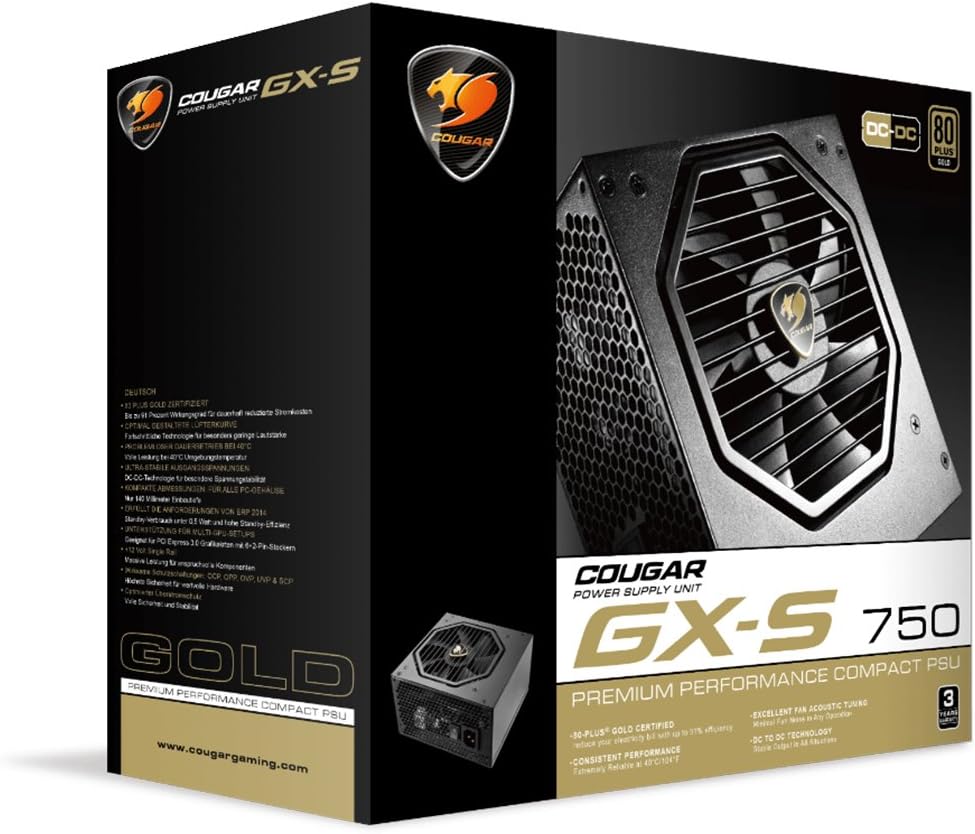
Image 3.1: COUGAR GX-S 750W Power Supply packaging. The image shows the retail box for the COUGAR GX-S 750W PSU, highlighting its 80 PLUS Gold certification and compact design.
4. Настройка и установка
Follow these steps to install your COUGAR GX-S 750W Power Supply:
- Подготовка: Убедитесь, что ваш компьютер полностью выключен и отсоединен от розетки. Откройте корпус ПК, чтобы получить доступ к месту крепления блока питания.
- Монтаж блока питания: Carefully place the GX-S 750W PSU into the designated PSU bay in your PC case. Align the screw holes on the PSU with those on the case. Secure the PSU using the provided mounting screws. Ensure the PSU fan is oriented correctly for optimal airflow (typically facing downwards if there's a vent, or upwards if not).
- Connecting Motherboard Power: Connect the 24-pin ATX power cable from the PSU to the corresponding 24-pin connector on your motherboard. Ensure it clicks securely into place.
- Подключение питания процессора: Connect the 4+4-pin EPS (CPU) power cable to the CPU power connector on your motherboard. This is usually located near the CPU socket. If your motherboard requires an 8-pin connector, combine the two 4-pin halves.
- Connecting PCIe Power (Graphics Cards): If you have a dedicated graphics card, connect the 6+2-pin PCIe power cables from the PSU to your graphics card(s). Some high-end graphics cards may require multiple PCIe power connectors.
- Connecting SATA/Molex Power: Connect SATA power cables to your storage drives (HDDs, SSDs) and optical drives. Use Molex connectors for any other peripherals that require them (e.g., case fans, fan controllers).
- Управление кабелями: Route all cables neatly to improve airflow and aesthetics within your PC case. Use cable ties or straps if necessary.
- Окончательная проверка: Double-check all connections to ensure they are secure and correctly seated. Close your PC case.
- Включение питания: Connect the AC power cord to the PSU and then to a wall outlet. Flip the power switch on the back of the PSU to the 'ON' position. You can now power on your computer.

Image 4.1: COUGAR GX-S 750W Power Supply. This image displays the top-down view of the COUGAR GX-S 750W PSU, showing the fan grille, power input, and power switch, along with various cable connections.

Image 4.2: COUGAR GX-S 750W Power Supply side view. This image shows a side view of the COUGAR GX-S 750W PSU, illustrating the compact form factor and the exit point for fixed cables.
5. Инструкция по эксплуатации
The COUGAR GX-S 750W PSU is designed for continuous operation within its specified limits. Once installed, its operation is largely automatic, managing power delivery to your system components.
- Эффективность: The 80-PLUS Gold certification ensures high power efficiency (up to 91%), reducing electricity consumption and heat generation.
- Охлаждение: The PSU features an optimized fan curve tuning designed to minimize noise levels while maintaining effective cooling for internal components. The fan will adjust its speed based on the PSU's temperature and load.
- Стабильная мощность: DC-DC power conversion technology provides stable and reliable voltage outputs to all connected components, crucial for system stability and longevity.
- Условия окружающей среды: The PSU is designed to operate reliably even at ambient temperatures up to 40°C (104°F). Ensure adequate ventilation around your PC to prevent overheating.
6. Техническое обслуживание
Proper maintenance helps ensure the longevity and optimal performance of your COUGAR GX-S 750W PSU.
- Удаление пыли: Periodically clean the exterior of the PSU and its fan grille to prevent dust buildup, which can impede airflow and reduce cooling efficiency. Use compressed air or a soft brush. Always disconnect the PSU from power before cleaning.
- Избегайте жидкостей: Never spray cleaning liquids directly onto the PSU. Use a slightly damp cloth for external cleaning only.
- Кабельные соединения: Occasionally check that all power cables are securely connected to the PSU and your components. Loose connections can lead to instability or damage.
7. Поиск Неисправностей
If you encounter issues with your COUGAR GX-S 750W PSU, refer to the following troubleshooting steps:
- Система не включается:
- Убедитесь, что шнур питания переменного тока надежно подключен как к блоку питания, так и к розетке.
- Убедитесь, что выключатель питания на задней панели блока питания находится в положении «ВКЛ».
- Verify that the 24-pin ATX and 4+4-pin CPU power cables are correctly connected to the motherboard.
- Проверьте розетку с помощью другого устройства, чтобы убедиться, что в ней есть питание.
- Система включается, но тут же выключается:
- This could indicate a short circuit or an overloaded component. Disconnect all non-essential components (e.g., extra drives, graphics card) and try powering on. Reconnect one by one to identify the problematic component.
- Ensure all components are compatible with the PSU's wattage.
- Чрезмерный шум вентилятора:
- Check for dust buildup on the fan grille and clean if necessary (after disconnecting power).
- Убедитесь, что блок питания надежно закреплен и не вибрирует, ударяясь о корпус.
- High fan speed can be normal under heavy system load. Monitor system temperatures.
- Нестабильность системы/сбои:
- Ensure all power connectors are firmly seated.
- Убедитесь, что потребляемая мощность вашей системы не превышает мощность блока питания в 750 Вт.
- This could also be related to other components (RAM, CPU, GPU). Test components individually if possible.
If these steps do not resolve the issue, please contact COUGAR customer support for further assistance.
8. Технические характеристики
| Особенность | Спецификация |
|---|---|
| Бренд | COUGAR |
| Номер модели | GXS750 |
| Выход Втtage | 750 Вт |
| Сертификация 80 PLUS | Золото |
| Метод охлаждения | Воздух |
| Размеры изделия (Д x Ш x В) | 5.9 x 3.4 x 5.5 дюйма (150 x 86 x 140 мм) |
| Вес товара | 88.15 унции (приблизительно 2.5 кг) |
| Совместимые устройства | Персональный компьютер |
| Тип разъема | PCI-Express |
| СКП | 871520007974 |
9. Гарантия и поддержка
The COUGAR GX-S 750W Power Supply Unit comes with a Гарантия 5 год с даты покупки, распространяется на дефекты материалов и изготовления при нормальном использовании.
For technical support, warranty claims, or further inquiries, please visit the official COUGAR webили обратитесь в службу поддержки клиентов. Сохраните чек о покупке для подтверждения гарантии.
Официальный представитель "Кугар" Webсайт: www.cougargaming.com