
Введение
This manual provides detailed instructions for the setup, operation, and maintenance of your A4tech Bloody Light Strike B314 Gaming Keyboard. Please read this manual thoroughly before using the product to ensure optimal performance and longevity.
Основные характеристики
- Bloody 4 Light Strike Mechanical Switches: Experience ultra-fast response times of 0.2ms with infrared optic switches, providing a competitive edge in gaming.
- Повышенная прочность: Designed for intensive use, featuring A,S,D,W silicon keys with a convex shape for improved control and longevity.
- Neon Glare System LED Backlighting: Customize your gaming environment with vibrant LED backlighting, making keys easy to locate in low-light conditions.
- 9 программируемых клавиш: Personalize your gaming experience by assigning custom functions to 9 individually programmable keys.
- Double Secure Water-Resistance: The keyboard is electronically sealed with a water drain hole, protecting it from accidental spills and extending its lifespan.
Содержимое упаковки
Проверьте наличие всех предметов в упаковке:
- Bloody Light Strike B314 Gaming Keyboard
- Руководство пользователя (этот документ)

Image: The retail packaging for the Bloody Light Strike B314 Gaming Keyboard, showing the keyboard with LED backlighting and key features highlighted.
Руководство по настройке
- Подключите клавиатуру: Подключите USB-разъем клавиатуры к свободному USB-порту компьютера.
- Установка драйвера: The keyboard is typically plug-and-play. Your operating system should automatically detect and install the necessary drivers. If prompted, follow the on-screen instructions.
- Установка программного обеспечения (дополнительно): For advanced customization, including programming keys and managing backlighting, download and install the official Bloody software from the A4tech webсайт.
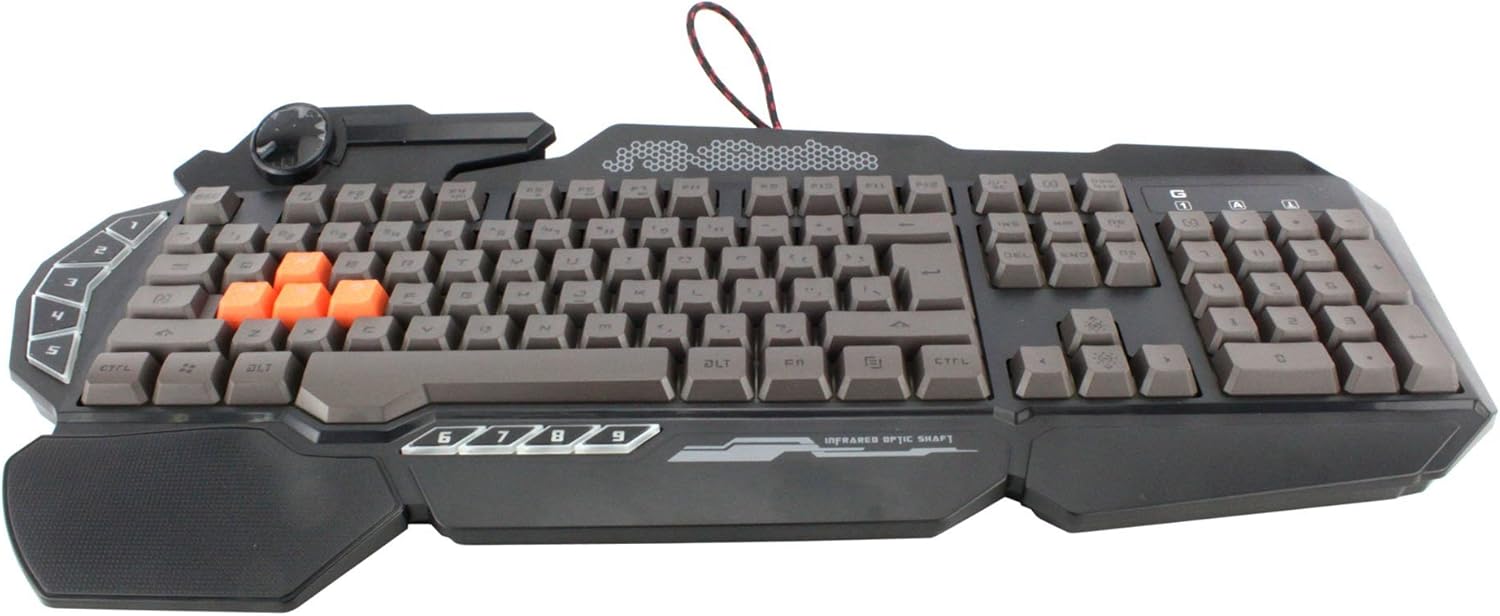
Изображение: вид сверху вниз view of the Bloody Light Strike B314 Gaming Keyboard, showcasing the full QWERTY layout with orange WASD keys and dedicated macro keys on the left.
Инструкция по эксплуатации
Базовое использование
The Bloody B314 functions as a standard QWERTY keyboard for everyday typing and gaming. Its infrared mechanical switches provide a fast and responsive typing experience.
Программируемые клавиши
The keyboard features 9 programmable keys, typically located on the left side. To customize these keys:
- Install the official Bloody software from the A4tech webсайт.
- Launch the software and navigate to the key customization section.
- Select the desired programmable key (e.g., G1-G9 or similar).
- Assign macros, key functions, or multimedia controls as needed.
- Сохраните свой профиfile для применения изменений.
LED Backlighting Control
The Neon Glare System LED backlighting can be adjusted using function key combinations:
- Fn+F12: Cycle through different backlighting modes (e.g., static, breathing, off).
- Fn + стрелка вверх/вниз: Отрегулируйте яркость подсветки.
- Fn + стрелка влево/вправо: Adjust backlight speed or direction (if applicable to the mode).
Игровой режим
Activate Game Mode to disable the Windows key and prevent accidental interruptions during gameplay.
- Fn+F8: Включение / выключение игрового режима.

Изображение: под углом view of the Bloody Light Strike B314 Gaming Keyboard, highlighting the ergonomic wrist rest and the distinct orange WASD keys.
Обслуживание
Уборка
- Перед чисткой отсоедините клавиатуру от компьютера.
- Используйте мягкий, damp cloth to wipe the surface of the keyboard. Avoid harsh chemicals or abrasive materials.
- Для удаления пыли и мусора между клавишами используйте сжатый воздух.
- The water-resistant design helps protect against spills, but it is still recommended to clean up liquids promptly.
Хранилище
Если вы не используете клавиатуру в течение длительного времени, храните ее в прохладном, сухом месте, вдали от прямых солнечных лучей и экстремальных температур.
Поиск неисправностей
Клавиатура не отвечает
- Убедитесь, что USB-кабель надежно подключен к клавиатуре и компьютеру.
- Попробуйте подключить клавиатуру к другому USB-порту.
- Перезагрузите компьютер.
- Check if the keyboard is recognized in your computer's Device Manager (Windows) or System Information (macOS).
Подсветка не работает
- Ensure the backlighting is not turned off using the Fn + F12 combination.
- Adjust brightness using Fn + Up Arrow.
- Если используется пользовательский профессиональныйfiles, ensure the backlighting settings are correctly configured in the Bloody software.
Programmable Keys Not Working
- Verify that the Bloody software is installed and running.
- Ensure your custom profiles are loaded and active within the software.
- Check for any software updates for the Bloody keyboard utility.
Технические характеристики
| Особенность | Деталь |
|---|---|
| Бренд | A4tech |
| Номер модели | A4TKLA45173 |
| Технология связи | Инфракрасный |
| Описание клавиатуры | Механический |
| Тип переключателя | Mechanical (Light Strike Optic) |
| Специальная характеристика | Backlit, Programmable Keys, Water Resistant |
| Цвет | Черный |
| Поддержка цвета подсветки клавиатуры | RGB (Neon Glare System) |
| Количество ключей | 104 |
| Программируемые кнопки | 9 |
| Уровень водонепроницаемости | Водостойкий |
| Вес товара | 2.9 фунта |
Гарантия и поддержка
Информацию о гарантии и техническую поддержку можно получить на официальном сайте A4tech. webсайт или свяжитесь со службой поддержки клиентов напрямую. Сохраните чек о покупке в качестве доказательства покупки для гарантийных претензий.
Официальный сайт A4tech Webсайт: www.a4tech.com